
If you've ever read an AI-generated meeting summary and thought "this missed the whole point" or "this invented action items nobody actually committed to," you've run into the LLM-fit problem. Different models have measurably different strengths in summarising meetings: long-context handling, multilingual coverage, prose quality, instruction-following, cost per summary. The model that's strongest on one of those dimensions is rarely strongest on all of them.
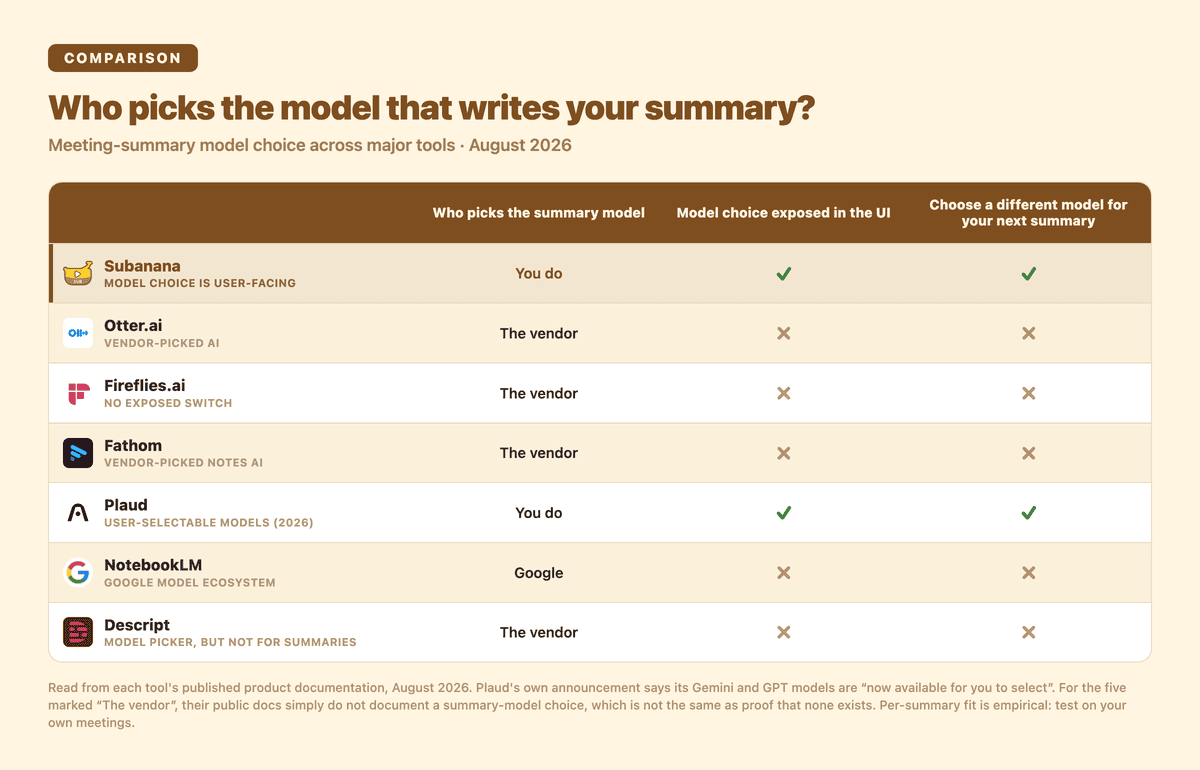
Who picks the model that writes your summary, at a glance. Subanana and Plaud put the choice in the product; the other five do not document one.
Most meeting transcription tools, including Otter, Fireflies, Fathom, Descript and NotebookLM, decide it for you. When the vendor's pick doesn't fit your meeting type, your summary suffers and you have no way to fix it short of switching tools.
This post is about how to think about the choice, with honest disclosure: I run Subanana. Subanana lets users pick the LLM that writes their summary, the only feature in our product where model selection is a user-facing decision. The thesis applies whether or not you use Subanana: the point is to understand the dimensions, then evaluate any tool's approach against them.
TL;DR
- No single LLM is "best for meeting summaries." The right model depends on what your meeting is and what kind of output you need.
- Long meetings (90+ minutes) reward long-context models. Context-window capacity varies materially across families.
- High-velocity meetings reward speed-optimised mid-tier models. Action-item extraction and clean structured output matter more than reasoning depth.
- Multilingual meetings reward multi-model approaches more than any single "multilingual" model. The right summary-LLM for non-English or mixed-language content is rarely the same as for English-only.
- High-stakes communications reward a top-tier flagship model with strong prose quality, since the marginal cost is small next to a meaningful difference in output, while routine internal meetings reward a lightweight model, since throwing a flagship at a 15-minute team sync just wastes its reasoning depth.
The practical answer for most users is: default to a mid-tier model, switch to a top-tier flagship model for the meetings that actually matter, and don't agonise over specific version numbers. That framing works across the whole market: specific frontier models change over time, but the difference between a flagship, a mid-tier and a lightweight model stays a useful way to reason about the choice.
The dimensions that actually vary
Five axes where LLMs differ meaningfully for meeting summary work:
- Context window. How much transcript can the model hold in one shot? A 30-minute meeting is comfortable for most models; a 3-hour board meeting separates the long-context flagships from everything else.
- Instruction-following. When you ask for "decisions, action items, follow-ups in that order," does the model deliver that structure cleanly, or does it freelance? Strong instruction-following models produce summaries you can ingest into a downstream workflow without reshaping.
- Hallucination resistance. Does the model fabricate action items that weren't actually agreed? Top-tier reasoning models tend to be more conservative; lightweight models can paraphrase loosely under pressure.
- Multilingual handling. Models trained predominantly on English produce visibly worse summaries of non-English and mixed-language content. The gap is bigger than vendors usually admit.
- Cost per summary and latency. A flagship-tier model can cost meaningfully more than a mid-tier model for output you may not notice the difference on. Latency varies similarly.
Notice what's missing from this list: an aggregate "intelligence" score. Public LLM benchmarks (MMLU, HumanEval, etc.) rank models on aggregate tasks that are mostly not meeting-summary tasks. A model that wins on math reasoning doesn't necessarily win on extracting decisions from a strategic discussion. Treat aggregate benchmarks as noise for this specific use case.
Why most meeting tools still don't let you pick
Look at how the major meeting tools handle LLM choice:
- Otter.ai: no summary-model choice documented. Its business page describes an automated summary with action items, and says nothing about choosing the model behind it
- Fireflies.ai: its settings guide documents summary TEMPLATES, which is template choice, not model choice
- Fathom: its settings documentation lists every configurable option, and an AI model is not one of them
- NotebookLM (Google): Google's own help page describes the output formats it can produce, with no model selector anywhere
- Descript: it does have a model picker, but its docs scope that to generative image and video, and the summariser page says nothing about choosing a model for text
- Plaud: the exception. Plaud's own announcement says its newer models are "now available for you to select", so Plaud users can pick the model that writes their summary
The lock-in pattern is still the norm across the category, but Plaud shows that norm is already breaking. Each vendor designed their product when "the LLM" was effectively one mainstream choice, and re-architecting to a multi-model system is non-trivial: different APIs, different prompt engineering per model, different cost-tracking infrastructure. Most vendors decided model choice wasn't worth user-facing differentiation. Subanana made the opposite bet: model choice is a user-facing decision worth surfacing in the picker.
How Subanana's approach works
Subanana's meeting summary feature lets you choose which model writes the summary. This is the only place in the product where the model is a user-facing choice: translation and subtitle correction are routed automatically by Subanana and aren't user-selectable.
What's on the menu today is shown in the picker inside the app itself. That picker is the live source of truth for what you can choose right now, not this post.
Subanana isn't committed to one AI provider. The point of exposing the choice is to let you match the model to the meeting, not to lock you into a single vendor's roadmap.
Practical picking guide
The framework most users need is short:
Reach for a top-tier flagship model when:
- The meeting really matters (board meetings, strategic planning, customer escalations, legal proceedings)
- The meeting is long (90+ minutes, where context-window capacity becomes a differentiator)
- The output goes to executives or clients without heavy human editing: prose quality is load-bearing
A mid-tier model is the right default when:
- Routine internal meetings, sales calls, customer-success check-ins, project syncs
- Speed and clean structured output matter more than maximum reasoning depth
- The marginal quality difference versus a flagship model isn't worth the extra cost for your use case
A lightweight model is enough when:
- High-volume routine summaries (multiple meetings per day per user)
- 15-minute check-ins where any structured summary is more valuable than no summary
- You're cost-sensitive and a flagship model's reasoning depth would be wasted on the content
For multilingual or mixed-language meetings: the underlying transcription routing handles the speech-to-text language step (Subanana benchmarks STT models per source language and routes to the best evaluated one, across 95+ supported languages). For the summary step, the picker still applies: try a stronger and a lighter model and compare on your actual content. There's no single "multilingual specialist LLM" that wins across all non-English content; the right pick is empirical, not theoretical.
How to find your own default
The fastest way to find your own default is to run it on real meetings, not benchmarks. Over your next few meetings, try a stronger model on one and a lighter model on another, then compare the summaries against what you know actually happened in the room. Benchmarks tell you how a model performs on generic tasks; they don't tell you how it handles your team's shorthand, your industry's jargon, or the way your meetings tend to run.
Once you've done that a few times, settle on a default that matches your typical meeting: a mid-tier model, for most people. Then reach for a stronger model only when a specific meeting is high-stakes enough to justify it: a board meeting, a legal readout, a customer escalation you'll be quoted on. That's a better use of the extra cost than applying it everywhere out of habit.
Frequently asked questions
Isn't picking an LLM too technical for most users?
No. It is one setting among the summary settings, not a separate workflow. If you don't want to think about it, pick one option and leave it there; you can go a long time without revisiting it. The readers who benefit from choosing are the ones with a specific problem to solve, such as long board meetings or mixed-language calls, and for them one setting is a much cheaper fix than changing tools.
Will the "best" LLM change in 6 months?
Almost certainly yes. The roster of available models evolves continuously as new models come out and older ones fall behind. What's stable is the idea of model classes: a top-tier flagship versus a mid-tier default versus a lightweight option remains a useful distinction even as the specific models in each class change. Treat any specific model recommendation as a snapshot, not a commitment.
Why doesn't every meeting tool let me pick?
Most tools were built when there was effectively one mainstream model choice, so the product surface was designed around a single model. Re-architecting to support multiple models means different APIs, different prompt engineering per model, and separate cost-tracking per provider. Most vendors decided that engineering cost wasn't worth the user-facing differentiation. Subanana made the opposite bet. That said, this is already changing: Plaud now exposes model choice to its users, so check a tool's current documentation rather than trust any comparison post's snapshot, including this one.
Are there meetings where a lighter model really is better?
Yes, many. Routine status updates, casual brainstorms, quick check-ins. Throwing a flagship model's reasoning depth at a 15-minute team sync wastes capacity you don't need and don't use. For routine content, a lightweight model produces summaries that are indistinguishable in usefulness at a fraction of the cost.
Can I migrate my summary history to a different tool if I switch?
Yes. Summaries export as DOCX, TXT, or Markdown: standard formats portable to any other tool. Most meeting tools export summaries in similar standard formats, so the migration cost on summary export is low. Plan for the export step before you commit to any tool, not after.
Does Subanana publish per-model accuracy benchmarks?
No public per-model benchmarks. Per-model performance varies materially by meeting type, audio quality, language mix and content domain, so a single number would be misleading. The recommendation across this post is the same one: test on your own actual meetings, where the model's fit to YOUR content is what determines the value.
Related guides
- Best AI Meeting Transcription Tools 2026 (EN hub)
- Subanana vs Otter (2026)
- Subanana vs Fireflies (2026)
- Subanana vs Fathom (2026)
- 2026 Hong Kong AI Meeting Tools (zh-HK)
Methodology note
This post is about how to think about model choice, not a benchmark report. Specific per-model performance numbers aren't published here — model performance varies by version, by meeting type, by audio conditions, and updates faster than any blog snapshot can keep up with. The right way to settle "which LLM works best for MY meetings" is to test on your actual content. Subanana's free tier previews the first 15 minutes of a file, which is enough to compare how two models summarise the same opening stretch, but a full-length meeting comparison needs a paid plan.