
Yes — Microsoft Teams can transcribe your meetings, in 44 languages. The catch isn't whether you get words on a page; it's getting from a raw transcript to something you can actually hand off: the decisions, the action items, who owns what. That last mile is where Teams puts up admin settings and two separate paid add-ons. Below I'll walk through what Teams transcription does out of the box, where the walls are, and when it's worth reaching for Subanana instead. Full disclosure: I run Subanana, so I'll use it for the walkthrough.
Can Microsoft Teams transcribe a meeting?
It can. Microsoft's list of supported languages gives 57 language-and-region variants for live transcription — 44 distinct languages, counting English's six regional variants once. Participants can view the transcript after the meeting "along with timestamps and speaker attribution", per Microsoft's admin documentation, and it's stored together with the recording in OneDrive and SharePoint. So if your organization has transcription switched on and your meetings are mostly in a single language, Teams already hands you a serviceable transcript with no extra tooling.
That's the part people underestimate — the built-in transcript is genuinely decent. The friction shows up afterward.
What are the limits of Teams meeting transcription?
Three things tend to trip teams up:
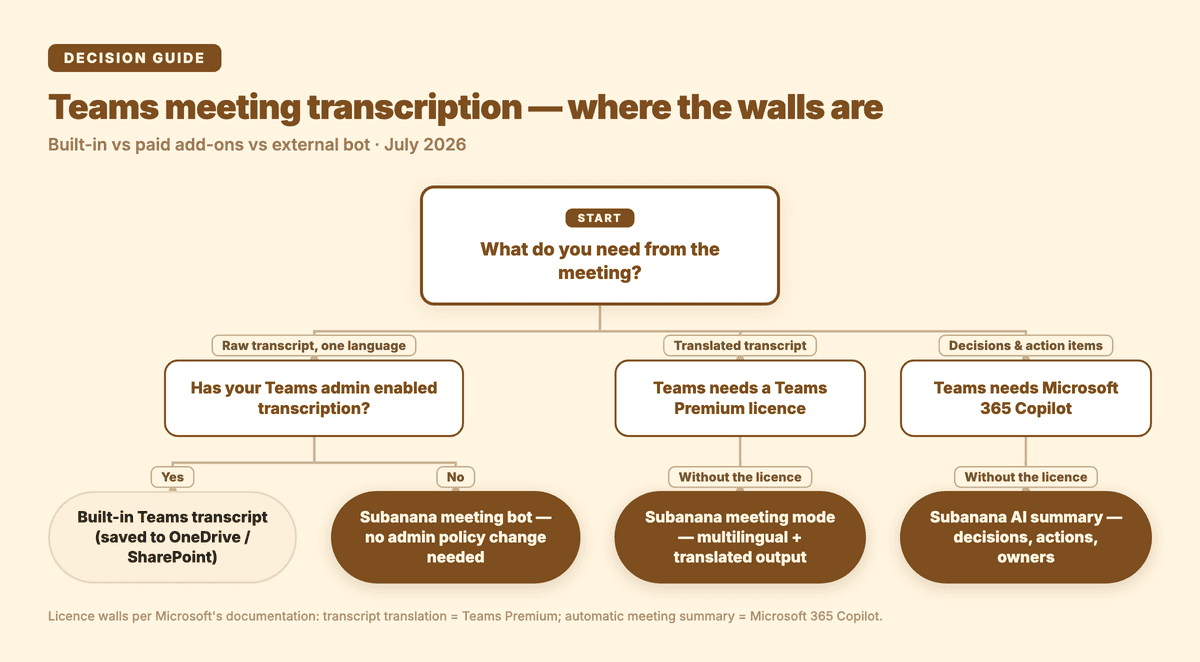
- An admin has to turn it on first. Microsoft states that "transcription is both a per-organizer and per-user policy setting" — so the organizer and whoever starts the transcript both need it enabled. Plenty of people only discover this mid-meeting, when the "Start transcription" button is greyed out and there's nobody to flip the switch.
- Translation and summaries are separate paid add-ons. For translated transcripts, Microsoft is explicit: "the meeting or event organizer must have a Teams Premium license for attendees to use live translated transcription." Summaries are a different licence again — Microsoft's own documentation puts an automatic recap (Microsoft calls the feature intelligent recap) behind either Teams Premium or Microsoft 365 Copilot; the Copilot admin doc lists its own prerequisite as "an add-on Microsoft 365 Copilot license for intended users," and it is Copilot that can "recommend follow-up tasks" (Copilot in Teams meetings). Two separate purchases on top of your existing plan. A raw transcript on its own is still a long way from a record you can circulate.
- It assumes one language per meeting. Microsoft's wording is that "by default, transcripts are shown in the language spoken during a meeting or event" — a phrasing that quietly assumes a meeting only uses one. If your calls mix languages, a single-language assumption is a poor fit.
To be fair: if your org already has transcription enabled, already pays for Teams Premium or Copilot to generate summaries, and your meetings are mostly one language, the Teams path is smooth and you probably don't need anything else.
How do you get a structured meeting record with Subanana?
Subanana's meeting mode has a Microsoft Teams bot. You connect your calendar, the bot joins the call, and — because the bot is post-production, not live — it processes the recording after the meeting ends into a clean transcript with punctuation, paragraphing and speaker labels, then organizes it into an AI summary: decisions, action items, owners. You also get to pick which large language model generates that summary. The point of this path: it doesn't touch your Teams admin policy, and it doesn't require Teams Premium or a Copilot licence — the summary that pulls out decisions and owners is the default output, not a licence you add. For how the accuracy holds up across languages, see Subanana's AI meeting transcription.
The actual steps
- Connect your calendar so Subanana's bot can join your Teams meeting.
- Run the meeting as usual — you set the source language yourself inside Subanana, independent of your Teams admin's transcription policy, with an optional translation into a single target language.
- After the meeting, open the transcript in Subanana. The AI pulls out decisions and action items; if you want a different angle, pick another model to regenerate the summary.
- Proofread, then export the transcript and summary (export is a paid feature).
When is the built-in Teams transcript enough?
If transcription is already enabled across your org and you already have Teams Premium or Copilot for summaries — stick with Teams, it's the path of least resistance. But the moment you hit any one of these — transcription is locked behind an admin setting you can't change, you need the record in a language other than the one spoken (Teams requires a Teams Premium licence for live translated transcription; Subanana's meeting mode can produce a translated version on its own), or you want a structured decisions-and-action-items summary without buying Teams Premium or Copilot for it — getting the record through Subanana's meeting bot is usually less hassle. Further reading: how to do AI meeting minutes.
A meeting record is really two problems: can the tool capture the words, and can you use what comes out. Teams handles the first problem well, across 44 languages. What actually stalls teams is the second one — the licensing, the admin permissions, and turning a raw transcript into a structured record.