
Speaker diarization is the process that answers "who spoke when" in an audio recording. When you transcribe an interview or a meeting, diarization is the layer that splits the running text into turns and tags each one — Speaker 1, Speaker 2, Speaker 3 — so the transcript reads like a conversation instead of one undifferentiated wall of words. It is what turns a raw dictation into a usable record of a discussion.
This explainer covers what diarization actually is, how AI assigns the labels under the hood, why it matters for interviews, meetings, and research, and the practical steps that make those labels more accurate. Every technical claim below cites a live transcription-service documentation page, so you can check the source yourself.
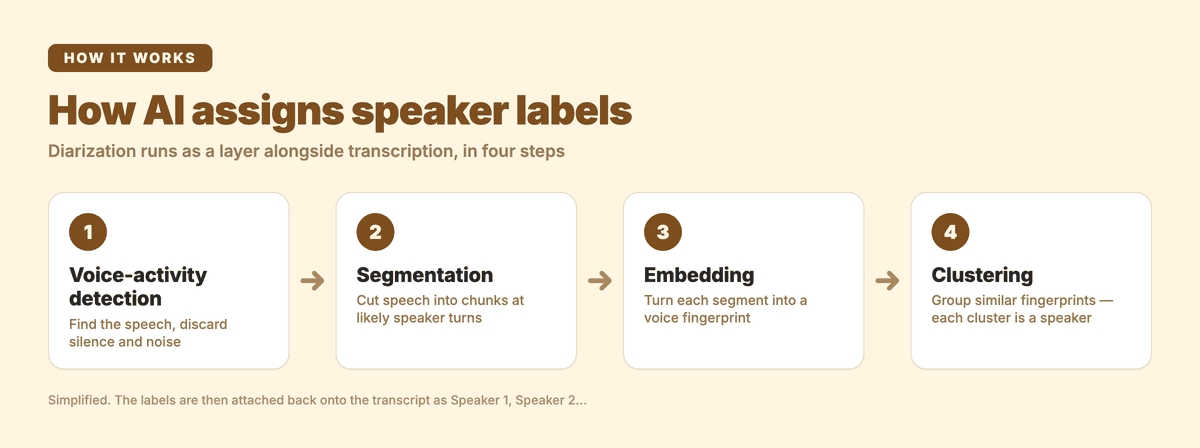 The four-step pipeline diarization runs alongside transcription — detect speech, segment, embed, cluster.
What is speaker diarization?
Speaker diarization is the task of partitioning an audio stream by speaker identity. The transcription engine does not need to know who the people are by name — it only works out how many distinct voices are present and which segments of speech belong to each one. Google's Cloud Speech-to-Text describes the output plainly: "The transcription result tags each word with a number assigned to individual speakers. Words spoken by the same speaker bear the same number." (Google Cloud Speech-to-Text docs)
A few terms are worth separating, because they get conflated:
- Transcription turns speech into words.
- Diarization groups those words by speaker and assigns anonymous labels (Speaker 1, Speaker 2…).
- Speaker identification (or speaker recognition) goes one step further and attaches a known identity to a voice — this usually requires a voice sample or reference clip up front, and most transcription workflows skip it.
So "speaker labels in a transcript" is diarization, not identification. The labels are placeholders you rename yourself once you know who's who.
It is also distinct from channel separation. If each person was recorded on their own audio track — a podcast where every guest has a dedicated microphone, or a call-centre recording with the agent on one channel and the customer on another — you don't need diarization at all. AWS calls this channel identification and treats it as a separate approach from speaker partitioning. (AWS Transcribe docs) Diarization is the harder, more common case: multiple people on a single mixed track.
How does AI assign speaker labels?
Diarization is not the same model as the one writing the words. It runs as a layer alongside transcription, and at a high level it does four things:
- Voice-activity detection: find the stretches that contain speech and discard silence and noise.
- Segmentation: cut the speech into short, homogeneous chunks, splitting at the points where the voice characteristics change (a likely speaker turn).
- Embedding: convert each segment into a numerical voice fingerprint that captures pitch, timbre, and other acoustic traits, independent of the actual words spoken.
- Clustering: group segments with similar fingerprints together. Each cluster becomes one speaker label.
The labels are then attached back onto the transcript. AWS Transcribe, for example, can differentiate between a maximum of 30 unique speakers and labels each one with a value such as spk_0 through spk_29, returning a separate speaker_labels section with the start and end time of every utterance. (AWS Transcribe docs) Google's output works the same way at the word level, attaching a speakerLabel number to each word and noting that a result "can include numbers up to as many speakers as Cloud Speech-to-Text can uniquely identify in the audio sample." (Google Cloud docs)
One important nuance: diarization is not universal across speech models. OpenAI's documentation notes that its base transcription models do not natively support speaker labelling, and that diarization is handled by a dedicated, diarization-capable model which "produces speaker-aware transcripts." (OpenAI Speech-to-Text guide) In other words, the engine that writes the best words is not automatically the one that draws the best speaker boundaries — which is exactly why a transcription product that benchmarks and routes across multiple models has an advantage here. This is the approach behind Subanana's AI transcription tool: the system continuously benchmarks speech models and picks the best performer for the source language and task rather than locking to one vendor.
Why do speaker labels matter?
Without diarization, a multi-person recording transcribes into a single block of text where you can't tell a question from its answer. The labels are what make the transcript navigable and quotable. Three settings where this is decisive:
- Interviews and journalism. Attribution is the whole point. You need to know exactly which sentence the source said versus what the interviewer prompted, and you need it timestamped so you can verify against the audio before publishing a quote.
- Meetings and minutes. "Who committed to what" only works if action items are tied to a person. A diarized transcript lets you scan a meeting by speaker and pull each participant's decisions and follow-ups.
- Qualitative research and UX studies. Researchers coding focus groups or user interviews analyse responses per participant. Speaker turns are the unit of analysis — without them, you can't separate the moderator's framing from the participant's reaction.
- Legal, medical, and compliance records. A doctor-patient consult or a deposition is only useful as a record if each statement is correctly attributed.
In every one of these, the diarization quality determines how much manual clean-up you do afterwards. Good labels save hours; bad labels mean re-listening to the audio to fix mis-attributed turns. This is why diarization is a core part of Subanana's transcript mode, which produces a clean, readable transcript with speaker identification, automatic filler-word removal, and auto-punctuation and paragraphing for the source text.
What affects diarization accuracy?
Diarization is harder than transcription and degrades under specific conditions. The biggest factors:
| Factor | Effect on speaker labels | What helps |
|---|---|---|
| Overlapping speech | People talking over each other blur the voice fingerprints | Encourage one-at-a-time speaking; expect some manual fixes on crosstalk |
| Audio quality | Background noise and low bitrate muddy the acoustic features | Record close to the mic; reduce ambient noise |
| Similar voices | Two speakers with close pitch/timbre can be merged into one label | More audio per speaker helps the model separate them |
| Very short turns | One-word interjections give the model little to fingerprint | Unavoidable; clean up in the editor |
| Unknown speaker count | The model has to guess how many clusters to form | Tell it the number of speakers if you know it |
That last point is the single highest-leverage tip. Most engines accept a speaker-count hint, and supplying one constrains the clustering step so it doesn't over- or under-split. Google's Speech-to-Text requires you to "set the min_speaker_count and max_speaker_count values according to how many speakers you expect," and AWS lets you pass a MaxSpeakerLabels value when you start a job. (Google Cloud docs · AWS Transcribe docs)
How to get accurate speaker labels in Subanana
Subanana's transcript mode runs diarization automatically, and gives you control over the inputs that matter most. The workflow:
| Step | Action |
|---|---|
| 1. Upload | Add your audio or video file, or paste a public YouTube, Instagram, or Facebook URL to import it without a local download |
| 2. Set source language | Pick the language spoken in the recording so the system routes to the best-benched model for it |
| 3. Set the number of speakers | Choose automatic detection, or set the speaker count manually if you already know it — the manual hint usually produces cleaner separation |
| 4. Transcribe | Subanana runs multiple quality layers — best-benched model per language, hallucination detection with automatic model substitution, and CPS flagging in the editor |
| 5. Rename and edit | Relabel "Speaker 1 / Speaker 2" with real names in the editor and fix any mis-attributed turns — punctuation and paragraph breaks are already applied automatically, so there's nothing to turn on for this step |
| 6. Export | Download as TXT, DOCX, XLSX, SRT, VTT, or Markdown |
A couple of things worth knowing while you work:
- You can ask questions about the transcript directly in the editor — "summarise what Speaker 2 proposed," for example — using the built-in AI chat grounded in your meeting.
- The LLM-assisted proofreading pass flags likely misheard words and same-sounding wrong characters for you to approve, so the text you review is already cleaned up.
If your meetings happen on Google Meet or Microsoft Teams, the calendar-triggered meeting bot can record and transcribe them after the call ends, then run the same diarization and summary pipeline on the recording.
Diarization is one of those features you only notice when it's wrong. The practical recipe is simple: feed the engine the cleanest audio you can, tell it how many speakers to expect, and use a tool that routes to the strongest model for your language rather than one that's locked to a single vendor. You can start transcribing for free and see the speaker labels on your own audio, or compare plans on the pricing page.
Frequently asked questions
Is speaker diarization the same as speaker identification? No. Diarization separates voices and assigns anonymous labels (Speaker 1, Speaker 2). Identification attaches a known name to a voice and usually needs a reference sample. Most transcription workflows use diarization and let you rename the labels manually.
Do I need a separate microphone per person? No — diarization works on a single mixed track, which is the common case. If you do have one track per person (separate channels), that's channel separation, which is a different and simpler approach, as AWS notes in its documentation. (AWS Transcribe docs)
Why did the transcript merge two people into one speaker? Usually because their voices are acoustically similar, the audio was noisy, or the engine wasn't told how many speakers to expect. Supplying a speaker count and using cleaner audio are the two most effective fixes.
Does every speech-to-text model support speaker labels? No. Some base transcription models don't diarize natively and need a separate, diarization-capable model, as OpenAI's documentation shows. (OpenAI Speech-to-Text guide) A tool that benchmarks and routes across models avoids that single-model limitation.