
Wordly is the enterprise default for live AI translation and captioning at conferences, corporate events, and large webinars. Their public marketing reports passing 1 billion minutes of live translation, they sell into associations, corporates, churches, governments, and education, and they integrate deeply with Zoom, Teams, Meet, WebEx, and Cvent. If you're running a multi-day flagship event for 500+ attendees in 8 languages with managed onboarding and live event support, Wordly is purpose-built for that shape.
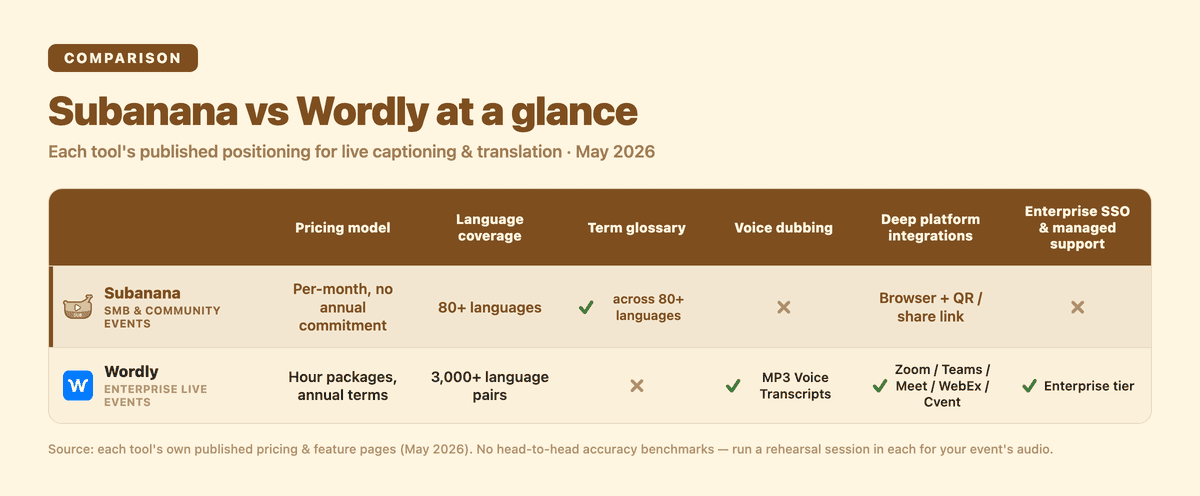
At-a-glance: the six dimensions compared in detail below. Subanana row highlighted.
Subanana plays a different shape: published per-month pricing, no hour packages, no 12-month commitment, with a buyer profile centred on SMB events, university lectures, hybrid webinars, community and church events, and any scenario where the friction of "request a quote → annual hour commitment" is too heavy for the use case. If you're hosting a 90-minute event with 30 attendees across two languages, you don't want to negotiate an enterprise contract for it.
Disclosure: I run Subanana. This post compares each tool using its own published documentation — pricing pages, features pages, integration lists, support tiers — pulled in May 2026, with Wordly's pricing and tier claims re-verified live on 2026-08-22. No fabricated head-to-head accuracy benchmarks; if you want accuracy testing on your event's source audio, run a rehearsal session in each.
Roundup context: Subanana is one of seven tools profiled in Best AI Meeting Transcription Tools 2026. Wordly is the live-event specialist not in that roundup — different category — but the buyer profiles overlap for any team that runs multilingual events alongside multilingual meetings.
TL;DR
- Pick Wordly if you run large multi-day enterprise events, need a published roster of 3,000+ language pairs, want a managed-service tier with optional live event support and premium onboarding add-ons, require pre-built deep integrations with Zoom / Teams / WebEx / Cvent, need MP3 voiceover dubbing of translated text, or your procurement process can accommodate annual hour packages and "contact for quote" pricing.
- Pick Subanana if you run smaller or shorter events (single-session conferences, university lectures, hybrid webinars, church/community events), want published per-month pricing without an annual hour commitment, need glossary support across 95+ languages for speaker names and event terminology, or want a free tier to validate fit before committing.
- Honest middle ground: for a 500+ attendee multi-day flagship event with serious accessibility compliance requirements and a procurement budget for enterprise tooling, Wordly is the safer choice today. For SMB-and-below event volume, Subanana's pricing model is straightforward and there's no annual commitment risk.
Pricing model
The pricing model difference is the single biggest split between these two tools.
Wordly's published model is hour-package + attendee-based, with annual terms. Packages start at 10 hours and scale up to 500+ (the published ceiling), sold across tiers (Starter, Pro, Pro+, Corporate, Corporate+, Enterprise). Smaller packages can be purchased online; larger packages and the Enterprise tier are "Contact Sales for a Quote." Hours can be used across multiple sessions for up to 12 months after purchase. Discounts: volume (10-30%+), multi-year (2-3 year commitments), and non-profit. Add-ons include voice transcripts (MP3 dubbing), summaries, live event support, and premium onboarding.
Subanana's published model is per-month subscription, with no hour packages, no annual commitment, and no per-session "package" structure. Pricing is on the subanana.com pricing page; the free tier exists for validation and small-scale use; paid tiers are workspace-based. There's no "Contact Sales for a Quote" gate for standard use cases — published pricing applies up to typical SMB event volume.
Practical implication: if you're running occasional events (one a quarter, a few a year), Wordly's 10-hour minimum + 12-month term can leave you pre-paying for capacity you don't use — Wordly's own pricing notes say unused hours can roll over, but only by arrangement with your sales rep, so it isn't automatic. Subanana's monthly subscription bills only the months you use. If you're running continuous high-volume events, Wordly's hour-package volume discounts can make per-hour cost very competitive.
Language coverage
Wordly publishes "dozens of languages" and "3,000+ language pairs." Their public marketing covers the major world languages plus many less-resourced ones — the language pair count (which is what matters for translation) is the broadest publicly cited in this category.
Subanana supports 95+ languages for transcription and translation. The underlying STT layer continuously benchmarks multiple frontier models per source language and routes each transcription to the best-evaluated one — so accuracy on a given language tracks the best-performing model rather than being locked to a single vendor. Glossary works across all 95+ supported languages, letting hosts pre-load speaker names, organization names, and event-specific terminology.
Honest concession to Wordly: if your event has audience members across 8+ languages — Korean, Vietnamese, Tagalog, Arabic, Swahili, Portuguese, German, Italian — Wordly's language-pair breadth covers the spread more completely than Subanana's roster.
Glossary support exists on both sides. Wordly ships Glossaries + Blocklists on every published tier (with Shared Glossaries from Pro up), and Subanana's cross-language glossary works across all 95+ supported languages, letting hosts pre-lock speaker names, sponsor names, and event terminology for accurate recognition during the event.
How attendees experience the captions
Wordly's model: attendees join via the Wordly app or web link; integrations with Zoom / Teams / Meet / WebEx / Cvent embed translation into the meeting platform itself.
Subanana's model: the host runs the live session from a browser. The host configures the source language and the target translation language(s) before the event — Subanana supports 95+ languages, but only the ones the host pre-configures are active for that specific session. Attendees scan a QR code (or open a share link) and view live captions in their phone's browser; each picks one display language — the source, or any of the up to 5 translation targets the host configured. No app install required.
Trade-offs:
- Wordly's deep platform integrations are more polished inside an existing Zoom/Teams meeting workflow.
- Subanana's audience-facing browser caption is simpler for events where attendees aren't all on the same video platform (hybrid in-person + remote, walk-up conference attendance, community events with mixed devices).
- Attendees cannot add a language on the fly — if a Korean speaker shows up and Korean wasn't pre-configured by the host, they're limited to whichever languages the host did configure for that session. Wordly's broader language pair coverage means more languages are likely already loaded.
Audio output & dubbing
Wordly Pro+ tier and above includes Voice Transcripts — translated text is converted to MP3 voiceovers in dozens of languages, usable as downloadable audio dubbing. This is a feature most live-caption tools don't have.
Subanana does not produce voice/audio dubbing. Subanana's live-session output is text captions in real time (see Post-event artefacts below for what you can take away afterwards). If your event needs AI voice dubbing of speaker audio into another language, Wordly is the right choice.
This is a clear win for Wordly.
Post-event artefacts
Wordly's post-event outputs: session transcripts (translatable into all Wordly languages), summaries (translatable), voice transcripts (MP3 dubbing).
Subanana's post-event route from a live session is the recording. Re-process the recorded event audio as a separate file-upload transcription project, which unlocks the full transcription artefact set (SRT, VTT, TXT, DOCX, XLSX, Markdown) but re-transcribes from scratch, re-charges transcription minutes, and does not reproduce the live transcript verbatim. Subanana's meeting-bot recordings (Google Meet and Microsoft Teams — no Zoom meeting-bot; Zoom is captured by the Chrome extension instead) are a separate feature: they produce a recorded project after the meeting ends, not real-time captions during it.
Trade-off: Wordly's post-event package is more complete out of the box. Subanana's live-session artefacts require a second, separately-charged re-processing step to get any exportable file at all.
Integrations
Wordly's published integrations: Zoom, Microsoft Teams, Google Meet, WebEx, Cvent, plus others. Each is a deep platform integration with translation embedded inside the meeting platform.
Subanana's integrations for live captioning: the live session is browser-based, takes audio input from the host's mic, system audio, or a virtual cable, and produces the audience-facing share link / QR code. There's no per-platform deep integration with Zoom / Teams / Meet for the live-caption shape; instead, the workflow is to capture the speaker's audio (mic or system audio) and let the audience-facing captions handle the multilingual display layer.
Honest assessment: Wordly's deep platform integrations are more polished if your event is hosted entirely inside one of those platforms. Subanana's "browser + QR code + audio input" model is more flexible for hybrid or non-platform events but lighter on per-platform polish.
Support & onboarding
Wordly offers premium onboarding (guided account setup, admin training, integration assistance, glossary creation, rehearsal testing, presenter coaching, and technical support — online and phone) as an optional add-on across its published tiers, not a bundled Enterprise inclusion. Live event support is also available as an optional add-on at multiple tiers.
Subanana ships standard product support (email / in-product chat) without managed-service onboarding. For a flagship multi-day enterprise event where you want a dedicated support engineer on standby during the event, Wordly's managed tier exists for that and Subanana's doesn't.
At the high-touch enterprise end, Wordly's managed-onboarding tier is the stronger offer.
SSO, compliance, data storage
Wordly Enterprise includes SSO access and configurable data storage. The published tier table lists these as Enterprise-only.
Subanana does not currently advertise SSO or per-customer data storage configuration. Workspace-level access controls exist; enterprise-grade SSO and bespoke data-residency controls are not in the published feature set today.
If SSO or data residency is a procurement requirement, Wordly's Enterprise tier addresses it and Subanana doesn't.
When each one is the wrong fit
Wordly is the wrong fit if:
- Your event is short / occasional and the 10-hour minimum + 12-month expiry creates dead-money risk
- "Contact Sales for a Quote" gating is a procurement blocker
- You want to validate the tool on a single small session before committing
- Your buyer profile is SMB / education / community / church scale rather than corporate
Subanana is the wrong fit if:
- You need AI voice dubbing (MP3 audio output of translated text)
- You need 3,000+ language-pair breadth (less-resourced languages your host can't pre-configure)
- You need enterprise SSO + bespoke data-residency configuration
- You need managed live-event support engineers on-call during the event
- Your event is a multi-day flagship enterprise conference where the procurement process can absorb annual hour commitments and managed-service add-ons
Frequently asked questions
Is Subanana cheaper than Wordly?
For small-volume use (a few sessions a year), Subanana's per-month subscription is typically cheaper because there's no 10-hour minimum and no 12-month expiry on unused capacity. For continuous high-volume use, Wordly's volume + multi-year discounts can drive per-hour cost very competitive. The right comparison depends on your actual annual hour count.
Can Wordly do less-resourced languages?
Wordly's published roster is "dozens of languages, 3,000+ language pairs." Individual less-resourced languages (Cantonese, Hokkien, Tagalog, Swahili, smaller African or SEA languages) aren't broken out with published accuracy figures on the public pricing page — for confirmation that a specific language is in their roster and accuracy meets your bar, request a demo and run a rehearsal with your speaker audio. Subanana's 95+ supported source languages are listed publicly.
Does Subanana have voice dubbing like Wordly's Voice Transcripts?
No. Subanana's live-session output is text captions in real time only — there is no transcript export during or after the session; the only re-use path is re-processing the recorded audio as a separate file-upload transcription. AI voice dubbing of translated text into MP3 audio is not in Subanana's feature set. If your event requires translated audio playback alongside the speaker, Wordly's Voice Transcripts is the right tool.
Can I use Wordly inside Zoom / Teams without leaving the meeting?
Yes — Wordly publishes integrations with Zoom, Microsoft Teams, Google Meet, WebEx, and Cvent. Translation is embedded inside the meeting platform.
Does Subanana require attendees to install anything?
No. Attendees scan a QR code or open a share link in their phone's browser. There's no app to install. Each attendee picks one display language — the source, or one of the up to 5 translation targets the host pre-configured for the event.
Is Subanana's live captioning a meeting-bot like Otter or Fireflies?
No — these are separate features. Subanana does have a meeting-bot for Google Meet and Microsoft Teams (not Zoom — Subanana doesn't ship a Zoom bot; Zoom is captured by its Chrome extension instead) that records meetings and creates a project after the meeting ends, but that's not live captioning. Live captioning takes direct audio input (mic, system audio, or virtual cable) and produces real-time captions with the audience-facing share link — it's a different feature with a different shape.
Can I migrate from Wordly to Subanana mid-contract?
Wordly's packages run on a 12-month term; Wordly's own pricing notes say unused hours can roll over if you arrange it with your sales rep, so it's worth asking before assuming the hours are dead. The practical migration shape is: finish using (or roll over) your existing Wordly hours, then move new events to Subanana. There's no technical lock-in on either side, though the portable artefact differs — Wordly exports session transcripts directly, while Subanana's live transcript itself isn't exportable; re-processing the recorded audio as a file-upload transcription is what produces a portable Subanana file.
Methodology note
All figures and capability claims above sourced from:
- Wordly: wordly.ai/pricing and feature pages (May 2026; pricing/tier table re-verified live 2026-08-22)
- Subanana: subanana.com pricing and features pages plus verified shipped-feature set
No fabricated head-to-head accuracy benchmark numbers. For your specific event's source audio, the right way to settle accuracy claims is to run a rehearsal session in each tool's free trial / demo.