
To transcribe audio with OpenAI Whisper, install it with pip install -U openai-whisper, make sure ffmpeg is on your system, then run whisper audio.mp3 --model turbo. Whisper writes out a transcript plus subtitle files. It's a general-purpose speech recognition model that handles many languages and is good on clean audio, and because it's open source under the MIT license you can run it on your own machine at no cost.
What it won't do is the tidying-up around the transcript: out of the box it won't label who said what, it won't clean spoken filler into readable prose, and getting it installed (GPU drivers, ffmpeg, sometimes Rust) is its own small project. This guide walks the real ways to run Whisper, then is honest about where the DIY route stops and a managed tool starts to make sense.
Disclosure: I run Subanana, an AI transcription tool. Everything below about Whisper comes from OpenAI's published README and speech-to-text docs, fetched June 2026 and re-verified 10 September 2026: the pip install command, the MIT license, the model line-up, and the 25 MB hosted-API upload cap are all still current. No invented benchmarks, and we don't quote vendor accuracy percentages. Whisper is free to run and Subanana has a free tier; test your own audio.
What is Whisper, and how good is it?
Whisper is an open-source speech recognition model OpenAI released to the public. One model handles multilingual transcription, speech translation into English, and language identification, which is why it became the default engine inside so many transcription apps. It's strong on clean, single-speaker audio in widely-spoken languages, and noticeably weaker on heavy accents, fast crosstalk, code-switching (two languages in one sentence), and noisy recordings, the same hard cases that challenge every speech model.
We deliberately don't put an accuracy percentage on it. Word-error-rate numbers swing wildly with the audio, the language, and who's measuring, so a single "Whisper is X% accurate" figure tends to mislead more than it informs. Here's how we think about judging models instead. The practical takeaway: on a clear recording in a major language, Whisper is good; the further your audio drifts from that, the more cleanup you'll be doing by hand.
How do you transcribe audio with Whisper?
There are four realistic routes, from most hands-on to least. Pick based on how comfortable you are in a terminal and whether you want to run it locally or call a hosted API.
Route 1: pip + the command line (run it locally, free)
This is the canonical way and it's free. You'll need Python and the ffmpeg command-line tool installed first (brew install ffmpeg on macOS, sudo apt install ffmpeg on Debian/Ubuntu, or your platform's package manager).
- Install Whisper:
pip install -U openai-whisper. If the install errors out on the tokenizer, you may also need a Rust toolchain on your machine. - Transcribe a file with the default
turbomodel:whisper audio.mp3 --model turbo. Whisper prints the text and writes transcript and subtitle files next to your audio. - For a different speed/accuracy trade-off, choose another model size with
--model(more on the sizes below). - To translate non-English speech into English, use a larger model with the translate task, e.g.
whisper interview.wav --model medium --language Japanese --task translate. Note theturbomodel is built for transcription, not translation. Usemediumorlargefor translating.
Route 2: Python (for scripting and pipelines)
If you're wiring transcription into your own code, the Python API is three lines:
import whisper

model = whisper.load_model("turbo")
result = model.transcribe("audio.mp3")
print(result["text"])
That gives you the text plus timestamped segments you can post-process however you like, which is the point of going the code route.
Route 3: the hosted OpenAI API (no local GPU)
Don't want to install models or own a GPU? OpenAI exposes transcription as a hosted API, so you send a file and get text back. You'll need an OpenAI account and API key, and uploads are currently limited to 25 MB per file, so longer recordings have to be split first.
from openai import OpenAI

client = OpenAI()
audio_file = open("speech.mp3", "rb")
transcription = client.audio.transcriptions.create(
    model="whisper-1",
    file=audio_file,
)
print(transcription.text)
The hosted API trades the install headache for per-use billing and that file-size cap. It's a good fit if you're already building on OpenAI and just need text from short clips.
Route 4: a desktop GUI built on Whisper
If you never want to touch a terminal, several third-party desktop apps wrap the Whisper model behind a drag-and-drop window. They're the friendliest on-ramp, but you're still running the bare model, so the gaps below (no speaker labels, no cleanup) still apply, and you inherit whatever model versions and limits the app ships.
What are Whisper's real gaps?
Whisper transcribes well. The honest friction is in everything around the transcript, and it's the same list whether you run it locally or call the API.
- No built-in speaker labels. The open-source Whisper model doesn't tell you who spoke; by design it sets speaker differences aside to focus on the words. To get a "Speaker 1 / Speaker 2" transcript you bolt on a separate diarization library such as pyannote.audio and merge the two outputs yourself. That's a real engineering task. (OpenAI's hosted API has since added a separate diarization-capable model, but that's a different, paid, cloud product with its own setup.)
- No readability cleanup. You get a faithful transcript of speech, including every "um," false start, and run-on. Turning that into clean, readable prose is manual editing.
- Environment and compute friction. Installing the model,
ffmpeg, and sometimes Rust, plus the GPU memory the larger models want, is a setup project on its own. The hosted API removes the install but adds the 25 MB file cap and per-use cost. - It's a model, not a workflow. Whisper hands you raw output. Importing media by URL, scoping a glossary so brand names and jargon come out spelled right, organising projects, exporting to the format your team needs: none of that is in scope. You assemble it.
These aren't knocks on Whisper; they're the line between a model and a finished tool. If you enjoy the assembly and your audio is clean, the DIY route is genuinely great and free.
Whisper hallucinates on silence and music: a real accuracy risk
There's one gap that isn't about the workflow around the transcript, but about the transcript itself: Whisper can write down words that were never spoken. Researchers call it hallucination, and it shows up most on the parts of a recording that aren't speech.
An academic study, Investigation of Whisper ASR Hallucinations Induced by Non-Speech Audio, set out to trigger these on purpose and found that "there exists a set of hallucinations that appear frequently" when the model meets non-speech audio.
What gets invented isn't always harmless filler. TechCrunch's write-up of the same research notes Whisper has introduced "everything from racial commentary to imagined medical treatments into transcripts." In one cited example, that included a drug that doesn't exist. And it isn't only a bad-audio problem: in one analysis of public-meeting recordings, researchers reported finding fabricated text in roughly eight of ten clips, even on audio that was well recorded. (Treat figures like that as one team's finding on one dataset, not a fixed rate — but the direction is consistent across reports.)
A related cousin is repetition: the model can get stuck looping a phrase. That's a known enough failure that Whisper's own decoder ships a knob to catch it: segments with very high compression (a tell-tale of repeated text) get re-generated with more randomness to break the loop, and a separate "no-speech" check exists specifically to decide whether a chunk is just silence and should be skipped. The guards exist precisely because, left to its own devices, the raw model will sometimes narrate silence.
Why this matters: real-world audio is full of the exact conditions that trigger it: the pause before someone answers, music under an intro, room tone between speakers, a phone left recording in a quiet room. On a clean studio file you may never see a hallucination; on a real meeting, lecture, or interview you might, and the invented line reads just as confidently as the real ones. If you run Whisper yourself, catching that is on you: you have to either tune those thresholds or proof-read against the audio.
This is one place a managed transcription service can quietly earn its keep. Rather than handing you whatever a single model emitted on dead air, a managed pipeline can run quality checks on the output and, when a segment looks like a hallucination, route it to a different model and use the cleaner result, so the transcript you read isn't the raw, un-vetted pass. (It's why Subanana doesn't lock to one engine in the first place: no single model can be trusted to behave on every kind of audio, so it continuously benchmarks multiple frontier speech models and routes each transcription to the best performer for that language.)
When does a managed transcription tool win?
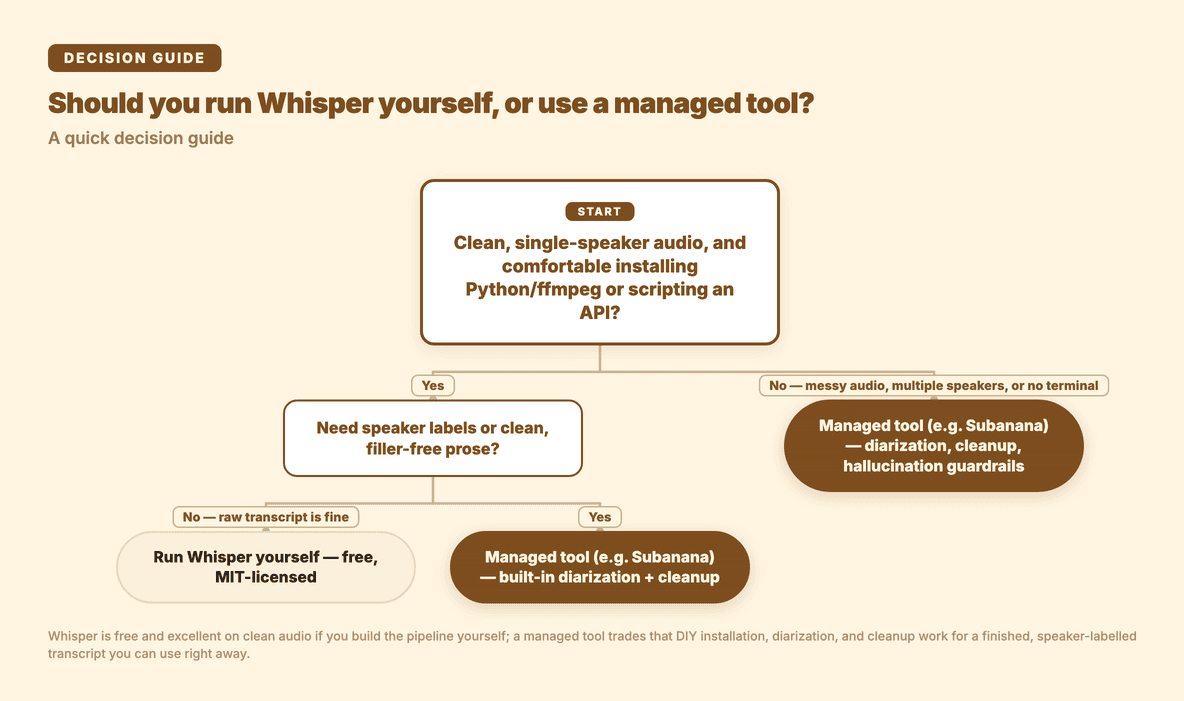
When you'd rather get a clean, speaker-labelled, readable transcript back without building the pipeline yourself. That's the gap Subanana fills. Instead of locking to one speech model, it continuously benchmarks speech-to-text models and routes each job to the strongest performer for the source language. In transcript mode, the parts that map directly onto Whisper's gaps:
- Nothing to install. Upload a file (or paste a public link) in the browser and get a transcript back: no Python, no
ffmpeg, no GPU, no file-size juggling. - Speaker diarization built in. Multi-speaker audio comes back labelled by speaker automatically, no second library to wire up.
- Spoken speech turned into clean written text. Filler and false starts are cleaned into readable prose, so you're editing a finished draft rather than a raw dump.
- 95+ languages, strong on the hard cases. Built to hold up on accented speech and Asian languages, alongside the major Western languages.
- A glossary you can scope. Pin brand names, product names, and jargon so they're transcribed correctly, with a workspace list plus per-project lists and bulk import.
You can try it at plus.subanana.com; upload a recording and you'll get a labelled, cleaned-up transcript back without installing anything.
The trade is the usual one: Whisper is free and infinitely tweakable if you'll do the engineering; a managed tool costs money but hands you the finished transcript. For a one-off clean recording you're comfortable scripting, Whisper is hard to beat on price. For recurring, multi-speaker, or messy real-world audio where you just need usable text, the managed route usually pays for itself in saved editing time.
Whisper (DIY) vs a managed AI transcription tool
| Whisper (DIY) | Managed AI transcription (Subanana) | |
|---|---|---|
| Cost | Free to run locally (open source); hosted API bills per use | Paid, with a free tier to try |
| Setup | Install Python, ffmpeg, sometimes Rust; or call the hosted API | None (runs in the browser) |
| Speaker diarization | Not built in (add pyannote.audio yourself) | ✅ automatic speaker labels |
| Readability / filler cleanup | ❌ raw speech, you edit by hand | ✅ spoken speech cleaned to written text |
| Languages | Many, strong on major languages | 95+, strong on accented speech and Asian languages |
| File size | 25 MB cap on the hosted API; local limited by your hardware | Large files supported |
| Best for | Developers who want a free, tweakable model | Anyone who wants a clean transcript without the build |
The takeaway: Whisper is an excellent free model if you're willing to run it and do the cleanup. The moment you need speaker labels, readable output, or just don't want to maintain a transcription pipeline, that's where a managed tool earns its place.
Frequently asked questions
Is OpenAI Whisper free to use?
Yes. The open-source Whisper model and its weights are released under the MIT license, so you can run it on your own machine at no cost. OpenAI also offers a separate hosted transcription API that bills per use, which saves you the install but caps uploads at 25 MB per file.
How do I install Whisper for transcription?
Install Python and ffmpeg first, then run pip install -U openai-whisper. If the install fails on the tokenizer step, add a Rust toolchain and try again. Once installed, transcribe a file with whisper audio.mp3 --model turbo.
Can Whisper identify different speakers?
The open-source Whisper model does not label speakers on its own; it's built to focus on the words and set speaker differences aside. To get a speaker-separated transcript you pair it with a diarization library such as pyannote.audio and merge the results, or use a tool that includes speaker diarization out of the box, like Subanana.
Which Whisper model size should I use?
Whisper ships in several sizes (tiny, base, small, medium, large, and the optimised turbo). Smaller models are faster and lighter on memory; larger ones are more accurate but want more GPU memory. The default turbo is a good all-round starting point for transcription, but use medium or large if you need to translate non-English speech into English, since turbo isn't built for translation.
Does Whisper clean up filler words and punctuation?
No. Whisper gives you a faithful transcript of what was said, filler and false starts included. Turning that into clean, readable prose is manual editing, or you use a transcription tool that cleans spoken speech into written text for you.
Does Whisper make things up on silent audio?
It can. Whisper is prone to hallucination (transcribing words that were never said), and studies and reporting find this happens most during silence, pauses, and background music rather than during clear speech. It can also get stuck repeating a phrase. On a clean recording you may never see it; on real-world audio with quiet gaps and ambient noise it's a genuine risk, so the raw output is worth proof-reading against the audio. A managed transcription tool can run quality checks and re-route segments that look fabricated, so you're less likely to be reading invented text.
Wrapping up
Whisper is one of the best things to happen to open speech recognition: a capable, multilingual, MIT-licensed model you can run for free. If you're comfortable in a terminal, your audio is clean, and you don't mind editing the output by hand, the DIY route is genuinely the right call. But a raw model isn't a finished transcript: no speaker labels, no cleanup, and a real setup tax. When you'd rather upload a file and get clean, speaker-labelled text back in any of 95+ languages, that's what Subanana is for.