
Speaker labels are the tags in a transcript that mark who is speaking — usually as "Speaker 1," "Speaker 2," or named participants. The technical name for producing them automatically is diarization: the process of splitting an audio recording by speaker so each line of text is attributed to the person who said it. If you have ever read an interview transcript where every turn is labeled, you have seen diarization at work.
Disclosure of interest: I run Subanana, an AI transcription and subtitling tool. The material below is drawn from how diarization works in general and from Subanana's own product documentation, collected in May–June 2026. There are no invented "measured accuracy" figures here. If accuracy matters to your work, test any tool on your own recordings.
This guide covers what speaker labels are, how AI assigns them, where they break down, and when your transcript actually needs them.
What speaker labels (diarization) actually do
A raw speech-to-text transcript is just one continuous block of text. It tells you what was said but not who said it. Diarization adds the missing dimension: it segments the audio into speaker turns and attaches a label to each one, so a two-person interview reads as a back-and-forth instead of an undifferentiated wall of text.
Two things often get confused:
- Diarization answers "who spoke when" by clustering voices — it does not necessarily know anyone's name. The output is "Speaker 1 / Speaker 2," which you then rename.
- Speaker identification matches a voice to a known identity (a specific named person). Most transcription tools do diarization, not identification — naming the speakers is a human step you do in the editor.
How AI diarization works, step by step
Modern AI diarization runs in three broad stages:
- Segmentation: the audio is sliced into short homogeneous chunks at points where the voice appears to change.
- Embedding: each chunk is converted into a numeric "voiceprint" that captures the acoustic characteristics of whoever is speaking.
- Clustering: chunks with similar voiceprints are grouped together, and each cluster becomes one speaker label. If you tell the tool how many speakers to expect, it constrains the clustering to that number; if you leave it on auto, it estimates the count itself.
The transcript text from speech-to-text is then aligned to these speaker segments, so every sentence inherits a label.
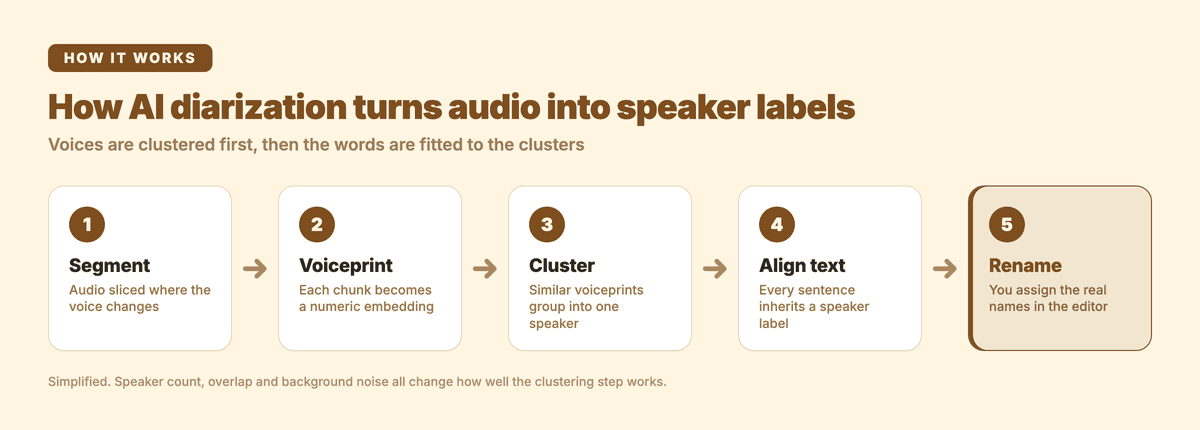
Note the order: the clustering decides the speaker boundaries, and the words are fitted to them afterwards. That is why a diarization mistake shows up as a whole block of text under the wrong name rather than a single wrong word, and why fixing it is a relabeling job rather than a retyping job.
Where diarization gets things wrong
Speaker labels are an estimate, not ground truth. Accuracy depends heavily on the recording, and these are the situations that degrade it:
- Overlapping speech: two people talking at once is genuinely hard; the segment may be split awkwardly or assigned to one voice.
- Similar-sounding voices: speakers of the same gender, age, and accent are harder to separate than distinct ones.
- Crosstalk and background noise: a single shared microphone in a noisy room blurs the voiceprints.
- Unknown speaker count: auto-detection can merge two quiet speakers into one, or split one person across two labels when their tone shifts.
- Short turns: one-word interjections ("right," "exactly") often get mislabeled because there is too little audio to cluster.
What you can change before you hit record
Most label quality is decided by the recording, not the software. Four things are usually within your control:
- Give each speaker their own microphone where you can. Separate close-mic audio is the single biggest improvement; one laptop mic in the middle of a table is the hardest case.
- Ask people to name themselves in the first minute. "Priya here" at the top gives you an anchor for renaming labels later, and it takes seconds.
- Count the speakers before you upload and enter that number rather than leaving it on auto. A known count constrains the clustering.
- Discourage talking over each other in the first few minutes especially, because early overlap poisons the voiceprints the whole rest of the recording is clustered against.
Clean audio and a known speaker count produce far better labels than a noisy recording on auto. When the stakes are high (legal, medical, research), review and correct labels in the editor rather than trusting them blind.
When do you actually need speaker labels?
Not every transcript needs them. Use this as a guide:
| Use case | Speaker labels needed? | Why |
|---|---|---|
| Interview (1-on-1 or panel) | Yes | Attribution is the whole point of the transcript |
| Meeting minutes | Yes | Decisions and action items must be tied to who said them |
| Focus group / user research | Yes | Analysis depends on separating participant voices |
| Podcast show notes | Often | Host vs guest turns improve readability and SEO |
| Legal / deposition | Yes | The record must attribute every statement |
| Lecture or single-speaker talk | No | One speaker means labels add nothing |
| Subtitles / captions for video | No | Captions follow the on-screen speaker, not a label |
If your recording has one voice, skip diarization. If it has two or more and attribution matters, turn it on.
How to get a speaker-labeled transcript with Subanana
In Subanana's transcript mode, diarization is built in. The workflow:
- Upload your audio or video file, or paste a public link. No separate download is needed.
- Set the source language. Subanana supports 95+ languages, and transcript mode takes one source language per file.
- Set the number of speakers: choose a known count for cleaner results, or leave it on auto if you are unsure.
- Generate the transcript. Speaker turns come back labeled as Speaker 1, Speaker 2, and so on, and punctuation and paragraph breaks are applied automatically. That formatting always runs on a transcript; there is no setting to switch it on or off.
- In the editor, rename each speaker to the real participant and fix any turns that were attributed to the wrong person.
- Export to your preferred format.
If you want a summary as well as the labeled transcript, choose meeting mode when you create the project instead. Meeting mode returns the tidied transcript plus a summary that pulls out key discussion points, decisions, and action items. Those all arrive as text inside the summary document. Subanana does not turn them into tasks or push them to a task tracker, so if you run on Asana or Linear, moving the items across is still a manual step.
For recurring use cases, the same diarization powers audio transcription and podcast transcripts, so interviews, panels, and multi-host shows all come back attributed.
Frequently asked questions
Can AI transcribe multiple speakers?
Yes. AI transcription tools handle multi-speaker audio by pairing transcription with diarization — the audio is split by speaker so each line of text is attributed to whoever said it, as covered above in "What speaker labels (diarization) actually do."
Results depend heavily on the recording, so a few things help before you hit record: give each speaker their own microphone where you can, ask people to name themselves in the first minute, and enter a known speaker count instead of leaving it on auto.
In Subanana's transcript mode, this is the number of speakers setting: choose a known count for cleaner results, or leave it on auto if you are unsure, alongside the source language you set for the file.
What is the difference between diarization and transcription?
Transcription turns speech into text: what was said. Diarization adds who said it by splitting the audio into speaker turns. Most tools run both together, but they are separate steps: you can transcribe without speaker labels, and diarization is the layer that adds them.
Should I set the number of speakers manually or use auto?
If you know exactly how many people are in the recording, set that number, which constrains the clustering and usually produces cleaner labels. Use auto when the count is uncertain (an open meeting, a call with drop-ins), then correct any merges or splits in the editor.
Why does my transcript show more speakers than people in the room?
This is over-segmentation, and it is one of the most common diarization complaints. It usually happens for one of the reasons already covered above: a single speaker's tone or volume shifts enough mid-recording that the clustering step treats the second half as a different voiceprint, or a short interjection ("right," "exactly") does not carry enough audio to cluster correctly and gets split off as its own label. Entering a known speaker count instead of auto reduces this, because it constrains how many clusters the system is allowed to create. After generation, the fix is a renaming step, not a retyping job: rename both split labels to the same person in the editor and every turn under either label updates to match.
Does diarization work on multilingual recordings?
The speaker-splitting part does. Diarization separates voices by acoustic characteristics, not by language, so a conversation that switches between languages still gets split by speaker.
What language-switching affects is the transcription underneath. In Subanana's transcript mode you pick one source language for the file, so a recording that moves between two languages is transcribed against the one you chose. If the recording splits cleanly (the first half in English, the second half in Cantonese), the usual answer is to upload each half as its own file with its own source language. Automatic detection of mid-sentence language switching is a feature of Subanana's live caption mode for events, not of file-based transcript mode.
Can I rename "Speaker 1" to a real name?
Yes, and it is a manual step. Diarization clusters voices but does not know identities, so you assign the real names once in the editor, and the label updates across every turn for that speaker.