
Search "best transcription software" and every roundup hands you a ranked list with a number-one pick and a buy button. Almost none of them tell you the honest part: the best transcription tool depends entirely on what you record, what language it's in, and whether you'd rather pay a human to guarantee the words or let AI do it in minutes for a fraction of the cost.
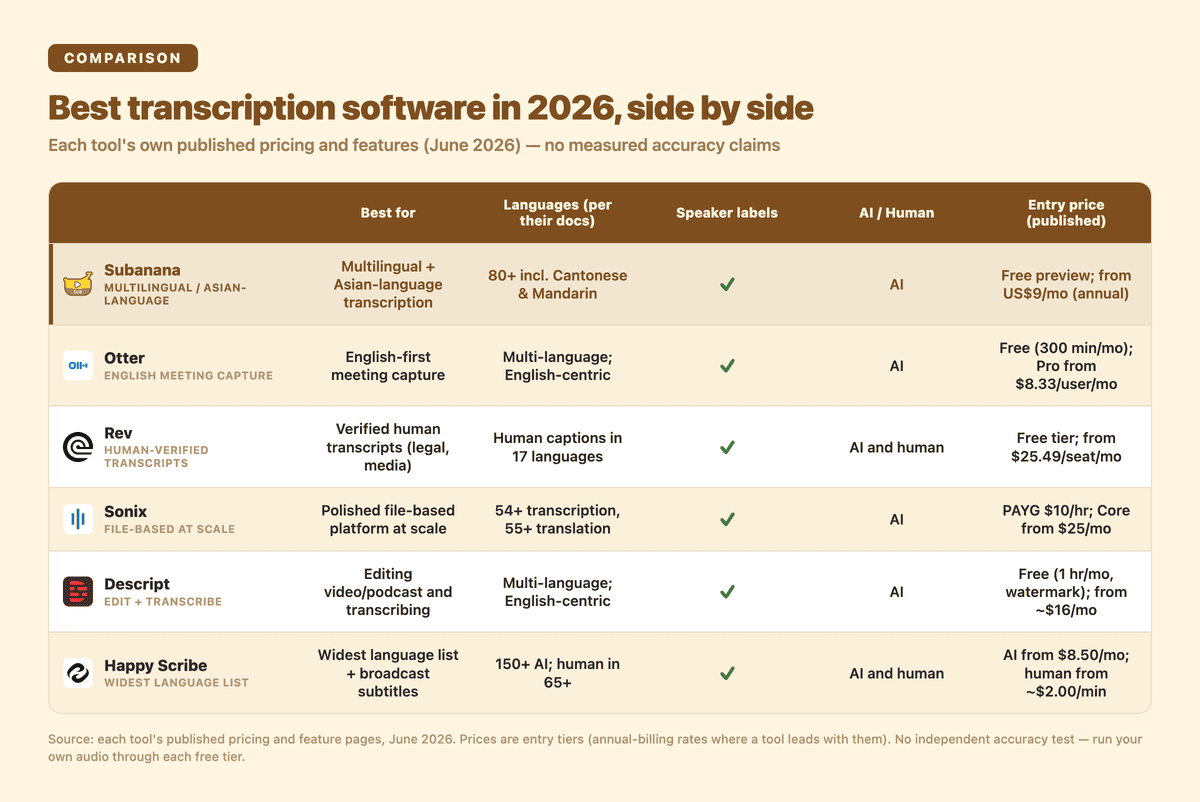
At a glance — full detail in the table below.
Two disclosures before the list. First, I run Subanana, one of the six tools below — so I'm not pretending to be neutral. I'll tell you where it wins and, just as importantly, where Rev, Sonix, Descript, Happy Scribe, or Otter is the better buy. Second, every claim about every competitor comes from that tool's own published pricing and feature pages, pulled in June 2026 — not from a fabricated head-to-head test. Vendors' own accuracy boasts ("99% accurate") are their marketing, not a measured comparison; the only honest way to settle accuracy is to run your own audio through each free tier. This guide narrows the field so you only have to test two.
A quick scope note: this is about file-based transcription software — you have a recording (an interview, a podcast, a lecture, a legal deposition, a video) and you want accurate, editable text out of it. If what you actually want is a bot that joins your Zoom or Google Meet calls live and writes the notes, that's a different category with a different shortlist — see the best AI meeting transcription tools roundup instead.
What actually separates good transcription software from the rest?
Pricing pages love to compete on accuracy percentages, but for real work the decision usually comes down to five concrete things:
- Language coverage — and specifically your language. A tool that's flawless in English may be mediocre in Cantonese, Mandarin, or a code-switched recording. Headline language counts (54+, 150+) tell you breadth, not how good any single one is.
- Speaker labels (diarization) — if you transcribe interviews, focus groups, or multi-person meetings, "who said what" is non-negotiable. Most serious tools do this now; the quality and the editing UX vary.
- AI vs human — AI transcription is cheap and near-instant; human transcription is expensive and slow but gives you a verified record. Some jobs (court, broadcast, medical) genuinely need the human pass; most don't.
- Export formats — a transcript you can't get out of the tool in the format your workflow needs (DOCX for editing, SRT/VTT for subtitles) is half-useless.
- Price model — pay-as-you-go per hour rewards occasional large jobs; a monthly subscription rewards steady volume. Picking the wrong model is how people overpay.
Keep those five in mind as you read the table.
How do the best transcription tools compare in 2026?
Here's the shortlist side by side. Prices are the figures each tool published in June 2026 (annual-billing rates where a tool leads with them); accuracy figures are each vendor's own stated claim, not an independent measurement.
| Tool | Best for | Languages (per their docs) | Speaker labels | AI / Human | Entry price (published) | Notable export |
|---|---|---|---|---|---|---|
| Otter | English-first meeting capture | Multi-language; English-centric | Yes | AI | Free (300 min/mo); Pro from $8.33/user/mo (annual) | TXT, DOCX, SRT, PDF |
| Rev | Verified human transcripts (legal, media) | Human captions in 17 languages | Yes | AI and human | Free tier; subscriptions from $25.49/seat/mo (annual); human service marketed at 99% accuracy | DOCX, SRT, TXT |
| Sonix | Polished file-based platform at scale | 54+ transcription, 55+ translation | Yes (labels + timestamps) | AI | Pay-as-you-go $10/hr; Core from $25/mo | DOCX, PDF, TXT, SRT, VTT |
| Descript | Editing video/podcast and transcribing | Multi-language; English-centric | Yes | AI | Free (1 hr/mo, watermark); paid from ~$16/mo (annual) | Transcript export inside an editor |
| Happy Scribe | Widest language list + broadcast subtitles | 150+ AI; human in 65+ | Yes | AI and human | AI from $8.50/mo (annual); human from ~$2.00/min | DOCX, PDF, SRT, VTT, plus FCPXML/STL on higher tiers |
| Subanana | Multilingual + Asian-language transcription with speaker labels and AI summaries | 95+ incl. Cantonese & Mandarin | Yes | AI | Free preview tier; paid from US$9/mo (annual) | SRT, VTT, TXT, DOCX, XLSX, MD |
The honest read on that table: there is no single winner. Each of these is the best for a specific buyer, so let's go tool by tool and be clear about who that is.
One trap worth flagging before we do: the price model matters more than the headline price. Sonix's pay-as-you-go hourly rate beats its own monthly subscription if you transcribe only a couple of hours a month — but flip that around at twenty hours and the subscription wins easily. Otter and Descript meter you in monthly minutes or media hours that don't roll over, so a quiet month is wasted budget. Rev's and Happy Scribe's human tiers are priced per minute, which is predictable for a one-off deposition but adds up fast across a busy week. Map a tool's pricing to your actual monthly volume before you compare sticker prices, or you'll overpay on the wrong model.
Otter — the English meeting default
Otter's strength is the English-speaking workplace. Its pricing page shows speaker identification and multi-language support on every tier, with DOCX and SRT export above the free plan, and a free Basic plan that gives you 300 transcription minutes a month (capped at 30 minutes per conversation). It's a mature, well-integrated meeting notetaker, and for an English-only team that lives in Zoom and Google Meet it's a reasonable default.
Where it's a weaker fit: Otter is English-centric, and if your recordings are heavily multilingual or in Asian languages it's not where its accuracy reputation was built. It's also meeting-first rather than file-first — if your job is transcribing uploaded interviews or podcasts in mixed languages, the next few tools fit better.
Rev — when you need a human to guarantee the words
Rev is the tool to reach for when "good enough AI" isn't acceptable. Its pricing page markets human transcription at 99% accuracy, offers both AI and human services, sells human captions and subtitles in 17 languages, and publishes per-seat subscription plans (from $25.49/seat/month on annual billing) on top of pay-per-minute services. For legal, broadcast, or compliance work where a human-verified transcript is the actual requirement, Rev's human option is its clearest win — and it's a genuine one that AI-only tools, Subanana included, don't match.
Where it's a weaker fit: the human option is expensive and slower than AI, and for everyday multilingual transcription you're paying for a guarantee you may not need.
Sonix — the clean file-based platform
Sonix is a strong, polished pick for file-based transcription at volume. Per its pricing and features pages, it covers 54+ languages for transcription and 55+ for translation, does speaker diarization with speaker labels and timestamps, and exports DOCX, PDF, TXT, SRT, and VTT. Its pricing is flexible — pay-as-you-go at $10/hour, or monthly subscriptions from $25 — which makes it appealing whether you have one big project or steady throughput. Its editor is genuinely pleasant to work in.
Where it's a weaker fit: it's a transcription-and-translation platform, not a meeting-notes or live-event tool, and it doesn't lead on Asian-language or colloquial-speech handling the way a specialist does.
Descript — best if you're editing, not just transcribing
Descript is the odd one out, in a good way: its pricing page makes clear that transcription is one feature inside a full video and podcast editor — with filler-word removal, voice editing, and studio-sound AI tools. If your real job is producing the content (cutting the podcast, editing the video) and the transcript is a means to that end, Descript is the most natural fit on this list. Its free tier gives 1 media hour a month with a watermark; paid plans start around $16/month (annual) and lift resolution and hours.
Where it's a weaker fit: if you just want accurate text out of a recording and don't need an editor, you're paying for a studio you won't use. It's also English-centric for transcription.
Happy Scribe — the widest language net and broadcast exports
Happy Scribe wins on breadth. Its pricing page lists 150+ languages for AI transcription and subtitles (human services in 65+), offers both AI and human-made transcription (human from ~$2.00/minute), includes a glossary for custom terminology, and exports the broadcast subtitle formats — DOCX, PDF, SRT, VTT, and FCPXML/STL on higher tiers — that professional captioning workflows depend on. If you need the longest language list on paper or you're feeding a Final Cut subtitle pipeline, it's the strongest pick here.
Where it's a weaker fit: that breadth is "supported," not "best in each" — for any single language you should still test it against a specialist before committing a large job.
Where does Subanana fit — and where is it the wrong choice?
I'll be specific, because a comparison where the author's own tool wins everything isn't worth reading.
Subanana is built for multilingual and Asian-language transcription — 95+ languages including Cantonese (offered as both colloquial and Standard Written Chinese output options) and Mandarin — with speaker labels, automatic punctuation and paragraphing for readable transcripts, and an AI subtitle and transcription workflow that also produces a meeting summary. A few things genuinely differentiate it for that buyer:
- It routes to the best-evaluated speech model per language, not one fixed engine. Rather than locking to a single provider, it continuously benchmarks models and picks the best performer for your source language — and runs quality checks that automatically re-run a weak segment on another model. That fallback re-run is free — you're charged for the file once, no matter how many internal retries it took.
- Glossary granularity for proper nouns. A custom glossary itself is table stakes now (Happy Scribe and others have one too); Subanana's edge is the granularity — a workspace-wide list plus per-project lists, per-language tagging, and bulk XLSX/CSV import — so brand names, people, and jargon survive transcription.
- Paste a public link instead of uploading. It can pull a public YouTube, Instagram, or Facebook video straight from the URL — Reels and Shorts included — and transcribe it without a local download.
Where Subanana is the wrong choice, plainly:
- You need a human-verified transcript for court, broadcast, or compliance. Use Rev (or Happy Scribe's human tier). Subanana is AI-only.
- You're editing the video or podcast itself, not just transcribing it. Use Descript — it's a studio, not just a transcriber.
- You need the absolute longest published language list or STL/EDL subtitle exports for a broadcast pipeline. Happy Scribe leads there; Subanana exports SRT, VTT, TXT, DOCX, XLSX, Markdown, and FCPXML, but not those specialist formats.
How should you actually pick?
Three questions get you to one tool fast:
- Does this recording legally or professionally require a human-verified transcript? If yes → Rev (or Happy Scribe human). Stop here.
- Are you also editing the media (cutting the podcast, producing the video)? If yes → Descript.
- Otherwise, it comes down to language and workflow. English-only meeting capture → Otter. High-volume English file transcription → Sonix. Multilingual or Asian-language work — Cantonese, Mandarin, mixed-language recordings — with speaker labels and an AI summary → Subanana. Widest language list or broadcast subtitle exports → Happy Scribe.
Then do the one thing every roundup skips: run your own audio through the free tier of your top two. Every tool here has one. Five minutes of your real recording tells you more about accuracy than any percentage on a pricing page — and use your hardest sample, not a clean studio clip: the noisy room, the heavy accent, the meeting where two people talk over each other, the recording full of proper nouns and jargon. That's where transcription tools actually diverge, and where a published "99% accurate" claim quietly stops being true.
If a multilingual recording is what you're transcribing, you can start with Subanana free and compare the result against another tool on the same file. See Subanana pricing for the paid tiers once you've decided it fits.
This comparison cites each tool's published pricing and feature pages as of June 2026; features and prices change, so verify the current pages before you buy. Accuracy figures quoted are each vendor's own stated claims, not independent test results — run the free tiers on your own audio to judge accuracy for your use case.