
If you've spent any time searching for "best meeting transcription tool," you've already noticed the problem: every roundup ranks them differently, every roundup ends with a quiet affiliate disclosure, and almost none of them tell you when the tool they're recommending is the wrong fit.
Two things make this one different. First, I run Subanana, one of the seven tools below. So I'm not pretending to be neutral. I'm telling you up front which one is mine, where it wins, and where another tool is the better buy. Second, every claim about every competitor is quoted from that vendor's own published pages, re-pulled on 20 September 2026. No invented head-to-head benchmark numbers.
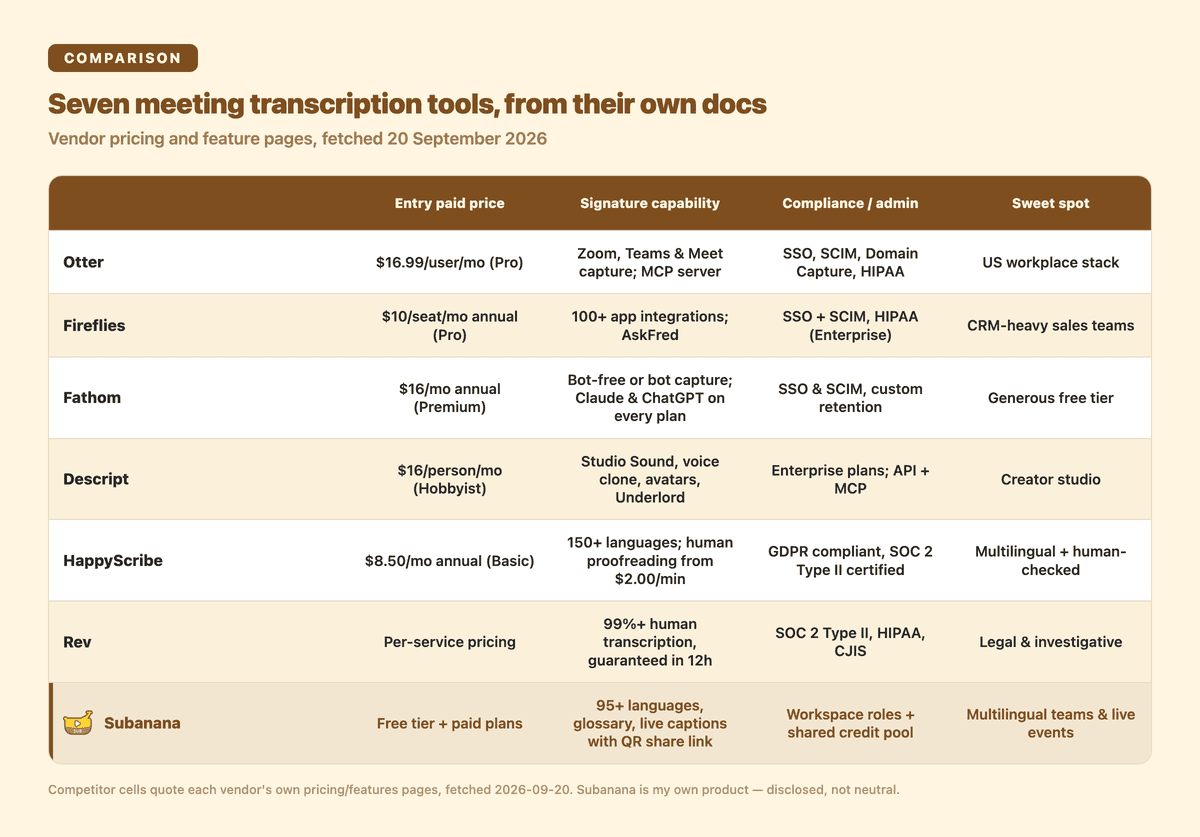
Each row quotes the vendor's own pricing and features pages as of 20 September 2026. The sections below give the detail behind each line.
Two questions narrow seven tools down to one faster than any feature table: what language do your meetings actually happen in, and what does the rest of your stack already look like (CRM, video editor, courtroom, conference hall)?
TL;DR
| If this is you | Start with |
|---|---|
| Zoom, Teams or Meet plus Salesforce and HubSpot, US workplace | Otter |
| Sales team that lives in the CRM and wants meeting analytics | Fireflies |
| One person or a small team who wants a real free tier | Fathom |
| You also edit video, cut podcasts, or need voice and avatar work | Descript |
| Wide language coverage with an option to have a human check it | HappyScribe |
| Legal, investigative or broadcast work with a turnaround guarantee | Rev |
| Meetings in many languages, or a live event where the audience needs captions | Subanana |
1. Otter
Otter's case is the plan ladder. It is the clearest published progression in this roundup, so here it is straight from the pricing page:
| Plan | Price | What you get |
|---|---|---|
| Basic | Free | 300 monthly transcription minutes, 3 lifetime audio/video file imports, Otter Chat, real-time recording |
| Pro | $16.99/user/mo, $8.49 annual | 1200 monthly in-app recording minutes, 10 monthly file imports, up to 90 minutes per meeting, team vocabulary |
| Business | $30/user/mo, $24 annual | Unlimited meetings, up to 4 hours per meeting, join up to 3 concurrent meetings, usage analytics |
| Enterprise | Contact sales | SSO (SAML), SCIM provisioning, Domain Capture, HIPAA compliance |
Source: Otter's pricing page, fetched 2026-09-20.
Two details matter more than the prices. Otter integrates directly with Zoom, Microsoft Teams and Google Meet, and its integrations directory runs from Airtable and Amazon S3 through Asana, HubSpot, Salesforce and Zapier, organised into categories like CRM, Storage, Dialers and Video Conferencing. It also ships an Otter MCP server, so an AI assistant can query your meeting history directly.
Choose Otter when the deciding factor is how cleanly the transcript lands in the tools your company already runs.
→ Deep dive: Subanana vs Otter (2026): A Documentation-Based Comparison
2. Fireflies
Fireflies sells breadth of connection. Its integrations page (fetched 2026-09-20) advertises "100+ Apps You Love," covering Salesforce, HubSpot, Slack, Notion, Google Docs, OneNote, Dropbox, and recruiting systems including Greenhouse, Lever and BambooHR.
The free plan is unusually open for this category: unlimited transcription, limited AI summaries, 400 minutes of storage per team, 20 AI credits, real-time notes and live transcriptions, AskFred (the assistant you can ask questions about a meeting), API access, and "Transcription in 100+ languages."
Paid tiers are priced per seat and stack like this:
- Pro, $18 list or $10 per seat per month billed annually: 8,000 minutes of storage per seat, unlimited integrations.
- Business, $29 or $19 annually: unlimited storage, Multi-language Mode, conversation intelligence, team analytics.
- Enterprise, $39 per seat, billed annually only: rules engine, SSO plus SCIM, HIPAA compliance, private storage.
Source: Fireflies pricing, fetched 2026-09-20.
That Business tier is the interesting one. Conversation intelligence and team analytics are what a sales manager actually buys a notetaker for, and they sit one step above the entry plan.
→ Deep dive: Subanana vs Fireflies (2026): A Documentation-Based Comparison
3. Fathom
Fathom's free tier is the most generous thing on this page: unlimited recordings and unlimited transcriptions, instant AI call summaries, clips, playlists and search. For a solo rep or a two-person team, that can genuinely be the whole product.
It has also changed shape in 2026 in two ways worth knowing. Capture is now your "choice of bot-free (in beta) or bot capture," so a silent participant joining your call is optional rather than mandatory. And Fathom's Claude and ChatGPT integrations are, in its own words, "available on every Fathom plan," which puts your meeting history inside the assistant you already use without paying for a higher tier.
Paid plans: Premium at $20 monthly or $16 annually, Team at $19 or $15 with a two-user minimum, Business at $34 or $25. Business is where the revenue tooling appears (CRM field sync, Deal View, coaching metrics and AI scorecards), and Enterprise adds SSO with SCIM plus custom data retention.
Fathom keeps its integration list short and deliberate. Fathom lists Asana, ChatGPT, Claude, HubSpot, Salesforce and Superhuman Go, plus a public API with MCP.
Source: Fathom pricing and integrations, fetched 2026-09-20.
→ Deep dive: Subanana vs Fathom (2026): A Documentation-Based Comparison
4. Descript
Descript is a creator studio in which transcription is one component. What you are actually buying, per its features page: video editing, podcasting, a screen recorder, Rooms for remote recording, Enhance video, Generate media, Captions, AI speech with "a realistic voice clone or … stock AI voices," transcription, AI Avatars, Translation, Eye Contact, Green Screen, Automatic Multicam, Brand Studio, Studio Sound, Remove Filler Words, Remove Retakes and Regenerate Speech. Underlord is the AI assistant that drives it, and there is an API plus MCP for editing video from code or from inside an assistant.
Pricing is per person per month, and the meter is media hours rather than meeting minutes:
- Hobbyist, $16 annual or $24 monthly: 10 media hours, 400 AI credits, 1080p watermark-free export.
- Creator, $24 annual or $35 monthly: 30 media hours, 800 AI credits, 4K export, generate video with the latest AI models.
Source: Descript pricing and features, fetched 2026-09-20.
Choose Descript when the transcript is raw material for something you will publish, not a record of a meeting you will search later.
→ Deep dive: Subanana vs Descript (2026): A Documentation-Based Comparison
5. HappyScribe
HappyScribe leads with language count, and the number went up this year: "150+ Supported Languages," with the marketing line "Your team doesn't meet in one language." Its own framing of what's included out of the box: free to try without a credit card, joins Zoom, Teams and Meet, transcribes in 150+ languages, and is available through MCP. It reports 41,000+ teams as customers and states it is "GDPR compliant and SOC 2 Type II certified."
The second distinctive thing is the human layer. Every plan carries human proofreading from $2.00/min as a paid add-on, which is the escape hatch when a file has to be right rather than fast.
The free plan is worth reading closely because the limits are unusual: unlimited meeting recordings, 45 minutes per recording, a 10-minute free trial of AI Transcription, Subtitling and Translation, AI speech-to-text for 60+ languages and dialects, automatic speaker detection, and export in DOCX, TXT, SRT and MP4 (watermarked). Basic is $17 monthly or $8.50 annually and raises recordings to 90 minutes with 120 transcription minutes per month, plus credits at $0.20/min. Pro is $29 or $19 with unlimited minutes per recording and 600 transcription minutes per month.
Source: HappyScribe pricing and features, fetched 2026-09-20.
→ Deep dive: Subanana vs Happy Scribe (2026): A Documentation-Based Comparison
6. Rev
Rev has repositioned. Its homepage now calls it "The #1 Investigative Intelligence Platform," and the products on display are built around evidence rather than around standups.
What it sells, with the turnaround times it publishes:
- Human Transcription: "99%+ accurate, guaranteed in 12 hours or less."
- Human Captions: "Reliable captions in English and Spanish."
- Global Subtitles: available in 17 languages.
- Legal Rough Draft in 3 days, Legal Premium Transcript in 5 days, plus Court Reporting Self-Service and SmartDepo.
- rev.ai, a developer API, for teams that want the engine rather than the workflow.
The security posture is the other half of the pitch: Rev states its security "ensures attorney-client privilege through SOC 2 Type II, HIPAA, and CJIS compliance, with zero third-party data training." CJIS is the one that matters if your work touches criminal justice data, and it is rare in this category.
Source: rev.com, fetched 2026-09-20.
Choose Rev when a wrong word is expensive and somebody needs to sign off on the transcript.
→ Deep dive: Subanana vs Rev (2026): A Documentation-Based Comparison
7. Subanana
Disclosure again: this one is mine, so read it with that in mind. Three places where it is the strongest fit on this page.
Language coverage, with the model chosen per language. Subanana covers 95+ source languages. The transcription layer continuously benchmarks multiple frontier models per language and routes to whichever currently performs best, rather than locking the whole product to a single engine.
Glossary granularity. A custom-vocabulary list is table stakes in this category; every tool above has one. The difference here is shape. Subanana runs a workspace-wide list plus per-project lists, each term tagged Universal or language-specific, imported one by one, pasted in bulk, or uploaded as XLSX/CSV. Most rivals offer a single account-wide list, so the practical difference shows up when one client's product names should not leak into another client's transcript.
Live captions for a room, not just a call. Subanana's live captioning takes audio directly from a microphone, system audio, or a virtual audio cable, and publishes captions to an audience share link and QR code so attendees read on their own phones. The host sets one source language plus up to five translation targets for the session, and each attendee picks the one language they want to see. That multi-target setup runs on the Max plan, and every workspace gets a one-time 5-minute trial to test it first. It is built for multilingual conferences, university lectures, church and community events, and hybrid webinars.
One more thing that is genuinely useful and rarely advertised: the AI chat inside the meeting editor and the subtitle editor lets you pick which frontier model answers you, by name, on every plan. The meeting summary itself runs on whichever model Subanana benchmarks as best for summarisation, which is the same idea applied automatically.
Paid plans export SRT, VTT, TXT, DOCX, XLSX and Markdown. The free tier is a preview tier: it shows you the first 15 minutes of a file so you can judge the quality, and export unlocks on paid.
Where another tool wins: if your stack is Salesforce and your meetings are all in English, Otter and Fireflies have more integration surface. If you are cutting video, Descript's editor is the product. If a court needs the transcript, Rev's compliance list is the deciding factor. If you want a person to check the file, HappyScribe's proofreading tier is the direct answer.
→ Product: Subanana — multilingual transcription & live captioning
Methodology note
Every competitor figure above is quoted from that vendor's own pricing, features or integrations page, fetched on 20 September 2026. Every Subanana claim comes from internal product documentation describing what ships today.
Things move. This page previously credited HappyScribe with 120+ languages; the number is now 150+, and Fathom has moved from fathom.video to fathom.ai. Vendor pages are the source of truth, and the deep-dive comparisons linked above are re-verified on the same cycle as this one.
Most tools here publish a free tier or a free trial, which is the honest way to settle accuracy arguments. Run the same ten-minute recording through your two finalists and compare the output on your own audio. That is an afternoon, not a research project.
Frequently asked questions
Which AI meeting transcription tool is most accurate?
Accuracy is language-specific and audio-specific, and no vendor in this roundup publishes a like-for-like benchmark against the others. Any single "accuracy %" you see is measured on one language under one set of conditions. Pick the two tools that match your profile, run the same test file through both, and compare on your own recordings.
Is there a free AI meeting transcription tool?
Several. Fathom's free plan covers unlimited recordings and transcriptions. Fireflies offers a free-forever plan with unlimited transcription and 400 minutes of team storage. Otter's Basic plan gives 300 transcription minutes a month. HappyScribe's free plan allows unlimited meeting recordings at 45 minutes each. Subanana's free tier previews the first 15 minutes of a file. Descript's published plans start at Hobbyist, $16 per person per month.
Which tool handles non-English or mixed-language meetings?
Compare the published numbers directly. HappyScribe states 150+ supported languages, Fireflies states transcription in 100+ languages, and Subanana covers 95+ source languages with per-language model routing and a glossary that tags each term as universal or language-specific. Rev's published multilingual products are Global Subtitles in 17 languages and human captions in English and Spanish. Descript ships a Translation feature inside its editor.
Which tool works for a live event where the audience needs captions?
Subanana is built for that specific shape. The host configures a source language plus up to 5 translation targets, and each audience member scans a QR code and picks one of those languages to read on their phone. Multi-target live translation is a Max-plan feature, with a one-time 5-minute trial on every workspace. The other tools on this page are oriented around joining a video call or processing an uploaded file.
Can I move between tools later?
The transcript itself travels well. Most of these tools export SRT or TXT, so the words are portable. What does not travel: AI summaries, which are structured differently by every vendor, CRM-synced metadata, and integration configuration. Switching costs land on teams that have wired a tool deep into their workflow, not on individuals.