
Happy Scribe is one of the most established names in AI transcription and subtitling, with broad language coverage (150+), a human-verified transcription option for accuracy-critical work, and 15+ export formats at the Pro tier including FCPXML, VTT, STL, XML, and EDL. If you're searching for a Happy Scribe alternative, you're usually hitting one of three gaps: cost (the per-seat model adds up for teams), accuracy on harder audio (accented, code-switched, or multi-speaker recordings that Happy Scribe doesn't break out per-language), or you need live multilingual event captioning that the Happy Scribe product doesn't cover.
Subanana plays in that narrower transcription + live-caption space, with a specific strength in messy real-world audio: mixed-language and code-switched recordings, accented speech, and Asian languages (Mandarin, Japanese, Korean, and Cantonese among them).
Disclosure: I run Subanana. This post compares each tool using its own published documentation (pricing pages, features pages, integration lists), pulled in May 2026. No fabricated head-to-head test; both tools have free tiers, and your own audio is the right way to test accuracy.
Roundup context: Best AI Meeting Transcription Tools 2026 →. This post is the Happy Scribe deep dive.
TL;DR
- Pick Happy Scribe if you need broad language coverage with no specific code-switched or Asian-language requirement, want the option of human-verified transcription for high-accuracy projects, need FCPXML / STL / EDL exports for established subtitle workflows, or value an established brand with 6M+ users.
- Pick Subanana if you need transcription that holds up on mixed-language, code-switched, or Asian-language audio (per-language STT model routing across 95+ supported languages), want user-selectable LLMs for meeting summaries, run live multilingual events with audience-facing captions, or are a team of 3+ where per-workspace pricing scales better.
- The shape of the choice: Happy Scribe is the established multilingual transcription + subtitling specialist with a human-verified safety net. Subanana is narrower: multilingual transcription tuned for harder, code-switched audio, plus live event captioning. Both can transcribe, but their strengths point at different jobs.
Pricing snapshot (May 2026)
Happy Scribe (per seat, USD)
| Plan | Monthly | Annual (effective /mo) | AI minutes/mo | Meeting cap | Export | Seats |
|---|---|---|---|---|---|---|
| Free | $0 | — | 10-min trial | 45 min/recording | TXT, SRT | 1 |
| Basic | $17 | $8.50 | 120 min | 90 min | TXT, SRT, PDF, DOCX | 1 |
| Pro | $29 | $19 | 600 min | unlimited | 15+ formats (incl. VTT, STL, XML, FCPXML, EDL, HTML, MP4) | 3 |
| Business | $89 | $59 | 6,000 min | unlimited | 15+ formats | 5 |
| Enterprise | Custom | Custom | Custom | unlimited | All + custom workflows | Unlimited |
Add-on minute credits: $0.20/min. Human proofreading: from $2.00/min (Business: $1.90/min).
Subanana (per workspace, USD)
| Plan | Monthly | Annual (effective /mo) | File limit | Annual minute allocation |
|---|---|---|---|---|
| Free | $0 | — | 8 hr/file, 30 GB (first 15 min of each file transcribed) | — |
| Lite | $18 | $9 | 8 hr/file, 30 GB | 720 min/yr |
| Pro | $30 | $18 | 8 hr/file, 30 GB | 2,160 min/yr |
| Max | $75 | $50 | 8 hr/file, 30 GB | 7,200 min/yr |
| Enterprise | Contact sales | Contact sales | Custom | Custom |
Per-workspace pricing. Free tier doesn't allow subtitle/transcript download; paid tiers enable downloads. Subanana minutes don't roll over across billing cycles.
The two pricing models are different shapes. Happy Scribe charges per seat with monthly minute pools that DO carry implicit reset behaviour (per their pricing page, allocations are per-month). Subanana charges per workspace with annual minute allocations. For solo creators on light-to-moderate usage Happy Scribe Basic and Subanana Lite are roughly comparable. For teams of 3+, Subanana's per-workspace pricing tends to be cheaper at similar usage.
Where Happy Scribe wins
I'll start here because these are real strengths sourced from Happy Scribe's published pages.
1. Broader published language list
Happy Scribe states 150+ languages for transcription and 80+ for translation on its pricing page. Subanana also publishes 95+ languages for translation, but doesn't currently publish a public list of 150+ for transcription. For workflows that depend on rare-language coverage, Happy Scribe's broader list is more searchable up-front.
2. Human-verified transcription option
Happy Scribe offers human proofreading as a paid service (from $2.00/min, Business $1.90/min). For accuracy-critical work (legal depositions, broadcast subtitles, pharma), having a documented human-verified path inside the same product is a real advantage. Subanana is currently AI-only; if you need human-verified output, you'd need a separate vendor or in-house QC step.
3. Established subtitle export breadth (FCPXML, STL, XML, EDL)
Happy Scribe Pro lists 15+ export formats including VTT, STL, XML, FCPXML, EDL, HTML, MP4. Subanana exports SRT, VTT, TXT, DOCX, XLSX, and Markdown: six formats, with FCPXML and STL not currently supported. For Final Cut Pro users who want FCPXML directly, or broadcast workflows that depend on STL, Happy Scribe is the closer fit. Subanana users in those workflows would export SRT and convert downstream.
4. SDH (Subtitles for Deaf and Hard of Hearing) workflow
Happy Scribe explicitly supports SDH subtitles, including speaker identification and non-speech audio cues (e.g. [applause], [door slams]). For accessibility-required content (broadcast, public-sector, education compliance), Happy Scribe's published SDH workflow is a documented advantage.
5. Brand maturity (6M+ users, 41,000+ teams)
Happy Scribe's site claims "trusted by 6m+ users and 41,000+ teams." For procurement contexts where vendor maturity matters, this is a real signal. Subanana is younger.
Where Subanana wins
1. Mixed-language and code-switched audio is a deliberate per-language choice, not a black box
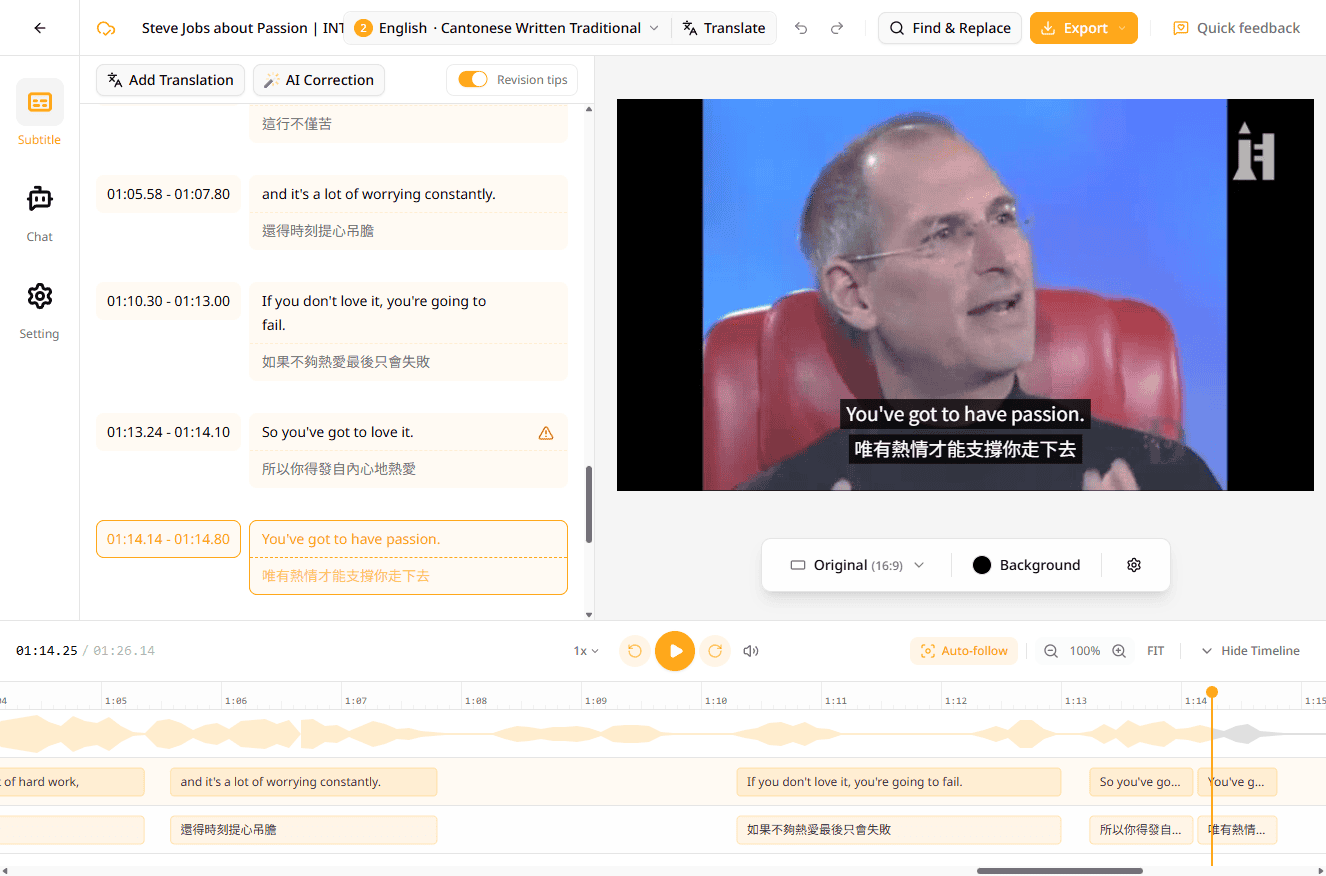
Happy Scribe lists 150+ languages but doesn't break out per-language model selection or methodology for the harder cases: accented speech, multi-speaker recordings, or code-switched audio that mixes languages. Subanana doesn't publish per-language accuracy numbers either. Instead it benchmarks STT models and routes to the best one for each source language, with Asian and code-switched languages (Mandarin, Japanese, Korean, Cantonese) treated as first-class targets rather than long-tail entries. For multilingual and code-switched workflows specifically, that routing matters because general "150 languages" claims rarely translate to production-grade quality on the long tail; your own audio is the right way to confirm it.
2. User glossary with per-project term pinning
Subanana lets you supply a glossary to pin the spellings of brand names, product names, people, and jargon. A workspace list applies everywhere, and custom lists attach per project; you can add terms one-by-one, paste a batch, or bulk-import from XLSX / CSV, and mark each term Universal (same in every language) or language-specific. The same lists feed transcription, subtitle, and live-caption jobs. Happy Scribe also offers a user-supplied glossary (CSV import, applied at workspace level, with multiple glossaries and multi-language assignment gated to its Business plan), but it doesn't advertise the per-project list granularity Subanana offers, so workspaces that handle several clients or product lines with different vocabularies have to swap one workspace-wide glossary in and out.
3. Spoken-to-written conversion for languages that need it
For languages with a wide gap between how people speak and how text is written, Subanana converts colloquial speech into clean written form automatically. Cantonese is the clearest example (e.g. spoken "我哋 call 完之後 follow up" becomes written Chinese). This is unique to Subanana among AI transcription tools: Happy Scribe transcribes spoken speech literally, without the spoken-to-written conversion step that some professional contexts require.
4. User-selectable summary LLM
Subanana lets users pick which LLM writes the meeting summary, with multiple frontier models supported and the list expanding as new models ship. Happy Scribe's "Ask AI" feature uses a single underlying model that's not user-selectable. For teams that have opinions about model behaviour on specific meeting types (technical standups vs. customer interviews vs. legal depositions), this matters.
5. Live multilingual translation with audience-facing captions
Subanana runs real-time captioning + translation for live events with an audience-facing shareable link: attendees scan a QR code and each picks one display language for the live captions on their phone, either the original, or any of the up to 5 translation targets the host pre-configured for the event. Happy Scribe is a post-production transcription + subtitling tool; it doesn't offer live event captioning. For conferences, university lectures, or multilingual board meetings, Subanana is purpose-built for the scenario.
6. Bilingual SRT export
Subanana exports a single SRT file containing both the source transcription and the translated text (one above the other per cue). For bilingual content (English subtitles over another language or vice versa), this saves a downstream merge step. Happy Scribe's translation outputs are separate language files: useful for parallel publishing, less useful for bilingual on-screen subtitles.
7. Per-workspace pricing for teams
Subanana's per-workspace pricing means a 5-person team pays the same as a 1-person team at a given tier. Happy Scribe Pro is 3 seats included; beyond that you upgrade to Business (5 seats) or Enterprise. For teams that are 3+ on similar usage, Subanana's per-workspace model gets cheaper as the team grows.
8. Different storage philosophy
Happy Scribe doesn't appear to publish a separate workspace storage cap; its limits are framed as monthly AI minutes. Subanana also doesn't impose a workspace storage cap. It caps per-file size only: 30 GB per file on every plan, including free (on free, only the first 15 minutes of each file is transcribed). Both tools avoid Descript-style tiered storage ceilings, so this is roughly parity rather than a clear win for either.
Side-by-side feature table
| Feature | Happy Scribe Pro | Subanana Pro |
|---|---|---|
| Free tier | ✅ 10-min AI trial + 45-min meeting recordings | ✅ 30 GB / 8 hr per file; first 15 min of each file transcribed |
| Mixed-language / code-switched handling | Not broken out per-language | Benchmarked + per-language STT routing |
| Spoken-to-written conversion (e.g. Cantonese) | Not advertised | ✅ |
| User glossary / term pinning | ✅ workspace-level (CSV; multiple glossaries on Business) | ✅ Workspace + per-project (XLSX/CSV, universal or per-language) |
| Human-verified transcription | ✅ (paid add-on, from $2/min) | ❌ AI-only |
| User-selectable summary LLM | ❌ (single model) | ✅ |
| Live multilingual captions (event-scale, audience-facing) | ❌ | ✅ |
| Bilingual SRT (single file, dual-track) | ❌ (separate files per language) | ✅ |
| SDH (deaf / hard-of-hearing subtitles) | ✅ | Not advertised |
| Speaker diarization | ✅ | ✅ |
| Translation languages | 80+ | 95+ (same list used for transcription) |
| Transcription languages | 150+ | 95+ (multi-model routed, no single vendor; same list as translation) |
| Export formats | 15+ (incl. VTT, STL, XML, FCPXML, EDL, HTML, MP4) | 6 (SRT, VTT, TXT, DOCX, XLSX, Markdown) |
| Pricing model | Per seat | Per workspace |
| Storage model | Monthly AI minutes pool | No aggregate cap; per-file limit only (30 GB on every plan, including free; free transcribes the first 15 min of each file) |
So which should you pick?
Pick Happy Scribe if:
- You need 150+ language coverage with no specific code-switched or Asian-language requirement
- Human-verified transcription is required for some of your work (legal, broadcast, compliance)
- You need FCPXML, STL, EDL, or other broadcast / video-pro export formats
- SDH subtitles for accessibility compliance are a hard requirement
- Vendor maturity is a procurement consideration
Pick Subanana if:
- A meaningful portion of your work is mixed-language, code-switched, or Asian-language audio (Mandarin, Japanese, Korean, Cantonese among them)
- You want user-selectable LLMs for meeting summaries
- You run live multilingual events that need audience-facing captions
- You need bilingual SRT in a single file
- You're a team of 3+ where per-workspace pricing scales better
If your audio is already in Happy Scribe's comfort zone (broad language coverage, a human proofreader on standby, FCPXML/STL exports for an existing broadcast pipeline), there's no reason to switch. Subanana earns its place specifically when the audio itself is the hard part: code-switched, accented, or Cantonese/Mandarin/Japanese/Korean recordings where a single generic model tends to slip.
FAQ
Is Subanana cheaper than Happy Scribe?
For solo users on light usage, the two free tiers are different shapes. Happy Scribe gives a 10-minute AI trial plus unlimited 45-min meeting recordings; Subanana's free tier allows up to 3 uploads per month, accepts files up to 30 GB / 8 hours per file (same per-file limit as paid), with only the first 15 minutes of each file transcribed. Both let you test the product. For paid usage at moderate volume, Subanana Lite (~$9/mo annual) and Happy Scribe Basic ($8.50/mo annual) are similar. For teams of 3+ at similar usage, Subanana's per-workspace pricing tends to be cheaper.
Does Happy Scribe handle mixed-language or Cantonese audio?
Happy Scribe lists "150+ languages" but doesn't break out per-language STT routing in its public docs. Cantonese and other Asian languages are presumably included in the long list, but how it handles them, including code-switching with English, isn't detailed on their site. Subanana doesn't publish a per-language accuracy figure either; instead it benchmarks STT models and routes to the best one for each source language, with code-switched and Asian languages treated as first-class targets. Test it on your own audio to confirm.
Can I migrate from Happy Scribe to Subanana?
Yes. Subanana imports audio and video files in mp4, mov, m4a, mp3, ogg, webm. Happy Scribe lets you export your recordings, which you can re-process in Subanana. Existing transcripts can be exported as TXT or DOCX from Happy Scribe and used as reference.
Does Subanana offer human-verified transcription?
Not currently. Subanana is AI-only. If you need human-verified output for legal, broadcast, or compliance contexts, Happy Scribe's human-proofreading service (from $2/min) is the right fit. For most non-compliance use cases (meeting transcripts, podcast subtitles, video subtitling), Subanana's AI output is sufficient, especially with a glossary pinning your brand and jargon terms.
What about live event captioning?
Happy Scribe is a post-production tool: it transcribes recorded media, not live events. Subanana includes real-time captioning + translation with an audience-facing shareable link (QR code; attendees see live captions in their chosen language on their phones). For conferences, lectures, multilingual events, this is a different product category and Subanana is purpose-built for it.
Can I export to FCPXML or STL with Subanana?
Not currently. Subanana exports SRT, VTT, TXT, DOCX, XLSX, and Markdown. For FCPXML, STL, EDL workflows, you'd export SRT from Subanana and convert downstream, or use Happy Scribe directly. (For Final Cut Pro specifically, importing SRT works for most subtitle workflows; FCPXML is needed for round-trip editing.)
Related comparisons
If you're comparing several transcription tools, see also:
- Subanana vs Otter: meeting-tool focus
- Subanana vs Fireflies: CRM-native vs multilingual
- Subanana vs Descript: creator studio vs transcription specialist
Try Subanana free →. No payment method required.