
Otter is the default meeting transcription tool for English-speaking teams in the US workplace stack — Zoom, Salesforce, HubSpot, with a HIPAA add-on for healthcare. If you're searching for an alternative, you're usually hitting one of three gaps: wanting to choose which LLM writes your meeting summaries, running live multilingual events that need audience-facing captions, or non-English meetings — mixed-language, code-switched, or Asian-language audio (Mandarin, Japanese, Korean, and Cantonese among them). Subanana addresses all three.
Disclosure: I run Subanana. This post compares each tool using its own published documentation — pricing pages, features pages, integration lists — pulled in May 2026. No fabricated head-to-head test; if you want accuracy testing on your own audio, both tools have free tiers and that's the right way to settle it.
Roundup context: Best AI Meeting Transcription Tools 2026 → — this post is the Otter deep dive.
TL;DR
- Pick Otter if your team is English-only and lives inside the US workplace stack (Zoom + Salesforce + HubSpot). Otter has Salesforce, HubSpot, and Zapier integrations, plus a HIPAA add-on at the Enterprise tier.
- Pick Subanana if you want to choose which LLM writes your meeting summaries, run live multilingual events with audience-facing captions, or need transcription that holds up on multilingual, code-switched, or Asian-language audio (Mandarin, Japanese, Korean, Cantonese among them).
- Honest middle ground: for a US-based English-only team, Otter is the more complete product today on integrations and ecosystem. Subanana's strongest cases are multi-LLM summary, live-event scenarios, and multilingual / non-English markets.
Pricing snapshot (May 2026)
Otter (per Otter's pricing page)
| Plan | Monthly | Annual (effective /mo) | Recording limit | Monthly minutes | Concurrent meetings | AI Chat queries |
|---|---|---|---|---|---|---|
| Basic (Free) | $0 | — | 30 min/meeting | 300 min | 1 | 20/user/mo |
| Pro | $16.99 | $8.33 | 90 min/meeting | 1,200 min | 2 | 50/user/mo |
| Business | $30 | $19.99 | 4 hr/meeting | Unlimited (in-app) | 3 | 200/user/mo |
| Enterprise | Custom | Custom | 4 hr/meeting | Unlimited | 3 | — |
Per-user pricing. Otter Free includes 3 lifetime audio/video file imports; Pro includes 10 imports/month; Business unlimited.
Subanana (per subanana.com/en/pricing)
| Plan | Monthly | Annual (effective /mo) | File limit | Annual minute allocation |
|---|---|---|---|---|
| Free | $0 | — | 8 hr/file, 30 GB (first 15 min of each file transcribed) | — |
| Lite | $18 | $9 | 8 hr/file, 30 GB | 720 min/yr |
| Pro | $30 | $18 | 8 hr/file, 30 GB | 2,160 min/yr |
| Max | $75 | $50 | 8 hr/file, 30 GB | 7,200 min/yr |
| Business | Contact sales | Contact sales | Custom | Custom |
Per-workspace pricing — the same plan covers everyone in your workspace.
Pricing notes:
- Subanana Free does not allow subtitle/transcript download and caps export at 720p; paid plans enable downloads and 4K export.
- Subanana minutes do not roll over between billing cycles; allocations reset at the start of each cycle on both monthly and annual plans.
- Otter's "unlimited" Business minutes apply only to in-app recordings via Otter Assistant.
The two pricing models are different shapes, so the right comparison depends on team size. A 1-2 person team with heavy individual use leans toward Otter's per-user tier. A small team with shared meetings (3+ users) tends to be cheaper on Subanana's per-workspace pricing.
Language support
Otter lists "multi-language support" on its features page but doesn't break out per-language STT routing in its public docs. Live captions are advertised for Zoom and Google Meet.
Subanana doesn't publish per-language accuracy numbers; it benchmarks STT models and routes to the best one per source language, with mixed-language, code-switched, and Asian audio (Mandarin, Japanese, Korean, Cantonese) treated as first-class rather than long-tail. It also includes a spoken-to-written conversion for languages that need it — Cantonese is the clearest example, turning spoken phrasing into clean written Chinese during transcription, useful for workplaces where bilingual code-switching is the default register. Otter's published documentation does not describe an equivalent feature.
If multilingual, code-switched, or non-English meetings are part of your workflow, this is the most consequential difference between the two products. Don't take my word for it — Otter offers a free tier; run a meeting through both and compare the output yourself.
AI summary: single model vs. user-selectable
Otter offers AI Chat over your meeting archive (with monthly query caps per tier) and AI summaries. The underlying model is not user-selectable.
Subanana's meeting summary lets the user pick which LLM generates the summary, organised into three tiers (Standard / Advanced / Premium). Subanana continuously evaluates frontier models on intelligence, throughput, pricing, and context window, and the menu is updated as new models ship and older ones lose their edge. The thesis is "we don't lock to any one provider."
This is the only Subanana feature where users pick the LLM. Translation and subtitle correction are routed internally — Subanana picks the best-fit model for those, not the user.
Live transcription and translation
Otter provides live captions in Zoom and Google Meet for the meeting attendees.
Subanana runs real-time transcription with simultaneous translation and an audience-facing display: attendees scan a QR code and each picks one display language for the live captions on their phone — the original, or any of the up to 5 translation targets the host pre-configured for the event. This is the differentiator for events, conferences, lectures, and any scenario where you have an audience that's not all in the same Zoom room.
If you don't run those scenarios, this section doesn't apply. If you do, Otter doesn't compete here.
Honest concessions: where Otter wins
I'll spell these out clearly because comparison posts that give the home team every win lose readers within 30 seconds.
1. Native CRM integrations
Otter Pro and Business include native Salesforce and HubSpot integrations, plus Zapier connectivity. Subanana does not currently ship native CRM integrations or a public Zapier integration. If your meeting → CRM activity loop matters, Otter's setup is tighter.
2. HIPAA compliance
Otter offers HIPAA compliance as an Enterprise add-on. Subanana does not currently advertise HIPAA compliance. Healthcare teams with that requirement should pick Otter.
3. SSO / SCIM / enterprise admin
Otter Business and Enterprise include SSO, and Enterprise adds SCIM, custom integrations, and an API. Subanana's Business tier exists for enterprise customers; specifics are quoted on request.
4. Auto-join meeting bot for Zoom
Both tools auto-join scheduled meetings via calendar integration. Otter covers Zoom, Google Meet, and Microsoft Teams. Subanana's bot covers Google Meet and Microsoft Teams — no Zoom bot today; Zoom is captured by Subanana's Chrome extension instead. If you want a bot inside every Zoom call, Otter's bot coverage is broader.
5. Mobile / desktop app surface area
Otter ships iOS, Android, web, desktop app, and a Chrome extension. Subanana is web-first, plus a Chrome extension for meeting capture. For mobile-heavy capture (e.g. journalists recording in the field), Otter's mobile app is more developed.
Where Subanana wins
1. Multilingual, code-switched, and Asian-language meetings
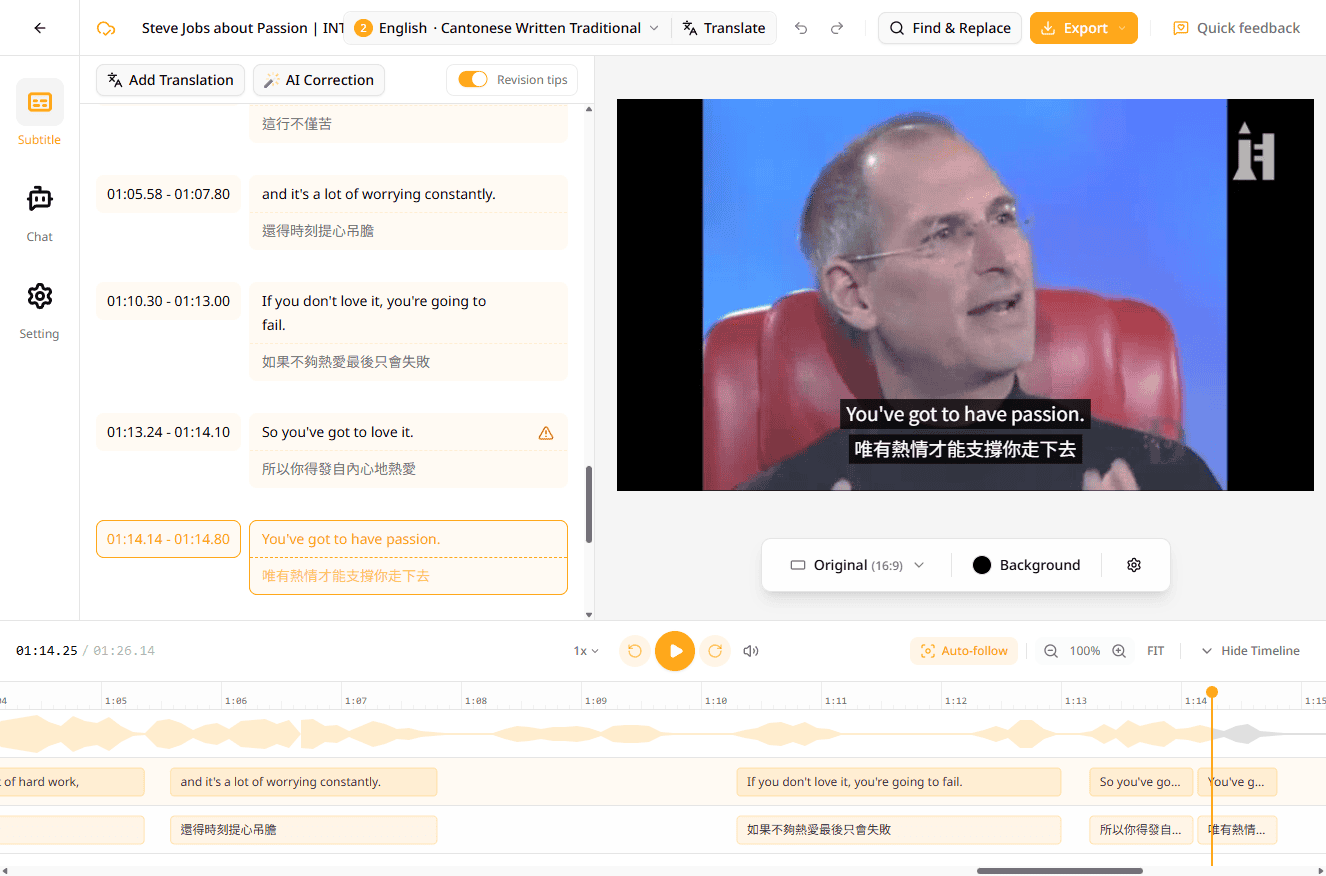
Already covered above. Subanana doesn't publish per-language accuracy numbers; it benchmarks STT models and routes to the best one per source language, plus a spoken-to-written conversion for languages that need it (Cantonese being the clearest example). Otter doesn't publish equivalent figures or features for these languages.
2. User-selectable LLM for meeting summary
Subanana exposes a tiered LLM menu for summaries; Otter does not.
3. Live multilingual translation with audience-facing display
Already covered. Subanana has it; Otter doesn't compete in this space.
4. User-supplied glossary for term pinning
Subanana lets you supply a glossary to pin brand names, product names, people, and jargon so they transcribe consistently. It's a workspace-wide list plus per-project lists, bulk-importable from XLSX/CSV, with each term marked universal or per-language. Otter has a comparable feature here — its Custom Vocabulary lets you teach proper names, jargon, and acronyms (personal lists on Pro, a shareable team vocabulary on Business), so this is a structure-and-granularity difference, not a have/have-not: Subanana's edge is the per-project scoping, bulk import, and per-language tagging.
5. URL import from YouTube / Instagram / Facebook
Subanana accepts a public YouTube, Instagram, or Facebook link directly — paste the URL and the system fetches and transcribes (Shorts/Reels included). Otter's published features focus on Zoom/Meet/Teams capture and audio file import; URL-fetch from social platforms isn't part of its standard feature set.
6. Bilingual subtitle output
Subanana exports a single SRT file containing both the source transcription and the translated text — useful for content creators producing bilingual subtitles. It also offers one-click rendering of a video file with subtitles burned in (single-language or bilingual). Otter's exports lean toward business document formats rather than video subtitle tracks.
7. Workspace-based pricing for small teams
Per-workspace pricing means a 5-person team pays the same as a 1-person team at a given tier. This becomes meaningful past 2-3 users compared to Otter's per-seat model.
Side-by-side feature table
| Feature | Otter | Subanana |
|---|---|---|
| Free tier | ✅ 300 min/mo | ✅ 30 GB / 8 hr per file; first 15 min of each file transcribed |
| Per-language accuracy figures | Not published | Not published — benchmarks STT models, routes best per source language |
| Colloquial-to-formal Chinese conversion | Not advertised | ✅ |
| User glossary / term pinning | ✅ Custom Vocabulary (personal; team on Business) | ✅ Workspace + per-project, bulk import, per-language |
| User-selectable summary LLM | ❌ (single model) | ✅ (3-tier menu) |
| Live captions in Zoom/Meet | ✅ | — |
| Audience-facing live translation w/ QR share | ❌ | ✅ |
| URL import (YouTube / IG / FB) | Not advertised | ✅ |
| Bilingual SRT export | Not advertised | ✅ |
| Burned-in subtitled video export | Not advertised | ✅ |
| Speaker identification | ✅ | ✅ |
| Auto-join meeting bot | ✅ Zoom / Meet / Teams | ✅ Meet / Teams (no Zoom bot; Zoom via Chrome extension) |
| Native Salesforce / HubSpot | ✅ Pro+ | ❌ (manual export) |
| Native Zapier connectivity | ✅ Pro+ | Not advertised |
| HIPAA compliance | ✅ Enterprise add-on | Not advertised |
| SSO / SCIM | ✅ Business+ | Business tier (on request) |
| Mobile / desktop apps | iOS / Android / Web / Desktop / Chrome ext | Web-first |
| Subtitle export formats | TXT, MP3, PDF, DOCX, SRT | TXT, DOCX, XLSX, SRT, VTT, Markdown |
So which should you pick?
Pick Otter if:
- Your team meets exclusively in English
- Your stack is Zoom + Salesforce + HubSpot, and tight CRM integration matters daily
- HIPAA compliance is a hard requirement
- Mobile capture is a primary workflow
Pick Subanana if:
- You want to choose which LLM summarises your meetings
- You run live events or multilingual lectures and need audience-facing captions
- A meaningful portion of your meetings is multilingual, code-switched, or in Asian languages (Mandarin, Japanese, Korean, Cantonese among them)
- You import audio from public YouTube / Instagram / Facebook URLs
- You produce bilingual or burned-in subtitled video output
- You're a team of 3+ and want workspace-based pricing
FAQ
Have you actually tested both products head-to-head?
Not in a publishable head-to-head benchmark — and I'd be wary of any comparison post that claims to without showing the audio set, the scoring method, and the raw outputs. This post compares published documentation and verified product facts. The right way to settle accuracy on YOUR meetings is to run the same audio through each tool's free tier and judge for yourself.
Is Subanana cheaper than Otter for teams?
For teams of 3+ on similar usage patterns, Subanana's per-workspace pricing tends to be lower than Otter's per-user pricing. Run the numbers for your team size — the break-even point shifts depending on minute consumption.
Does Otter support non-English or Asian languages well?
Otter advertises multi-language support but doesn't break out per-language STT model selection in its public docs, and specific Asian languages such as Cantonese aren't called out in its public feature documentation. If multilingual or code-switched audio matters, test on the free tier before committing.
Can I switch from Otter to Subanana?
Yes. Subanana imports common audio/video files (mp4, mov, m4a, mp3, ogg, webm) and Otter lets you export your recordings. You can also paste public YouTube / Instagram / Facebook URLs directly into Subanana without re-downloading.
Zoom bot — does Subanana have one?
Not today — Subanana's auto-join bot doesn't cover Zoom; Zoom is captured by Subanana's Chrome extension instead. The bot does cover Google Meet and Microsoft Teams via calendar integration. If you want a bot inside every Zoom call, Otter's bot coverage is broader.
Does Subanana have a public API?
Not currently advertised. If you need custom integrations beyond what Otter's public API supports, that's a workflow concern Otter handles better today.
Closing
Otter is a solid product run by a serious team — it's a real choice for English-only US workflows, especially with the CRM stack. Subanana wins on user-selectable summary LLM, live multilingual translation, bilingual / burned-in subtitle output, and transcription that holds up on multilingual, code-switched, and Asian-language audio (Mandarin, Japanese, Korean, Cantonese among them). Match the strengths to the meetings you actually have.
Try Subanana free → — no payment method required; free transcribes the first 15 minutes of each file, and the 30 GB / 8 hour per-file limit is the same on every plan.