
Descript is the all-in-one creator studio — transcription, multitrack audio editing, video editing, voice cloning (Overdub), AI avatars, studio sound enhancement, all under one roof. If you're searching for a Descript alternative, you're usually hitting one of three gaps: cost (Descript's full creator workflow gets expensive), language scope (Descript's 25-language transcription doesn't break out per-language STT routing and Cantonese specifically isn't covered in the public docs), or you only need transcription and live captioning, not the full creator suite.
Subanana plays in that narrower transcription / live-caption space, with a specific strength in Cantonese, Mandarin, and mixed-language workflows. Different products serving different jobs.
Disclosure: I run Subanana. This post compares each tool using its own published documentation — pricing, features, integrations — pulled in May 2026. No fabricated head-to-head benchmark; both tools have free tiers, and your own audio is the right way to test accuracy.
Roundup context: Best AI Meeting Transcription Tools 2026 → — this post is the Descript deep dive.
TL;DR
- Pick Descript if you want a full creator studio in one tool: video editing, podcast production, AI voice cloning, AI avatars, screen recording, and transcription as one piece of a bigger workflow.
- Pick Subanana if you need Cantonese / Mandarin / mixed-language transcription that actually works, want user-selectable LLMs for meeting summaries, or run live multilingual events with audience-facing captions.
- The shape of the choice: Descript is "creator studio." Subanana is "transcription + live caption." If you need a video editor + AI speech, Descript wins. If you need accurate non-English transcription or live event captioning, Subanana wins.
Pricing snapshot (May 2026)
Descript (per descript.com/pricing)
| Plan | Monthly | Annual (effective /mo) | Media/month | AI credits | Export | Storage | Seats |
|---|---|---|---|---|---|---|---|
| Free | $0 | — | 60 min | 100 (one-time) | 720p, watermarked | 5 GB | 1 |
| Hobbyist | $24 | $16 | 10 hr + top-up | 400/mo + top-up | 1080p, no watermark | 100 GB | 1 |
| Creator | $35 | $24 | 30 hr + 5 bonus | 800/mo + 500 bonus | 4K, no watermark | 1 TB | 1–3 (billed separately) |
| Business | $65 | $50 | 40 hr + 10 bonus | 1,500/mo + 1,000 bonus | 4K | 2 TB | up to 5 (billed separately) |
| Enterprise | Custom | Custom | Custom | Custom | Custom | Custom | Custom |
Per-seat pricing for additional seats. AI credits gate features like AI speech, generate media, custom avatars.
Subanana (per subanana.com/en/pricing)
| Plan | Monthly | Annual (effective /mo) | File limit | Annual minute allocation |
|---|---|---|---|---|
| Free | $0 | — | 8 hr/file, 30 GB (first 15 min of each file transcribed) | — |
| Lite | $18 | $9 | 8 hr/file, 30 GB | 720 min/yr |
| Pro | $30 | $18 | 8 hr/file, 30 GB | 2,160 min/yr |
| Max | $75 | $50 | 8 hr/file, 30 GB | 7,200 min/yr |
| Business | Contact sales | Contact sales | Custom | Custom |
Per-workspace pricing. Free tier doesn't allow subtitle/transcript download and caps export at 720p; paid tiers enable downloads and 4K export. Subanana minutes do not roll over across billing cycles.
Pricing notes:
- Descript bills hours of media per month + AI credits as a separate gating mechanism. Heavy AI users (voice cloning, generate media, custom avatars) consume credits fast.
- Subanana bills minutes of transcription with no separate credit pool. Free differentiators: hallucination-detection re-runs are not charged; translation on top of transcription is currently free.
- For a small team (3+) on similar transcription usage, Subanana's per-workspace pricing tends to be cheaper than Descript's per-seat model.
Where Descript wins
I'll start here because Descript is genuinely more product than Subanana — it's a creator studio, not a transcription tool. If your job-to-be-done overlaps with what Descript covers, the comparison is lopsided in Descript's favour.
1. Video editing integrated with transcription
Descript's headline feature is "edit video like a doc" — you edit the transcript, the video edits with it. For podcasters, YouTubers, and creators who do their own editing, this is a genuine workflow upgrade over a separate transcription + separate editor flow. Subanana does not include video editing. If editing video is part of your day, Descript covers a step Subanana doesn't.
2. AI Speech — voice cloning + AI avatars
Descript's Overdub creates a voice clone from your audio; AI Speech uses voice clones or stock AI voices to generate new audio; AI avatars generate video from a photo or selected avatar. Subanana does not offer voice cloning, AI speech, or AI avatars. If you produce content where AI-generated voiceover or avatar speech is a feature you'd actually use, Descript is the only option of the two.
3. Studio Sound + audio enhancement suite
Descript bundles Studio Sound (audio cleanup), Remove Filler Words, Remove Retakes, Edit for Clarity, Regenerate Speech, Eye Contact correction, Green Screen, and Automatic Multicam. Subanana doesn't ship any of these. Subanana's audio quality story is "we route to the best STT model and re-run if quality fails," which is a different problem (transcription quality) from Descript's (output audio polish).
4. Brand Studio + 30+ language dubbing at Business tier
Descript Business adds Brand Studio (templated brand assets) and a "translate/dub in 30+ languages with proofread" workflow. Subanana doesn't currently offer dubbing. For multi-language video output where you want translated voiceover (not just translated subtitles), Descript covers this.
5. Different storage model
Descript caps workspace storage by tier — Hobbyist 100 GB, Creator 1 TB, Business 2 TB. Once you fill the cap, you delete or upgrade. Subanana takes the opposite approach: no workspace storage cap, only a per-file size limit — 30 GB per file on every plan, including free (on free, only the first 15 minutes of each file is transcribed). You can keep adding new projects without hitting an aggregate ceiling, but each individual file must fit under the per-file limit.
Which model fits better depends on how you work. Heavy creators producing many small-to-medium files prefer no aggregate cap; teams producing a few very large multi-hour project files have an easier time budgeting against Descript's tier limits. Neither is strictly "more storage" — different storage philosophies.
Where Subanana wins
1. Cantonese, Mandarin, and Cantonese-English mixed-language transcription
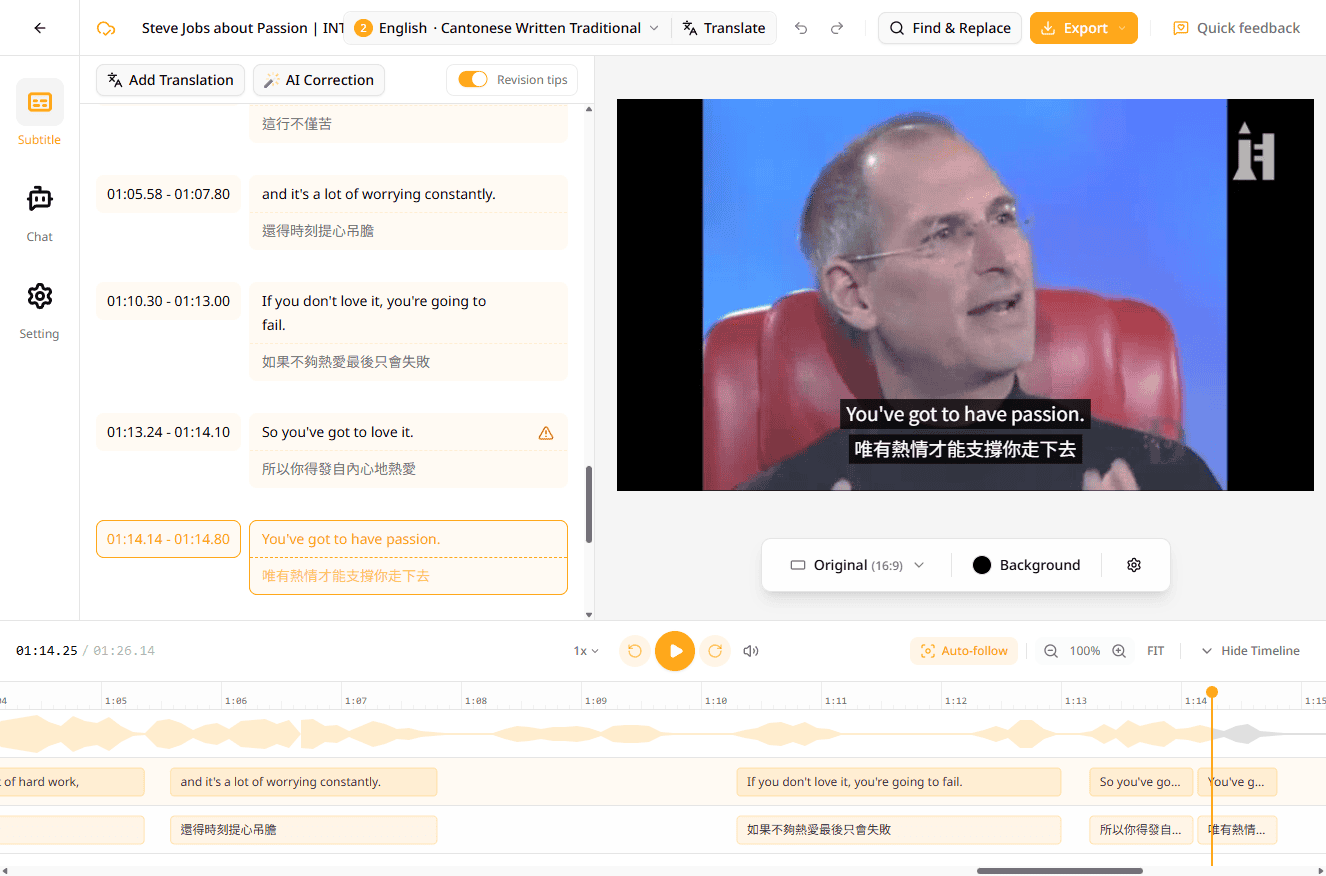
Descript's free tier mentions "multi-language transcription (25 languages)" but its features page doesn't break out per-language STT routing. Cantonese specifically isn't called out in Descript's public materials.
Subanana doesn't publish per-language accuracy numbers; instead it benchmarks STT models and routes to the best one for your source language, with Mandarin generally stronger than Cantonese (Mandarin has more training data + less accent variance). It also includes colloquial-to-formal Chinese conversion — turning spoken Cantonese into written Chinese during transcription, useful for Hong Kong workplaces with bilingual code-switching as the default register.
If Cantonese, Mandarin, or Asian-language mixed content is part of your workflow, this is the most consequential difference.
2. Live multilingual translation with audience-facing display
Subanana runs real-time captioning + translation for live events with an audience-facing shareable link — attendees scan a QR code and each picks one display language for the live captions on their phone — the original, or any of the up to 5 translation targets the host pre-configured for the event. Descript is a creator studio, not an event captioning platform, and doesn't compete in this space.
3. User-selectable summary LLM
Subanana's meeting summary lets the user pick which LLM generates the summary, organised into three tiers (Standard / Advanced / Premium). Subanana continuously evaluates frontier models and updates the menu as new models ship. Descript's transcription-summary AI features are bundled and not user-selectable — you don't pick which model wrote the summary.
This is the only Subanana feature where the user picks the LLM; translation and subtitle correction are routed internally.
4. URL import from public YouTube / Instagram / Facebook
Subanana accepts a public YouTube, Instagram, or Facebook URL directly — paste the link, the system fetches and transcribes (Shorts and Reels included). Descript's media intake is file upload + recording within Descript — pasting a YouTube URL to transcribe isn't part of its workflow.
5. Bilingual SRT + burned-in bilingual subtitle video
Subanana exports a single SRT file containing both the source transcription and the translated text (one above the other per cue), and one-click renders video files with subtitles burned in (single-language or bilingual). Descript's caption export is single-language SRT. For bilingual creator workflows (especially HK / TW content with English subtitles), Subanana's output covers this directly.
6. User glossary for pinning brand, product, and jargon terms
Subanana lets you supply a glossary that pins brand names, product names, people, and domain jargon so they transcribe consistently. Lists work at both the workspace and per-project level, you can bulk-import terms (XLSX or CSV), and a list can be applied universally or scoped to a specific language. Descript does ship a transcription glossary too — but it's capped at 30 terms per Drive, English-only (it doesn't affect translated transcripts), and shared Drive-wide rather than offering per-project lists. If you transcribe non-English content, manage long term lists, or want per-project glossaries, Subanana's is the more flexible implementation.
7. Workspace-based pricing for teams
Per-workspace pricing means a 5-person team pays the same as a 1-person team at a given tier. Descript's per-seat model adds cost per teammate. Past 2-3 users, the math diverges.
Side-by-side feature table
| Feature | Descript Creator | Subanana Pro |
|---|---|---|
| Free tier | ✅ 60 min/mo + 100 AI credits | ✅ 30 GB / 8 hr per file; first 15 min of each file transcribed |
| Per-language accuracy disclosed | No independently-audited numbers | No published per-language numbers; benchmarks + routes to best STT per source language |
| Colloquial-to-formal Chinese | Not advertised | ✅ |
| User glossary / term pinning | ✅ 30 terms/Drive, English-only, Drive-wide | ✅ Workspace + per-project, multi-language, bulk import |
| User-selectable summary LLM | Not advertised | ✅ (3-tier menu) |
| Video editing | ✅ (headline feature) | ❌ |
| Voice cloning + AI speech | ✅ | ❌ |
| AI avatars | ✅ | ❌ |
| Studio Sound / audio enhancement | ✅ | ❌ |
| Live audience-facing translation | ❌ | ✅ |
| URL import (YouTube / IG / FB) | Not advertised | ✅ |
| Bilingual SRT + burned-in bilingual video | Not advertised | ✅ |
| Speaker identification | ✅ | ✅ |
| Auto-join meeting bot | Not advertised | ✅ Meet / Teams (no Zoom) |
| Translate / dub to 30+ languages | ✅ Business+ | Translation only (no dubbing) |
| Recording / file limit | 30+ hr/mo (Creator) | 8 hr / 30 GB per file |
| Storage model | Workspace cap by tier (100 GB / 1 TB / 2 TB) | No workspace cap; per-file limit only (30 GB on every plan, including free; free transcribes the first 15 min of each file) |
| Subtitle export formats | SRT (single-language) | SRT, VTT, TXT, DOCX, XLSX, Markdown |
| Pricing model | Per seat | Per workspace |
So which should you pick?
Pick Descript if:
- Video editing is part of your daily workflow and you want it integrated with transcription
- You need voice cloning, AI speech, or AI avatars as a real production feature
- You want Studio Sound + filler-word removal + AI audio cleanup as part of one workflow
- You need 30+ language video dubbing
- Your content is English-only or covered by Descript's 25-language list with acceptable quality
Pick Subanana if:
- Any meaningful portion of your meetings or videos involves Cantonese, Mandarin, or mixed Asian languages
- You run live multilingual events and need audience-facing captions
- You import content from public YouTube / Instagram / Facebook URLs
- You produce bilingual subtitle output (SRT or burned-in video)
- You want to choose the LLM that writes your meeting summaries
- You're a team of 3+ and want workspace-based pricing
- You only need transcription + live captioning, not a full creator suite
The honest framing: these tools serve different jobs. Descript replaces "video editor + transcription tool + AI voice generator" with one product. Subanana focuses on transcription accuracy + live multilingual captioning. If your core need maps to either, that's the pick.
FAQ
Have you actually run a head-to-head test?
Not in a publishable benchmark. Both tools have free tiers; the right way to compare on YOUR audio is to run the same content through each. Documentation-based comparison is the honest framing without invented numbers.
Is Subanana cheaper than Descript?
Depends on usage. For pure transcription on a small team, Subanana's per-workspace model is generally cheaper. For a single creator who needs video editing + AI speech, Descript's bundled feature set is the right purchase even at higher cost.
Does Descript support Cantonese?
Descript advertises 25-language transcription but doesn't break out per-language STT routing in its public docs, and Cantonese isn't called out in its features page. Test on the free tier before committing if Cantonese matters.
Can Subanana replace Descript for video editing?
No. Subanana does not include video editing. It exports transcription + subtitle files (including burned-in subtitle video output as a one-click render), but you'd use a separate video editor (Premiere Pro, Final Cut Pro, DaVinci Resolve, or even Descript) for cuts, transitions, and audio cleanup.
Can Subanana clone my voice?
No. Subanana does not offer voice cloning, AI speech, or AI avatars. If voice cloning is core to your workflow, Descript is the right tool.
How does Subanana compare to other meeting-transcription tools?
For Otter and Fireflies (the two most direct meeting-transcription competitors), see Subanana vs Otter and Subanana vs Fireflies. Otter and Fireflies are closer to Subanana's category; Descript is a different shape (creator studio).
Closing
Descript is a strong all-in-one creator studio — for video editors, podcasters, and YouTubers who want one tool covering edit + AI voice + transcription, it's a real choice. Subanana is purpose-built for transcription + live captioning with Cantonese / Mandarin / mixed-language strength. Match the strengths to the work you actually do.
Try Subanana free → — no payment method required; free transcribes the first 15 minutes of each file, and the 30 GB / 8 hour per-file limit is the same on every plan.