
Closed captions are a separate track the viewer can turn on or off; open captions are burned permanently into the video and can't be switched off; SDH (subtitles for the deaf and hard of hearing) is a captions-style track that travels in the subtitle slot of a file and behaves like closed captions on platforms that don't carry the older broadcast caption data. All three put the audio into on-screen text — they differ in how that text is delivered and how much control the viewer has. This guide explains what closed captioning is, how open and closed captions differ, where SDH fits, what the law actually requires, and how to produce whichever one you need.
Disclosure: I run Subanana, an AI subtitle and caption tool, so I have skin in the "how do you make these" part at the end. The definitions in this post aren't mine — they come from the W3C Web Accessibility Initiative, the FCC's closed-captioning rule at 47 CFR § 79.1, and the U.S. Department of Justice's 2024 ADA web rule, all fetched in June 2026. Nothing below is invented.
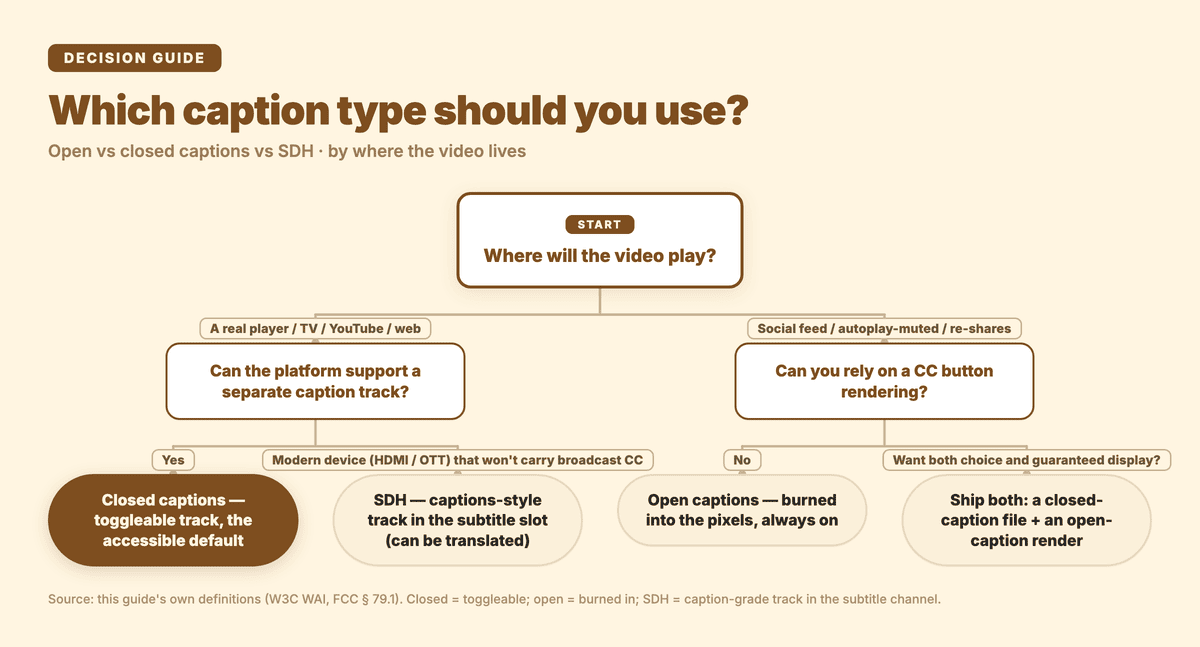
Which caption type to use, by where the video plays — closed for real players, SDH for modern HDMI/OTT devices, open for autoplay-muted social feeds.
What is closed captioning?
Closed captioning is the on-screen text version of a video's audio that the viewer can switch on or off. The "closed" part is the whole idea: the captions are carried as separate data, hidden by default, and shown only when someone turns them on — which is why you toggle them with the CC button.
The FCC, which regulates captioning on U.S. television, defines closed captioning in 47 CFR § 79.1 as "the visual display of the audio portion of video programming." That phrase — the audio portion, not the dialogue — matters. Good closed captions transcribe speech and the non-speech audio you'd miss with the sound off: who is speaking when it isn't obvious, relevant sound effects ([door slams]), and music cues. The W3C Web Accessibility Initiative makes the same point, defining captions as "a text version of the speech and non-speech audio information needed to understand the content," displayed in the player and synchronized with the audio.
Closed captioning exists primarily for people who are deaf or hard of hearing. But the W3C notes captions are "also used by people who process written information better than audio" — and in practice, anyone watching on mute in a quiet office, a noisy gym, or a late-night sofa benefits too. That second audience is large and growing, which is part of why captions have become table stakes for social video, not just a compliance checkbox.
Open captions vs closed captions: what's the difference?
The single dividing line is control: can the viewer turn the text off?
-
Closed captions can be hidden or shown by the person watching. The W3C describes them as captions that "can be hidden or shown by people watching the video." They live as a separate track — a sidecar
.srt/.vttfile, a broadcast caption stream, or a platform's caption layer — so the same video can play with captions on for one viewer and off for another. The trade-off: the platform or player has to support that caption track, or it won't show at all. -
Open captions are burned directly into the video frames. The W3C calls them captions that "are always displayed and cannot be turned off." Because the text is now part of the picture itself — literally baked into the pixels — it shows up everywhere the video plays, on any player, with zero dependence on caption support. The trade-off runs the other way: a viewer who doesn't want them can't remove them, you can't offer a second language as a toggle, and the text is fixed at whatever size and position you rendered.
Which one wins depends entirely on where the video lives:
| Closed captions | Open captions | |
|---|---|---|
| Viewer can turn off? | Yes (toggle) | No (always on) |
| How it's delivered | Separate track (sidecar file / caption stream / platform layer) | Burned into the video pixels |
| Needs player/platform caption support? | Yes | No — shows anywhere |
| Multiple languages | Yes — viewer picks a track | One language, fixed |
| Editable after the fact | Yes (edit the track) | No (must re-render the video) |
| Best for | TV, YouTube, web players, accessibility compliance | Social feeds, autoplay-muted clips, re-shares, screens without a CC button |
In short: closed captions are the flexible, accessible default for anything that plays in a real player — they're what the law generally has in mind, and they let viewers choose. Open captions are the "it will display no matter what" option for social clips, autoplay-on-mute feeds, and any surface where you can't trust a caption track to render. Plenty of creators ship both: a closed-caption file for YouTube and accessibility, and an open-caption render for Instagram and TikTok where burned-in text reads reliably.
If you're still untangling the broader caption-versus-subtitle vocabulary, our explainer on subtitles vs captions covers that distinction; this post stays on the open/closed/SDH axis.
Where does SDH fit in?
SDH stands for subtitles for the deaf and hard of hearing, and it's the one that confuses people, because it sits between the two categories above.
Per 3Play Media's breakdown, SDH was created to do the job of closed captions — include the non-dialogue information a deaf or hard-of-hearing viewer needs, like sound effects, music cues, and speaker labels — but travel in the subtitle slot of a file rather than as a traditional broadcast caption stream. That distinction exists for a practical reason: connections and platforms like HDMI and many streaming/OTT services don't carry the old broadcast closed-caption data, so a captions-style track had to ride in the subtitle channel instead.
Two more differences worth knowing:
- Presentation. Traditional broadcast closed captions are usually rendered as plain white text on a black band. SDH is typically shown in the same proportional font as a film's translated subtitles, and can be positioned on screen — so it looks more like subtitles even though it carries caption-style information.
- Language. Classic closed captions are single-language (the broadcast language). SDH can be produced in multiple or translated languages — which means it pulls double duty: the accessibility role of captions and the translation role of subtitles, in one track.
A clean way to hold all three in your head: captions describe all the audio (speech plus sound), and the deliver-method splits them into closed (toggleable track) and open (burned in). SDH is a captions-grade track engineered to live in the subtitle channel so it works on modern devices — and, handily, it can be translated.
Open vs closed captions vs SDH, side by side
| Closed captions (CC) | Open captions (OC) | SDH | |
|---|---|---|---|
| Includes non-speech audio (sound effects, speaker IDs)? | Yes | Yes | Yes |
| Viewer can turn off? | Yes | No | Usually yes (it's a selectable track) |
| Delivery | Broadcast caption stream / sidecar file / platform layer | Burned into the video pixels | Travels in the subtitle slot of the file |
| Typical look | White text on a black band | Whatever you rendered | Proportional subtitle-style font, positionable |
| Languages | Single (broadcast language) | Single, fixed | Can be multiple / translated |
| Designed for | Players/TV that support a caption track | Surfaces with no caption support | Modern devices (HDMI, OTT) where broadcast CC isn't carried |
Do captions matter for accessibility law?
Yes — captions are one of the most clearly mandated pieces of media accessibility, across both broadcast and the web. A quick, plain-English map (this is the legal landscape, not legal advice for your specific situation):
- FCC (U.S. television and TV-derived online video). Under 47 CFR § 79.1, closed captioning is required for "video programming" — programming comparable to what a TV broadcast station distributes for residential use. The CVAA later extended captioning obligations to internet-delivered video that previously aired on TV.
- The four FCC quality standards. The FCC doesn't just require captions to exist — § 79.1 sets four quality standards: accuracy (match the spoken words, in order, with correct spelling and punctuation), synchronicity (captions appear and clear roughly when the speech does, at a readable speed), completeness (captions run from the start of the program to the end), and placement (captions don't block faces, on-screen text, or other essential visuals). It's a useful bar even if your video isn't FCC-regulated.
- WCAG (the web's accessibility standard). The Web Content Accessibility Guidelines require captions for prerecorded video with audio at Level A (success criterion 1.2.2) and for live audio content at Level AA (success criterion 1.2.4).
- ADA (U.S. websites and apps). The Department of Justice's 2024 ADA Title II rule adopts WCAG 2.1 Level AA as the technical standard for state and local government web content and apps — which folds in those caption requirements. Compliance deadlines (extended in 2026) fall on April 26, 2027 for entities serving populations of 50,000 or more, and April 26, 2028 for smaller entities and special districts. ADA Title III, which covers private businesses, has no explicit federal web deadline, but courts have increasingly treated websites as covered and point to WCAG 2.1 AA as the benchmark.
The practical upshot: if your video has to satisfy accessibility requirements, you almost always need captions (the speech-plus-sound kind), and closed captions or SDH — the toggleable, selectable forms — are the usual way to meet that, because they preserve viewer choice and can be verified against a quality bar.
How do you create open or closed captions?
You have three honest routes: type the text and timecodes by hand (only sane for a few lines), use a video editor's caption tool, or generate them automatically from the audio with a speech-to-text tool. For anything past a short clip, automatic generation is the practical path — and it lets you produce both the closed-caption file and the open-caption render from one transcription.
That last part is where it's worth being concrete, because "open vs closed" maps directly onto two different outputs:
Subanana transcribes your audio or video and gives you each form:
- Add your media. Upload a video or audio file, paste a public YouTube, Instagram, or Facebook link, or record straight in the browser — no local download needed for the link route.
- Let it transcribe and time-align. Subanana runs the audio through speech-to-text and aligns the result into caption cues. Rather than locking to one engine, it benchmarks speech-to-text models and routes each job to the strongest performer for the source language, which helps on the hard cases like accented speech and Cantonese. An editor pass flags likely misheard words for you to approve, and marks any cue that's too dense to read comfortably.
- Get the closed-caption track. Export a standalone SRT or VTT file — that's your closed-caption (toggleable) track, the one you upload to YouTube, attach to web video, or hand to a platform. You can also export TXT, Word, Excel, or Markdown, or grab a ZIP with all of them. (For the file-format details, the closed caption generator page and our SRT vs VTT explainer go deeper.)
- Or get the open-caption video. If you need text that displays everywhere with no CC button — for autoplay-muted social feeds — Subanana can render the video with the captions burned in, single-language or bilingual, without a separate editor.
Need a translated track too? You can translate into 95+ languages, and because subtitle mode supports multiple translation targets, you can output several language tracks (or a bilingual source-plus-translation file) from one job — the closest Subanana equivalent to the "SDH can be translated" idea.
One honest note on the free tier so there are no surprises: the free plan is a preview — it lets you see the result as a short watermarked clip, but exporting the actual caption file (and copying the transcript) is a paid feature. You can still run the whole workflow before deciding.
Frequently asked questions
What is the difference between open and closed captions?
Control. Closed captions are a separate track the viewer can turn on or off (the CC button), so the same video plays with or without them depending on who's watching. Open captions are burned permanently into the video's pixels and are always displayed — they show up on any player with no caption support needed, but no one can switch them off. Use closed captions for players, TV, and accessibility; use open captions for autoplay-muted social feeds and surfaces where you can't rely on a caption track rendering.
Are subtitles the same as closed captions?
No. Per the W3C, captions are for the same language as the audio and include non-speech information (sound effects, speaker IDs) because they assume the viewer can't hear; subtitles are for audio translated into another language and assume the viewer can hear but doesn't understand the words. So captions are an accessibility feature; plain foreign-language subtitles are not. We cover this fully in subtitles vs captions.
What does SDH mean, and how is it different from CC?
SDH means "subtitles for the deaf and hard of hearing." Like closed captions, it includes non-dialogue audio — sound effects, music cues, speaker labels — but it travels in a file's subtitle channel rather than as a traditional broadcast caption stream, so it works on connections and platforms (HDMI, many streaming services) that don't carry the older closed-caption data. SDH is usually shown in a proportional subtitle-style font rather than white-on-black, and unlike classic single-language CC, it can be produced in multiple or translated languages.
Does the law require captions on my videos?
It depends on the video. TV and TV-derived online programming fall under the FCC's closed-captioning rule (47 CFR § 79.1). On the web, WCAG requires captions for prerecorded video at Level A and live video at Level AA, and the DOJ's 2024 ADA rule adopts WCAG 2.1 Level AA for state and local government sites and apps (deadlines in 2027–2028). Private businesses under ADA Title III have no explicit federal web deadline, but courts increasingly treat websites as covered and reference WCAG 2.1 AA. This is the general landscape, not legal advice — check your own obligations.
Should I use open or closed captions for social media?
Open captions, usually. Social feeds autoplay on mute and don't always surface a reliable CC toggle, so burned-in (open) captions guarantee the text shows. It's common to ship both: a closed-caption file for YouTube and accessibility, plus an open-caption render for Instagram, TikTok, and re-shares. A speech-to-text tool like Subanana can produce the SRT/VTT track and the burned-in video from a single transcription.
What are the FCC's caption quality standards?
The FCC's § 79.1 sets four: accuracy (captions match the spoken words, in order, with correct spelling and punctuation), synchronicity (they appear and clear about when the speech does, at a readable pace), completeness (they run from the start of the program to the end), and placement (they don't block faces, on-screen text, or other essential visuals). Even for non-broadcast video, those four make a solid quality checklist.
Wrapping up
The vocabulary trips people up, but the structure is simple. Captions put all of a video's audio — speech and sound — into text. Closed captions ride in a separate track the viewer can toggle; open captions are burned into the picture and always show; SDH is a captions-grade track built to live in the subtitle channel so it works on modern devices, and it can be translated. Accessibility law — the FCC for broadcast, WCAG and the ADA for the web — generally wants the speech-plus-sound kind, delivered in a form viewers can choose. Once you know which output you need, making it is the easy part: Subanana will transcribe your media and hand you either a closed-caption SRT/VTT file or a video with open captions burned in.