
The short version: subtitles assume your viewer can hear the audio but may not understand the language, so they carry the dialogue (often translated). Captions — also called closed captions when the viewer can toggle them on or off — assume your viewer can't hear the audio, so they carry the dialogue plus who's speaking and important sounds like music or a door slamming. SDH (subtitles for the deaf and hard of hearing) is a hybrid: caption-style information delivered as a subtitle-style text track, which is what streaming platforms, DVDs, and Blu-ray use. Use subtitles for translation, captions for accessibility and sound-off viewing, and SDH when you're delivering to a platform that wants a subtitle file but you still need the non-speech detail.
People use "subtitles" and "captions" interchangeably in everyday speech, and most of the time it doesn't matter. It starts to matter when you're meeting an accessibility requirement, publishing to a platform with specific rules, or translating content for an audience that can hear perfectly well but doesn't speak the language. This guide draws the line clearly, then shows how to generate whichever track you actually need.
Disclosure: I run Subanana, an AI speech-to-text tool, so I'll explain how to produce these tracks at the end. The definitions below come from the W3C Web Accessibility Initiative and standard industry usage, fetched June 2026.
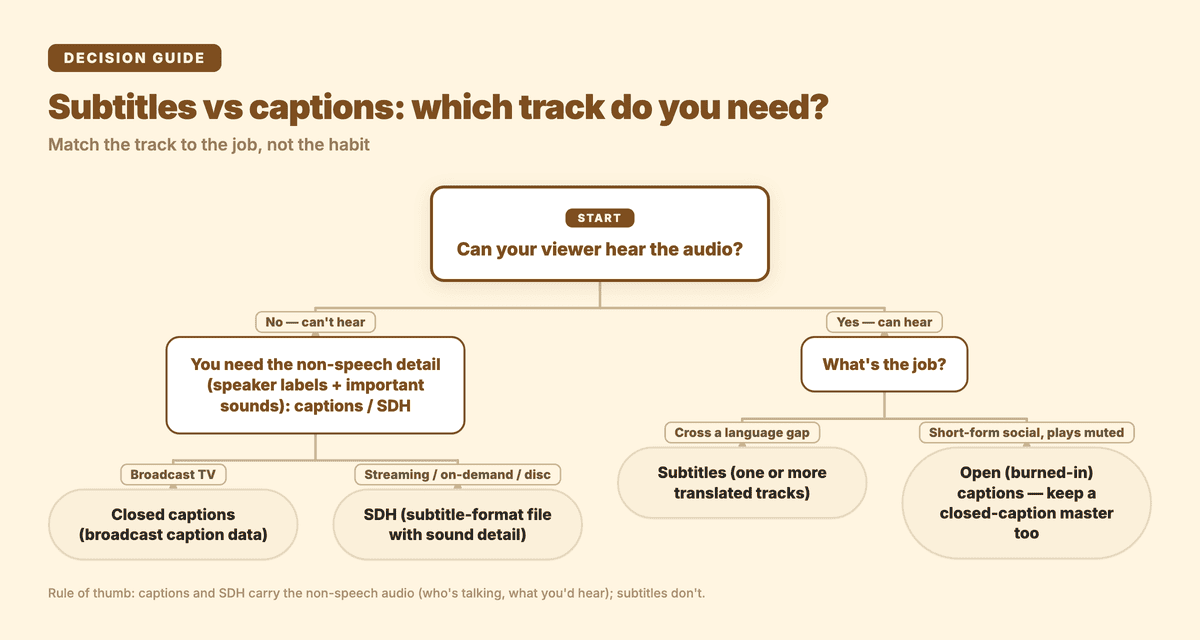
Quick decision guide: start by asking whether your viewer can hear the audio.
Subtitles vs captions: what's the difference?
The cleanest way to think about it is to ask one question: can the viewer hear the audio?
Subtitles are for people who can hear but don't understand the spoken language. They transcribe (or translate) the dialogue and assume you can already hear the music, the tone, and the sound effects. The W3C describes these as interlingual subtitles — text "for spoken audio translated into another language." If you put English text under a Korean drama so an English speaker can follow it, that's a subtitle.
Captions are for people who can't hear the audio at all. Per the W3C, "Captions are a text version of the speech and non-speech audio information needed to understand the content" — and critically, that "includes the words that are spoken, who is speaking when it is not evident, and important sounds like music, laughter, and noises." A subtitle that just says "I'll be back" is incomplete as a caption; the caption version might read [ominous music] ARNOLD: I'll be back.
There's a terminology wrinkle worth knowing. In American usage, "captions" almost always means same-language text with the non-speech detail, and "subtitles" means translation. In British and much of European usage, "subtitles" is the umbrella word for both, and the accessibility kind gets called "subtitles for the deaf and hard of hearing." The W3C splits the difference precisely: it calls same-language captions intralingual subtitles and translation interlingual subtitles. Same underlying idea, different labels by region.
SDH vs SRT vs closed captions: what's the difference?
SDH stands for "subtitles for the deaf and hard of hearing." It carries the same non-speech information as closed captions — speaker labels, sound effects, music cues — but it's delivered as a subtitle-style text track rather than as broadcast caption data.
Why does that distinction exist at all? Traditional closed captions on TV are encoded using a broadcast standard (the old line-21 / CEA-608 system in North America) that the playback device decodes. DVDs, Blu-ray discs, and most streaming platforms don't carry that broadcast signal — they render text tracks the same way they render foreign-language subtitles. SDH was created to bring caption-level detail to those subtitle-rendered platforms. So when you turn on "English SDH" on a streaming service, you're getting caption content (the sound effects and speaker IDs) packaged in the subtitle delivery format that the platform actually supports.
Practically, this means SDH is the format you'll most often deliver for on-demand and streaming video, while "closed captions" in the strict sense is a broadcast-TV concept. If a platform asks for an SRT or VTT file with sound descriptions, they're asking for SDH whether they use the term or not. In short: SRT and VTT are file formats — the container for the text and timing. SDH is a type of caption content that gets delivered inside one of those files.
Subtitles vs captions vs SDH: a side-by-side
| Subtitles | Closed captions | SDH | |
|---|---|---|---|
| Assumes viewer can hear? | Yes | No | No |
| Includes dialogue | Yes (often translated) | Yes (usually same language) | Yes |
| Includes speaker labels + sound effects | No | Yes | Yes |
| Primary purpose | Translation / language access | Accessibility, sound-off viewing | Accessibility on streaming/disc |
| Delivery | Subtitle text track | Broadcast caption data (line-21/CEA-608) | Subtitle text track (e.g. SRT/VTT) |
| Can be translated to other languages | Yes (that's the point) | Rarely | Yes |
| Typical file | SRT, VTT | Broadcast or sidecar | SRT, VTT |
The single biggest takeaway from this table: if you only remember one rule, remember that captions and SDH carry the non-speech audio (who's talking, what you'd hear) and subtitles don't. Everything else follows from that.
Open vs closed captions: what's the difference?
This is a separate axis from the subtitles-vs-captions question, and it trips people up. "Open" and "closed" describe whether the viewer can turn the text off, not what the text contains.
- Closed captions can be switched on or off by the viewer. The W3C puts it simply: closed captions "can be hidden or shown by people watching the video." The "CC" button on YouTube or your TV toggles closed captions.
- Open captions are burned permanently into the video frame and cannot be turned off. They're also called burned-in, baked-on, or hard-coded captions. Everyone watching sees them, always.
When do you want open (burned-in) captions instead of closed? Social platforms are the classic case: a huge share of feed video is watched on mute, autoplaying as someone scrolls, and many in-feed players don't expose a reliable CC toggle. Burning the text in guarantees it shows up. The trade-off is that burned-in text is permanent — you can't switch languages, you can't turn it off for viewers who don't want it, and you can't edit a typo after export without re-rendering the video.
A good default: keep a closed caption file (SRT/VTT) as your master so the platform or viewer controls it, and produce a burned-in (open) version only for the surfaces that need it, like short-form social clips. Captions also help people who can hear — the W3C notes content "can be used in loud environments where you cannot hear the audio" and "in silent environments where you cannot turn on sound," which is exactly the muted-autoplay feed scenario.
Which one should you use?
Match the track to the job, not the habit:
- Translating dialogue for hearing viewers → subtitles. You're giving language access, not sound access. One source language in, one or more translated tracks out.
- Meeting an accessibility standard, or publishing to a broad audience → captions / SDH. You need the speaker labels and the important sounds, not just the words. For streaming and on-demand delivery, that's SDH (a subtitle-format file with the non-speech detail).
- Short-form social video (Reels, Shorts, TikTok, feed clips) → open (burned-in) captions, because so much of it plays muted and the CC toggle isn't dependable. Keep an editable closed-caption file as your master too.
- Long-form video on a platform with a real CC button (YouTube, a course player, a webinar VOD) → a closed-caption file so viewers can toggle it and you can offer multiple languages.
- Reaching viewers in multiple languages who can hear → subtitle tracks, one per language, layered on top of your original audio.
Note that automatic captions from the host platform are a starting point, not a finished product. YouTube, for example, says its auto-captions are "generated by machine learning algorithms, so the quality of the captions may vary" and "might misrepresent the spoken content due to mispronunciations, accents, dialects, or background noise" — and its live-stream auto-captions are English only. Live meeting captions have similar limits: Google Meet shows real-time captions during a call, but its translated captions are gated to paid Workspace editions. Whatever you start with, review it before you ship it.
How does Subanana generate subtitles and captions?
Subanana is an AI speech-to-text tool, and its subtitle generation mode produces the editable text track you then deliver as subtitles, closed captions, or burned-in open captions. Here's the workflow:
- Bring in your audio or video. Upload a file, or paste a public YouTube, Instagram, or Facebook link and let Subanana fetch and transcribe it — no local download step.
- Set your source language, and add translation targets if you need them. This is where multi-language output comes in: subtitle generation supports multiple translation targets in one job, so you can output, say, an English track and a Spanish track from the same job. (Transcript mode takes a single translation target; live captioning allows up to five per session.)
- Let the quality layers run. Subanana benchmarks speech-to-text models per language and routes each job to the best performer, with automatic fallback to another model if it detects a likely transcription error — you're not locked to one vendor. An editor pass then flags likely misheard or same-sounding words for you to confirm, and a readability check highlights cues that flash by too fast or sit too long to read comfortably.
- Edit, then export the right format. Export an SRT or VTT file for closed captions and SDH-style tracks (these are the subtitle-format files streaming platforms accept), a bilingual SRT with the original and translation stacked per cue, or a burned-in video with the captions rendered permanently into the frame for open-caption use. Subanana also exports TXT, DOCX, XLSX, and Markdown for transcript-style needs.
One honest scope note: Subanana generates the dialogue text track accurately and lets you add translations, but it doesn't auto-author the descriptive sound cues ([applause], [phone rings]) that full SDH requires — you'd add those in the editor. For pure dialogue subtitles and same-language captions, the output is ready to use; for complete SDH, treat it as the fast first draft you annotate.
When your subtitle track is the spoken record of a meeting or interview rather than something for video, that's a different job — Subanana's transcript mode adds punctuation, paragraphing, and speaker separation, which subtitle tracks deliberately leave out. And if you need text to appear live as someone speaks at an event, that's the real-time captioning feature, which streams captions (with up to five translations) to an audience via a shareable link.
FAQ
Are subtitles and captions the same thing? No. Subtitles carry the dialogue and assume you can hear the audio (they're often a translation). Captions carry the dialogue plus who's speaking and the important non-speech sounds, and assume you can't hear the audio. In everyday speech people use the words interchangeably, but for accessibility and platform delivery the difference is real.
What does SDH mean? SDH means "subtitles for the deaf and hard of hearing." It packages caption-level information — speaker labels and sound effects — into a subtitle-style text track, which is why streaming services, DVDs, and Blu-ray use it instead of broadcast-style closed captions.
What's the difference between open and closed captions? Closed captions can be turned on or off by the viewer (the "CC" button). Open captions are burned permanently into the video and can't be switched off. Open captions are common on muted-autoplay social video; closed captions are better when you want viewer control or multiple languages.
Is closed captioning the same as subtitles? No. Closed captions assume the viewer can't hear the audio, so on top of the dialogue they add who's speaking and important sounds — and the viewer can switch them on or off. Subtitles assume the viewer can already hear the audio; they carry only the dialogue, often translated. Same-sounding terms, different jobs: one is accessibility, the other is language access.
Do I need captions if my video already has subtitles? If your audience includes people who can't hear the audio, yes — plain subtitles omit the speaker labels and sound effects that make content understandable without sound. For accessibility, use captions or SDH, not translation subtitles alone.
Are auto-generated captions good enough to publish? They're a starting point, not a finished track. Platform auto-captions vary in quality with accents, background noise, and crosstalk, and they don't add speaker labels or sound descriptions. Always review and correct them before publishing.
What file format do I need for captions? For most online and streaming delivery, an SRT or VTT file works for both closed captions and SDH-style tracks. For burned-in (open) captions you export a finished video with the text rendered into the frame instead of a separate file.
What's the difference between SRT and SDH? They're not the same kind of thing, which is why the comparison is confusing. SRT (and VTT) are caption and subtitle file formats: the container that holds the text and its timing. SDH is a type of caption content, dialogue plus speaker labels and sound effects, that can be delivered inside an SRT or VTT file. So a file can be "an SRT" and also "SDH" at the same time: SRT describes the format, SDH describes what's in it.
Pick the track that matches who's watching and how: subtitles to cross a language gap, captions or SDH to cross a sound gap. Once you know which one you need, you can generate it from your audio in minutes.