
An action item is a specific next step that comes out of a meeting, assigned to one named owner with a deadline. Put plainly: it's the part of the conversation that turns "we should do something about this" into "Priya sends the signed contract by Friday."
That definition does a lot of work, so this post unpacks it: the three parts every action item needs, how an action item differs from a task, a decision, and a plain note, what separates a good one from a useless one, and how to capture them reliably — by hand or with an AI note-taker. Subanana is an AI speech-to-text app. This post covers the "capture it without re-listening to the whole call" problem. If you want the broader picture of how AI turns a recording into notes, summaries, and extractions, that's the companion piece: how AI meeting notes capture decisions and action items. This post is narrower — it's about the action item itself.
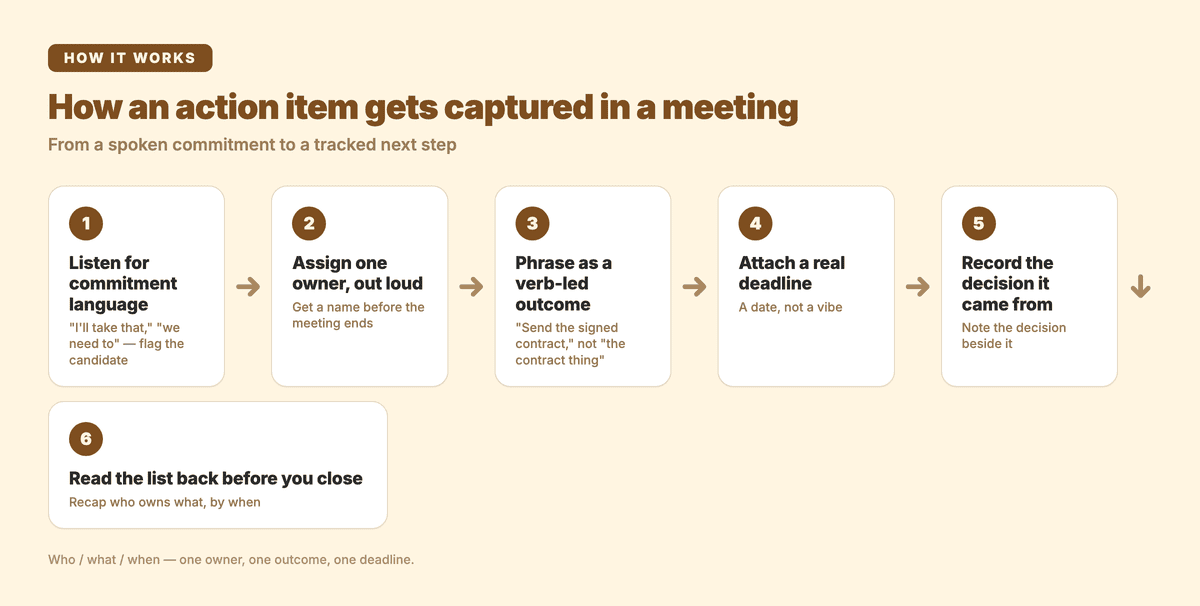
From a spoken commitment to a tracked next step — the six-step capture sequence this post walks through.
What is an action item, exactly?
An action item is a single, executable next step that someone agreed to do as a result of a meeting. The standard project-management definition is tight: Asana defines it as "a specific task that arises from a meeting, assigned to a clear owner with a defined deadline, to move a project toward its goal".
The word specific is the load-bearing one. "Improve onboarding" is a wish. "Draft the new welcome email and share it in #onboarding by Tuesday" is an action item — you can picture the person doing it, and you'll know at a glance whether it's done.
Every solid action item has three parts:
- An owner — one named person, not a team. "Marketing will handle it" is where action items go to die. "Sarah owns it" is where they get done.
- A clear outcome — what specifically needs to happen, phrased as a verb-led instruction ("send", "draft", "schedule", "decide"). If you can't tell when it's finished, it's too vague.
- A deadline — a realistic due date. "Soon" is not a deadline; "by end of day Thursday" is.
A useful mental shortcut is the "who / what / when": who owns it, what they're doing, and when it's due. Asana frames effective action items around exactly these, plus an optional why — the context that explains how the task connects to a larger goal. The why is what stops an owner from quietly deprioritising a task they don't understand.
How is an action item different from a task, a decision, and a note?
This is where most meeting records get muddy. Four different things come out of a conversation, and lumping them together is why follow-up falls apart. They're related but not interchangeable — Asana notes that "an action item is a specific type of task that originates from a meeting or discussion and is tied to a decision that was made". In other words, every action item is a task, but not every task is an action item, and a decision is a different beast entirely.
Here's the distinction laid out:
| What it is | Has an owner? | Has a deadline? | Example | |
|---|---|---|---|---|
| Action item | A next step the meeting committed someone to do | Yes — one named person | Yes | "Alex sends the revised quote to the client by Wednesday." |
| Task | Any unit of work, whether or not it came from this meeting | Sometimes | Sometimes | "Update the pricing spreadsheet." (no owner, no date — just work that exists) |
| Decision | A choice the group made; the outcome, not the work | No (it's already settled) | No | "We're going with vendor B." |
| Note | Context, discussion, or background worth remembering | No | No | "The client mentioned their budget resets in Q3." |
The practical reason to keep these separate: they get handled differently after the meeting. Decisions get recorded so the group doesn't re-litigate them next week. Notes give future-you the context behind a decision. Action items get assigned, tracked, and chased. If your meeting record is one undifferentiated blob, you can't tell what needs chasing — and the things that needed chasing are exactly the things that quietly don't happen.
A decision and its action item usually travel together. The decision is "we're going with vendor B"; the action item is "Alex signs the vendor B contract by Friday." Recording the decision without the action item is how a settled choice still produces zero movement a week later.
What makes a good action item (vs. a useless one)?
The difference between an action item that gets done and one that gets ignored is almost always specificity and ownership. Fellow's guide to meeting action items puts the ownership principle bluntly: "If nobody owns a task, nobody does it. The diffusion of responsibility is real: when everyone is responsible, no one is responsible."
Compare these:
| Weak action item | Why it fails | Strong action item |
|---|---|---|
| "Look into the pricing issue." | No owner, no outcome, no date — nobody knows if it's theirs or when it's due. | "Maya reviews the three pricing tiers and recommends one in the team doc by Thursday." |
| "The team should follow up with the client." | "The team" owns nothing. Verb is vague. | "James emails the client a project update by Tuesday 5pm." |
| "Improve the onboarding flow." | A goal, not a step. Could take a day or a quarter. | "Sara drafts the new first-run checklist and shares it for review by next Monday." |
A good action item is something you could hand to the owner with zero further explanation and they'd know exactly what "done" looks like. Fellow's framework adds two refinements worth borrowing: a bit of context ("why this matters") so the owner can prioritise it sensibly, and a follow-up protocol so everyone knows how completion gets verified — in their words, "a defined follow-up protocol so everyone knows how completion will be verified."
You don't need every action item to be a full SMART goal, but the overlap is real: specific, measurable, and attainable are the qualities that separate a step that happens from a wish that doesn't.
How to capture action items from a meeting
Capturing action items well is a habit, not a tool. Here's the sequence that works whether you're writing them down by hand or letting software do it:
- Listen for commitment language. Action items hide behind phrases like "I'll take that," "we need to," "can someone," and "let's make sure." When you hear one, flag it — that's a candidate, not yet a finished action item.
- Assign one owner, out loud, before the meeting ends. This is the step people skip and then regret. Don't let "someone will do it" stand. Say "Who owns this?" and get a name. Diffused ownership is the single biggest reason action items don't get done.
- Phrase it as a verb-led outcome. Rewrite "the contract thing" as "send the signed contract." If you can't start it with an action verb, you haven't pinned down what the step actually is.
- Attach a real deadline. Tie it to a date, not a vibe. "By Friday" beats "soon" every time, and it gives you something concrete to chase against.
- Record the decision it came from. An action item floating without its context ("why am I doing this again?") is easy to deprioritise. Note the decision beside it.
- Read the list back before you close. A 30-second recap of "here's who owns what, by when" catches the half-formed items while everyone's still in the room and can object or clarify.
The failure mode is always the same: the meeting feels productive, everyone nods, and a week later nothing has moved because no single person clearly owned anything with a clear deadline. Steps 2 and 4 are the antidote.
Can AI capture action items automatically?
Yes — and this is where capture stops being a chore. A meeting note-taker transcribes the conversation, then runs a language model over the transcript to pull out the structured pieces: a summary, the decisions, and the action items with their owners. Instead of one person half-listening while they type, the tool listens to everything and organises it afterward.
It's worth understanding what the AI is actually doing, because it sets expectations. The model is pattern-matching commitment language in the transcript — the same "I'll take that by Friday" cues you'd listen for manually — and attributing them to the speaker who said them. That means two things. First, the quality of the extraction rests on the quality of the transcript: if the speech-to-text garbles a name or mishears a date, the action item inherits the error. Second, the model still benefits from a human read-through — it's a strong first draft of the action-item list, not a system of record you should trust blind. For the deeper mechanics of how that pipeline works end to end, see how AI meeting notes capture decisions and action items, and for how much the transcript underneath it can be trusted, how we test transcription accuracy.
How Subanana extracts action items
In Subanana, action-item capture lives in the meeting summary mode. You bring the audio in one of two ways — upload a recording (or paste a link), or let the Google Meet / Microsoft Teams bot join a scheduled call via your calendar and record it for processing after the meeting ends. Subanana then transcribes the conversation, cleans it into a readable, speaker-labelled transcript, and runs a summary that extracts the key discussion points, the decisions, and the action items — keeping those separate the way this post argues they should be.
One thing is worth calling out for action-item quality specifically:
- You can teach it your vocabulary. A glossary of people's names, brand terms, and project jargon reduces the mistranscriptions that would otherwise corrupt an action item — getting "Maya" instead of "Maia," or your product name spelled right, means the owner and the outcome come out clean.
A boundary worth being clear about: Subanana extracts action items into your meeting notes — it doesn't push them out to a task manager like Asana or Linear, and there's no public API or Zapier connector for that today. The output is a structured, searchable, exportable record you act on; you assign and track the items in whatever tool your team already uses. If you want to interrogate the notes without leaving the editor, you can also chat with the transcript — ask "what did we decide about pricing?" or "who committed to the client follow-up?" and get an answer grounded in the meeting.
Frequently asked questions
What is an action item in a meeting?
An action item is a specific next step that comes out of a meeting, assigned to one named owner with a deadline. It converts a discussion or a decision into concrete, trackable work — "Priya sends the contract by Friday," not "we should sort out the contract."
What's the difference between an action item and a task?
Every action item is a task, but not every task is an action item. An action item specifically arises from a meeting or discussion, is tied to a decision, and carries a named owner and a deadline. A general task is any unit of work and may have no meeting origin, no owner, and no date attached.
What's the difference between an action item and a decision?
A decision is a choice the group made — the outcome ("we're going with vendor B"). An action item is the work that follows from it ("Alex signs the vendor B contract by Friday"). Decisions are settled and recorded so they aren't re-debated; action items are assigned and chased until done. They usually travel as a pair.
How do you write a good action item?
Give it three things: one named owner (a person, not a team), a clear verb-led outcome (so "done" is unambiguous), and a realistic deadline. Adding the context — why it matters — helps the owner prioritise it. If you can't tell who's doing it or when it's finished, it isn't ready.
Can AI tools capture action items automatically?
Yes. AI meeting tools transcribe the call and run a language model over the transcript to extract the action items, owners, and decisions. The extraction is only as good as the transcript underneath it and is best treated as a strong first draft you skim and confirm — not a record to trust without a glance.
Want your action items captured for you instead of typed during the call? Subanana transcribes the meeting and pulls out the decisions and action items automatically.