
AI meeting notes are the structured record an AI note-taker produces from a meeting: a clean, speaker-labelled transcript, a summary of what was discussed, the decisions that were made, and the action items with their owners. Instead of one person half-listening while they type, the tool captures the conversation and then organises it into something you can search, share, and act on.
I run Subanana, an AI speech-to-text app, so meeting notes are something I think about a lot. This post is the part most "best tool" roundups skip: not which tool ranks first, but how the notes actually get made — and the handful of differences that decide whether a note-taker fits the way you meet. If you just want a ranked list, our best AI meeting transcription tools roundup covers that. This is the how-it-works and how-to-choose companion.
What are AI meeting notes, exactly?
It helps to separate three things that often get lumped together, because tools differ on each:
- The transcript — a near-verbatim, time-stamped record of who said what. This is the raw material everything else is built from. For reading rather than captioning, a good transcript is punctuated and broken into paragraphs, with speakers labelled.
- The summary — a condensed version of the meeting. Good summaries are structured (topics, key points) rather than a single wall of text, and the structure usually comes from a template you pick.
- The extractions — the high-value items pulled out of the conversation: decisions ("we're going with vendor B"), action items ("Priya sends the contract by Friday"), and sometimes questions, risks, or chapter markers.
The transcript is a transcription problem. The summary and the extractions are a language-model problem. That split matters when you choose a tool, because some tools are strong at one and weak at the other.
How does AI actually capture decisions, action items, and summaries?
Under the hood, a meeting note-taker runs a pipeline. Knowing the stages tells you where quality is won or lost.
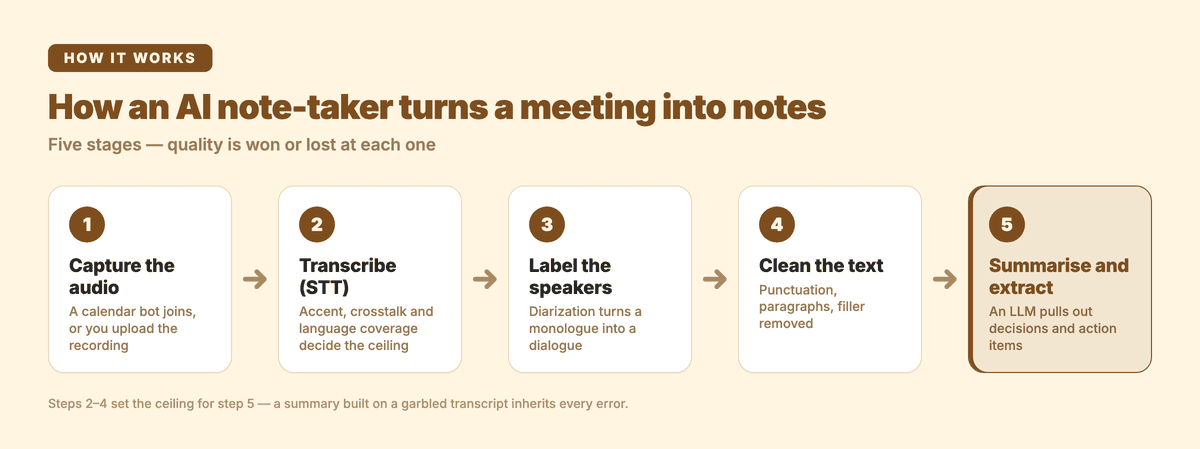
- Capture the audio. Either the tool's bot joins your video call (via a calendar connection) and records, or you upload a recording / paste a link after the fact. Bots are convenient but visible to other attendees; uploads are private but manual.
- Transcribe with speech-to-text (STT). An STT model converts speech to text. This is where accent, crosstalk, jargon, and language coverage make or break the result — a summary built on a garbled transcript inherits every error.
- Add speaker labels (diarization). The system segments the audio by speaker so the transcript reads as a dialogue, not a monologue. If you want the mechanics, see our explainer on speaker diarization.
- Clean up the text. For a readable transcript, punctuation and paragraph breaks are added, and filler is tidied.
- Summarise and extract with an LLM. A large language model reads the cleaned transcript and produces the summary plus the action items and decisions. The prompt — usually driven by a summary template — is what turns "summarise this" into "list the decisions, then the action items with owners."
The decisions and action items aren't magic: the LLM is pattern-matching commitments and outcomes in the text. That's why the transcript quality from steps 2–4 sets the ceiling. It's also why the model doing step 5 matters — different LLMs are better or worse at following "extract owners and deadlines" instructions, and at not inventing items that were never said. We dug into that specific problem in why the best LLM for meeting summaries depends on the meeting.
Why can't I just use my video call's built-in transcript?
You sometimes can — but built-in transcripts are narrower than they look. Google Meet, for example, offers meeting transcripts only on paid Google Workspace editions (Business Standard and up, several Enterprise and Education tiers, Workspace Individual, and Google One subscribers with 2 TB+), not on free personal accounts. Even where a transcript is available, the built-in versions tend to stop at "here's the text" — limited structured summaries, limited action-item extraction, limited language and translation control, and limited ability to feed the tool your own vocabulary. A dedicated note-taker exists to do the steps after the transcript well.
What makes one AI note-taker better than another?
Six dimensions decide fit. Rank them by how you meet, then pick.
- Transcript quality on your audio. Your accents, your jargon, your languages. No published number substitutes for running your own real recording through the free tier and reading the result.
- Language and translation coverage. If your meetings are English-only, almost everything works. If they're multilingual or you need the notes in another language, coverage varies enormously between tools.
- Summary control. Can you pick a template (sales call vs. standup vs. interview)? Can you choose the model that writes the summary, or are you stuck with the vendor's one?
- Capture method. Bot-in-call (calendar-triggered) vs. file upload vs. link import. Privacy-sensitive teams often prefer upload so no bot appears in the room.
- Custom vocabulary. A glossary of brand names, people, and jargon meaningfully reduces the embarrassing mistranscriptions — and how granular that glossary can be (account-wide vs. per-project, per-language) varies.
- What it costs to get a usable file out. Free tiers differ a lot: some give you working exports, some are preview-only.
How AI note-takers compare
This table cites each tool's published documentation, fetched while writing this post. It's a starting point for shortlisting — not a substitute for testing the tools on your own audio.
| Tool | Free tier | Summaries + action items | Language coverage (published) | Pick the summary model? |
|---|---|---|---|---|
| Otter | Yes — 300 min/mo | Yes ("automated summaries with action items") + AI chat | 6 languages (EN, ES, FR, DE, JA, ZH) | No |
| Fireflies | Yes — limited AI summaries | Yes ("action items & task manager") + CRM sync | "100+ languages" | No |
| Fathom | Yes — unlimited recordings + transcripts | Yes (AI summaries; action items on Premium) | Not published on pricing page | No |
| Notta | Yes | Yes (AI summaries) | Broad multilingual, incl. major Asian languages | No |
| Subanana | Preview only (no transcript export until paid) | Yes — decisions + action items, template-driven | 95+ languages | Yes — summary model is user-selectable |
Sources: Otter pricing, Fireflies pricing, Fathom pricing, Notta. Pricing and features drift — re-check before you commit.
A few reads of that table:
- Otter and Fathom both have genuinely strong free tiers. Fathom's "unlimited recordings and transcriptions" on the free plan is hard to beat if your meetings are English and you mostly want a personal record. Otter's AI chat and 300 free minutes make it an easy starting point.
- Fireflies leads on workflow plumbing — action-item task management and CRM sync are real strengths if your meetings feed a sales pipeline.
- Subanana's free tier is preview-only — you can see the result, but transcript and subtitle export is behind the paywall. If "I need a usable file for free" is your requirement, that's a real point against us and in favour of Fathom or Otter.
- Where Subanana is the right fit: multilingual meetings (we support 95+ languages, the same set for transcription and translation), and teams that want to choose the model that writes the summary instead of accepting one vendor's default.
How Subanana builds meeting notes
Here's the flow end to end, scoped to what the product actually does today.
- Get the audio in. Connect your calendar and let the Google Meet or Microsoft Teams bot join and record, or upload a recording, or paste a public link. The bot records the meeting and creates the project after the call ends — it's a note-taker, not a live-caption display. (There's no Zoom bot; for Zoom, capture the call with Subanana's Chrome extension, or record and upload the file.)
- Get a clean transcript. Subanana benchmarks speech-to-text models and routes each job to the best performer for that language, with automatic fallback if a model's output looks unreliable — and those internal re-runs don't cost you extra credits. Speakers are labelled, and transcript mode adds punctuation and paragraphs so it reads like a document.
- Feed it your vocabulary (optional). Pin brand names, people, and jargon in a glossary so they're spelled right, and attach a background pack (an agenda, a deck) so the summary has context. Glossaries can be workspace-wide or per-project, and tagged per language.
- Generate the summary, decisions, and action items. Pick a summary template (standup, sales call, interview, and more), pick the model tier that fits the meeting, and Subanana produces a structured summary with the decisions and action items pulled out. The summary is the one place you choose the LLM yourself.
- Ask follow-ups and export. Chat with the transcript — "what did we decide about pricing?", "who owns the follow-up?" — and export to TXT, DOCX, SRT, VTT, XLSX, or Markdown. Need the notes in another language? Translation runs on top, currently at no extra credit cost.
If most of your meetings are bilingual or mixed-language, that combination — model-routed transcription across 95+ languages plus a user-pickable summary model — is the case where we'll usually serve you better than an English-first tool. For a head-to-head, see Subanana vs. Otter.
Frequently asked questions
Are AI meeting notes accurate enough to rely on?
For the transcript, accuracy depends on your audio — clear speech in a supported language transcribes well; heavy crosstalk, strong accents, or unsupported languages degrade it. For summaries and action items, the bigger risk is the LLM omitting or inventing an item, which is why you should skim the summary against the transcript before sending it. Treat AI notes as a strong first draft you verify, not an unreviewed source of truth.
Do I need a bot to join my meeting, or can I upload a recording?
Both work. A calendar-connected bot (Subanana supports Google Meet and Microsoft Teams) joins and records automatically, which is convenient but visible to other attendees. Uploading a recording afterwards keeps things private and works for any platform, including Zoom. Choose based on whether convenience or discretion matters more for that meeting.
Can AI meeting notes handle meetings in more than one language?
It depends heavily on the tool. English-first tools support a handful of languages; others are broadly multilingual. Subanana supports 95+ languages with the same set available for transcription and translation, so a meeting can be transcribed in its spoken language and the notes delivered in another. Check each tool's published language list against your actual meeting languages.
Can I choose which AI model writes my summary?
With most note-takers, no — you get the vendor's single model. Subanana is the exception here: the meeting-summary feature offers a tiered menu of models so you can match the summariser to the meeting (a quick standup and a dense legal call don't need the same model). Model choice applies to the summary specifically.
How is this different from my video platform's built-in transcript?
Built-in transcripts (where available — Google Meet gates them to paid Workspace tiers) generally stop at the raw text. A dedicated note-taker adds structured summaries, decision and action-item extraction, custom vocabulary, broader language and translation control, and in some cases the ability to pick the summary model. If you only ever need raw text on a paid Workspace plan, the built-in option may be enough.
Ready to turn your next call into a structured set of notes? See how AI meeting transcription works, create a free account, or
.