
If you're searching for a Notta alternative, you're usually hitting one of three walls: the Free tier's 3-minute-per-conversation cap doesn't let you test on real meetings, the custom-vocabulary feature only supports English and Japanese, or you want to pick a different LLM per meeting instead of accepting a single vendor model.
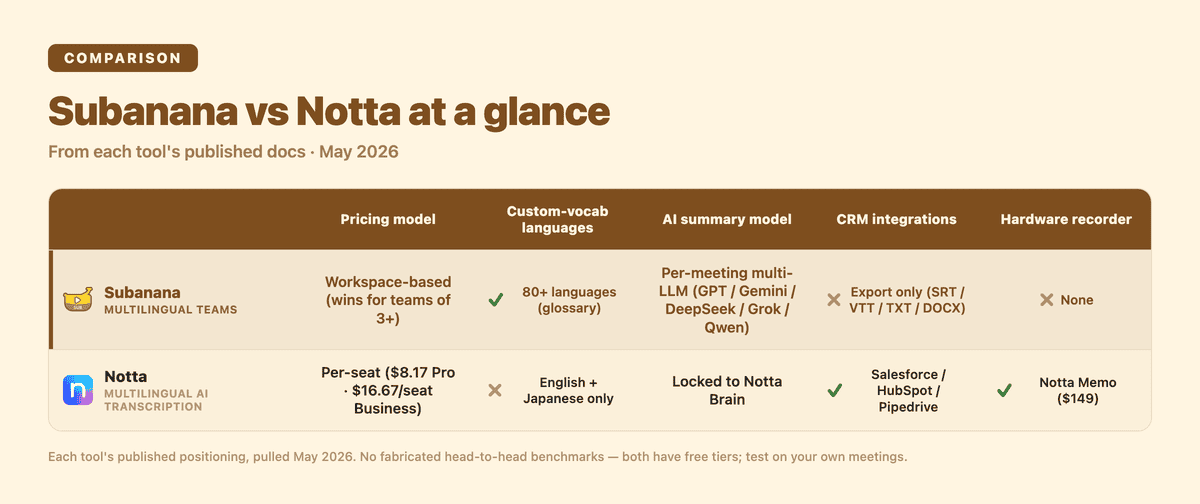
Disclosure: I run Subanana. This comparison cites only verified facts from each tool's published documentation (Notta's pricing, features, and tool pages, plus subanana.com pricing and features pages plus verified shipped-feature set), pulled May 2026. No fabricated head-to-head benchmarks; both have free tiers, so test on your own meetings if you want claim-level accuracy comparisons.
For context: Notta is headquartered in Tokyo, raised $6.3M in 2025 for US expansion, and launched the Notta Memo hardware recorder ($149) in five EU markets in February 2026. Subanana is a smaller Hong Kong-based team that combines meeting transcription, subtitling, and live captions in a single workspace.
TL;DR
- Pick Notta if you live in Japanese-language meetings, want a hardware companion (Notta Memo), or value out-of-the-box CRM integrations (Salesforce, HubSpot, Pipedrive) for sales workflows.
- Pick Subanana if you want per-meeting LLM selection (your choice of leading model providers), need custom vocabulary that works across 95+ languages (not just English + Japanese), or are a team of 3+ where workspace-based pricing economics flip the math.
- Honest middle ground: for a Japan-based solo professional doing Japanese meetings, Notta is the most mature pick in that market. For multilingual teams or buyers who care specifically about model choice for summaries, Subanana fits closer.
Pricing (May 2026)
Notta's pricing page lists these tiers (annual billing):
| Plan | Monthly price | Monthly transcription | Per-conversation cap | AI Summary | Notes |
|---|---|---|---|---|---|
| Free | $0 | 120 min | 3 min | 10/month | Personal trial |
| Pro | $8.17/mo | 1,800 min | 5 hours | 100/month | Solo professional |
| Business | $16.67/seat/mo | Unlimited | 5 hours | 200/month | Teams |
| Enterprise | Custom | Customized | 5 hours | Unlimited | 51-seat minimum |
The Free tier's 3-minute-per-conversation cap is the strongest free-tier ceiling among meeting AIs we've benchmarked against. It works for evaluating UI and short voice notes, but a real client call gets cut off mid-sentence. To test Notta on actual meetings you effectively need Pro. Real-time translation ($6/mo annual) and bilingual translation ($9/mo annual) are paid add-ons on top of Pro.
Subanana uses workspace-based pricing: a single workspace fee covers the team rather than per-seat billing. For a team of 5 on a comparable tier, that math typically lands materially below 5 × per-user pricing. See the live pricing page for current tiers.
Notta's per-seat model is cleaner for solo professionals; Subanana's workspace model tends to win for teams of 3+ that share recording and summary access.
Language support and the custom-vocabulary trap
Notta supports 58 transcription languages including Cantonese (dedicated landing page), Mandarin, Korean, and most European languages. The list is broad.
The notable constraint: Notta's custom vocabulary feature only supports English and Japanese (per the pricing page's feature table). If you want to boost recognition for proper nouns, technical terms, or product names in Mandarin, Cantonese, Korean, German, or any other supported language, Notta doesn't offer that today. This is the single biggest wedge for non-EN/non-JP teams.
Subanana covers 95+ languages, and the glossary feature works across all supported languages, not just two. For multilingual product teams (a feature name needs to be recognized correctly in EN, JP, ZH, and KR meetings), this difference matters operationally.
No independent benchmarks exist for either tool's per-language accuracy. Notta's vendor-claimed accuracy figure on the Cantonese landing page is self-reported and assumes high-quality audio. Treat it as marketing, not benchmark. The reliable way to compare is to run the same audio through both free tiers (mindful of Notta's 3-minute cap).
Integrations and meeting capture
Notta has two meeting-capture paths:
- Notta Bot joins Zoom / Google Meet / Microsoft Teams as a participant.
- Notta Desktop (Beta) records the desktop without a bot. Labeled "(Beta)" in main navigation, so evaluate it before making it central to commercial workflows.
CRM-side integrations include Salesforce, HubSpot, and Pipedrive (per Notta's pricing page), among other workplace tools per Notta's product pages.
Subanana's integration story is narrower today. Direct downloads of SRT / VTT / TXT / DOCX / XLSX / MD (the full six-format export set), with extensive support for editing software (Premiere Pro, Final Cut Pro, DaVinci Resolve via SRT import). Subanana does not currently offer a public Zapier app, native Salesforce integration, or HubSpot CRM hook. If your workflow is anchored to those tools, Notta has more out-of-the-box wiring.
This is a real Subanana weakness for stack-heavy buyers. The corresponding Subanana strength is that the transcript and summary stay in the workspace where you can edit them in detail (speaker labels, glossary corrections, sentence-level rewording) before exporting.
AI summary: Notta Brain vs multi-LLM
Notta's AI layer is called Notta Brain. In February 2026, Notta Brain expanded with cross-file analysis and image / PPT / Excel / Word generation. It runs on credit metering. Per the pricing page: 1,000 credits per PPT generation, 200 credits per image generation, 200 per Excel/Word, 100 per Q&A. All tiers get 1,000 base credits/month, with a $93.59/year heavy-use add-on for 8,000 extra credits/month.
Subanana's differentiator on the summary side: multi-LLM routing. The platform supports multiple frontier LLM providers, and the lineup expands as new models ship, and lets you pick which one summarizes each meeting. Summary quality is a taste problem more than a correctness problem: the best model for short standups is often not the best for client-call faithfulness, or for non-English summarization. Subanana exposes that choice; Notta locks you to Notta Brain.
For teams that have tested several AI tools and found that one model writes better client-call summaries while another nails action-item extraction, Subanana lets you pick per meeting.
Hardware: Notta Memo
Notta uniquely ships a hardware product. The Notta Memo voice recorder ($149) was reviewed by TechRadar at 4.5/5 with "almost 100%" transcription in cafe, lecture, and quiet meeting settings (caveats: transcription, translation, and summarization all require internet connectivity; proprietary charging cable). As of February 2026 the Memo is available in UK, France, Germany, Italy, and Spain in addition to the US. If "record meetings in the field without lugging a laptop" is real for your workflow, this is genuinely differentiated. Subanana has no hardware; you record via Zoom / Teams / local recording and upload.
Where Notta wins / where Subanana loses
A short list, framed honestly. Notta strengths: Japanese-market maturity (Tokyo HQ, custom vocab for Japanese, deepest JP brand recognition); hardware + SaaS strategy (Notta Memo $149, TechRadar 4.5/5, EU launch: a product axis Subanana doesn't have); out-of-the-box CRM integrations (Salesforce, HubSpot, Pipedrive teams get value within the first hour); funded and growing ($6.3M raised, EU expansion).
Subanana weaknesses: no native Salesforce, no public Zapier app, no HubSpot CRM webhook today (outbound is export-and-paste, not push-and-forget); no hardware product (you record meetings separately and upload); smaller brand recognition outside HK / Greater China.
How to decide
- Japan-based solo professional, Japanese meetings, considering a hardware companion. → Notta. Mature in JP market, Memo is useful for field recording.
- Sales team on Salesforce / HubSpot / Pipedrive, English meetings, 5-20 seats. → Notta for the CRM integration depth.
- Multilingual team (EN + JP + ZH or similar), per-meeting LLM selection mattering, custom vocab needed across 95+ languages. → Subanana. Workspace pricing + multi-LLM summary + cross-language glossary are direct fits.
Try them both
Both have free tiers, but Notta's Free tier has a 3-minute-per-conversation cap that limits real-meeting testing. The most practical way to decide is:
- Run a typical 1-on-1 client call through each (you'll need Notta Pro to bypass the 3-min cap)
- Run an internal team standup through each
- Run one meeting in a non-EN/non-JP language through each (custom vocab gap shows up here)
Subanana trial: https://subanana.com/en. Notta trial: https://www.notta.ai/. Run both, compare on what your team actually says, not on what a comparison post claims.
Related reading
- Subanana vs Tactiq (2026)
- Best AI meeting transcription tools 2026
- Subanana vs Otter (2026)
- Subanana vs Fireflies (2026)
Methodology: facts in this post are sourced from Notta's published pricing page (https://www.notta.ai/en/pricing), Cantonese tool page (https://www.notta.ai/en/tools/cantonese-speech-to-text), Slator's funding coverage (https://slator.com/transcription-startup-notta-raises-usd-6m-to-bring-standalone-recorder-to-us/), TechRadar's Notta Memo review (https://www.techradar.com/pro/notta-memo-ai-voice-recorder-review), Yahoo Finance / GlobeNewswire announcement (https://finance.yahoo.com/news/notta-launches-ai-powered-memo-140000700.html), and subanana.com pricing and features pages plus verified shipped-feature set, pulled May 2026. No fabricated head-to-head benchmarks. To run a real head-to-head, trial both tools on your own audio.