12 Free Meeting Minutes Templates — Copy, Adapt, and Let AI Fill Them In

2026-07-14
KKevin Wong

Most meeting minutes templates are a blank table you still have to fill in by hand while the meeting moves on without you. The 12 below are ready to copy — pick the one that matches your meeting, paste it into Word, Google Docs, or your notes app, and go.

Then there's the faster version: record the meeting and let AI fill the template in for you. Both are on this page. Jump to what you need:

Meeting minutes templates — copy, adapt, and let AI fill them in

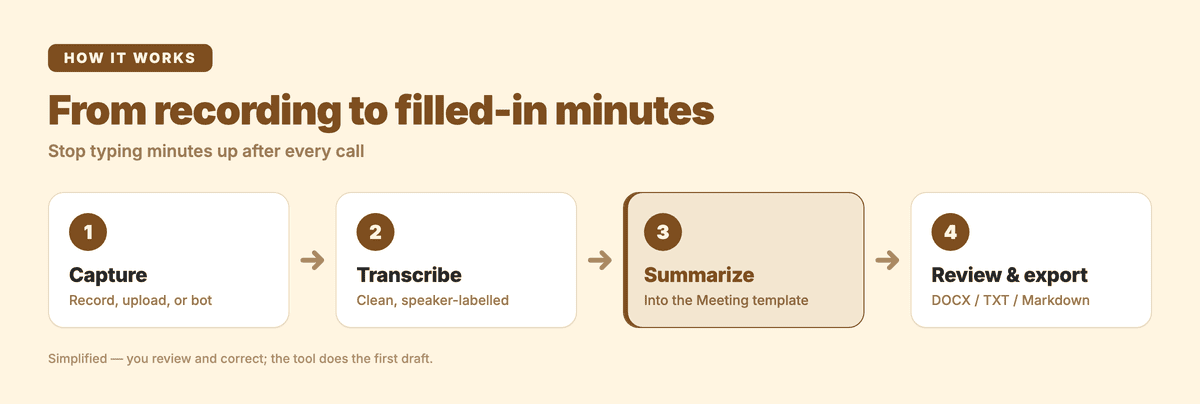
From recording to filled-in minutes: record the meeting, AI transcribes it, the template fills in, you review and send.

What every set of minutes needs

Whatever the meeting, good minutes capture the same six things. Everything else is detail you can drop.

ComponentWhat goes hereWhy it matters
HeaderMeeting name, date, time, location or call linkMakes the record findable and proves when it happened
AttendanceWho was there, who sent regrets, who chairedEstablishes quorum and accountability
Agenda itemsEach topic discussed, in orderLets a non-attendee follow the meeting's shape
DecisionsWhat was actually decided, in plain wordingThis is the part people come back to read
Action itemsTask, owner, due dateTurns talk into follow-through
Next meetingDate and any carried-over itemsCloses the loop

Minutes are a record of decisions and actions, not a transcript. You don't need every sentence — you need what was settled and what happens next.

The 12 templates

Each template is plain text you can copy straight into a document. Under each one is when to use it and what the AI version fills in for you automatically.

1. Simple team meeting

When to use: Recurring team or staff meetings — the everyday workhorse.

TEAM MEETING — MINUTES
Date:            Time:            Location / Link:
Attendees:
Apologies:

Agenda & discussion
1.
2.
3.

Decisions
-

Action items
- [Task] — [Owner] — [Due date]

Next meeting:

AI fills in: attendees from the recording, the discussion summary per agenda item, and every "we should…" or "can you…" turned into an action item with the owner's name.

2. Formal board meeting

When to use: Company board meetings where the minutes are an official corporate record.

BOARD OF DIRECTORS — MINUTES
Company:
Date / Time / Place:
Directors present:        Directors absent:
Also present:             Chair:        Secretary:
Quorum present: Yes / No

1. Call to order (time)
2. Approval of previous minutes
3. Reports (financial, committee, management)
4. Old business
5. New business
6. Resolutions passed
   - Resolution: [text] — Moved: — Seconded: — Result:
7. Adjournment (time)

Action items: [Task] — [Owner] — [Due]

AI fills in: the timeline, who spoke to each report, the wording of resolutions, and the vote result when it's stated aloud.

3. Nonprofit board (with motions)

When to use: Nonprofit and association boards, where motions, votes, and conflict-of-interest recusals need to be on record.

[ORGANISATION] BOARD MEETING — MINUTES
Date / Time / Location:
Present:      Absent:      Quorum: Yes / No
Chair:        Minute-taker:

Approval of prior minutes: [approved / amended]

Agenda
1. [Topic]
   Discussion:
   Motion: [text]
   Moved / Seconded:
   Vote: For __ Against __ Abstain __  — Carried / Failed
   Conflicts declared:

Action items: [Task] — [Owner] — [Due]
Next meeting:

AI fills in: the discussion summary, the motion text, the vote tally when it's read out, and a flag wherever someone says they're recusing.

4. Robert's Rules minutes

When to use: Any body that runs on parliamentary procedure (Robert's Rules of Order). These minutes are deliberately spare — they record what was done, not what was said.

MINUTES — [BODY], [REGULAR / SPECIAL] MEETING
Date, time, place:
Presiding officer:        Secretary:
Members present / absent:
Minutes of [prior date]: approved / approved as corrected

Main motions (each):
  Motion: [exact wording]
  Moved by:        Result: adopted / lost / referred
Points of order & appeals (with the chair's ruling):
Meeting adjourned at:

Robert's Rules minutes leave out discussion and opinion on purpose — only motions, their exact wording, the maker, and the disposition belong in the record.

AI fills in: the exact wording of each main motion and its result, pulled from the recording so you're not reconstructing it from memory afterward.

5. Project kickoff

When to use: The first meeting of a project, where scope, roles, and timeline get set.

PROJECT KICKOFF — MINUTES
Project:        Date:        Attendees:
Project goal (one sentence):
Scope — in:
Scope — out:
Roles: [Name] — [Responsibility]
Milestones: [Milestone] — [Target date]
Risks raised:
Decisions:
Action items: [Task] — [Owner] — [Due]

AI fills in: the stated goal, the in/out scope split, who took which role, and the dates mentioned for each milestone.

6. Daily standup

When to use: Short daily team syncs — keep it to three lines per person.

STANDUP — [Date]
Present:
[Name]: Yesterday / Today / Blockers
[Name]: Yesterday / Today / Blockers
Blockers to resolve:

AI fills in: each person's update and, usefully, a clean list of just the blockers so nothing said in passing gets lost.

7. 1:1

When to use: Manager / report one-on-ones — a running doc beats a fresh page each time.

1:1 — [Names] — [Date]
Carried over from last time:
Their topics:
My topics:
Feedback (both directions):
Decisions / commitments:
Follow-ups: [Task] — [Owner] — [Due]

AI fills in: the commitments made by each side and the follow-ups, so the next 1:1 starts from a real "last time we agreed…".

8. Client meeting

When to use: External client or stakeholder calls where you'll want a shareable record.

CLIENT MEETING — MINUTES
Client:        Date:        Attendees (both sides):
Purpose:
Client asks:
What we committed to:
Open questions:
Next steps: [Step] — [Owner] — [Due]
Follow-up to send:

AI fills in: the client's asks, what your side committed to, and the open questions — the three things a follow-up email actually needs.

9. Sales call

When to use: Discovery and pipeline calls you'll log to a CRM by hand later.

SALES CALL — NOTES
Prospect / Company:        Date:        Stage:
Attendees:
Pain points raised:
Budget / authority / timeline signals:
Objections:
Agreed next step:        Date:

AI fills in: the pain points, any budget/timeline signals the prospect mentioned, and the objections — so the recap you paste into the CRM is the call, not your memory of it.

10. All-hands

When to use: Company-wide updates where most attendees are listening, not speaking.

ALL-HANDS — [Date]
Presenters:
Key updates:
1.
2.
Metrics shared:
Q&A — notable questions + answers:
Announcements:

AI fills in: the updates per presenter and a clean Q&A section, which is usually the part people who missed it want to read.

11. Annual general meeting

When to use: AGMs for companies, associations, and member organisations — a formal, archived record.

ANNUAL GENERAL MEETING — MINUTES
[Organisation], [Date, Time, Place]
Chair:        Secretary:        Members present / proxies:        Quorum: Yes / No
1. Approval of previous AGM minutes
2. Chair's report
3. Financial statements / treasurer's report
4. Election of officers / directors — results:
5. Resolutions — [text], result:
6. Other business
7. Close (time)

AI fills in: the reports, election results, and resolution outcomes as they're announced.

12. Informal huddle

When to use: Ad-hoc catch-ups where you still want the two or three things that came out of it.

QUICK NOTES — [What] — [Date]
Who:
What we talked about:
What we decided:
Who's doing what:

AI fills in: the decisions and the who's-doing-what — the only parts of an informal chat worth keeping.

A filled-in example

Templates are easier to use once you've seen one filled. Here's the simple-team template, completed:

TEAM MEETING — MINUTES
Date: 10 June 2026   Time: 10:00–10:35   Location: Meet call
Attendees: Aric, Priya, Marcus, Lena
Apologies: Sam

Agenda & discussion
1. Launch date — pushed one week to clear QA backlog.
2. Pricing page copy — Lena's draft approved with minor edits.
3. Support coverage — gap on Fridays flagged.

Decisions
- Launch moves to 24 June.
- Pricing copy ships as drafted, edits by Wed.

Action items
- Apply pricing-copy edits — Lena — 12 Jun
- Draft a Friday support rota — Marcus — 16 Jun
- Email customers about the new launch date — Priya — 13 Jun

Next meeting: 17 June, 10:00

Notice what's not there: no back-and-forth, no "and then someone mentioned." Just what was decided and what happens next.

How to write meeting minutes in 6 steps

  1. Start from a template, not a blank page. Pick the one above that matches the meeting and have it open before the meeting starts.
  2. Capture decisions, not dialogue. Your job is the outcome, not a transcript. If nothing was decided on a topic, one line ("discussed, no decision") is enough.
  3. Write action items as task–owner–date. "Follow up on pricing" isn't an action item. "Priya emails customers about the launch date by 13 June" is.
  4. Use names, not roles. "Marketing will handle it" guarantees no one handles it.
  5. Write them up the same day. Minutes written 30 minutes after the meeting are accurate; minutes written three days later are fiction.
  6. Send them within 24 hours. The value of minutes is follow-through, and follow-through decays fast.

Step 5 is where most people lose. The fix is to not write them up at all — record the meeting and have the structure filled in for you.

Formats, Robert's Rules, and what board minutes must include

A few formatting rules worth knowing before you adapt a template.

Keep tense and voice consistent. Past tense, third person, no opinion words ("the board discussed," not "we had a great discussion"). Minutes are a neutral record.

Board and corporate minutes carry legal weight. They're the official evidence a decision was made, so they should reliably include the date, time and place, who attended and whether a quorum was present, the resolutions passed and how the vote went, and the time of adjournment. Requirements vary by jurisdiction and by your organisation's own bylaws — when in doubt, check what yours require.

Robert's Rules minutes are stricter and shorter. Under Robert's Rules of Order, minutes record what was done, not what was said: the kind of meeting, the date and place, the presence of the chair and secretary, whether the previous minutes were approved, the exact wording of each main motion with its mover and result, and any points of order. Discussion and personal opinion are deliberately left out.

Nonprofit minutes should record motions, votes, and recusals. If a board member declares a conflict of interest and steps out of a vote, that belongs in the record — it protects both the member and the organisation.

Skip the typing: record it and the template fills itself

Every template above assumes one thing: someone is typing while the meeting happens. That's the part worth removing.

Subanana's AI meeting transcription records the meeting — a Google Meet or Microsoft Teams session through its meeting bot, or any audio or video file you upload — transcribes it with speaker labels, and generates a summary in the structure you choose: decisions, action items, and the sections your template needs. You review and edit; you don't type from scratch.

Here's what that looks like. A raw stretch of transcript from a team standup:

Marcus: okay so the QA backlog, we're not gonna clear it by Friday.
Priya: so do we push launch a week? if we slip, customers need to know.
Marcus: yeah let's move it to the 24th. Priya can you email them?
Priya: sure, I'll send it tomorrow.

Becomes:

Decisions
- Launch moves to 24 June (QA backlog won't clear by Friday).

Action items
- Email customers about the new launch date — Priya — by tomorrow

And it isn't limited to English meetings. Subanana transcribes and summarizes in 80+ languages, so a meeting run in Cantonese, Japanese, or Korean comes out as clean minutes the same way — which is exactly where the template galleries built for English-only tools leave Asian-language teams stuck.

A few honest limits worth setting: the meeting bot records Google Meet and Microsoft Teams after the meeting ends — it's not a live captioner, and there's no Zoom bot today (you'd upload a Zoom recording instead). And you still review the output — AI gives you a filled template to check, not a record to publish unread.

If you want to go deeper on the capture side, how to transcribe a Microsoft Teams meeting and the best AI meeting transcription tools cover the setup and the options. You can start free and run it on one real meeting before deciding.

FAQ

What are meeting minutes? Meeting minutes are a written record of what a meeting decided and what happens next — attendance, decisions, and action items with owners and due dates. They're a record of outcomes, not a word-for-word transcript.

What's the difference between minutes and a transcript? A transcript is everything that was said. Minutes are the decisions and actions distilled from it. A transcript is the raw material; minutes are the summary you act on.

How detailed should meeting minutes be? Detailed enough that someone who wasn't there can see what was decided and what they're responsible for — and no more. Capture decisions and action items in full; summarise discussion in a line or two.

Do board meeting minutes have legal requirements? Often, yes. Corporate and nonprofit board minutes are an official record and typically need the date and place, attendance and quorum, resolutions and votes, and adjournment time. The exact requirements depend on your jurisdiction and bylaws, so check what applies to your organisation.

Can AI write meeting minutes for me? It can fill the template in for you. If you record the meeting, AI can transcribe it and generate a summary structured as decisions and action items, which you then review and edit. It works across 80+ languages, so meetings run in Cantonese, Japanese, Korean, or English all produce usable minutes. You stay the editor — the AI removes the typing, not the judgement.

Which meeting minutes template should I use? Match it to the meeting: simple-team for recurring syncs, formal-board or nonprofit-board for governance, Robert's Rules for parliamentary procedure, and the lighter standup, 1:1, or huddle templates for everyday meetings. Pick the closest one above and delete the rows you don't need.

Boost Your Efficiency with Subanana

No payment method required
Free Trial
Cancel Anytime