
For qualitative research, a transcript is not the deliverable — it is the data. Before you can code a theme, count how often a concern comes up, or quote a participant in a paper, you need text that does three things a casual transcript does not: it has to attribute every line to the right speaker, it has to carry timestamps so any coded quote can be traced back to the recording, and it has to follow a transcription convention you chose on purpose rather than whatever a tool happened to produce.
This guide is about that specific job — transcription for interviews and focus groups that will be coded and analysed, not just read once. It covers why free auto-captions tend to fail qualitative rigour, the difference between verbatim and intelligent verbatim, how to handle the hardest case (a focus group with people talking over each other), and a step-by-step workflow using Subanana's transcript mode that ends with a file you can import straight into your coding software. (If you just need to transcribe a single one-on-one interview and read it, the more general how to transcribe an interview guide is the shorter path; this post goes deeper on the analysis workflow.)
What does qualitative research transcription actually require?
A research transcript has stricter requirements than a general one because the text feeds an analysis method — thematic coding, grounded theory, framework analysis, discourse analysis. Whatever the method, the transcript needs to support it. In practice that means:
- Speaker attribution on every turn. Coding depends on knowing who said something. "The interviewer prompted, the participant resisted" is a finding; an unlabelled wall of text can't show it.
- Timestamps for traceability. When you code a quote, you need to jump back to that moment in the audio to check tone, context, and that you heard it right. Timestamps are what make a coded dataset auditable — and auditability is part of what makes qualitative analysis defensible.
- A deliberate transcription convention. Verbatim or intelligent verbatim (more on this below) is a methodological choice. It should be consistent across every transcript in the study, not left to chance.
- A clean export your analysis software can read. The transcript has to leave the transcription tool and enter a coding tool. Qualitative data analysis (QDA) software such as NVivo, ATLAS.ti, Dedoose, and the free, open-source Taguette is built to import documents, then let you highlight and tag passages with codes. Taguette, for example, imports "PDFs, Word Docs (.docx), Text files (.txt), HTML, EPUB, MOBI, Open Documents (.odt), and Rich Text Files (.rtf)" (Taguette documentation) — so a transcript exported as Word or plain text drops in directly. Most QDA tools accept those same everyday document formats, which is exactly why a tidy DOCX or TXT export matters more than an exotic file type.
Miss any of these and you don't have research data — you have a rough recording of a recording.
Why do free auto-captions fall short for analysis?
Auto-captions — the ones generated by video platforms or quick "transcribe this" sites — are genuinely useful for skimming or accessibility. For coded analysis they tend to break down in predictable ways:
- No speaker separation. Most auto-caption systems produce one undifferentiated stream of text. In a one-on-one interview you can sometimes infer turns; in a focus group with five voices, an unlabelled transcript is close to unusable for analysis.
- No usable timestamps for quotes. Caption formats carry timing for on-screen display, but that's tuned to short caption cues, not to "let me jump to where Participant C raised this." You lose the clean traceability a coding workflow relies on.
- Caption formatting, not reading formatting. Auto-captions are cut into short on-screen lines, conventionally without punctuation. That's the correct convention for subtitles — but it produces a fragmented wall of text that's harder to read and code than punctuated, paragraphed prose. (This is the single most common mistake: running a research interview through a subtitle workflow and getting caption fragments instead of a transcript.)
- Higher error rate on the hard audio. Accented speech, overlapping talk, specialised vocabulary, and less-common languages are exactly where qualitative recordings live, and exactly where general-purpose auto-captions stumble most.
The result is that "free and instant" usually means a long manual restructuring pass afterwards — re-inserting speakers, fixing punctuation, and chasing down timings — which often costs more time than it saved.
How does this compare to typing it yourself?
Manual transcription has the highest accuracy ceiling and gives you total control over the convention, but it is slow: a long-standing industry rule of thumb is roughly four to six hours of typing per hour of audio, and longer again with multiple speakers or poor recording quality. For a study with a dozen interviews, that time cost is rarely affordable. The practical middle ground for most researchers today is AI transcription that produces speaker labels, timestamps, punctuation, and paragraphs automatically — then one human proofreading pass to make it citable.
| Approach | Speaker labels | Timestamps | Reading format | Speed | Best for |
|---|---|---|---|---|---|
| Manual typing | If you add them | If you add them | Whatever you choose | Slowest (~4–6 hrs per audio hr) | Conversation analysis needing fine detail you transcribe by hand |
| Free auto-captions | Usually none | Caption-cue only | Caption fragments | Fastest | Skimming, accessibility — not coded analysis |
| AI transcript mode + proofread | Automatic, renameable | Automatic | Punctuated paragraphs | Fast (AI does the grind) | Interview and focus-group studies that will be coded |
Verbatim vs intelligent verbatim: which should you use?
This is a methodological decision, not a software setting, and you should make it before you start.
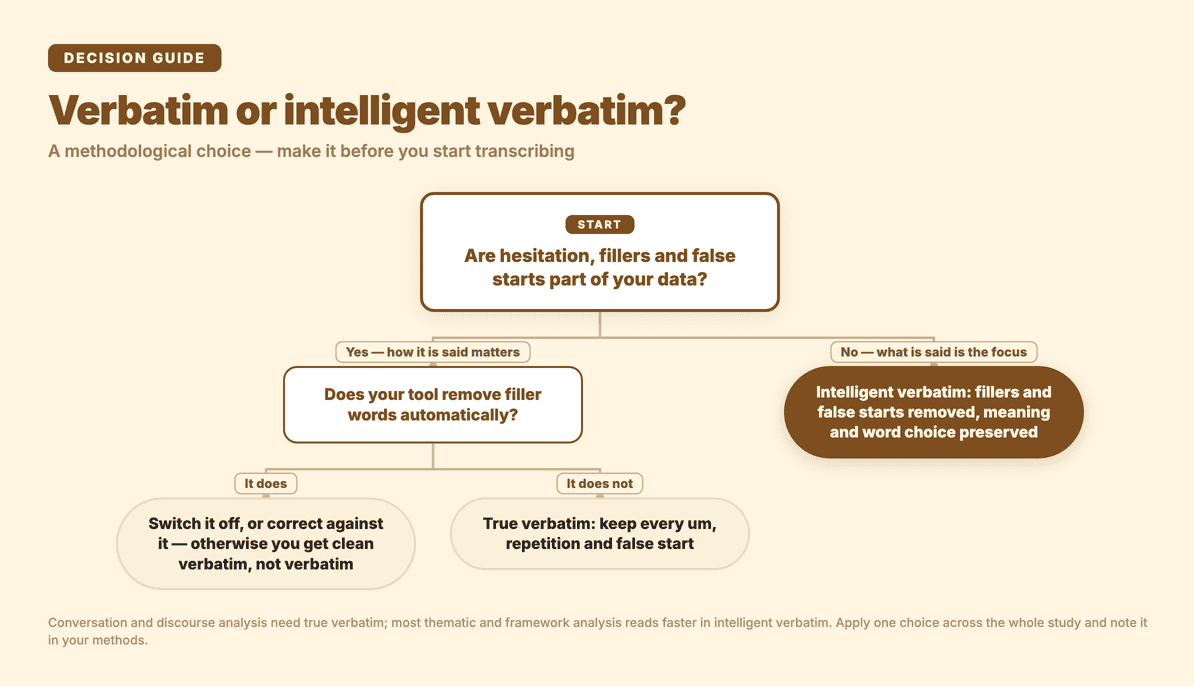
- Verbatim (true verbatim) captures everything — every "um", false start, repetition, and filler. Use it when how something is said matters: conversation analysis, discourse analysis, or any study where hesitation and self-correction are data.
- Intelligent verbatim (clean verbatim) removes fillers and false starts for readability while preserving meaning and word choice. Use it for most thematic and framework analysis, where what participants say is the focus and a cleaner read speeds up coding.
Whichever you pick, apply it consistently across the whole study, and note your choice in your methods write-up. The relevance for tooling: AI transcript tools that remove filler words automatically land you near intelligent verbatim by default — convenient if that's your convention, but something to switch off or correct against if your method needs true verbatim.
The decision in one view:
How do you transcribe a focus group with overlapping speakers?
Focus groups are the hard case. Several people, cross-talk, and people finishing each other's sentences make both speaker separation and accuracy harder than a quiet one-on-one. A few practices help regardless of tool:
- Record well. Speaker separation — by AI or by a human — is only as good as the audio. A single central microphone in a large room blurs voices together; distributed mics or a quiet room with good placement makes everyone separable.
- Open with a voice round. Having each participant say their name and a sentence at the start gives you a reference for matching voices to people during clean-up.
- Expect a heavier proofreading pass. Even strong tools will mislabel turns during genuine cross-talk. Budget time to relabel and to mark where talk genuinely overlapped, if your method records that.
- Use auto speaker detection, then rename. Let the tool split voices into generic speakers automatically, then rename them to real roles once — far faster than labelling turn by turn.
How do you produce a research transcript in Subanana?
Here's how that looks in Subanana. It earns its place for qualitative research on four things: multilingual accuracy across 95+ languages, automatic speaker identification (diarization), automatic punctuation and paragraphing, and an editor where the proofreading and export actually happen. The first decision is the most important one.
- Choose transcript mode — not subtitle mode. Subanana has subtitle, transcript, and meeting modes. For research data you want transcript mode, because it adds punctuation, breaks the text into meaningful paragraphs, and produces something readable and codable. Subtitle mode gives you short timed caption fragments — the wrong shape for analysis. (Subanana's AI meeting transcription page explains how the transcript and meeting modes are designed.)
- Import the recording. Upload the audio or video file (.mp4 / .mov / .webm / .ogg). Interview and focus-group recordings are almost always private, so use file upload rather than a public link.
- Set source language and speakers. Pick the recording's language — most research audio is in range across the 95+ supported languages. Set the number of speakers to auto-detect, or type the count if you know it (useful for a fixed-size focus group), and turn on automatic punctuation and paragraphing.
- Proofread, label speakers, and lock your terms. When transcription finishes you land in the editor, where the work that makes a transcript citable happens:
- Rename speakers from Speaker 1 / Speaker 2 to real roles — "Moderator", "Participant A" — and the whole transcript updates in sync, so it's consistent for coding.
- Fix misheard words by clicking and editing directly. For the words most likely to be wrong — participant names, organisation names, technical or clinical terms — set up a Glossary first so the system prefers your spellings while transcribing; you can keep a workspace-wide list for the study plus a per-project list, and bulk-import terms from a spreadsheet.
- Chat with the transcript. Inside the editor you can ask the AI questions grounded in the transcript — "where does Participant C mention cost?" or "summarise the second discussion topic" — which helps you find passages to read closely on a long recording. Treat this as navigation for your own coding, not as a replacement for it.
- Export in a coding-friendly format. For QDA software, export DOCX (Word — drops straight into NVivo, ATLAS.ti, Dedoose, or Taguette) or TXT (plain text, equally portable). For citation and tabular work, XLSX lays out timecode, speaker, and text as a table you can sort and reference. SRT, VTT, and Markdown are available too.
A note on accuracy and rigour: Subanana continuously benchmarks the available speech-recognition models and routes each transcription to the best-performing one for the source language, and if a transcription shows quality problems it automatically re-runs the affected part on a different model — a re-run that doesn't cost you any extra minutes. That gets you a strong first draft, but it does not replace the final human proofread. Before you quote a participant verbatim or code a sensitive passage, read it against the audio — accuracy is high, not perfect, and the places a wrong word changes the meaning are exactly the places that matter in qualitative work.
What about multilingual studies and live sessions?
Research often crosses languages — a participant interviewed in one language, analysed alongside transcripts in another. Transcript mode supports a single translation target, so you can transcribe in the source language and translate into one other language in the same pass; keep the original-language transcript as your source of record and treat the translation as a working aid for cross-language coding.
Two boundaries are worth being clear about so you pick the right feature:
- Real-time, in-sentence language switching — a speaker flipping between two languages mid-sentence with the tool detecting the switch live — is a strength of Subanana's live caption feature, not transcript mode. If you're running a live multilingual session (a public forum, a bilingual workshop) and want captions on screen as it happens, that's the AI real-time transcription feature, where the host sets one source language plus up to 5 translation targets and each audience member picks one of them via a shared link.
- Transcript mode is for recordings, after the fact, where multilingual accuracy and speaker labelling are what you're leaning on — which is what a coding workflow needs.
A note on participant confidentiality
Qualitative transcripts usually contain identifiable detail — names, employers, places, sometimes health or other sensitive information. De-identification is part of the transcription step, not an afterthought: decide your pseudonym scheme up front (P1, P2, or role labels), and when you rename speakers and proofread, that's the natural moment to replace identifying details in the text with your agreed placeholders before the transcript moves into shared analysis. Handle the recordings and transcripts according to your study's ethics approval and data-management plan; the tool produces the text, but the confidentiality decisions are yours to make and document.
Qualitative research transcription FAQ
Do I need timestamps in a research transcript? For coded analysis, yes — they're what let you trace any quote back to the exact moment in the recording to check context and tone, which keeps your coding auditable. Transcript mode produces timestamped output; the XLSX export in particular lays out timecode, speaker, and text together, which is convenient for referencing.
Will the transcript import into NVivo, ATLAS.ti, Dedoose, or Taguette? Yes — export as DOCX or TXT and import it into your coding software. QDA tools are built around importing everyday document formats; Taguette, for instance, lists Word (.docx), plain text (.txt), RTF, PDF, and others as supported import formats (Taguette documentation). A clean Word or text export is the most portable choice across tools.
Can the free tier export a research transcript? You can run a recording and preview the result, but exporting is a paid step. The free tier doesn't support transcript file downloads, and you can't select-and-copy the text in the editor either — the only output is a watermarked 15-second video clip, at 720p. Every plan, including free, accepts files up to 30 GB or 8 hours; on the free plan, only the first 15 minutes of each file is transcribed. To export usable transcript files (DOCX / TXT / XLSX) you need a paid plan. See pricing for details.
Should I use verbatim or intelligent verbatim? Use verbatim when how something is said matters (conversation or discourse analysis); use intelligent verbatim — fillers removed — for most thematic and framework analysis where what is said is the focus. Pick one, apply it consistently across the study, and note it in your methods.
Does a long focus group or interview (one to two hours) work? Yes. Every plan, including free, takes up to 30 GB / 8 hours per file (on the free plan, only the first 15 minutes of each file is transcribed), which covers most sessions. On a long recording, use the editor's AI chat to locate the passages you'll code most closely, then proofread those against the audio carefully before quoting.