
Live captioning is the real-time conversion of speech into on-screen text during a meeting, lecture, broadcast, or event — and the best live captioning tool for you depends on one fork in the road. "Live captioning" covers two genuinely different markets that get lumped into one search, and picking the wrong one wastes either money or credibility.
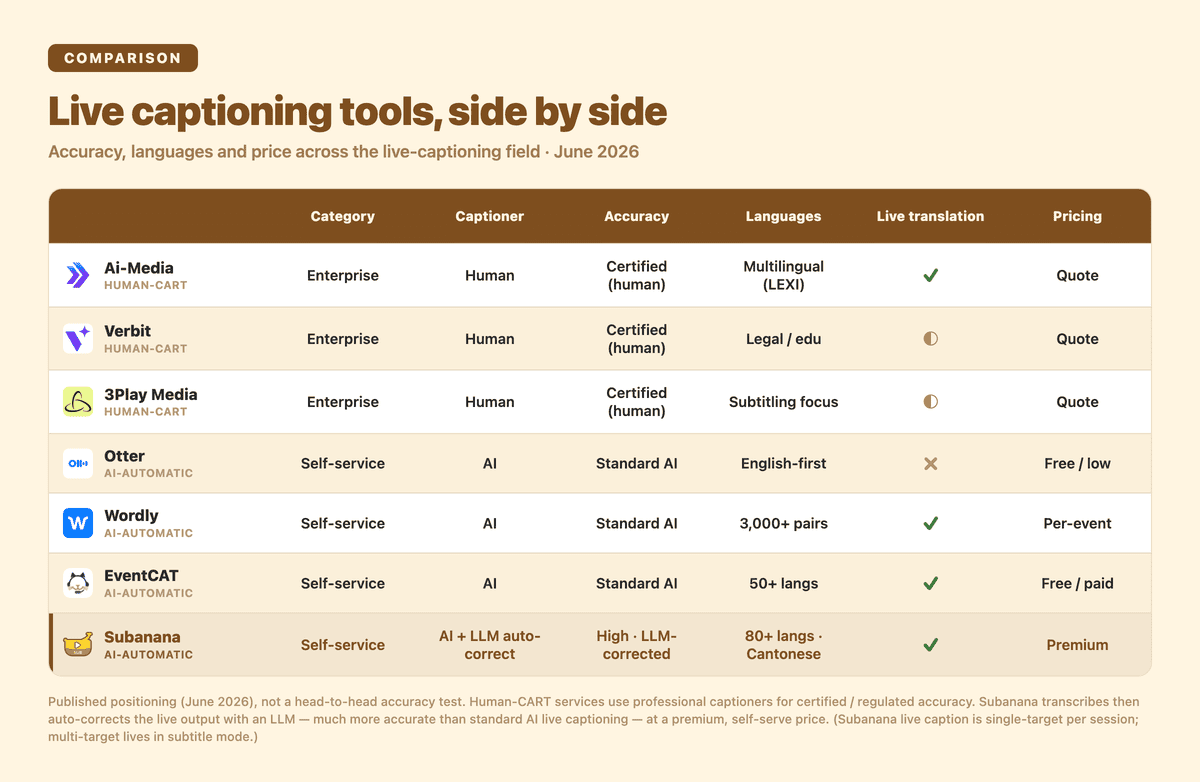
On one side are human-CART and enterprise captioning services — a professional captioner (or a human-in-the-loop hybrid) producing certified, broadcast-grade or compliance-graded captions in real time. On the other side are AI-automatic, self-service tools — software that captions (and often translates) live, instantly, at a fraction of the cost, with no captioner to book.
Per the W3C WAI accessibility guidance, "live captions are usually done by professional real-time captioners or Communication Access Realtime Translation (CART) providers." That's the human-CART category. The AI-automatic category is newer, cheaper, and improving fast — but it is not a drop-in replacement for certified CART when a wrong word is legally or editorially expensive.
This roundup keeps the two categories separate, gives every tool a genuine win, and tells you which one fits your event. Disclosure: I run Subanana, one of the AI-automatic tools below. Every capability claim is sourced from each tool's published pages (June 2026); there are no fabricated head-to-head benchmarks and no accuracy percentages invented for any tool.
TL;DR — pick by need
Choose a human-CART / enterprise service when accuracy is graded or regulated:
- Broadcast, in-venue, or OTT captioning that has to be on-air quality → Ai-Media. Both automatic (LEXI) and human caption services, caption-encoder hardware, ISO 27001 / SOC 2.
- Legal proceedings, court reporting, or higher-ed with ADA Title II obligations → Verbit. AI captioning paired with real people and a dedicated support team; built for legal, education, media, and government.
- Accessibility / compliance teams that need the paperwork (ADA, 508, CVAA, WCAG, EAA) → 3Play Media. AI-built, human-perfected captioning with the broadest stated compliance coverage.
Choose an AI-automatic / self-service tool when speed, scale, languages, and cost win:
- Internal English-first meetings already inside Zoom / Teams / Google Meet → Otter. Frictionless automatic live captions and an assistant that joins your calls.
- Large enterprise events that need many language pairs and translated audio → Wordly. AI captions + translation, 3,000+ language pairs, QR-code attendee access, deep event-platform integrations.
- In-person multilingual conferences where each attendee needs their own language live → EventCAT. Per-attendee QR multi-target captions + voice translation, 50+ languages, custom-glossary tuning — events-only (no file subtitles, transcripts, or summaries).
- SMB events, university lectures, hybrid webinars, or multilingual / Cantonese audiences that want the most accurate AI-automatic captions without procurement → Subanana. The premium, accuracy-first AI-automatic option: it transcribes and then runs a real-time LLM-correction pass over the caption stream, so the output is far more accurate than standard single-pass AI live captioning — not a cheap-but-rough feed. Instant QR-code audience display, published self-service pricing, no annual commitment — and the same tool also does file/YouTube subtitles, transcripts, and summaries, not events only.
If you want to skip the roundup and just try the AI-automatic, audience-facing route, here is the product page: AI real-time transcription & live captioning.
First: which category do you actually need?
A 30-second filter before you compare individual tools.
You need human-CART / enterprise captioning if any of these are true:
- The captions are broadcast on TV, streamed as OTT, or shown on in-venue displays where on-air quality is the bar.
- You have a legal or regulatory obligation (ADA Title II, FCC, Section 508, CVAA) and need a provider who signs up to it.
- The setting is a courtroom, deposition, medical, or other high-stakes context where a transcriber typing the record — what the ADA describes as CART, "a service similar to court reporting in which a transcriber types what is being said... onto a screen" — is the expectation.
AI-automatic / self-service is the better fit if:
- It's an internal meeting, a webinar, a conference talk, a lecture, or a community event.
- You want captions live in minutes, configured by you, without booking a captioner or signing an annual contract.
- You need multilingual coverage, real-time translation, or audience-facing display on attendees' own phones — and "very good, instantly, at low cost" beats "certified, booked in advance, at service rates."
The two categories aren't competitors so much as different products. Most of the disappointment in this space comes from buying one when you needed the other.
Comparison table
| Tool | Category | Human or AI | Setup model | Languages / translation | Best for |
|---|---|---|---|---|---|
| Ai-Media | Human-CART / enterprise | Human + automatic (LEXI) | Managed; broadcast hardware available | Multilingual via LEXI Translate | Broadcast, in-venue, OTT, regulated events |
| Verbit | Human-CART / enterprise | AI + real human support | Managed; dedicated project team | Multilingual; legal/education focus | Legal, court reporting, higher-ed, government |
| 3Play Media | Human-CART / enterprise | AI-built, human-perfected | Schedule live captioning per event | Subtitling / translation offered | Accessibility & compliance teams |
| Otter | AI-automatic / self-service | AI only | Self-service; assistant joins meetings | English-first; live translation not stated | Internal Zoom / Teams / Meet meetings |
| Wordly | AI-automatic / self-service | AI only (no interpreters) | Self-service; hourly pricing | 3,000+ language pairs + translated audio | Large multilingual enterprise events |
| EventCAT | AI-automatic / self-service | AI only (no interpreters) | Self-service; QR-code audience display | 50+ languages; per-attendee multi-target | In-person multilingual conferences |
| Subanana | AI-automatic / self-service | AI + real-time LLM correction (premium AI option) | Self-service; QR-code audience display | 95+ languages, up to 5 translation targets per live session; Cantonese / code-switched | SMB events, lectures, hybrid webinars, multilingual / HK audiences |
Notes: this table reflects each tool's published positioning (June 2026), not a head-to-head accuracy test. "Best for" is the buyer shape each tool is built around, not a ranking.
Human-CART / enterprise services
These win on certified, graded accuracy and compliance. If your output is regulated or broadcast, start here.
1. Ai-Media — best for broadcast, in-venue, and regulated captioning
Where it wins: Ai-Media is built around broadcast and large-venue captioning, and offers both automatic captioning (its LEXI product) and human caption services — so you can dial the human-vs-automatic mix to the stakes of the event. Its published stack includes caption-encoder technology for broadcasters, in-venue and OTT captioning, and ISO 27001 / SOC 2 certification. LEXI Translate adds AI-powered caption translation for multilingual reach. For television, stadiums, government, and any setting where captions appear on-air or on a venue screen and have to look professional, this is the category leader.
Where it's the wrong fit: a small internal webinar or a one-off community event where the managed-service overhead and broadcast tooling are far more than you need — a self-service AI tool will be faster and cheaper for that shape.
2. Verbit — best for legal, court reporting, and higher education
Where it wins: Verbit pairs AI captioning with real people — a dedicated support team that, in their words, keeps "every project running smoothly — service you won't get from generic AI tools." It serves legal, media, corporate, education, and government, with products aimed squarely at court reporting and litigation (real-time transcription for reporting agencies) and at campuses meeting ADA Title II requirements. It states support for ADA, FCC, Ofcom, and legal mandates with customization for regulated industries. When the transcript is part of a legal record or a compliance obligation, the human-in-the-loop model is the point.
Where it's the wrong fit: fast, low-cost, self-serve captioning for everyday meetings or marketing webinars, where the managed legal/education motion is heavier than the use case warrants.
3. 3Play Media — best for accessibility & compliance teams
Where it wins: 3Play Media's captioning is "built on AI, perfected by people," with human review central to the model, and you can schedule live captioning for an entire course, event, or broadcast. Its standout is the breadth of accessibility-compliance coverage it speaks to — ADA, Section 504/508, CVAA, WCAG, EAA, and ACA — alongside subtitling, translation, audio description, and dubbing. For an accessibility or localization team that has to satisfy auditors and procurement, the compliance surface is the differentiator.
Where it's the wrong fit: an organizer who just wants live captions on their own phone-friendly link in minutes, with no scheduling and no managed-service contract.
AI-automatic / self-service tools
These win on instant setup, scale, multilingual coverage, and cost. If your event is a meeting, a webinar, a lecture, or a conference talk, start here.
4. Otter — best for internal meetings already in Zoom, Teams, or Meet
Where it wins: Otter offers automatic live captions for Zoom and Google Meet, and an assistant that joins Zoom, Microsoft Teams, and Google Meet meetings to transcribe automatically. For an English-first team that lives inside those platforms and wants captions and notes to appear without anyone running a session, Otter is the path of least resistance.
Where it's the wrong fit: audience-facing event captioning on attendees' own devices, or multilingual / mixed-language content — Otter's live captioning is meeting-centric and English-first, and live translation isn't part of its stated live-caption feature set.
5. Wordly — best for large multilingual enterprise events
Where it wins: Wordly is the closest AI-automatic peer to an event-captioning service: "AI Translation & Captions for Meetings and Events" with no human interpreters required, a published 3,000+ language pairs, and translated audio output so attendees can listen as well as read. Attendees join with a QR code or link on their own phone, tablet, or computer — no downloads — and it integrates with Cvent, Zoom, Teams, Encore, and other event platforms. For a large conference with a procurement budget and many target languages, Wordly is purpose-built.
Where it's the wrong fit: smaller events or teams that want published per-event pricing and a free tier to validate on one event before committing — Wordly's model is enterprise and sales-led, priced by the hour. For that shape, see the picks below (and our dedicated best Wordly alternatives roundup).
6. EventCAT — best for in-person multilingual conferences
Where it wins: EventCAT (by XL8) is purpose-built for in-person multilingual conferences and events — AI real-time captions and voice translation for live venues, online meetings (Zoom, Teams, Meet), and live streams, with no human interpreters required. Its standout is per-attendee multi-target language selection: each audience member scans a QR code on their own mobile device and independently views (or listens to) captions in their preferred language, so one room full of attendees who speak different languages each gets their own. It covers 50+ languages, and you can supply a custom glossary so it translates industry-specific terms and company vocabulary accurately, with translated voice/audio output alongside the on-screen subtitles. For a conference where the audience is genuinely multilingual and everyone needs their own language at once, that per-attendee model is the differentiator.
Where it's the wrong fit: anything beyond live events. EventCAT is events-only — it does not generate subtitles for your video files or YouTube uploads, produce diarized transcripts, or write meeting summaries; it captions and translates live, and that's the product. (Pricing is published and self-serve: per-hour and pass-based for conferences, monthly or prepaid for online meetings, with a free trial.) If you need one tool across the whole speech-to-text workflow — file and YouTube subtitle generation with SRT/VTT export, transcripts, and summaries as well as live captions — or you need Cantonese and spoken-to-written Chinese handling, the next pick fits better.
7. Subanana — best for SMB events, lectures, and multilingual / Cantonese audiences
Disclosure noted at the top still applies — I run Subanana, so calibrate framing accordingly. Subanana's live captioning is AI-automatic, self-service, and software-only — and positioned as the accuracy-first, premium option in this category: rather than serving a raw single-pass feed, it transcribes and then runs a real-time LLM-correction pass over the live caption output, producing captions far more accurate than standard AI live captioning. Here is where it's the strongest fit on this list:
- Instant audience-facing setup. You run the live session on your own machine with the audio routed in (a microphone, or system audio from a Zoom / Teams / Meet call via a virtual audio cable); attendees scan a QR code or open a share link and read captions in their phone browser — no app install. Each attendee picks one display language from the set the host configured; side-by-side bilingual display is a venue-screen dual projection option, not a personal-device one.
- Multilingual, including Cantonese and code-switched speech. Subanana supports 95+ languages and auto-detects mid-utterance code-switching; for a clearly-segmented multilingual event (say, English first half, Cantonese second half) the operator can switch the source language at the boundary. The host configures one source language plus up to 5 translation target languages per live session, and each attendee picks one of them on their own phone. Cantonese support and mixed-language handling are genuinely uncommon in this category.
- Published self-service pricing, no annual gate. Subanana runs on a published per-month subscription — live sessions run on Max (or with top-up credits) — with a one-time 5-minute free trial per workspace, no 10-hour minimum, no annual commitment, no "contact sales for a quote" before you can run a standard self-service event. The underlying speech-to-text layer continuously benchmarks multiple models per source language and routes to the best-evaluated one, so quality on a given language tracks the best-performing model rather than being locked to one vendor.
Where Subanana is the wrong fit — and a human-CART service wins instead:
- Certified, legal-grade, or broadcast-grade accuracy with a human in the loop — choose Ai-Media, Verbit, or 3Play. Subanana's real-time LLM correction makes it the most accurate AI-automatic option here, but it is still automatic: it does not put a certified professional captioner on your event, so when accuracy must be regulated or attested, human-CART remains the right call.
- Graded accessibility-compliance sign-off (ADA / 508 / CVAA attestation as a deliverable) — 3Play and Verbit are built for that paperwork.
- 3,000+ language-pair breadth, translated audio output, or per-attendee / multiple target languages in a single live session — Wordly covers breadth and audio, and EventCAT gives each attendee their own language live; Subanana's live caption is single-target text per session (its multi-target output lives in subtitle mode, not live caption). If a multilingual audience each needs a different language at the same event, EventCAT or Wordly fit that shape better.
- On-call managed event engineers during your event — that's a service offering, not Subanana's self-service model.
Want the audience-facing, multilingual, self-service route? Try Subanana's live captioning — or open the app directly at plus.subanana.com.
How to choose between two finalists
Documentation gets you ~80% of the way. The last 20% — does this actually work on MY event? — needs a real test.
- Decide your accuracy bar first. If a wrong word is legally or editorially expensive, you are in the human-CART category; price and speed are secondary. If "very good, instantly" is fine, you are in the AI-automatic category.
- Match the setup model to your timeline. Managed services need lead time to book; self-service tools you can stand up the same day. A last-minute multilingual webinar effectively rules the managed services out.
- Test on representative audio. For the AI-automatic tools, run a 10-minute rehearsal with your real speakers, real languages, and real room/mic conditions — that settles accuracy questions no marketing page can.
- Check the audience-display shape. If attendees need captions on their own phones in their own language, confirm the tool produces an audience-facing link (Wordly and Subanana do); meeting-centric tools show captions inside the meeting window only.
Frequently asked questions
What's the difference between AI-automatic captioning and human-CART?
Human-CART (Communication Access Realtime Translation) uses a professional captioner who, per the ADA's description, "types what is being said at a meeting or event into a computer that projects the words onto a screen" — certified, graded accuracy, booked in advance, at service rates. AI-automatic captioning is software that captions (and often translates) live, instantly, at much lower cost, with no captioner. The first wins on guaranteed accuracy and compliance; the second wins on speed, scale, languages, and price.
When do I actually need CART instead of an AI tool?
When the captions are part of a legal record, broadcast on-air, or governed by a compliance obligation you must demonstrably meet (ADA Title II, FCC, Section 508, CVAA), and when the cost of a wrong word is high. Courtrooms, depositions, live television, and formal accessibility accommodations are the classic CART cases. For internal meetings, webinars, lectures, and conferences, AI-automatic tools are usually the better trade-off.
Which option is cheapest and fastest to set up?
The AI-automatic / self-service tools are both cheaper and faster — you configure and run them yourself, often the same day, on a published subscription. Among them, tools with published per-month pricing and a free tier (such as Subanana) let you validate on one event before paying, whereas enterprise event tools are typically priced by the hour through sales. Human-CART services cost more and need lead time to book, because you're paying for a professional captioner.
Does live captioning also translate into other languages?
Some tools do, some don't. Wordly is built around translation (3,000+ language pairs plus translated audio). EventCAT translates live across 50+ languages and gives each attendee their own target language on their phone. Subanana captions and translates live across 95+ languages, with one source plus up to 5 translation target languages per live session, displayed on an audience-facing link where each attendee picks their own language from the set the host configured. Otter's live captioning is English-first and doesn't state live translation. Among the human-CART providers, Ai-Media offers AI caption translation via LEXI Translate. Always confirm the specific language pair you need on the tool's own page.
What about Cantonese or mixed-language (code-switched) events?
This is where most tools fall short. Subanana supports Cantonese and auto-detects mid-utterance code-switching, and for clearly-segmented multilingual events the operator can switch the source language at the boundary — useful for Hong Kong and other multilingual settings where speakers move between Cantonese, English, and Mandarin. If your event mixes languages, test that specific mix in rehearsal rather than trusting a generic "supports 100+ languages" line.
Is Web Captioner still an option?
No. Web Captioner, the free browser-based live-captioning tool many people remember, was discontinued in 2023. If you see it recommended in an older roundup, treat that list as out of date. For a free or low-cost route today, the AI-automatic self-service tools above (with their free tiers and trials) are the current equivalents.
How do I run live captions for a Zoom, Teams, or Google Meet session?
Two patterns. Meeting-centric tools like Otter join the call via an assistant and caption inside the meeting window. Audience-facing tools like Subanana run the live session on the host's machine with the meeting's system audio routed in (via a virtual audio cable), then publish captions to a separate QR-code / share link attendees open on their own devices — which is what you want when the audience needs captions in their own language on their own phone.
Related guides
- What Is Live Captioning? A Plain-English Guide
- Best Wordly Alternatives 2026: Live Translation Tool Roundup
- Subanana vs Wordly (2026): Live Caption Comparison
- Live Captions for Multilingual Events: A Setup Guide
- Live Captions for University Lectures
- Multilingual Webinar Captions: Step-by-Step Setup