
Live captioning is the process of turning spoken words into on-screen text in real time — within a second or two of someone speaking, not after the event is over. It's what lets a deaf or hard-of-hearing attendee follow a conference talk as it happens, and what lets a Cantonese speaker read an English keynote in their own language while it's being delivered.
If you've searched "what is live captioning," you've probably hit two kinds of answers: dense accessibility-law explainers, and vendor pages that skip straight to "buy our thing." This piece sits in the middle. I run Subanana, a speech-to-text tool with a live-caption mode, so I have a stake here — but the goal below is to actually explain the category: how it works, how it differs from subtitles and transcription, the real split between AI-automatic captioning and human CART, and where each one fits.
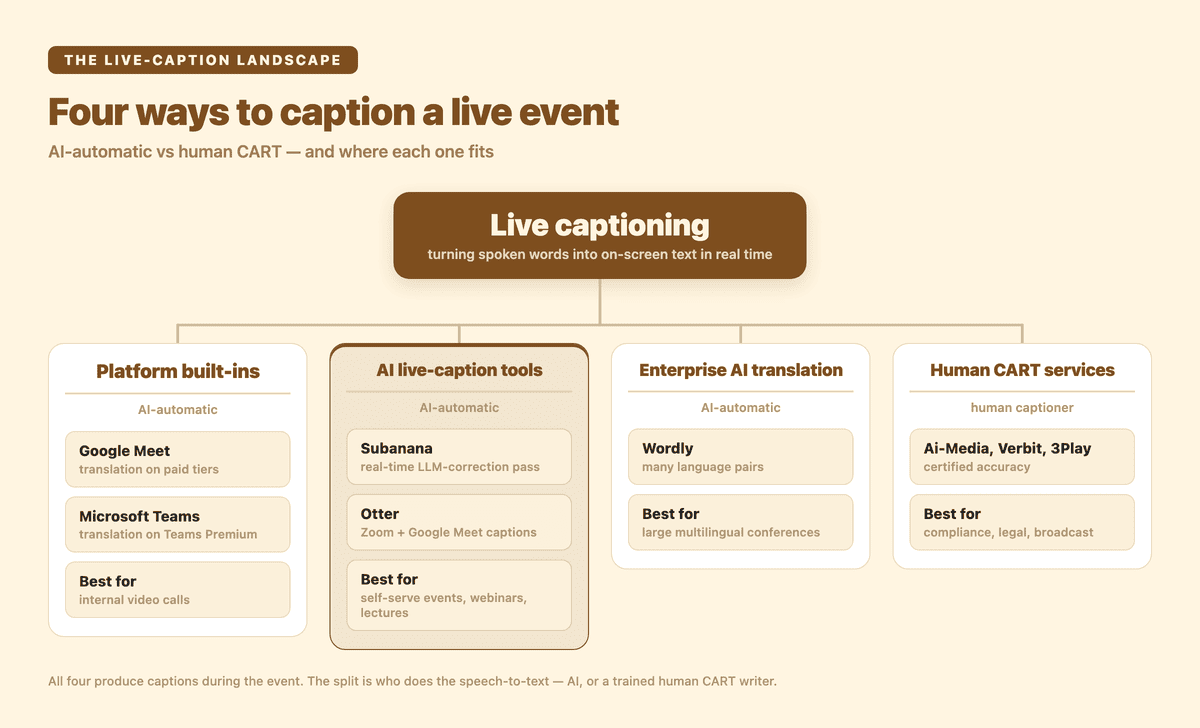
The live-caption landscape at a glance: four ways to caption a live event, split by AI-automatic vs human CART.
What is live captioning, exactly?
Live captioning (also called real-time captioning or, in the US accessibility context, CART) displays a running text version of what's being said while it's being said. The text appears on a screen, a personal device, or a shared link, and it scrolls as the speaker talks.
The accessibility standards body W3C WAI defines captions broadly as "a text version of the speech and non-speech audio information needed to understand the content" (W3C WAI). "Live" just adds the constraint that the text is produced during the event rather than added to a recording afterward.
Two things make live captioning genuinely hard, and they're worth naming because they explain most of the price and quality differences between tools:
- Latency. Captions that lag ten seconds behind the speaker are nearly useless at a live event. Good live captioning keeps the gap to a second or two.
- No second take. A subtitle editor working on a finished video can rewind, fix a name, and re-time a cue. Live captioning commits to the text in the moment. There's no undo while the room is watching.
That second constraint is the entire reason the human-versus-AI question (below) exists.
Live captions vs subtitles vs transcription — what's the difference?
These three get used interchangeably, but they're distinct jobs with distinct outputs. The cleanest way to keep them straight is to ask when the text is made and what language it's in.
| When it's produced | Language | Typical output | |
|---|---|---|---|
| Live captions | During the event, in real time | Same language as the speech (and increasingly translated live) | On-screen / shared-link text, scrolling |
| Subtitles | After the fact, on a recording | Usually a translation into another language | A timed file (SRT/VTT) burned or overlaid on video |
| Transcription | After the fact, on a recording | Same language as the speech | A document you read — paragraphs, speaker labels |
The captions-versus-subtitles line is a real one, not just jargon. W3C WAI draws it by language: captions are "for the same language as the spoken audio," while subtitles are "for spoken audio translated into another language" (W3C WAI). In practice, modern live-caption tools blur this by translating in real time — so you can have live captions that are also translated, which is where multilingual events come in.
Transcription is the odd one out: it's not real-time and not on-screen during the event. It's the readable record you produce afterward. Many workflows do both — live captions during the talk, then a polished transcript for the archive. (If you want the readable-document side, that's our AI meeting transcription mode, not live captioning.)
How does live captioning work?
Under the hood, every live-caption system — AI or human — does the same four things in a loop, fast:
- Capture the audio. A microphone, a mixing board feed, or the system audio from a video call. The cleaner the audio in, the better the captions out — this is the single biggest lever on quality, and it's true for every tool on the market.
- Convert speech to text. A human stenographer types on a steno machine; an AI system runs automatic speech recognition (ASR). Either way, audio becomes words.
- (Optional) translate. If the audience needs another language, the text is translated on the fly. This is the newer, harder capability — and the one that separates "captions" from "multilingual live captions."
- Display it. On a venue screen, in a meeting window, or — the flexible option — on each attendee's own phone via a shared link or QR code.
For an AI-automatic tool, the practical setup is: route your event's audio into the software (a microphone, or the meeting's system audio piped into the browser), pick a source language and a target language, and share the caption link with your audience. There's no hardware to rent and no captioner to schedule.
A note specific to how our own live-caption mode handles step 1, because it trips people up: Subanana's live captioning takes direct audio input — a mic or system audio routed into the browser running the session. It does not send a bot into your Google Meet or Teams call to caption it. (We do have a meeting bot, but it records meetings for post-event transcripts and summaries — a different job.) For a hybrid event on Zoom/Meet/Teams, the pattern is to run the live session on the host's machine and route the call's system audio into the browser tab.
AI-automatic captioning vs human CART — which is "real" live captioning?
This is the question that matters most, and the honest answer is: both are real, and they're good at different things.
Human CART (Communication Access Real-time Translation) is the gold standard for certified accuracy. The US Department of Justice describes it as a service "similar to court reporting in which a transcriber types what is being said at a meeting or event into a computer that projects the words onto a screen," and notes it's "particularly useful for people who are deaf or have hearing loss but do not use sign language" (ADA.gov). A trained CART writer handles crosstalk, accents, jargon, and proper nouns with a reliability that AI still can't guarantee in the moment. W3C WAI reflects the industry reality plainly: "Live captions are usually done by professional real-time captioners or Communication Access Real-time Translation (CART) providers" (W3C WAI).
If you're running a regulated proceeding, a legal or medical setting, or any event where a certified-accuracy transcript is a compliance requirement, a human CART provider or an enterprise human-captioning service is the right call. Vendors like Ai-Media, Verbit, and 3Play Media serve exactly this market — broadcast, government, and accessibility-mandated events — and several now pair human captioners with AI for scale.
AI-automatic captioning trades that certified ceiling for three things humans can't match: it's instant to set up, it scales to any number of events without booking a person, and it translates into many languages on the fly. The cost difference is large — booking a CART writer is a per-hour professional service; AI captioning runs off a software subscription.
The market has effectively split along these lines:
| Approach | Best for | Real strength | Real limitation |
|---|---|---|---|
| Platform built-ins (Google Meet, Microsoft Teams) | Internal video calls | Free, already in the meeting | Translation gated to paid tiers; locked to that call; no audience-facing link for in-person/hybrid events |
| AI live-caption tools (Subanana, Otter) | Self-serve events, webinars, lectures | Instant setup, multilingual, cost; Subanana adds a real-time LLM-correction pass for accuracy well above standard single-pass AI captioning | Not human-CART-certified; quality also depends on the audio in |
| Enterprise AI translation for events (Wordly) | Large multilingual conferences | Many language pairs, event tooling | Enterprise pricing and onboarding |
| Human CART / human-captioning services (Ai-Media, Verbit, 3Play) | Compliance, legal, broadcast | Certified accuracy, human judgment | Cost, scheduling, fewer languages live |
A quick note on the built-ins, because they're what most people try first. Google Meet offers translated captions that convert the spoken meeting into another language — but it's available only on certain paid Google Workspace plans. Microsoft Teams shows live captions too, with live translated captions gated behind a Teams Premium license. Both are great inside their own meeting window. Neither gives you a link to put live captions on a venue screen or on the phones of an in-person audience — which is the gap dedicated event tools fill. (Otter sits in the AI-live-tool column: it offers live captions for Zoom and Google Meet and real-time meeting transcription.)
One housekeeping note for anyone researching older guides: Web Captioner, a free browser tool that used to show up in every "live captions" list, was discontinued in 2023. It survives only as a DIY open-source project now — don't plan an event around it.
Where is live captioning used?
Four settings drive most of the demand, and they map cleanly onto why someone searches for this in the first place.
- Accessibility. This is the foundational use case. The WHO estimates that 1.5 billion people live with some degree of hearing loss, a number it expects to rise toward 2.5 billion by 2050. Live captions make a talk, class, or service legible to anyone who can't rely on the audio.
- Multilingual events. Conferences, AGMs, and houses of worship with mixed-language audiences use live captioning to translate a single speaker into the languages people in the room actually read. This is where real-time translation, not just same-language captioning, earns its keep.
- Education. Universities run live captions in lectures for accessibility and for international students following a class in a second language. (We wrote a dedicated guide to live captions for university lectures on the setup specifics.)
- Webinars and broadcasts. Online events caption to widen reach and to serve attendees who watch with the sound off.
How Subanana does live captioning
Here's where our live-caption mode fits in that landscape — including the parts where it's deliberately not the answer.
Subanana's real-time transcription is AI-automatic live captioning with translation, built around the audience-facing case. The host opens a session, routes the event's audio in (mic or system audio), and picks a source language plus up to 5 translation target languages. Attendees scan a QR code or open a shared link on their own phones, and each attendee picks one display language from that set — the original, or any of the targets the host configured. Side-by-side bilingual display is a venue-screen dual-projection option, not something an attendee gets on a phone. No app install, no hardware, no captioner to book.
What it's actually differentiated on:
- LLM-corrected captions, not a raw feed. Subanana doesn't just stream raw speech recognition the way standard AI live-caption tools do. It transcribes and then runs a real-time LLM-correction pass over the live caption output, which makes its captions far more accurate than standard single-pass AI live captioning. It's positioned as the accurate, premium AI live-caption option — not a fast-but-rough feed. (It still isn't a certified human CART service; for legal-grade accuracy, see the boundaries below.)
- Cantonese and code-switched speech. Hong Kong events rarely happen in one clean language — a speaker slides between Cantonese and English mid-sentence. Subanana's live captioning is built to handle Cantonese as a first-class source language and to auto-detect that mid-utterance code-switching. For long, clearly-segmented events (an English first half, a Cantonese second half), the operator can switch the source language at the break for extra stability.
- Instant, audience-facing setup. The shared-link-to-every-phone model is the thing platform built-ins don't do for an in-person or hybrid room.
- Multilingual on a self-serve plan. You get real-time translation without an enterprise contract.
- A glossary that the live session reads. You can pin brand names, people, and jargon ahead of time so they're not mangled in the moment — useful when "Subanana" or your CEO's name would otherwise get misheard.
And the honest boundaries, so you can rule it in or out fast:
- It's AI-automatic, not a human service. If you need certified, legal-grade accuracy, book a human CART provider — that's not what this is.
- Up to 5 translation targets per live session. The host sets one source language plus up to 5 target languages before the event; attendees pick one language from that set and can't add one the host didn't configure. (For an event that genuinely needs more than five at once, run a parallel session for the overflow.)
- Event files come from the recording. Re-process it as a regular file upload afterward for an SRT subtitle track, or a polished, paragraphed transcript or Word/Excel export — that's the transcription mode, which supports the broader format set.
If you want the step-by-step version for a specific event type, we have practical guides for multilingual live-caption events and for setting up multilingual captions for a webinar.
The fastest way to see how accurate AI live captioning can be for your event is to run it on your own audio. The free tier lets you preview the result before you commit.
Frequently asked questions
Is live captioning the same as subtitles? No. Live captions are produced in real time, during the event, and are usually in the same language as the speech (though many tools now translate live). Subtitles are added to a finished recording afterward and are typically a translation into another language. Different timing, different job.
Is AI live captioning accurate enough? For most events — webinars, lectures, conferences, internal meetings — modern AI live captioning handles the job well, and the biggest factor is audio quality alongside the tool you pick. Accuracy varies a lot between tools: Subanana, for instance, doesn't just stream raw recognition — it runs a real-time LLM-correction pass over the captions, which puts its accuracy well above standard single-pass AI live captioning. For settings where certified accuracy is a legal or compliance requirement (court, regulated medical, broadcast), a human CART provider is still the right choice. The honest test is to run an AI tool on your own audio first.
Can live captions be translated into another language in real time? Yes. This is the newer capability that separates basic captioning from multilingual live captioning. A tool transcribes the speaker and translates the text on the fly so the audience reads it in their language. With Subanana, the host sets one source language plus up to 5 translation targets per session; each attendee then picks one of those languages to read on their own phone.
Do I need special hardware for live captioning? Not for software-based AI tools. Subanana runs in the browser — you route your event's audio in (a microphone or the system audio from a video call) and share a link with your audience. Human CART and some enterprise setups may involve dedicated equipment or an on-site operator.
Can I get live captions for a Zoom, Google Meet, or Teams call? Yes, with a caveat about how. Google Meet and Microsoft Teams have built-in live captions, with live translation gated to their paid tiers — fine inside the meeting window. To put captions on a shared link or a venue screen (for a hybrid or in-person audience), use a dedicated tool: route the call's system audio into it and share its caption link. Subanana's live captioning takes that direct audio feed rather than joining the call as a bot.
What's the difference between live captioning and a transcript? Live captioning happens during the event and scrolls on-screen. A transcript is the readable document you produce from a recording afterward, with paragraphs and speaker labels. Many events do both — captions live, transcript for the archive.
Sources cited: W3C WAI — Captions; ADA.gov — Effective Communication; WHO — Deafness and hearing loss; Google Meet — translated captions; Microsoft Teams — live captions; Otter features.