
Captioning is the process of turning the audio of a video or a live event into synchronized on-screen text. What sets it apart from plain transcription is that captions carry not just the dialogue but the non-speech sounds (who's speaking, a phone ringing, music) that you'd miss with the sound off. The accessibility standards body W3C WAI defines captions as "a text version of the speech and non-speech audio information needed to understand the content", shown in the player and synced to the audio.
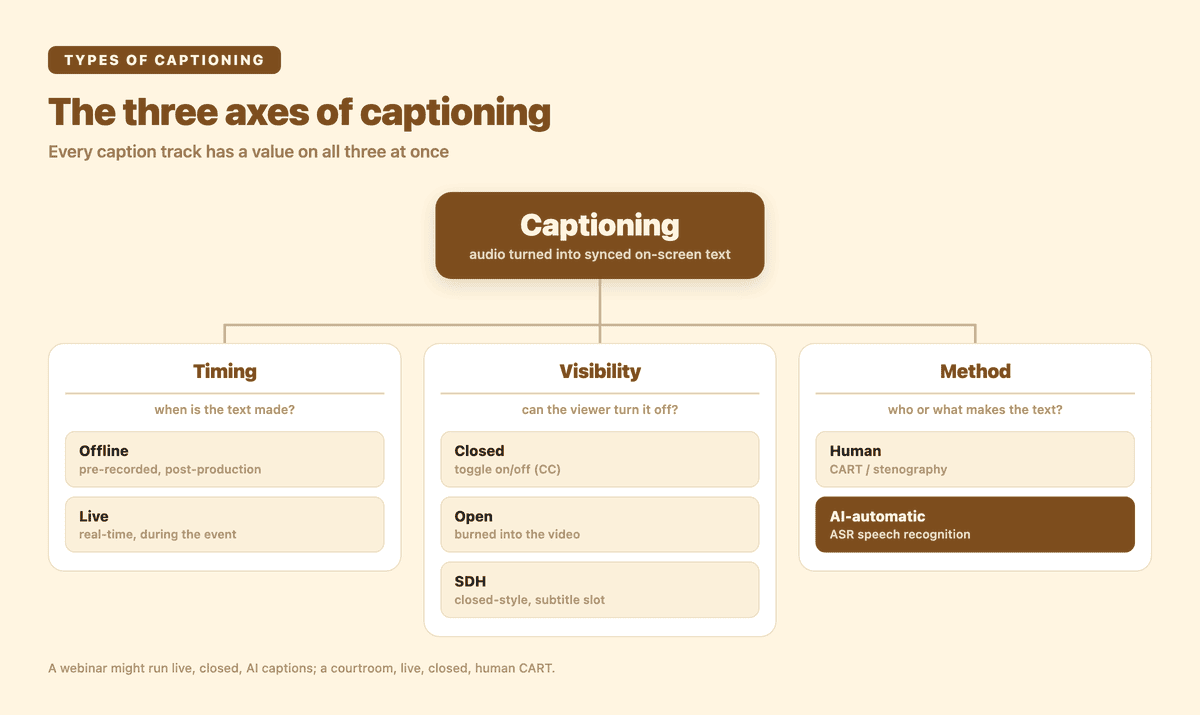
The three axes of captioning — every caption track has a value on each. This guide walks all three.
That one definition hides a whole category. "Captioning" covers pre-recorded TV captions and the live text scrolling at a conference; a toggle-on-or-off track and text burned permanently into a clip; a court stenographer and an AI model. If you've searched "what is captioning" or "types of captioning," you've probably found a dozen pages that each define one slice and skip the rest. This is the map. I run Subanana, a speech-to-text tool with subtitle and live-caption modes, so I have a stake in the AI end of this — but the goal below is to lay out the full taxonomy, link the deeper guides for each branch, and only then show where the modern AI form fits.
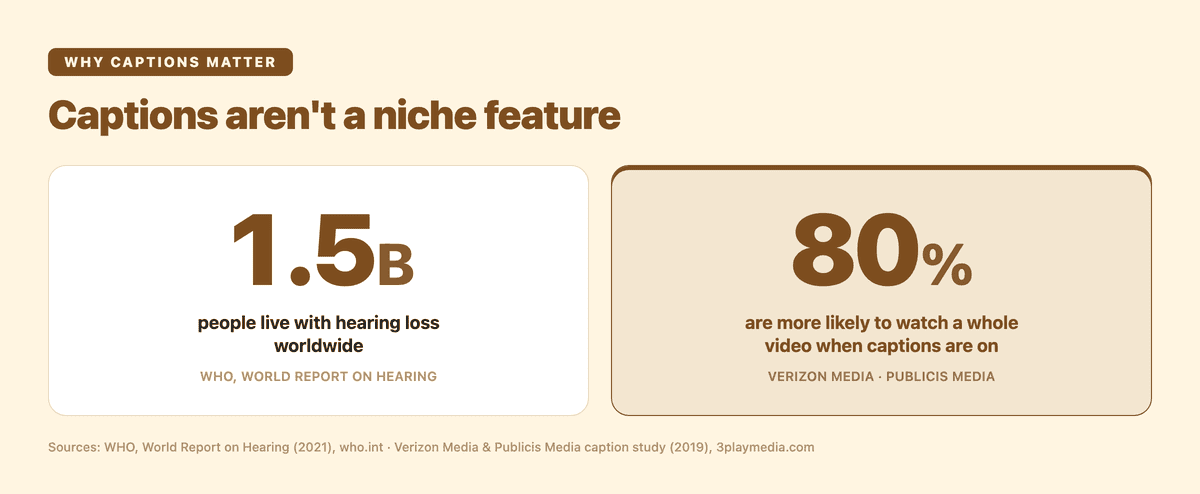
Captions aren't a niche feature. Roughly 1.5 billion people live with hearing loss worldwide (WHO), and in a Verizon Media and Publicis Media study 80% of viewers said they're more likely to watch an entire video when captions are on.
What is captioning, exactly?
Captioning means rendering audio as readable, time-synced text on a screen. The word matters: captions assume the viewer may not be able to hear the audio, so they carry more than the words. Per W3C WAI, captions cover "speech and non-speech audio information" — speaker changes, sound effects, music cues — everything you'd need to follow the content with the sound off.
That's also the line that separates captions from subtitles, and it's the single most common mix-up in this space. W3C WAI splits them by language and assumption: captions are "for the same language as the spoken audio" and carry non-speech sound; subtitles are "for spoken audio translated into another language" and assume you can hear, you just don't speak the language. So subtitles are usually a translation with dialogue only; captions are a same-language transcript with the audio context baked in.
That distinction has enough nuance — including SDH, which sits between the two — that it gets its own guide. If the caption-versus-subtitle vocabulary is what tripped you up, start with our explainer on subtitles vs captions; this pillar zooms out to the whole category instead.
What are the types of captioning?
There isn't one taxonomy — captioning is sorted along three independent axes at once. A single caption track has a value on each: it's offline or live, closed or open, and made by a human or by AI. Getting these straight is most of what "understanding captioning" actually means.
| Axis | The two types | The dividing question | Covered in depth |
|---|---|---|---|
| Timing | Offline (pre-recorded) vs. Live (real-time) | When is the text made — after a recording, or during the event? | Live captioning guide |
| Visibility | Closed vs. Open | Can the viewer turn the text off? | Open vs closed captions & SDH |
| Method | Human (CART / stenography) vs. AI-automatic (ASR) | Who or what turns the speech into text? | sections below + what is ASR |
The rest of this post walks each axis, briefly, and points to the spoke that goes deep. None of the three is "the" type of captioning — a webinar might run live, closed, AI captions; a TikTok clip might ship offline, open, AI captions; a courtroom might use live, closed, human CART. Same category, different coordinates.
Offline vs live captioning (the timing axis)
The first split is when the captioning happens. Offline captioning (also called pre-recorded or post-production captioning) is done on a finished recording — a movie, a course video, a YouTube upload. There's time to get it right: a captioner can rewind, fix a name, re-time a cue. This is the captioning behind streaming libraries; as 3Play Media puts it, offline/closed captioning is "for pre-recorded content" like Netflix.
Live captioning (real-time captioning) happens during an event, within a second or two of the words being spoken — a conference, a webinar, a broadcast, a lecture. 3Play describes it as captioning "designed for live events and... performed in real-time". The hard part is the absence of a second take: there's no rewind while the room is watching, which is exactly why the human-vs-AI question below carries more weight for live than for offline work. Live captioning is a deep topic on its own — the full how-it-works, latency, and event-setup detail lives in our guide to what live captioning is.
Closed vs open captions (the visibility axis)
The second split is whether the viewer controls the text. Closed captions are a separate track the viewer can switch on or off — that's the CC button. They ride alongside the video as sidecar data (an SRT/VTT file, a broadcast caption stream, or a platform's caption layer), so the same clip plays captioned for one viewer and clean for another. Open captions are "burned in" or "hardcoded" — fused into the video pixels, always visible, impossible to turn off, and dependable on any player or social feed that has no CC button.
Which one you want depends entirely on where the video lives, and there's a third option — SDH (subtitles for the deaf and hard of hearing) — that behaves like closed captions but travels in the subtitle slot for modern streaming and HDMI. That whole open/closed/SDH decision, plus what the FCC, ADA, and WCAG actually require, is its own guide: open vs closed captions and SDH.
Human vs AI captioning methods (the method axis)
The third split is how the speech becomes text — and it's the one with the biggest cost and accuracy trade-off, especially live.
Human captioning is the certified-accuracy gold standard. A trained professional produces the text, and per 3Play these "always include a human captioner" working by stenography (a steno machine) or voice writing (re-speaking the audio into speech recognition trained to their voice). For live work this is CART — Communication Access Real-time Translation — which W3C WAI names as the usual way "live captions are... done". A human handles crosstalk, heavy accents, jargon, and proper nouns with a reliability AI still can't guarantee in the moment. The trade-off is cost and scheduling: it's a per-hour professional service you have to book. For regulated proceedings, legal or medical settings, and broadcast — anywhere certified accuracy is a compliance requirement — human CART or an enterprise human-captioning service (Ai-Media, Verbit, 3Play Media) is the right call.
AI-automatic captioning turns speech into text with machine-learning and automatic speech recognition (ASR) — no human in the loop during the event. 3Play frames its benefits as "cost and ease of scheduling": it's instant to set up, scales to any number of events without booking a person, and increasingly translates into other languages on the fly. The trade-off is the inverse of human captioning — there's no certified-accuracy ceiling, and the single biggest factor in output quality is the cleanliness of the audio going in. ASR is the engine under this entire method, and if you want to understand why AI captions are sometimes flawless and sometimes mangle a name, the mechanics are in our explainer on what ASR is and what drives its accuracy.
A practical way to read the method axis:
| Method | Best for | Real strength | Real limitation |
|---|---|---|---|
| Human (CART / stenography / voice writing) | Legal, medical, broadcast, compliance-mandated events | Certified accuracy, human judgment on accents and jargon | Cost, scheduling, fewer languages live |
| AI-automatic (ASR) | Webinars, lectures, self-serve and multilingual events | Instant setup, scales, translates live, low cost | No certified ceiling; quality depends on audio in |
Neither is "better" in the abstract. The honest test for any AI tool is to run it on your audio before an event and see whether it clears your bar.
How do you caption a live event?
Captioning a live event is the question most people arrive here actually trying to answer, so here's the shape of it. Under the hood, every live-caption system — human or AI — runs the same loop, fast: capture the audio (a microphone, a mixing-board feed, or a video call's system audio), convert speech to text (a stenographer, or ASR), optionally translate it for a multilingual audience, and display it — on a venue screen, in the meeting window, or on each attendee's own phone via a shared link.
Your first decision is the method axis above. If the event is a regulated proceeding or demands certified accuracy, book a human CART provider. If it's a webinar, lecture, conference, AGM, or internal meeting, AI-automatic live captioning is usually good enough and dramatically cheaper — and it's the only option that translates into other languages without an enterprise contract.
For the AI route, the practical setup is short: route your event's audio into the software, pick a source language and a target language, and share the caption link with your audience — no hardware to rent, no captioner to schedule. The full step-by-step, including how AI live captioning stacks up against human CART for real events, is in our live captioning guide.
The modern form: AI real-time multilingual captioning
Step back and the trajectory of the whole category is clear. Captioning started as offline, human, single-language text for pre-recorded TV. The fastest-growing corner today is the opposite corner: live, AI-automatic, and multilingual — captions produced in real time, by ASR, and translated on the fly so a room full of people who don't share a language can each read along. That's the form that didn't really exist a few years ago, and it's where Subanana's real-time transcription sits.
Here's how it works in practice. The host opens a live session, routes the event's audio in (a microphone or the call's system audio), and picks a source language plus up to 5 translation target languages. Attendees scan a QR code or open a shared link on their own phones, and each attendee picks their own language from the set the host configured. Side-by-side bilingual display isn't a phone option — it lives on the venue-screen dual projection. No app install, no hardware, no captioner to book. The accuracy difference is in the engine: Subanana doesn't just pass the audio through a single ASR model and show you the raw result. It transcribes, then runs a real-time LLM-correction pass over the live caption output — so the captions on screen are far more accurate than standard, single-pass AI live captioning. It leans on the same quality stack we use for file transcription too: continuously benchmarking speech-to-text models and routing to the best performer per source language, rather than locking to one vendor.
What it's actually differentiated on:
- LLM-corrected captions, not raw ASR. The real-time correction pass is the point: where most automatic live captioning shows you a single model's unedited output, Subanana's captions are corrected as they stream, putting it at the accurate end of the AI live-caption spectrum rather than the fast-but-rough end.
- Cantonese and code-switched speech. Hong Kong events rarely happen in one clean language — a speaker slides between Cantonese and English mid-sentence. Subanana's live captioning treats Cantonese as a first-class source language and auto-detects that mid-utterance code-switching; for long, clearly-segmented events (English first half, Cantonese second half), the operator can switch the source language at the break for extra stability.
- Audience-facing by design. The shared-link-to-every-phone model is the thing platform built-ins (Google Meet, Microsoft Teams captions) don't do for an in-person or hybrid room.
- Multilingual without an enterprise contract. You get real-time translation on a self-serve plan.
And the honest boundaries, so you can rule it in or out fast:
- It's AI-automatic, not a human service. If you need certified, legal-grade accuracy, book a human CART provider — that's a different tool for a different job.
- Up to 5 translation targets per live session. The host sets one source plus up to 5 targets before the event; attendees pick one language from that set and can't add one the host didn't configure. (Need more than five at a single event? Run a parallel session for the overflow.)
- Event files come from the recording. Re-process it as a regular file upload afterward for an SRT subtitle track, or a polished, paragraphed transcript or Word/Excel export — the AI subtitle and transcription side supports the broader format set.
Captioning, in other words, is no longer one thing you order from a vendor weeks in advance. For most events it's now something you can switch on yourself. The fastest way to find out whether AI-automatic live captioning clears your bar is to run it on your own audio — the free tier lets you preview the result before you commit.
Frequently asked questions
What is captioning in simple terms? Captioning is turning a video or event's audio into synchronized on-screen text. Unlike subtitles, captions carry the non-speech audio too — who's speaking, sound effects, music — so someone who can't hear the audio can still follow everything. The text is timed to the speech and shown in the player or on a screen.
What are the main types of captioning? Captioning is sorted along three axes at once. By timing: offline (pre-recorded) vs. live (real-time). By visibility: closed (toggle on/off) vs. open (burned permanently into the video). By method: human (CART / stenography) vs. AI-automatic (ASR). A single caption track has a value on each — for example, a webinar might run live, closed, AI-automatic captions.
What's the difference between captions and subtitles? Captions are in the same language as the audio and include non-speech information (speaker labels, sound effects), for viewers who may not be able to hear. Subtitles are usually a translation into another language and contain dialogue only, for viewers who can hear but don't speak the language. (Full breakdown, including SDH, in our subtitles-vs-captions guide.)
What's the difference between closed and open captions? Closed captions are a separate track the viewer can switch on or off (the CC button); open captions are burned into the video and can't be turned off. Closed captions are the flexible default for real players and accessibility; open captions guarantee the text shows on social feeds and surfaces with no caption support.
Is AI captioning as good as human captioning? For settings where certified accuracy is a legal or compliance requirement — court, regulated medical, broadcast — human CART is still the right choice; that's the certified ceiling no automatic tool claims to beat. For webinars, lectures, conferences, and internal meetings, modern AI live captioning is the practical option — but not all AI captioning is the same tier. A tool that just shows you a single ASR model's raw output is the fast-but-rough end; one that adds a real-time LLM-correction pass over the captions (as Subanana does) sits at the accurate end of automatic captioning. The honest test is to run a tool on your own audio first.
How do I caption a live event? Decide the method first: human CART for certified-accuracy or regulated events; AI-automatic for webinars, lectures, and multilingual events where cost and instant setup matter. For the AI route, route the event's audio into the software, pick a source and target language, and share the caption link with your audience — no hardware or scheduled captioner needed.
Why does captioning matter for accessibility? The WHO estimates over 1.5 billion people live with some degree of hearing loss, rising toward 2.5 billion by 2050. Captions make a video, class, or event legible to anyone who can't rely on the audio — and accessibility law (the FCC's captioning rule and the ADA's adoption of WCAG) requires captions in many contexts. Our open vs closed captions guide covers the legal detail.
Sources cited: W3C WAI — Captions; 3Play Media — How live captioning works; 3Play Media — Live auto vs live professional captions; Ai-Media — Types of captioning; 3Play Media — SDH vs closed captions; FCC — 47 CFR § 79.1; ADA.gov — 2024 web rule; WHO — Deafness and hearing loss.