
Subanana now pays you to share it. If you already use Subanana to caption videos, write up meetings, or run live translation at events, you can hand friends a real discount and get paid when they subscribe.
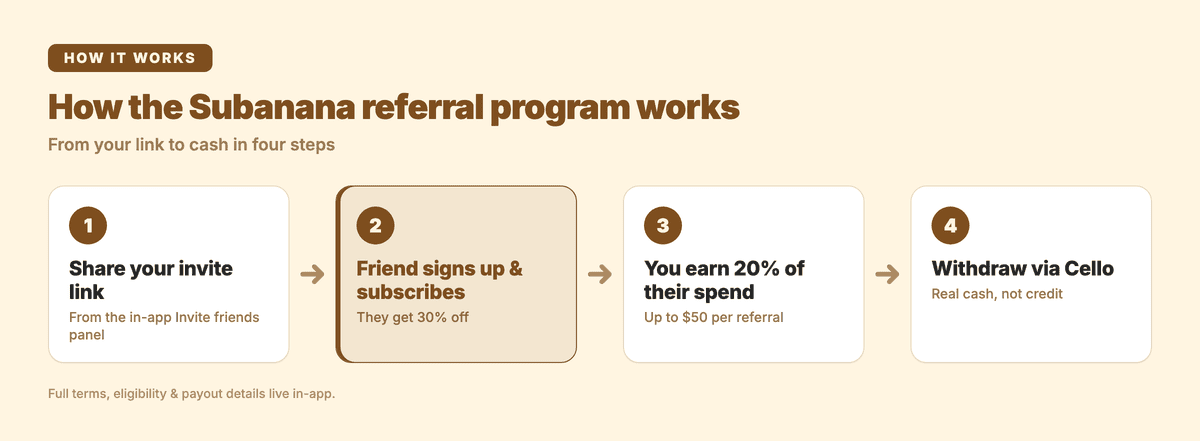
The deal is simple: your friend gets 30% off, and you earn 20% of their spend — up to $50 per referral. The rewards are cash you withdraw, not store credit locked inside your account. The program runs on Cello, so the link, the tracking, and the payouts are all handled for you.
What is the Subanana referral program?
It's a give-and-get referral program built into the app. From the Invite friends panel (top of the app's Home page), the headline says it plainly: "Give 30% off. Get up to $50."
- Your friend gets 30% off Subanana when they sign up through your link.
- You earn 20% of that friend's revenue, up to $50 (USD) per referral.
You don't need to be on any particular plan, run a campaign, or apply to an affiliate network. The link lives inside the product you already use. Subanana is an AI speech-to-text tool — subtitle generation, meeting transcription and summaries, and live captioning — so the people most worth inviting are the ones who'd reach for the same job you do: a creator drowning in subtitle work, a team that records every standup, an event organizer who needs live captions.
What do you get, and what does your friend get?
| Your friend (the invitee) | You (the referrer) | |
|---|---|---|
| The reward | 30% off Subanana | 20% of the friend's revenue |
| Cap | — | Up to $50 USD per referral |
| Paid as | A discount at checkout | Cash, withdrawable via Cello |
Two things are worth calling out. First, the cap is per referral, so inviting more people who subscribe means more rewards — there's no single one-and-done ceiling on the program. Second, the reward is a share of your friend's revenue, which means it tracks what they actually spend on Subanana, not a flat finder's fee.
How are you paid? (Cello, real cash)
This is the part most referral programs get cute about. Subanana's rewards are withdrawable through the payment methods Cello supports — actual money out, not a coupon you can only spend back inside Subanana. Cello is the platform powering the program, and it handles the link, the attribution, and the payout rails. You'll see your earnings in the Invite / Rewards dashboard inside the app, and you withdraw from there.
Exactly which payment methods are available, plus the eligibility rules and payout timing, are spelled out in the program's full terms — tap the ⓘ in the referral panel to read them. I'm not going to paraphrase the fine print here, because the in-app terms are the source of truth and they can change; read them there before you start sharing.
How to start referring (60 seconds)
- Open the Subanana app at plus.subanana.com.
- Click Invite friends at the top of your Home page.
- Copy your personal invite link — it looks like
subanana.cello.so/your-code— or share it straight from the panel. - Send it to someone who'd actually use Subanana. They get 30% off; once they subscribe, your 20% reward starts accruing.
- Track earnings and withdraw from the Rewards dashboard in the same panel.
That's the whole flow. No application, no separate login, no waiting on approval.
Who's actually worth inviting?
The referral pays you a share of what your friend spends, so the program rewards inviting people who'll genuinely stick around — not blasting a link to everyone. The strongest fits are people doing the jobs Subanana is built for:
- Creators who publish subtitled video and are tired of hand-syncing captions.
- Teams that run recorded meetings and want clean transcripts plus an AI summary instead of someone taking minutes.
- Event organizers who need live captions and translation on a shareable link.
If that sounds like someone in your circle, the 30% off is a real reason for them to try it, and you get paid when they do. If you're weighing which plan to point them at, the pricing page lays out what each tier includes.
Frequently asked questions
How do I join the Subanana referral program?
You don't apply — it's already in the app. Open plus.subanana.com, click Invite friends at the top of your Home page, and copy or share your personal invite link. Anyone who signs up through it gets 30% off.
How and when do I get paid?
Rewards are paid as cash and are withdrawable through the payment methods Cello supports, from the Rewards dashboard inside the Invite friends panel. You earn 20% of a referred friend's revenue, up to $50 per referral. The payout methods, minimums, and timing are listed in the program's full terms — tap the ⓘ in the referral panel.
How much can I earn per person I refer?
Up to $50 USD per referral — that's 20% of the referred friend's spend, capped at $50 for that person. There's no single cap across the program, so referring more subscribers means more rewards.
Who's eligible, and what are the exact terms?
Eligibility, payout conditions, and the rest of the fine print live in-app. Open the Invite friends panel and tap the ⓘ to read the current, authoritative terms before you start sharing.
What does my friend get?
A 30% discount on Subanana when they sign up through your link. It's a real reason to try a tool they were probably going to need anyway — whether that's AI subtitling or meeting transcription.
If you've gotten value out of Subanana, the referral program is the easiest way to pass it on and get paid for it. Open the app, grab your link, and send it to one person today.