Subanana
Product updates

Changelog: what we shipped, and when

What's new, what got better, what got fixed: every change to subtitles, transcripts, meeting notes and live captions, dated, each with its own link to share.

Last update Sep 5, 202617 releases since Aug 2025

All updates since July

Brand New Meeting Editor

Meetings now have a dedicated workspace—notes, timeline, and transcript sit side-by-side, built around a directly editable note.

  • Structured Notes: Summaries, decisions, action items, and open questions are presented in paragraph form and selected based on the actual meeting content.

  • Moment Playback: Every point comes with supporting content and links to the corresponding moment in the recording; click to hear the original words.

  • Timeline Alignment: Notes are built along the meeting timeline, fully covering conversations up to two hours.

  • Global Speaker Naming: Name a speaker once to apply it across the transcript, timeline, and all notes; action item assignees will also be synced.

  • AI Assistant with Timestamps: The editor's assistant answers based on the recording, with each claim accompanied by a clickable timestamp.

  • Unified Version History: Transcripts, translations, and every note are recorded as a single restorable version.

  • Real-time Collaboration: Access the same live document across tabs, devices, or shared links; edits are automatically merged without overwriting each other.

More Accessible Live Captions

  • Simplified Prompt Controls: Glossary and prompt controls have been merged into a single prompt field with default values, completing setup in one go.

  • Native Language Menu: The audience language menu displays names in each language's own script and name.

  • Advanced Playback Features: Supports bilingual subtitles and real-time translated speech (system-generated speech will now actually play).

  • Picture-in-Picture Streaming: Display captions continuously in an independent stream.

  • Smart Language Processing: Chinese and Cantonese target languages output written form, and glossary terms are preserved after conversion.

Meeting Recording That Won't Start Uninvited

  • Manual Control: Recording and live captions now both require manual activation; joining a call will not trigger unrequested actions.

  • Robust Recording Tools: Can enter Zoom meeting frames, capture pages without media elements, and fix timing when capture fails.

  • Queue Auto-Repair: Recurring meetings that previously remained silent without launching the bot will now be re-queued.

Caption Editing with Fewer Dead Ends

Operations that previously required contacting support can now be completed with a single button click:

  • Self-delete or regenerate completed translation tracks.

  • Fix a misheard term once to automatically apply it to the entire track.

  • Introduced a design mode for caption styles, along with a compact toolbox reachable even on short screens.

  • Dragging captions maintains readable lengths for adjacent captions, preventing them from being crushed into tiny fragments.

More Accurate Transcription

  • High Accuracy Upgrade: Accuracy taken to the next level, with default re-alignment to full audio to ensure captions stick closely to the speech.

  • Smart Language Prompts: Automatic and multi-language projects now provide prompts when the language is known in advance.

  • Formatting Normalization: Spaces in Chinese and Japanese are normalized, Korean is calculated by actual display width, and redundant punctuation is cleared before final caption segmentation.

Larger Files, Clearer Plans

  • Removal of Free Upload Limits: All workspaces share a 30 GiB limit per file, with a duration limit of eight hours for paid plans.

  • Gateway Upload Optimization: Large files are now uploaded via a gateway; long files no longer fail at the final step.

  • Upgraded Mobile Experience: Mobile plan dialogs are now expandable cards, pre-expanding the upgrade options that suit you best.

  • Real-time Credit Display: The credit bar shows both the cost of the current task and your remaining balance.

Correctly Rendered Sharing

  • Optimized Preview Cards: When sharing links are pasted into chats, they display the project title, sharer, and a preview card instead of a generic brand card.

  • Secure Guest Permissions: Guests open a true read-only editor, and links only provide the current version of the document; revision history and content deleted before sending remain with the sender.

Starting a Project

  • One-Click Settings Reuse: Reuse settings from completed projects with one click in the project list.

  • Smart Language Sorting: The language menu prioritizes languages that users are actually likely to select at that step.

  • Dedicated YouTube Downloader: Handled by a specialized downloader that clearly explains reasons for failure when encountering live streams, member-only videos, or temporary link errors.

Your Account

  • Subanana Branded Interface: Login features a Subanana branded interface with support for localized transitions.

  • Account Security: You can change your login email and perform recovery in case of conflicts.

  • Language Support: Korean has been added to the interface, alongside English, Traditional Chinese, and Japanese.

Details You Might Notice

  • Text selection now follows your theme color.

  • Pricing dialogs now open correctly on Safari.

  • AI conversations will reconnect quietly without needing a page refresh.
The subtitle editor, rebuilt from the ground up

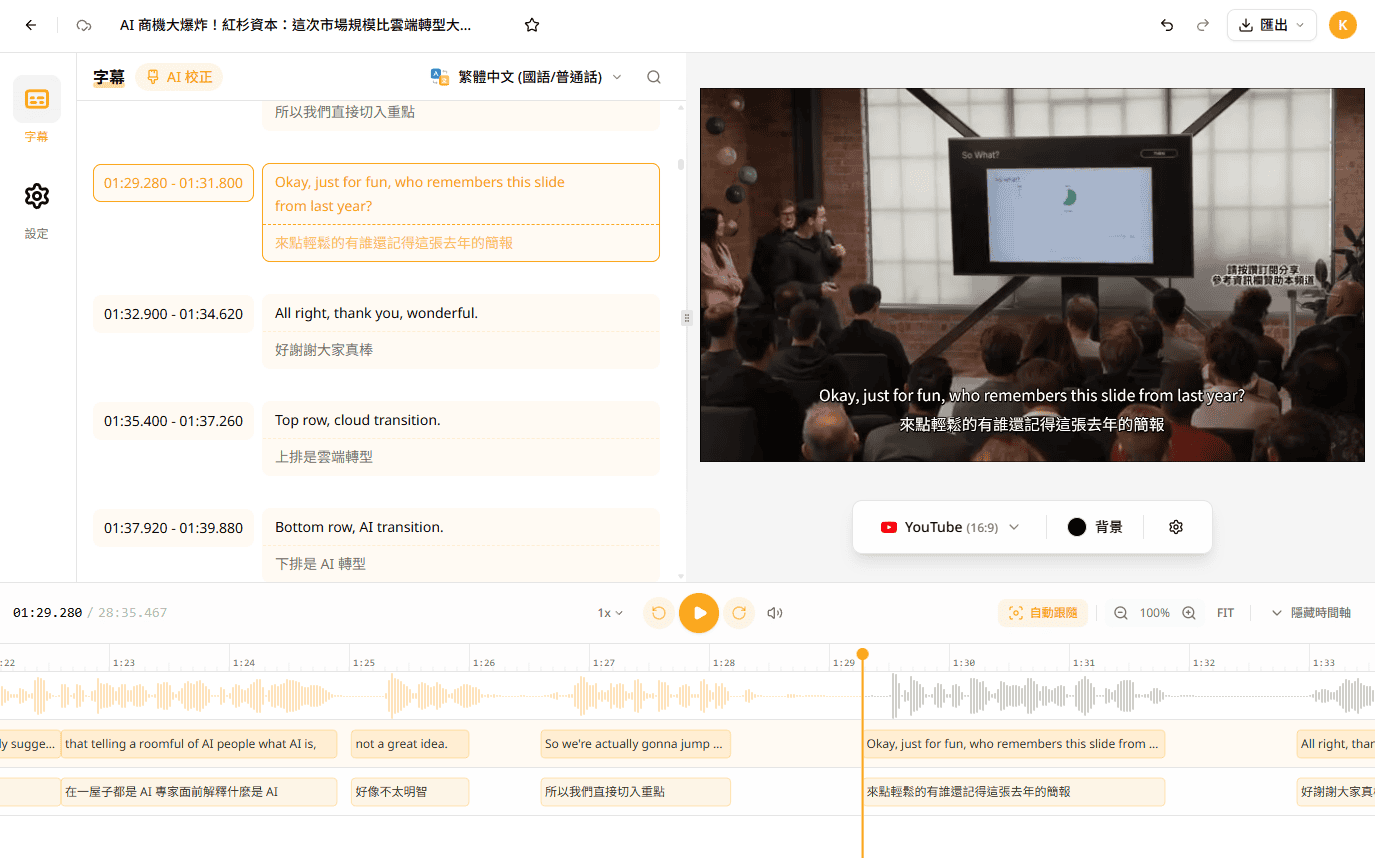
We spent the last three months rebuilding the subtitle editor around one principle: your edits and your content come first. Everything you type now lands instantly, stays safe through reloads and shaky connections, and exports exactly as you see it.

TL;DR

  • Every keystroke, split, merge, and undo now applies instantly on your device and syncs in the background — no more waiting on the network.

  • Your text has one source of truth. The old glitches — disappearing characters, text lost while splitting a cue, stale translations — are gone at the root.

  • Redesigned preview and Timeline, a Source track switcher for multi-source projects, cross-track Find and replace, dependable Version history, and faster, more faithful exports.

Editing at the speed of typing

The old editor confirmed many edits with the server before they fully settled — on a slow connection, undo after splitting a cue could hang for seconds. The new engine commits every change to your device first and syncs quietly behind the scenes. Typing, splitting, merging, and undo/redo are now immediate, every time, even mid-sync.

Built to never lose a word

Subtitles are your content, and the editor's first job is to keep every word safe. The new engine stores your track as a single authoritative document: edits survive page reloads, offline moments, and flaky networks, and each change is recorded exactly once — no duplicates, no silent drops. The bug classes that used to bite — deleted characters reappearing, text vanishing during a split, translations going stale — were all symptoms of the old architecture, and they're gone with it.

Preview and Timeline, redesigned

Drag a cue on the Timeline and its neighbours now shift out of the way instead of blocking you. Seeking is precise, and playback follow no longer yanks the cue list around while you're editing. The preview stays true to what your export will look like.

Every track, one editor

Projects with multiple sources now open every track in the same editor — switch between them with the Source track selector. Find and replace works across tracks, so one pass can clean up a term everywhere.

Version history you can rely on

Version history snapshots both your content and your track lineup. Restoring a version brings back the project exactly as it was then — including which tracks existed — and nothing is ever truly lost: any version remains recoverable.

Sharper, faster exports

A new rendering engine powers subtitle export. Rendered videos match the editor preview more closely and finish faster.

Why a three-month rebuild?

We could have kept patching glitches one by one. But every fix was fighting the same root cause: the old editor kept several copies of your subtitle text and synced them by hand, and every gap between copies was a chance to lose your work. That's not good enough for the place where your content becomes final. So we rebuilt the editing core on the same collaborative-editing technology that powers modern shared documents — one owner for every character, offline-safe by design. It took three months to do it right, and it's the foundation the next year of editor features will stand on.

This is just the beginning

The new engine unlocks what we hear asked for most — real-time collaboration is now on the horizon. To try the new editor: open any subtitle project. It's already on for everyone.

Smarter subtitles, less editing

TL;DR

  • New Standard / Enhanced transcription engine toggle in the upload drawer. Enhanced auto-polishes every cue and uses 1.5× credit.

  • Polish is rewritten as "diagnose first, apply once" — a ~10–30 s scan surfaces 4–5 categories of suggestions with real before → after examples from your own cues, and only the categories you tick get applied.

  • Live progress in the editor — no polling, no manual refresh.


Two transcription engines, your call

Pick Standard or Enhanced in the upload drawer (Enhanced has a NEW badge).

Standard is the fast path — best for rough cuts, sync-checking, and quick turnaround. 1× credit.

Enhanced runs an extra polish pass on top of Standard, auto-cleaning punctuation, line breaks, and common transcription slips. Best for final subtitles you'll publish as-is. Uses 1.5× credit.

The Estimated Transcription Usage shows a clear ×1.5 pill the moment you flip to Enhanced, so the multiplier is explicit before you submit.


Polish, redesigned — "diagnose first, apply once"

The old review-every-cue flow is gone. New shape:

  1. Click Polish. The system scans your transcript (~10–30 s).

  2. The AI lists 4–5 polish suggestion categories — e.g. Filler-word cleanup, Name spelling, Punctuation normalization — each with a plain-language description, a real before → after example pulled from your own cues, and a count of how many cues it would touch.

  3. Tick the categories you trust. Skip anything risky.

  4. Click Polish again. The selected fixes apply in one pass, with cues updating live in the editor.

If the scan finds nothing actionable, you'll see an Already polished or Almost perfect screen instead of an empty options list.


This is just the beginning

This is our first cut at smarter, in-product polish. We'll iterate fast on how you use it and what you tell us — consistent, personalized styling control is up next.

To try it: open the upload drawer, drop a file, toggle Enhanced, submit. Or open an existing project and click Polish in the editor toolbar.

Teach Subanana your words

Stop fixing the same misspellings, re-explaining your product, and rewriting summaries into your team's shape. Three new sidebar tabs let you teach Subanana once — every project benefits.

Glossary

Pin terms you don't want misspelled (brand names, people, jargon).

  • Workspace list applies everywhere; Custom lists attach per project.

  • Add one-by-one, paste a batch, or bulk import XLSX/CSV.

  • Mark Universal (same in every language) or Language-specific.

Background Pack

Hand the engine the brief upfront. Upload PDF, DOCX, PPTX, XLSX, TXT, MD, paste text, or drop a URL. Auto-classified into 16 reference types and structured into Summary, Key Points, Facts, Key Terms, and Tone.

Template Library

30+ built-in summary templates (Meeting, Speech, Business, Medical, Legal, Creator, and more). One click to use. Build your own with Generate with AI.

Supporting Materials picker

Pick which glossaries, background files, and template apply to a project — works for single files, batch uploads, and live caption (ASR + translation read your context too).

Also shipped

  • Smart meeting formatting is now always on.

  • Mobile-first redesign of all three tabs.

  • Plan limits visible on the pricing card.

  • "How it works" popover on every page.

Coming next

Auto-suggested glossary terms from your edits, inline attribution badges, and per-project glossary overrides.

Smarter Live Captions and More Reliable Exports

New Features

Live Captions

  • Optional language hints in auto-detect mode — When using automatic source-language detection for live captions, you can now provide likely language or script hints to help recognition lock on faster.

  • Faster first load for long sessions — Live caption history now opens from the latest part of the session first, so long-running sessions feel much faster to open.

  • On-demand loading for older caption history — Older live caption history is now loaded only when you scroll back to it, which makes large sessions easier to browse.

Exports

  • Subtitle styling in video exports now matches the editor preview more closely — Video export rendering has been improved so the final output stays true to what you see while editing.

  • Distinct file names when multiple tracks share the same language — If you export a project with imported or re-transcribed subtitle tracks in the same language, exported file names and sheets now stay distinct instead of overwriting each other.


Fixes

Sign-In & Access

  • Smoother recovery from expired sign-in links — If sign-in returns with an expired session, the app now restarts the sign-in flow automatically instead of leaving you on an error page.

Live Captions & Translation Quality

  • Short or mixed-language captions translate more reliably — Auto-translation for difficult short inputs is now more responsive and less likely to stall.

  • Live captions handle temporary service interruptions more gracefully — When one upstream provider times out, processing now moves on more predictably instead of repeatedly stalling.

  • Fewer awkward short fragments at the end of a caption line — Live captions are less likely to split into one- or two-word tail fragments.

  • Captured audio is preserved through reconnects — Live caption sessions now recover more safely from connection interruptions without dropping speech that was already captured.

What's New Since the New App Launch

New Features


Subtitle & Caption Editor

  • Find & Replace redesigned — The find-and-replace dialog and header actions in the editor have been rebuilt for a smoother, less cluttered experience.

  • Export directly from the project menu — You can now start an export from the project list without opening the full editor first.

  • Scene presets for quick project setup — Common scene types are now available as presets when creating a project.

Transcription Accuracy

  • Improved transcription accuracy — Several improvements have been made to transcription quality, reducing errors and missed words across a wider range of audio.

  • Better subtitle line quality — Subtitles are split into lines more naturally, including improved handling of mixed scripts.

Meetings and Transcript

  • Smart Segmentation — You can now choose to group consecutive speech into paragraphs and restore punctuation for better readability.

  • Improved meeting editor on mobile — The meeting editor's toolbar collapses overflow actions into a "More" menu on smaller screens.

File Uploads & Import

  • Large files upload more reliably — Large files now use a multipart upload with a real-time progress indicator. Files that are still uploading or have failed are blocked from being accidentally selected.

  • Clear error for files that exceed the duration limit — Instead of failing silently, the app now shows a clear message when a file is too long.

  • Files without audio are handled gracefully — Uploads without an audio track now show a clear explanation instead of failing without feedback.

Project Organisation & Folders

  • New projects stay in the folder you are in — Creating a project from inside a folder now keeps it in that folder, instead of moving it to the root level.

  • Recently used language variants appear at the top — The language selector surfaces the variants you use most often for quicker selection.

  • Search "Chinese" to find Cantonese and Mandarin — Typing "Chinese" in the language selector now shows both Cantonese and Mandarin options.

Live Translation & Live Captions

  • Switch your microphone — You can now change your audio input in the live translation admin panel.

  • Friendlier errors and auto-reconnect — Live translation now shows clearer error messages and reconnects automatically when the connection drops.


Fixes


Live Translation & Live Captions

  • Admin panel history loads reliably — A bug that sometimes showed only partial captions when navigating back to a session has been fixed.

  • Captions scroll correctly on iPhone and iPad — Live captions now stay in sync with the latest text on iOS Safari.

  • Pending captions survive a pause — Captions that were in-flight when you paused are now properly recovered when you resume.

  • More reliable reconnection — The live translation display reconnects more reliably after network interruptions, including on Safari.

  • Start and pause work reliably — Fixed cases where the start button could get stuck after pausing, or where pausing during a resume wasn't possible.

Subtitle & Caption Editor

  • Timeline drag, trim, and keyboard shortcuts polished — Drag-to-resize, ripple trim, and keyboard shortcuts in the timeline all work more reliably.

  • Mobile editor stability — Multiple fixes for playback, menus, and video loading on mobile.

Transcription & Accuracy

  • Clearer error messages when transcription fails — Projects that hit a permanent error during transcription now show a clear reason instead of silently retrying.

  • Improved transcription accuracy — Additional fixes to transcription output, reducing hallucinations and errors in edge cases.

Meetings

  • AI chat in meeting editor works reliably — Fixed a bug where the AI chat would load indefinitely in the meeting editor.

  • Calendar recording reliability — Fixed issues with calendar recordings being missed during sync and with errors when connecting a calendar.

File Uploads & Import

  • iPhone Voice Memos and M4A files upload correctly — M4A files from iPhone, including Voice Memos, were being rejected. This is now fixed.

  • Audio-only files work end-to-end — Projects created from audio-only files (MP3, M4A, podcasts) now work correctly throughout the entire workflow.

  • Large video uploads no longer block the browser — Uploading large video files no longer causes the browser to become sluggish or unresponsive.

Exports

  • ZIP files open on Windows — Exported ZIP archives now unzip correctly on Windows without errors.

Onboarding & Sign-In

  • Faster landing after sign-in — The check after sign-in has been streamlined so you reach the dashboard without an extra redirect.

New Upgrade: Smoother, Smarter AI Work Experience

We have spent months completely rebuilding the entire app architecture, addressing previous pain points in your workflow and introducing a brand new user interface.

--------------------------------------------------------------------------

Brand New Workspace

We've redesigned the most commonly used interface to make operations more intuitive:

  • Subtitle Editor: Bilingual subtitles, basic video editing, and video export preview are finally integrated into a single workspace, making editing smoother.

image

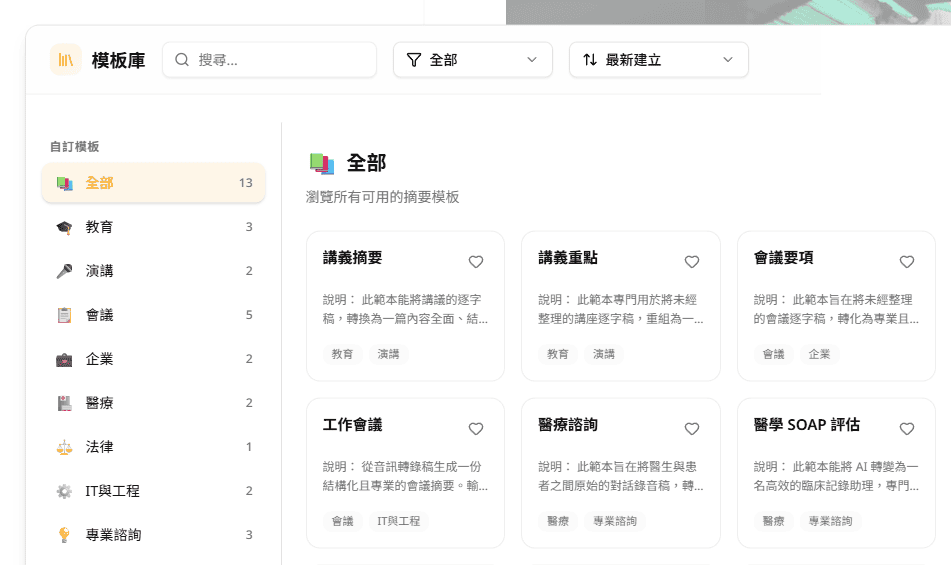
  • Meeting Editor: Features a dual-column layout with AI highlights on the left and transcript on the right—no more frequent page switching. Added an AI note template library:
  • Extensive Preset Templates: No need to rack your brain writing prompts—choose from a variety of built-in summary formats.

image

  • Custom Templates: Just provide a document sample and AI will mimic the tone and format to generate content.
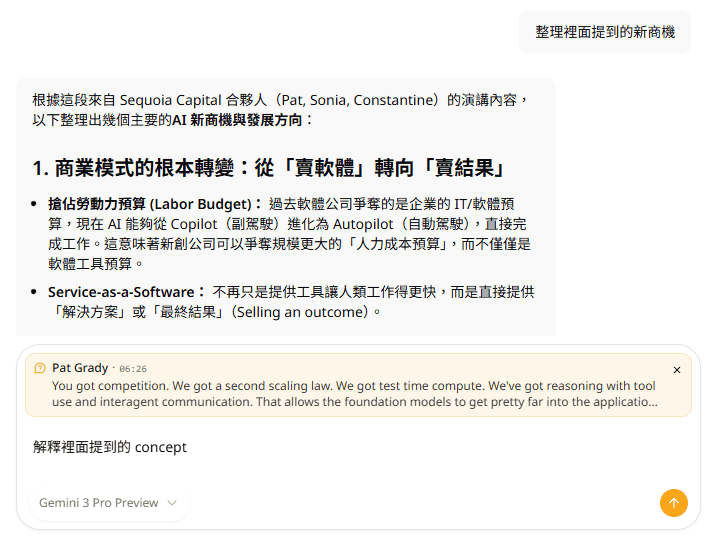
  • Smarter Ask AI: Improved Q&A experience—want to know "Who mentioned the budget in the meeting?" Just ask AI for more accurate answers.

image

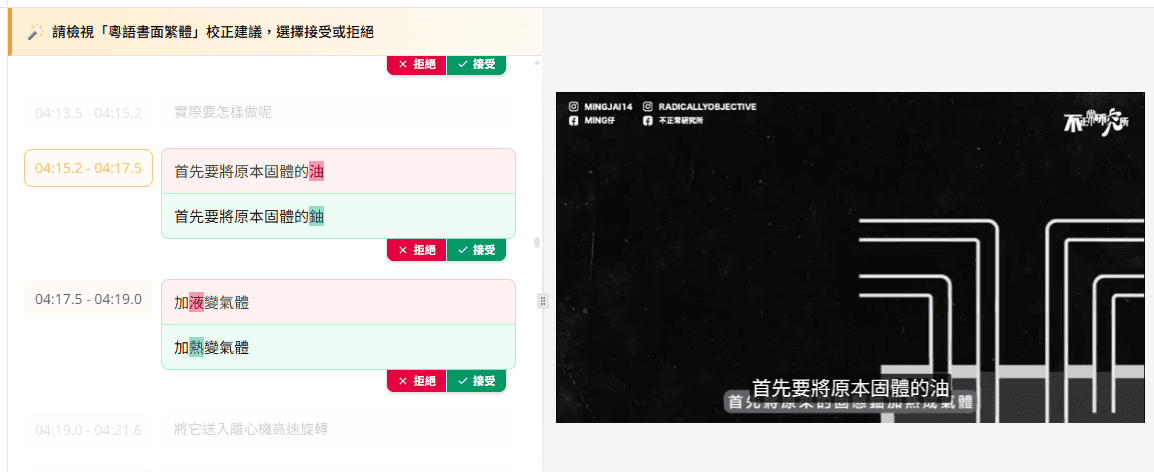
  • AI Spell Check: Enhanced automatic typo detection and correction—easily review and apply fixes.

image

  • Operate with Confidence: Supports Undo/Redo, so you can easily revert mistakes.

Faster and More Stable

  • We've updated the underlying architecture to reduce loading times and errors.

Clearer Calendar Meeting Management

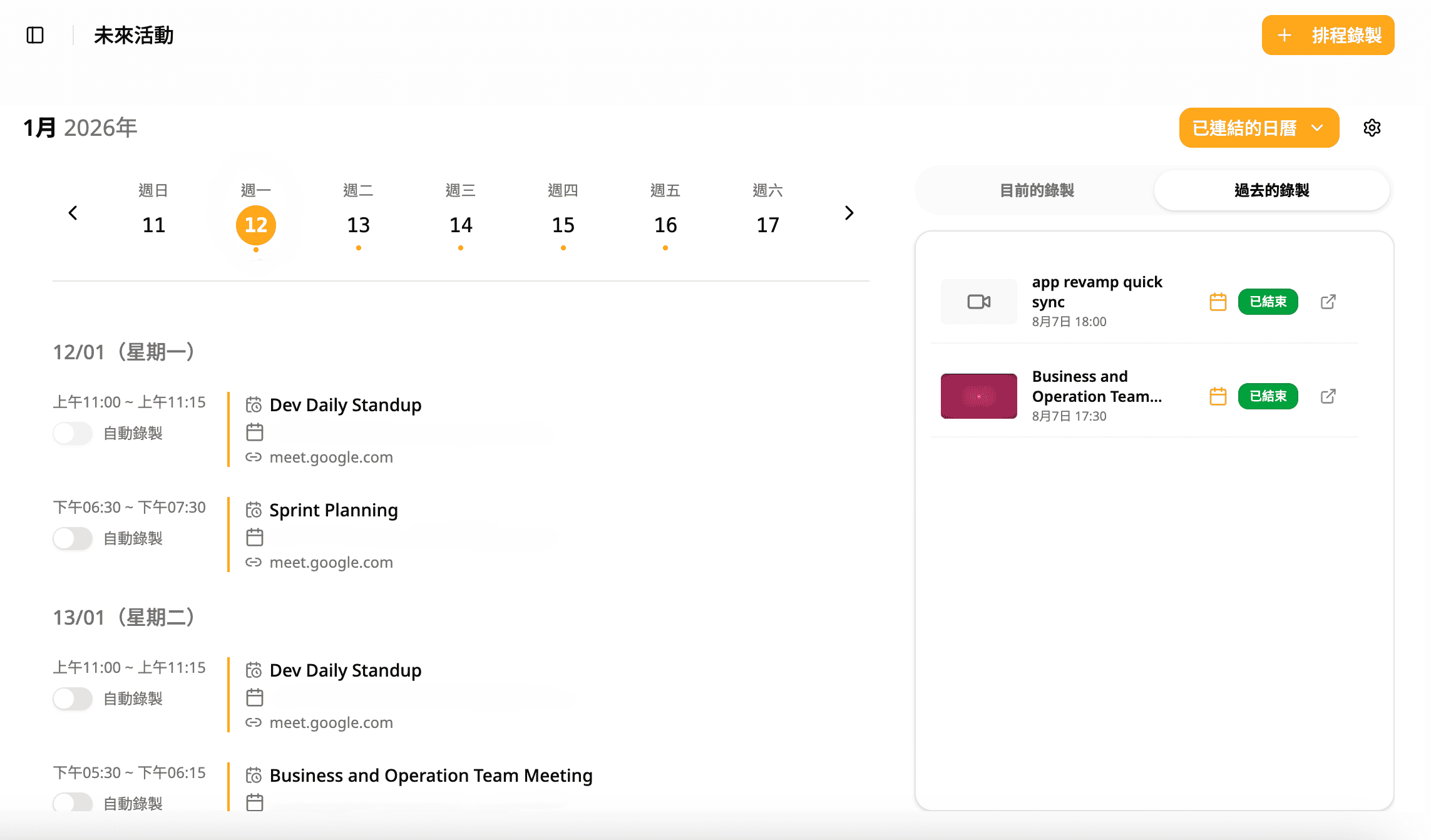
  • The new page better integrates your calendar. You can manage all meeting recordings and transcription settings here.

image

--------------------------------------------------------------------------

🔮 Coming Soon: Faster Iteration and New Features

This update will greatly accelerate our pace of developing new features. In the coming quarters, we will be rolling out:

  • More Flexible Plans: Updated pricing and plan options to better match your actual usage.
  • AI Smart Line Breaks: No more manual adjustments! Customize characters per line—AI will automatically analyze tone and grammar to re-break lines.
  • AI Agent Assistant: More than just "recording"—AI will proactively help you complete tasks (such as sending follow-up emails, syncing Notion or Slack project updates).
  • Seamless Sharing & Collaboration: Easily share folders, meeting notes, and video subtitles with your team or external clients for collaborative work.

--------------------------------------------------------------------------

We can't wait for you to experience the all-new Subanana.

If you have any questions about this update, feel free to reply to this email and contact us.

Support linking Microsoft Outlook Calendar

  • Support linking Microsoft Outlook Calendar to set up automatic meeting recording
  • Improve and update some page designs
  • Fix some operations in the editing interface and improve smoothness
  • Improve AI summary generation content

New Feature: AI Real-Time Subtitle Generation and Translation

Untitled design (5)

[Real-time Translation]

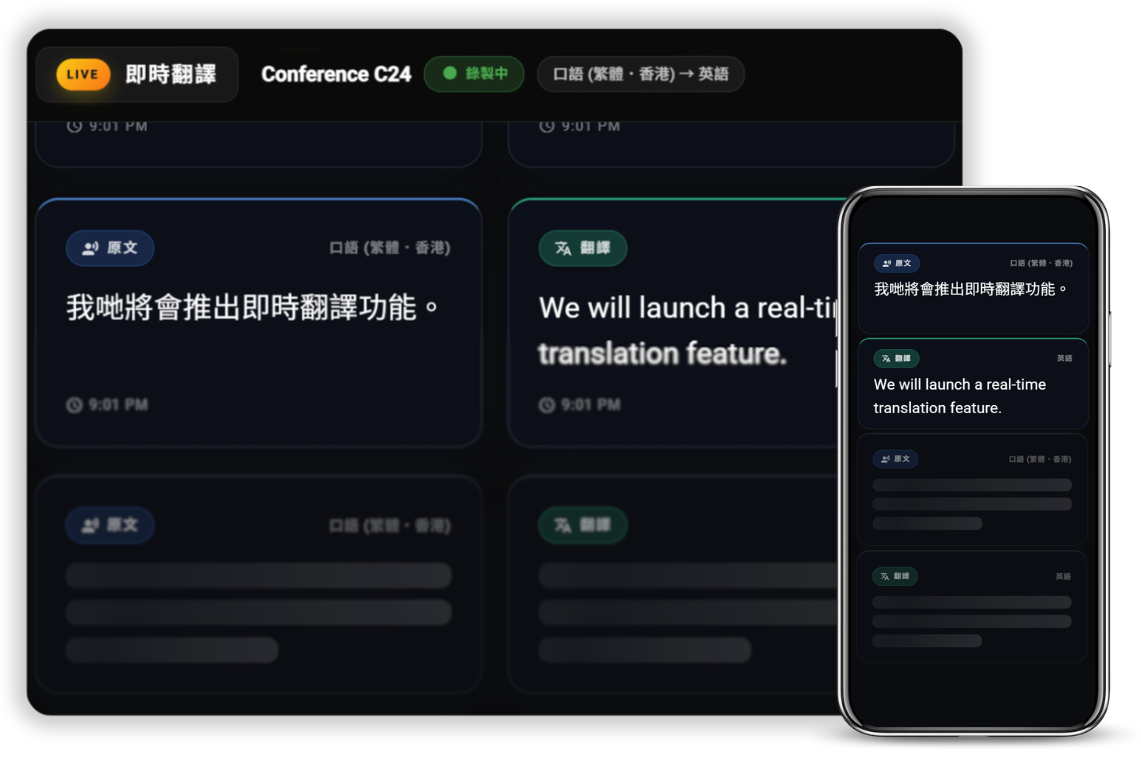
Added AI Real-time Translation feature for generating real-time subtitles and translations for meetings and events

After setting up real-time translation, you can start recording, and the system will instantly display transcription and translation results side by side

* Exclusive feature for Ultra and Business users, but all users can try this feature

Feature highlights:

  • Side-by-side bilingual subtitles: Allow all participants from different backgrounds to engage more in discussions
  • Customizable vocabulary style: Ensure translations accurately reflect industry terminology, company/product names
  • View subtitles on mobile: Use your personal device to scan the QR Code and view real-time subtitles and translations
  • Content security and confidentiality: Not used for any AI learning, and content can be deleted at any time
  • Export text records: View records and download subtitle files anytime, making post-production easier

The AI real-time transcription tool is suitable for various industries and scenarios:

  • 🏢 Seminars, Webinars, and large-scale events
  • 🎓 Real-time translation for classes
  • 🏥 Medical diagnosis and consultations
  • 🎤 Media interviews, Podcasts
  • ✈️ Travel tours

Added page recording upload feature

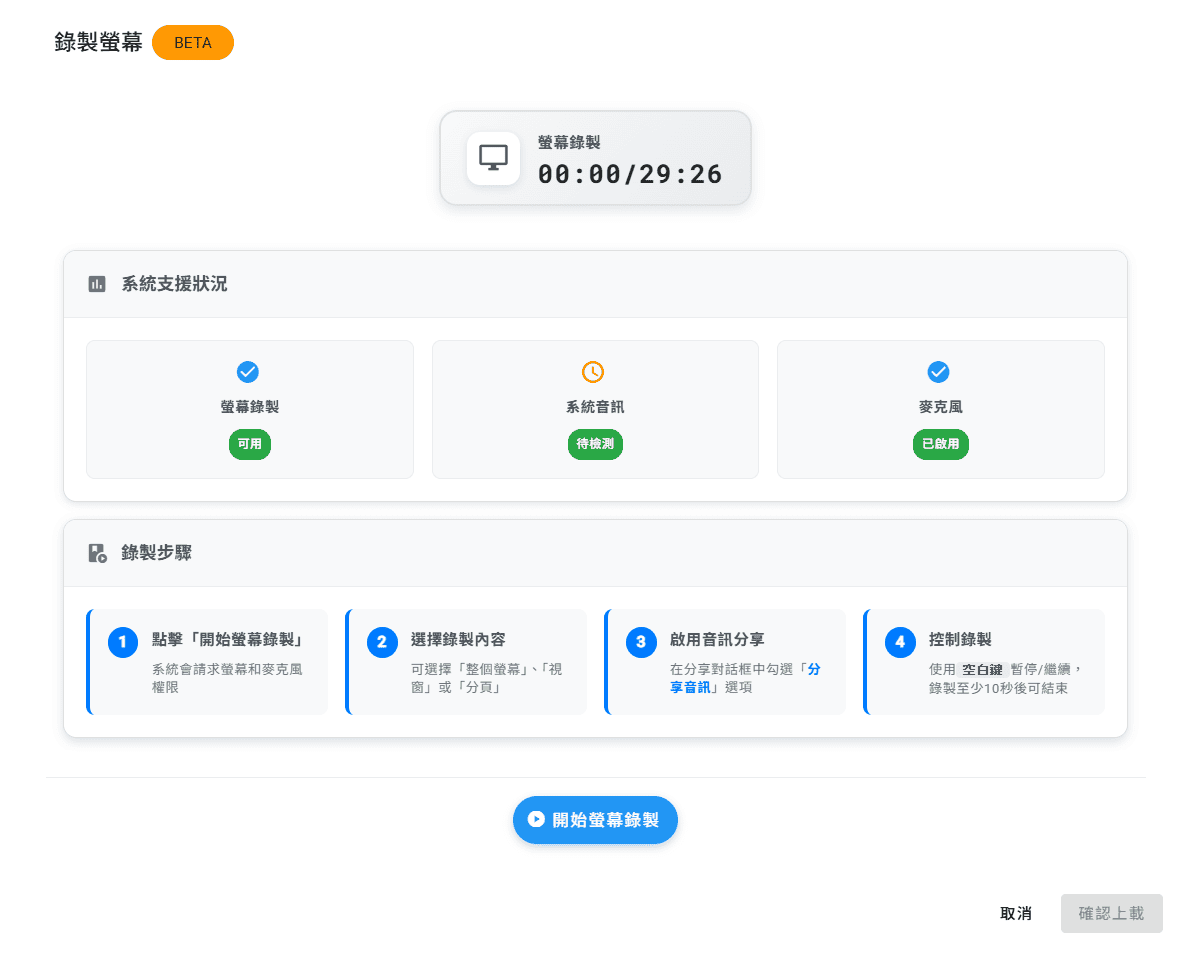
[Upload Video/Audio] Users can now select [Record Page Content] and upload transcribed subtitles or meeting notes

*Available only on MacOS and Windows recording

*You must record a specific window to capture audio content

Screenshot 2025-10-21 231233

Added email notification for completed transcription

[Upload Media] Users can now select [Send email notification after project completion] at the bottom right of the upload page. After all transcriptions are completed, users will receive a completion notification at their account email.

Meeting Notes AI Feature Updates and Other Improvements

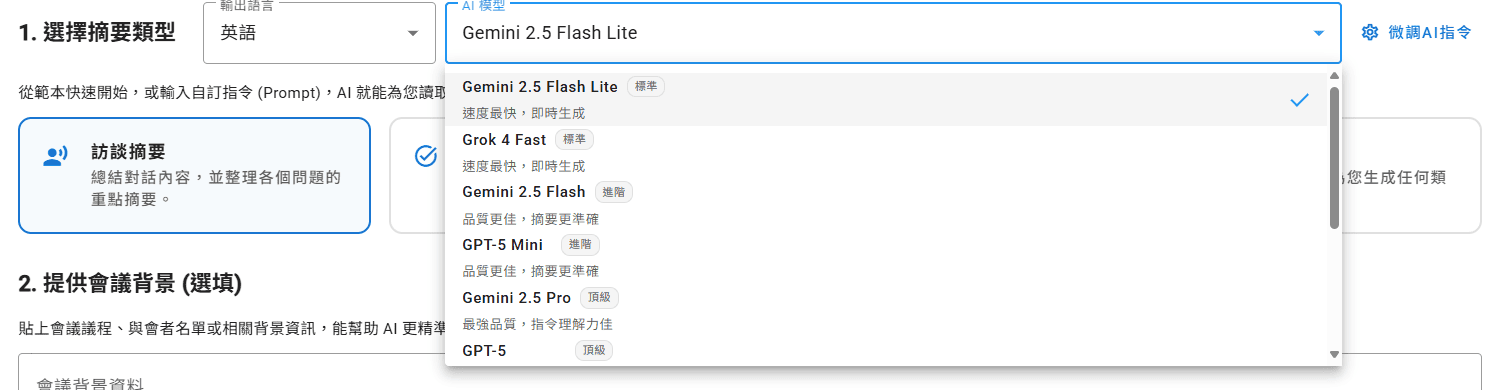
[Meeting Notes] Users can now select different AI models to assist in generating content when using AI generation features (AI Summary, Chapters, Ask AI)

Screenshot 2025-10-21 215413

[Meeting Notes] Improved the layout of text content in the editing page to make it clearer and easier to read

[Meeting Notes] Removed the text preview below the video in the editing page

[Meeting Notes] When connecting to Google Calendar, if a scheduled recording is changed in the calendar, the scheduled recording time will also update automatically

[Meeting Notes] Fixed and improved some text descriptions and navigation in Google Calendar

User experience optimization update

[Transcription Feature] If the uploaded content fails to transcribe, users can now click the [Retry] button on the right to attempt transcription again.

[Transcription Feature] Upload hours will now be deducted after a successful upload, instead of after a successful transcription, to prevent users from over-uploading and causing eventual transcription failures.

[Account] Users can now delete their Subanana account by themselves if needed.

You can delete your Subanana account by following these steps:

  1. On the project list page, click [User Avatar] at the top right -> [Account]
  2. Under Personal Information, in the Delete Account section, click [Click Here]
  3. Follow the instructions to confirm the information, then click [Delete Account]

Please note! Once your account is deleted:

  • Your paid subscriptions and usage will be cancelled and will not be refunded.
  • All audio and video files you have uploaded will be deleted and cannot be accessed again.
  • All transcription content you have generated will be deleted and cannot be accessed again.
  • Your account and personal information will be deleted.
  • This action will take effect immediately and cannot be undone.
  • You will not be able to use Subanana again unless you re-register.

Added user referral and reward feature

All users can now share a unique link to refer friends to subscribe to the Subanana plan.

Friends who subscribe through this link can receive a subscription discount, and users will also receive corresponding rewards for successfully referring friends.

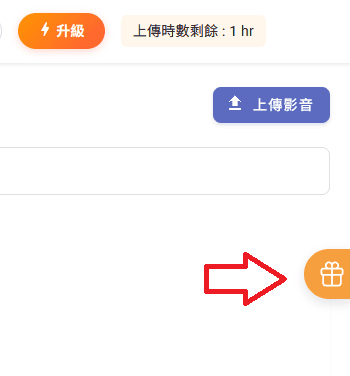
Click the gift button on the right side of the page to get your unique link:

Screenshot 2025-10-21 212847

Meeting Notes AI Feature Update

Meeting notes will now support exporting with reference times when generating chapters and summaries, allowing users to find relevant content more quickly.

Added automatic scheduling of video meetings in Google Calendar

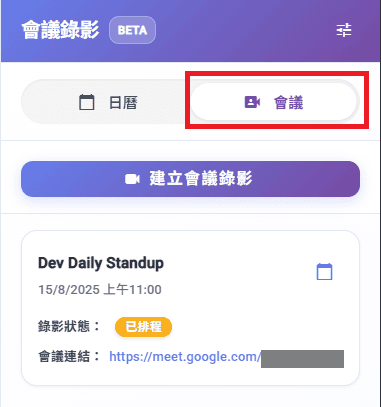
[Meeting Notes] Added the feature to link Google Calendar for automatic scheduling and recording of Google Meet meetings

  • You can now link Google Calendar and sync it to Subanana to set up automatic recording schedules for future Google Meet meetings

--------------------------------------------------------------------------

How to use

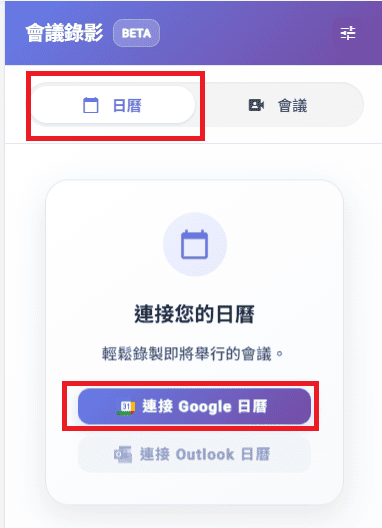
  1. On the right side of the meeting notes page, click [Calendar], then click [Connect Google Calendar]

01

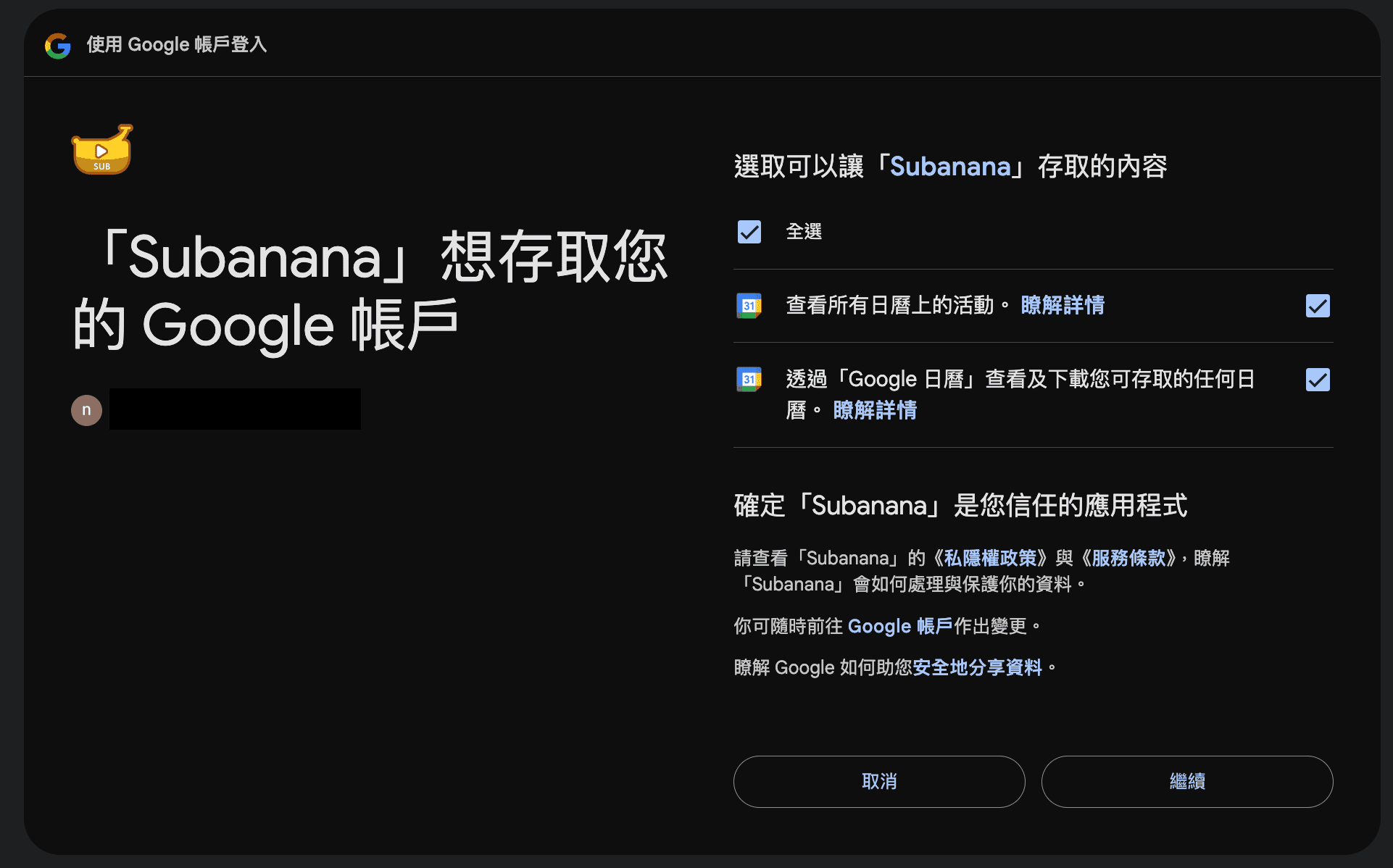
  1. After logging in, check all items on the right on the Google confirmation page, then click [Continue]

99

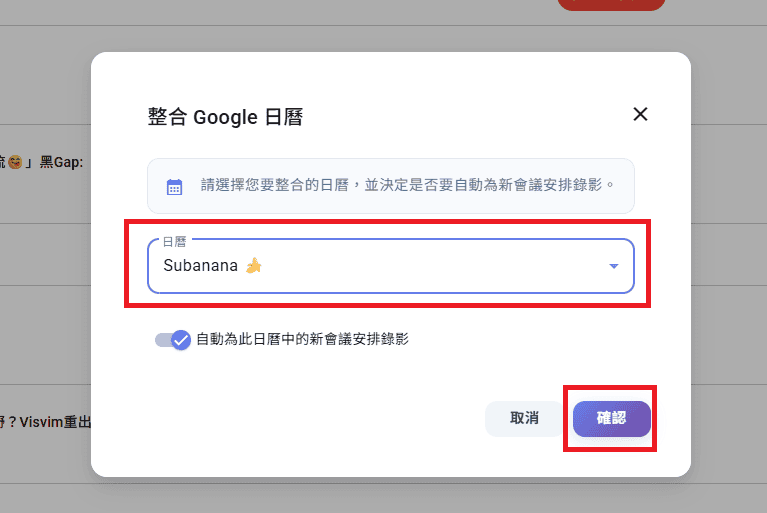
  1. Select the calendar you want to integrate and link, then click [Confirm]

04

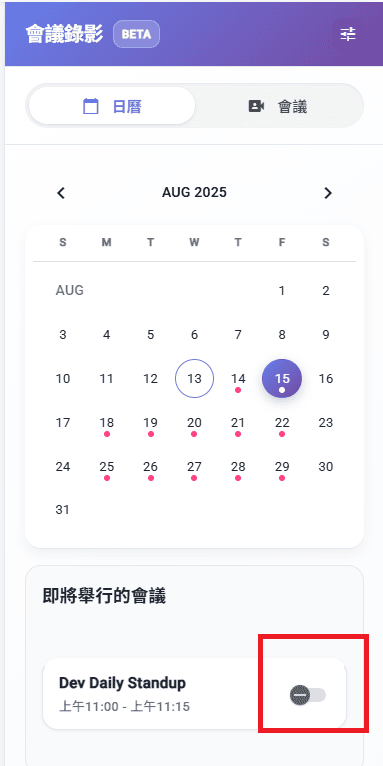
  1. In the calendar, you can check meetings as recording schedules as needed

05

  1. You can see the scheduled meeting recordings under the [Meetings] section

06

--------------------------------------------------------------------------

Others:

[Meeting Notes] Improved translation output for meeting notes

[Meeting Notes] Meeting notes summary AI now provides more accurate and detailed generated content when outputting timeline-related information