
Speech-to-text tools split into two camps: desktop apps tied to one operating system, and browser-based platforms that follow you across devices. MacWhisper and Subanana sit on opposite sides of that split, and the right pick depends on where and how you actually work.
MacWhisper is a desktop-first utility. Built specifically for macOS, it has earned a loyal following among Mac power users who want a native, one-time-purchase application that can transcribe audio directly on their local machine.
On the other side are cloud-based transcription and speech intelligence platforms like Subanana. Instead of living inside your operating system’s application folder, Subanana runs entirely in the browser across any device, focusing on end-to-end workflows: automated meeting summaries, speaker separation, multi-model quality routing, and live audience captioning.
Choosing between them comes down to a fundamental architectural split: do you want a local desktop utility designed to generate raw subtitle files from audio tracks on your Mac, or do you need an accessible, multi-device cloud platform that automates the entire transcription and meeting documentation workflow?
What follows breaks that choice down piece by piece: architecture, accuracy handling, workflow features, and what each one actually costs over time.
1. Architectural Differences: Local Mac Processing vs. Cloud Web Application
Where the computing actually happens, and how you get to it, is what separates these two tools from the first click onward.
MacWhisper: Native Desktop App Powered by Local Hardware
MacWhisper is built from the ground up as a native macOS application. Its core design philosophy centers on running transcription models locally on your computer’s processor (optimized primarily for Apple Silicon).
Two things follow directly from that choice:
- Offline privacy: Because processing can happen entirely on-device, your audio data never leaves your computer when using local models. For users working under strict non-disclosure agreements or with sensitive legal/medical recordings where cloud processing is strictly prohibited, local execution is a major advantage.
- One-time payment: Because you supply the computing power (your Mac’s CPU/GPU and Unified Memory), the developer does not incur recurring server costs for local transcription, allowing for a one-time license purchase model.
However, local execution also introduces hard physical constraints. Running modern speech models locally requires substantial system memory and compute. If you run a larger, more accurate model on an older Mac or a base-spec MacBook Air, your machine may slow down, the cooling fans may ramp up, and processing long files will drain battery life quickly. The desktop app itself is also built specifically for macOS, running natively on Apple Silicon and Intel Macs.
Subanana: Cloud-Based, Zero-Install Web Platform
Flip that setup around and you get Subanana: nothing to install, no OS requirement, all the transcription work happening on servers you never see.
Because all speech processing, diarization, and formatting are handled by dedicated server infrastructure:
- Zero local hardware drain: It does not matter whether you are running a high-end desktop workstation, an entry-level Windows laptop, or a smartphone on the go. The transcription speed and performance remain consistent because your local hardware does none of the heavy lifting.
- Cross-platform accessibility: You can start a transcription on a Windows PC at the office, review the transcript on your iPhone during your commute, and export the final document on a Mac at home. There are no native apps to install, update, or configure.
- Heavy file handling: Subanana supports individual file uploads up to 30 GB and 8 hours in duration on all plans, including the free tier. Uploading massive multi-gigabyte video or audio files will not freeze your local operating system or exhaust your local storage drive.
2. Ingestion Methods: How You Get Audio into the Tools
How your audio gets into a transcription tool determines how smoothly it fits into your daily routine.
Getting Audio Into MacWhisper
It starts in Finder: drag a local file into the app, pick a model size, and let your Mac's own processor do the work. It also includes features to record directly from your Mac’s built-in microphone or capture system audio from active applications on your desktop.
This setup works well if your files are already stored locally on your hard drive. However, if you want to transcribe an online interview, a public webinar, or a video hosted on a streaming platform, you must first find a third-party tool to download the media to your Mac before bringing it into MacWhisper.
Getting Audio Into Subanana
The web interface handles a wider range of capture methods, built in rather than bolted on:
- Direct File Uploads: Upload audio and video files up to 30 GB or 8 hours per file directly through the browser.
- Public URL Import: Paste a public link from platforms like YouTube or Instagram. Subanana fetches the public audio track directly from the source server and transcribes it immediately, so there is no need to manually download large video files to your local drive first.
- In-Browser Recording: Capture microphone audio or record your entire screen/browser tab directly within the web app without installing desktop screen-recording utilities.
- Meeting Platform Integration: Schedule automated meeting capture bots for Google Meet and Microsoft Teams, or capture audio from Zoom meetings using a lightweight Chrome extension.
3. Speech Recognition Engine & Quality Assurance
Transcription accuracy depends on more than raw words on a page. How a platform handles noise, hallucinations, pacing, and diverse languages matters just as much.
MacWhisper: General Multi-Language Local Model
Under the hood, MacWhisper packages open-source, general-purpose speech recognition models that run natively on macOS, offering a choice of local model sizes that trade speed against accuracy. It officially supports around 100 languages.
For users who want higher cloud-grade quality without upgrading their Mac hardware, MacWhisper allows you to plug in your own API keys for third-party cloud providers. However, managing API keys requires you to maintain developer accounts with external AI platforms, monitor your own token usage, and deal with billing across multiple services.
If a local model runs into background noise or long pauses, open-source models can occasionally get stuck in repetitive hallucination loops (repeating phrases or generating nonsensical text during silent gaps). In MacWhisper, resolving these errors is left entirely to the user during manual review.
Subanana: Multi-Model Routing and Automated Quality Layers
Subanana does not lock you into a single static model architecture. Behind the scenes, the platform continuously benchmarks multiple frontier speech-to-text models across different languages, audio qualities, and acoustic conditions.
When you submit a file, Subanana routes the audio to the specific frontier speech engine that demonstrates the highest baseline accuracy for that language and audio type.
On top of the raw speech-to-text conversion, Subanana applies an automated quality assurance pipeline:
- Hallucination Detection & Auto-Fallback: If the primary engine detects model looping, phantom text generation, or dropped speech during quiet intervals, Subanana automatically re-routes the affected audio segment to a fallback frontier model at zero extra cost to the user.
- LLM-Assisted Proofreading & Quality Scoring: Transcripts are evaluated by an automated proofreading layer that assigns a 0–100 quality confidence score, flagging misheard words, homophones, punctuation, and grammar issues through a propose-and-confirm correction flow.
- Characters-Per-Second (CPS) Pacing Checks: For video creators and subtitle editors, Subanana flags subtitle cues that exceed standard reading speeds (CPS), helping you catch text that appears on screen too quickly for viewers to read.
4. Workflow Capabilities: Raw Transcription vs. Structured Meeting Intelligence
A raw block of text with timestamps is useful, but transforming spoken dialogue into actionable business documentation requires a different set of tools.
MacWhisper: File-In, Text-Out Subtitling Utility
As a dedicated desktop tool, MacWhisper turns audio files into raw text or basic subtitle files. You drop in a file, review the text alongside audio playback, edit timestamps manually if needed, and export standard subtitle formats.
It does not attempt to be an all-in-one productivity suite or an AI meeting assistant. It does not natively synthesize meeting discussions into executive summaries, generate structured action items, or format transcripts into organized narrative documents. If you need meeting notes, you must copy the raw transcript out of MacWhisper and paste it into an external LLM chat interface.
Subanana: Meeting Mode and Structured Documentation
Subanana includes a dedicated Meeting Mode designed to eliminate post-meeting administrative work. Conversational speech gets converted into structured, readable paragraphs instead of an unbroken wall of text, and multiple speakers are separated throughout the conversation so quotes and discussion points attribute to the right person. On top of that, Meeting Mode generates a structured executive summary alongside clear, bulleted action items, deliverables, and owners, directly inside the transcript interface, without a separate summarization step.
5. Two Things Worth Knowing About, Outside the Core Comparison
The sections above cover where MacWhisper and Subanana genuinely do the same job: turning audio into text and subtitles. Two extra capabilities are worth a short, separate mention, not as a head-to-head, since they sit outside what MacWhisper is built for.
MacWhisper's own feature list includes "translate subtitles automatically" and "translate your transcripts" as a built-in capability. MacWhisper's site does not publish a target-language count, quality benchmark, or detail on whether translation happens locally or via a connected AI provider, so treat it as a real, but thinly documented, feature rather than a fully specified one.
Subanana has a comparable export-time translation step, but also goes further with a separate real-time feature called Live Caption. A presenter opens Subanana in a browser, speaks into their microphone, and the audio is transcribed and translated live for an audience that follows along on their own phones by scanning a QR code. It is built for keynotes, lectures, and webinars rather than for turning a file into a subtitle track. Live Caption is ephemeral: transcripts from Live Caption sessions cannot be exported to text files.
6. Comprehensive Feature Comparison Table
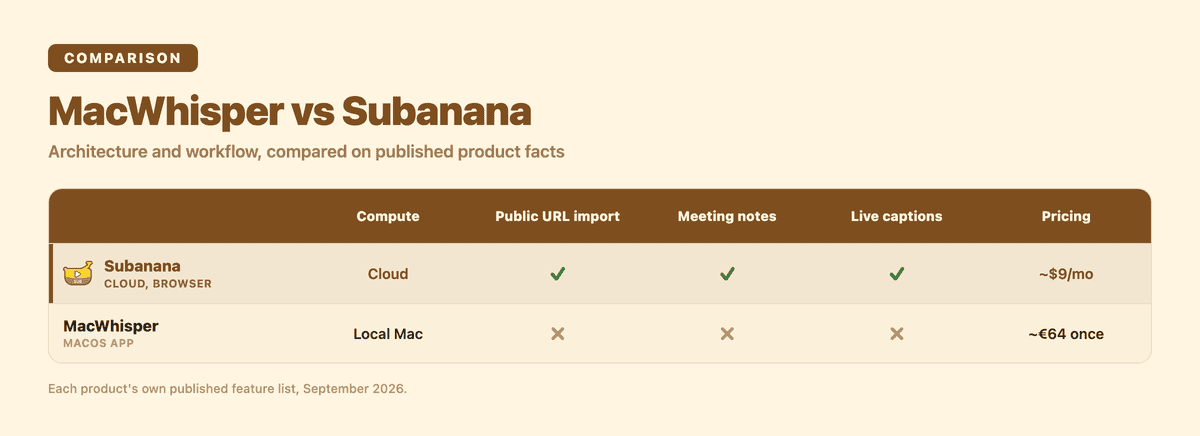
| Feature / Capability | MacWhisper | Subanana |
|---|---|---|
| Primary Platform | macOS Native App | Web Application (Any modern browser) |
| Runs On | Apple Silicon / Intel Mac (native app) | Any device with a modern browser |
| Compute Location | Local Mac CPU/GPU (or BYO API key) | Cloud Server Infrastructure |
| Local Hardware Requirements | High (Requires modern Mac / Apple Silicon) | Zero (Runs smoothly on any basic device) |
| Max Upload / File Limit | Limited by local disk & memory | 30 GB / 8 Hours per file (All plans) |
| Public URL Imports | ❌ No (Requires manual media download) | ✅ Yes (YouTube, Instagram public URLs) |
| In-Browser Screen/Mic Recording | ❌ Desktop mic/system audio only | ✅ Yes (Direct mic & tab/screen capture) |
| AI Speech Recognition Architecture | Packaged open-source models | Dynamic multi-model benchmarking & routing |
| Hallucination Detection & Fallback | ❌ No (Manual user correction) | ✅ Yes (Automated engine fallback included) |
| Proofreading & Pacing Checks | ❌ No | ✅ Yes (0–100 score + CPS subtitle warnings) |
| Meeting Intelligence Layer | ❌ No (Raw transcript only) | ✅ Yes (Summaries, action items, diarization) |
| Meeting Recording/Platform Integration | ✅ Yes (Zoom, Teams, Webex, Skype, Chime, Discord — file recording, per its own feature list) | ✅ Google Meet & Teams bots, Zoom Chrome ext (post-production, not live) |
| Supported Export Formats | SRT, VTT, TXT, Markdown, HTML, PDF, DOCX | SRT, VTT, TXT, DOCX, XLSX, Markdown |
| Free Tier / Trial | Free base version (limited model sizes) | Free plan (preview first 15 min, 15-sec watermarked video) |
| Pricing Model | One-time purchase (~€64 for Pro) | Paid subscriptions from ~$9/mo (billed annually) — see pricing |
7. Pricing Structure and Long-Term Value
The pricing models of these two applications reflect their underlying architecture.
MacWhisper: One-Time Buy-Out
MacWhisper Pro is sold as a one-time purchase (roughly €64). Because you are responsible for running the compute on your own machine, you do not pay a monthly subscription to the developer.
This model is cost-effective for solo Mac creators who transcribe files regularly and have an Apple Silicon machine capable of processing medium-to-large models efficiently. However, keep in mind:
- If you want to use external cloud models inside MacWhisper to save local battery or speed up processing, you must pay those cloud API providers separately.
- You do not get cloud storage, cross-device synchronization, or collaborative web features.
Subanana: All-Inclusive Cloud Subscription
Paid plans start at approximately $9 per month (when billed annually), and a free plan lets you preview transcription results (up to the first 15 minutes per file) and export a watermarked short-form video clip (up to 15 seconds at 720p) before you commit to anything.
What the subscription actually buys you:
- High-performance cloud compute (transcribing large files without stressing your computer).
- Continuous benchmarking and access to updated frontier speech-to-text models.
- Automated quality assurance (hallucination fallbacks, LLM proofreading, CPS checks).
- Structured Meeting Mode (summaries, action items, speaker separation).
- Infrastructure for live audience captioning and real-time translation broadcasts.
For pricing specifics and tier details, visit the Subanana pricing page.
8. Export Formats and Downstream Workflows
Once transcription is complete, moving that text into your production pipeline should not require manual reformatting.
MacWhisper Exports
MacWhisper exports standard subtitle and text formats, including:
- Plain text (
.txt) and Markdown (.md) - SubRip subtitles (
.srt) - WebVTT (
.vtt) - PDF, HTML, and Word (
.docx) documents
These formats cover the fundamentals for importing subtitles into video editors like Final Cut Pro, Adobe Premiere Pro, or DaVinci Resolve.
Subanana Exports
Paid users get a wider set of structured business, editorial, and subtitle formats to work with:
- Subtitle Formats:
.srt,.vtt - Editorial & Documentation:
.docx(Microsoft Word),.xlsx(Microsoft Excel),.md(Markdown),.txt(Plain text) - Bundled Packaging: An "All Tracks (ZIP)" option downloads every subtitle track in a project as a single chosen format, in one click. This is useful when a project has multiple language tracks and you want them all at once.
- Video Rendering: Burn stylized, paced captions directly into exported video files.
9. Who Should Pick Which Tool?
The two tools solve different problems. Pick based on where your work actually happens:
MacWhisper fits you if you live on one Mac
MacWhisper makes sense when you are exclusively on macOS: you own a capable Mac (preferably M1/M2/M3/M4) and do all your creative work on a single desktop or laptop. It's also the right call when offline privacy is mandatory: classified, medical, or strictly confidential legal data that cannot be uploaded to any third-party cloud server under any circumstances belongs on a machine that never sends audio out. And if you'd rather buy a clean desktop utility once and keep it in your dock than accept monthly bills, MacWhisper's license model is built for exactly that, as long as you're comfortable manually summarizing discussions, assigning action items, and proofreading text yourself, since raw transcripts and subtitle files are what you get.
Subanana fits you if your work crosses devices or scale
Subanana is the better fit once your workflow crosses devices or operating systems (Windows, Mac, Linux, Chromebooks, iPhones, Android) without installing native software on each one. It also earns its keep when you want automated meeting intelligence: structured executive summaries, categorized action items, and speaker separation instead of just raw timestamped text. The same is true if you regularly handle large media files or online content, since Subanana takes files up to 30 GB / 8 hours and can pull audio directly from a public YouTube or Instagram link without a separate download step. Hosting live events or webinars is another clear signal: live, multilingual subtitles delivered to an audience via a QR code scan aren't something a file-in/file-out desktop tool offers. And if automated quality control matters to you (hallucination detection, automated model fallback, pacing warnings, LLM-assisted proofreading), that's infrastructure Subanana runs by default rather than something you'd assemble by hand.
Frequently Asked Questions
What platforms does MacWhisper run on?
MacWhisper's desktop app runs natively on macOS. If your work spans multiple operating systems, a browser-based tool like Subanana works on any device you can open a browser on, without installing anything.
Does Subanana store my audio files locally or in the cloud?
Subanana processes all audio in the cloud. This allows you to close your browser window while a 30 GB file processes and access your completed transcripts from any computer or mobile device later.
Can Subanana transcribe Zoom, Google Meet, and Microsoft Teams meetings?
Yes. Subanana supports automated meeting capture bots for Google Meet and Microsoft Teams. For Zoom meetings, audio capture is handled through a lightweight Chrome extension rather than an external bot joining the call.
How does Subanana's Live Captioning differ from Meeting Mode?
Meeting Mode is an asynchronous post-processing tool: you upload a recorded meeting file (or record a session), and Subanana creates a structured transcript with speaker separation, an executive summary, and action items that you can export.
Live Captioning is a real-time audience engagement tool: a speaker talks into their microphone, Subanana generates live on-screen captions and translations, and the audience follows along in real time on their own mobile devices by scanning a QR code. Live Caption sessions cannot be exported to text files.
Pick the Tool That Matches Your Workflow
If you need an end-to-end speech platform that handles everything from large media imports to structured meeting summaries and live audience captioning, try the Subanana AI subtitle generator or explore the full platform to get started for free.