
Audio to Text Transcription Example: Raw vs. Cleaned Transcript
A raw audio transcription and a transcript you'd actually send to someone look very different—and the two worked examples below show exactly where they diverge. Speech-to-text output moves through several layers: the words detected from the audio, punctuation and paragraph structure, speaker identification, and a final proofreading pass. This article shows what those layers look like, side by side with the raw version.
The examples below are illustrative examples written for this article. They are not real customer transcripts, and they are not a benchmark or accuracy test. Their purpose is to show the difference between raw speech recognition and readable transcript copy.
Subanana is an AI speech-to-text web app, and this distinction matters from both sides: the audio needs to be transcribed faithfully, and the result needs to be useful after transcription.
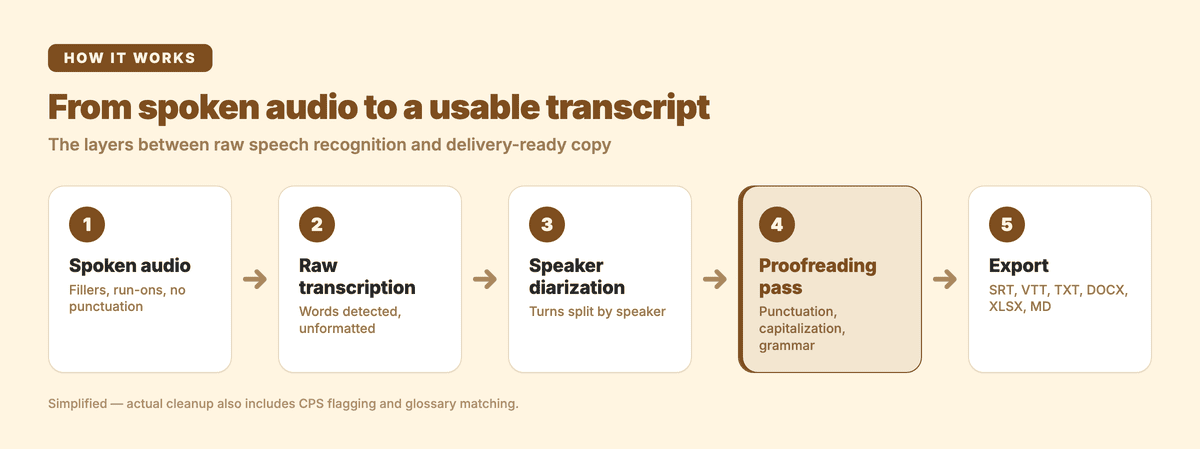
Example 1: From raw meeting speech to clean transcript copy
Imagine a short business meeting in which someone is discussing a launch schedule.
The spoken audio
“So I think what we should probably do is move the launch to next Thursday because the onboarding emails aren’t quite ready yet and, um, the design team said they can finish the new screenshots by Tuesday, which gives us Wednesday to test everything before we send it out.”
This is how people normally speak. The sentence contains a pause, a filler word, a self-contained explanation, and several connected ideas. There is no natural full stop in the audio.
Raw automatic transcription
so i think what we should probably do is move the launch to next thursday because the onboarding emails arent quite ready yet and um the design team said they can finish the new screenshots by tuesday which gives us wednesday to test everything before we send it out
The raw version is useful because it captures the speech in sequence. It is less useful as a document.
Notice what makes it difficult to read:
- There is no punctuation.
- “I” and “Thursday” are not capitalized.
- “Aren’t” has lost its apostrophe.
- “Um” remains in the sentence.
- Several related ideas run together.
- The reader has to decide where one thought ends and the next begins.
Cleaned and proofread transcript
I think we should probably move the launch to next Thursday because the onboarding emails aren’t quite ready yet. The design team said they can finish the new screenshots by Tuesday, which gives us Wednesday to test everything before we send it out.
The cleaned version preserves the meaning while making the transcript easier to scan. The filler word was removed, punctuation was added, capitalization was corrected, and the long run-on sentence was divided into two.
When you want to try the same workflow with your own recording, you can upload an audio file to Subanana’s Audio To Text tool. Subanana accepts audio and video uploads, including common formats such as MP3, M4A, WAV, OGG, AAC, FLAC, and OPUS.
Subanana routes each transcription to the best-benched speech-to-text model for that source language, catches and re-routes around model hallucinations automatically, and runs a proofreading pass over the text before you see it — so the output you review is already the strongest one the system can produce, not a raw first pass from a single model.
Example 2: What speaker diarization looks like
A second problem appears when two or more people are speaking.
Without speaker diarization, a transcript may contain the right words but give you no clear indication of who said them. That is especially inconvenient for interviews, project meetings, customer calls, and research sessions.
Here is another illustrative example.
The spoken audio
Speaker 1: “The first version is ready for internal review, but I would not send it to customers yet.”
Speaker 2: “What is still missing?”
Speaker 1: “The pricing section needs one more check, and the export instructions are too technical for a first-time user.”
Transcript without useful speaker labels
the first version is ready for internal review but i would not send it to customers yet what is still missing the pricing section needs one more check and the export instructions are too technical for a first time user
The text may be broadly understandable, but the conversation is flattened into one block. If you are reviewing a 45-minute meeting, that quickly becomes frustrating.
Diarized transcript
Speaker 1: The first version is ready for internal review, but I would not send it to customers yet.

Speaker 2: What is still missing?

Speaker 1: The pricing section needs one more check, and the export instructions are too technical for a first-time user.
Speaker diarization means the system separates the conversation into speaker turns and displays labels in the transcript editor.
Diarization groups the audio by voice, not by identity. The labels may start out generic, such as “Speaker 1” and “Speaker 2,” rather than real names, and you can use the labeled turns as a reliable structure for reviewing the conversation and identifying decisions.
That structure is valuable on its own: it lets you follow the conversation without manually marking every change in speaker.
For another workflow focused on meetings, see AI Meeting Transcription in Subanana.
Why the first transcript may look “wrong”
People often compare a raw transcript with a polished written document and conclude that the transcription failed. Sometimes the audio recognition did fail. But often the issue is that the two outputs serve different purposes.
Raw speech contains features that normal writing normally removes:
- Fillers such as “um,” “uh,” and “you know.”
- False starts: “We can—actually, let’s wait until Friday.”
- Repeated words used for emphasis or thinking time.
- Long sentences connected by “and.”
- Missing punctuation, because punctuation is not spoken directly.
- Changes in direction halfway through a thought.
- Pronouns and references that only make sense in the original conversation.
A transcript can therefore be faithful to the audio and still need editing.
The right question is not “Does this look exactly like an article?” The better questions are:
- Are the important words present?
- Has the meaning been preserved?
- Can I tell who said what?
- Is the punctuation helping me follow the ideas?
- Are names, technical terms, and numbers worth checking?
- Is the result suitable for its intended use?
A meeting transcript, a legal record, a subtitle file, and a publishable interview may all need different levels of cleanup.
What can improve the cleaned result?
The quality of the final transcript depends on more than the transcription engine alone.
Audio conditions matter. Clear speech, low background noise, and a microphone near the speaker generally give any transcription workflow more useful input. Overlapping speech, distant microphones, heavy reverb, and strong background noise make the result harder to interpret.
Context matters too. If a meeting contains product names, customer names, or industry terminology, a glossary can help the system handle terms consistently. Subanana supports workspace-wide and per-project glossaries, including bulk XLSX and CSV import. Background reference material can also provide useful context for a project.
After transcription, review the places where mistakes are most consequential:
- Names and proper nouns.
- Product, company, and place names.
- Numbers, dates, prices, and percentages.
- Negations such as “not” and “never.”
- Technical terms that sound like ordinary words.
- Sections with overlapping or distant speakers.
- Sentences where the meaning seems unusually strange.
Subanana’s editor proposes fixes for misheard words and homophones, punctuation, and capitalization so you can accept or reject each one, and separately flags dense caption lines using CPS, or characters per second, so you can spot text that may be difficult to read when used for captions.
What does a finished transcript look like?
There is no single definition of “finished.”
For an internal meeting, the diarized transcript may be enough. You may want speaker labels, paragraphs, and readable punctuation, but not a word-for-word record of every hesitation.
For an interview, you may remove repeated phrases while keeping the speaker’s personality. You might also want names in the final copy rather than generic speaker labels.
For subtitles, the priorities change. Text must be divided into short, timed cues that viewers can read while watching the video. A paragraph that looks excellent as a document may be too dense for a caption.
For delivery, you might export the result as TXT, DOCX, XLSX, Markdown, SRT, or VTT, depending on the next step in your workflow. The best format is determined by where the transcript is going, not by the audio file itself.
What is an easy way to transcribe audio to text?
The easiest route is to upload the audio file to an automatic transcription tool, select the source language, and review the generated text in an editor.
For a short recording, you can start on a free plan and preview whether the output fits your needs. The free tier previews the first 15 minutes of a file and does not require a card. For a meeting or interview, allow time for a review pass, especially around names, numbers, overlapping speech, and technical vocabulary.
You can transcribe audio to text online with Subanana to preview the cleaned transcript and speaker labels; exporting as a transcript or subtitle file (rather than a watermarked video) needs a paid plan.
How can I transcribe audio to text?
A simple workflow is:
- Upload an audio or video file, or paste a public YouTube, Instagram, or Facebook link.
- Choose the source language.
- Let the transcription finish.
- Review speaker turns, names, numbers, and unusual phrases.
- Apply any necessary edits.
- Export the transcript in the format you need.
Subanana accepts files up to 30 GB or eight hours on all plans, including the free plan. A free workspace can preview 15 minutes per project and upload three projects per month, with no card required; exporting a transcript or subtitle file (SRT, VTT, TXT, DOCX, XLSX, Markdown) is a paid-plan feature.
Can ChatGPT transcribe audio to text?
Some ChatGPT experiences can work with audio depending on the product surface, account, and current limits. However, a general chat interface is not always the best place for a repeatable transcription workflow.
If you need speaker labels, a transcript editor, project context, glossary support, proofreading, caption-density checks, and exports, a dedicated speech-to-text app may be more practical. The right choice depends on whether you need a quick one-off conversion or a transcript you can review and deliver.
Can you give me an example of a transcription?
Yes — see the meeting example above. The raw transcription captures speech exactly as spoken, filler words, missing punctuation, and all. The cleaned version restores punctuation and capitalization, drops the filler, and keeps the speaker’s meaning intact. That gap between the two is the core thing to look for when evaluating a transcription tool: how well the full workflow moves you from understandable speech to usable, deliverable text.