
Transkriptor has earned a reputation as one of the most accessible automated transcription tools on the market. If you have an MP3 file, an interview recording, or a video lecture that you need converted into raw text at a low per-minute rate, it handles the basics without friction.
However, transcription needs have shifted. Many teams no longer treat transcripts as the finished product. Instead, the transcript is merely the starting point for structured meeting briefs, action item lists, data analysis in spreadsheets, documentation in Markdown, or multilingual live event accessibility.
If you have hit the ceiling of Transkriptor's feature set, or if you are evaluating tools before committing to an annual plan, this guide breaks down how Transkriptor works, where it genuinely shines, where its limitations appear, and how Subanana compares.
A Sourced, Two-Sided Comparison
Every figure and feature cited for Transkriptor below was re-verified against Transkriptor's live English website and pricing documentation on September 27, 2026.
If your workflow requires nothing more than raw bulk transcription at the absolute lowest cost per minute, Transkriptor may already be your best option. This guide states clearly where Transkriptor has the edge and where an alternative makes more practical sense.
What Is Transkriptor and What Does It Cost?
Transkriptor is a cloud-based automated speech-to-text platform. Users upload pre-recorded audio and video files (MP3, MP4, WAV, and other common formats) and get back a transcript with speaker separation.
The platform provides automatic speech recognition (ASR), automated speaker diarization (separating Speaker 1 from Speaker 2), basic auto-translation, and automated meeting summaries.
Transkriptor makes two prominent marketing claims on its platform:
- "100+ Languages": Transkriptor advertises support for over a hundred languages and dialects.
- "99% Accuracy": this is Transkriptor's own marketing figure, not an independently audited benchmark. Real-world accuracy on any automated speech-to-text platform varies with background noise, microphone quality, speaker accents, overlapping dialogue, and specialized domain terminology.
Transkriptor Pricing (Verified September 2026)
Transkriptor structures its subscriptions around monthly minute allowances and prepaid bulk hour packages:
| Plan | Billed Monthly | Billed Annually | Included Minutes / Hours | Cost Breakdown |
|---|---|---|---|---|
| Free Trial | $0 | $0 | 90 minutes total | One-time trial |
| Lite | $9.99 / mo | Not offered | 300 min / month (5 hrs) | ~$0.033 / min |
| Pro | $19.99 / mo | $99.99 / year (~$8.33/mo) | 2,400 min / month (40 hrs) | ~$0.008 / min (monthly) |
| Team | $30 / seat / mo | $240 / seat / year ($20/seat/mo) | 3,000 min / seat / month (50 hrs) | ~$0.010 / min (monthly) |
(Source: transkriptor.com/pricing/, fetched 2026-09-27.)
For users handling massive transcription volumes, Transkriptor also sells prepaid bulk hour packages, billed either monthly or at 50% off on an annual plan (shown below as its annual effective monthly rate):
- 100 Hours / Month: $60/mo billed monthly, or $30/mo billed annually ($360/yr)
- 250 Hours / Month: $150/mo billed monthly, or $75/mo billed annually ($900/yr)
- 500 Hours / Month: $300/mo billed monthly, or $150/mo billed annually ($1,800/yr)
- 1,000 Hours / Month: $600/mo billed monthly, or $300/mo billed annually ($3,600/yr)
(Source: transkriptor.com/pricing/, fetched 2026-09-27.)
Where Transkriptor Excels (and When You Should Keep It)
Before looking at alternatives, it is worth acknowledging where Transkriptor is difficult to beat.
1. High-Volume Raw Transcription on a Tight Budget
If your sole requirement is converting hundreds of hours of spoken audio into plain text files without requiring advanced post-processing, Transkriptor's bulk plans provide an exceptionally low price per minute: as low as $300/month effective (annual billing) for 1,000 hours of processing time.
2. Dedicated Mobile Applications
Transkriptor offers native mobile apps for both iOS and Android, plus desktop apps for Windows and macOS. If your primary workflow involves recording on-the-go voice memos, classroom lectures, or field interviews on your smartphone and sending them straight to an automated transcription queue, Transkriptor's mobile apps provide a streamlined direct pipeline.
3. Broad Claimed Language Catalog
Transkriptor markets support for 100+ languages. For users working with lesser-spoken regional dialects where baseline transcription is needed without requiring nuanced formatting, Transkriptor covers a wide geographic surface area.
4. Established User Review Base
Transkriptor has an established rating base on Trustpilot and Capterra, a real trust signal for many buyers.
5. Cross-Library AI Search
"Ask Transkriptor" queries a user's entire transcript library at once, not just the file currently open, and cites the specific meeting a fact came from. That library-wide scope is genuinely broader than a per-transcript chat feature, a real concession and not a padding line.
If your workflow is strictly "upload file, get raw text or SRT, pay minimal cost per hour," Transkriptor is a capable tool and you may not need an alternative.
Where Transkriptor Falls Short (and Why Teams Look for Alternatives)
Transkriptor is built primarily as a transcription utility rather than a downstream productivity or live presentation engine. When your work involves structured meeting synthesis, specialized vocabulary management, non-standard exports, or real-time event delivery, several clear bottlenecks emerge.
1. Limited Export Ecosystem: Spreadsheets and Markdown
Transkriptor restricts its file exports to standard document and caption formats:
- Plain Text (
.txt) - Microsoft Word (
.docx) - SubRip Subtitles (
.srt) - WebVTT (
.vtt)
This covers standard video subtitling and basic text editing. However, modern workflows frequently require structured formats:
- Spreadsheets (
.xlsx): User researchers, qualitative analysts, and legal teams often need timestamped, speaker-segmented dialogue aligned in table columns to tag themes, run sentiment analysis, or correlate data alongside customer metadata. - Markdown (
.md): Product teams, software engineers, and technical writers document meetings, architecture reviews, and sprint planning directly in knowledge bases like Notion, Obsidian, GitHub, or internal wikis. Exporting to DOCX forces manual reformatting and syntax cleanup. - FCPXML: Video editors cutting a podcast or interview in Final Cut Pro can import native title tracks instead of re-timing subtitle files by hand.
How Subanana compares: Subanana provides seven export formats on all paid plans: SRT, VTT, TXT, DOCX, XLSX, Markdown, and FCPXML, each downloadable individually — or, for a project with multiple language tracks, as a one-click "All Tracks" ZIP that bundles every track of that project in your chosen format.
2. Per-Transcript Model Choice vs. a Fixed Assistant
Transkriptor's automated summary is a fixed, one-size-fits-all output, and Ask Transkriptor runs on a single assistant with no model-choice option.
In collaborative environments, a single summary format rarely fits every stakeholder:
- An executive needs a 3-bullet decision memo.
- An engineering lead needs a list of technical blockers and architecture decisions.
- A project manager needs Jira-ready action items assigned to specific speakers.
Subanana's meeting summary also uses one backend-recommended model with no picker, matching Transkriptor there. The difference is the interactive in-editor AI chat grounded strictly in your transcript: it lets you select across multiple continuously evaluated frontier large language models (LLMs) for that meeting or subtitle file, rather than being locked to one fixed assistant. The trade-off is scope — Subanana's chat reads one transcript at a time, where Ask Transkriptor searches the whole library.
Instead of reading a 45-minute transcript or settling for a generic overview, you can query your meeting directly:
- "What did Sarah say about the Q3 infrastructure budget?"
- "List every deadline mentioned in chronological order."
- "Extract the open objections raised by the client during the pricing discussion."
The AI assistant answers with direct citations grounded in the speaker-attributed dialogue.
3. Account-Wide Glossaries vs. Project-Scoped Terminology
Speech-to-text models struggle most with niche industry jargon, brand names, acronyms, and product terminology. Both platforms allow custom vocabulary hints, but the architecture differs:
- Transkriptor: Uses standard account-level vocabulary lists.
- Subanana: Supports both workspace-level and project-level custom glossaries with language tagging and bulk CSV/XLSX imports.
Project-level scoping matters when you work across multiple clients or subjects. A medical project, a fintech project, and a developer podcast each have conflicting acronyms (e.g., "PR" meaning Pull Request in software vs. Public Relations in marketing vs. Pulse Rate in clinical research). Subanana isolates vocabularies by project so domain terms don't pollute unrelated audio transcriptions.
4. Live Multilingual Captioning for Events and Audiences
If you run hybrid meetings, webinars, all-hands presentations, or live conferences, making spoken presentations accessible in real time is a critical operational requirement, distinct from uploading a finished recording after the fact.
Subanana includes a dedicated Live Captioning and Event Translation system, available on the Max plan:
- The host launches a live session from a microphone input or stream.
- The platform generates an instant web link and QR code.
- Audience members scan the QR code on their own mobile devices or laptops.
- Each attendee selects their preferred display language from the host's configured target languages to view real-time captions and translations simultaneously.
This turns speech-to-text from an internal post-production task into an active event accessibility tool.
If your team needs structured data exports, custom vocabulary isolation, and flexible meeting intelligence:
Side-by-Side Comparison: Transkriptor vs. Subanana
Here is how the core specifications compare side by side as of September 2026:
| Feature / Metric | Transkriptor | Subanana |
|---|---|---|
| Starting Price (Monthly) | $9.99 / mo (300 min) | $18 / mo (60 min) |
| Starting Price (Annual Effective) | ~$8.33 / mo ($99.99/yr on Pro) | $9 / mo ($108/yr on Lite) |
| Free Tier / Trial | 90 minutes total, one-time trial | 15-min preview per file (no export) |
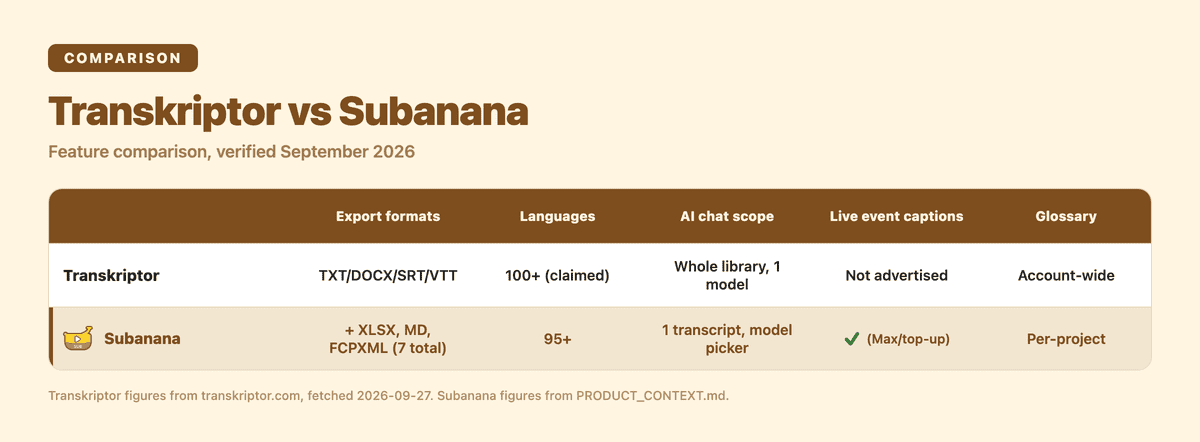
| Languages Supported | 100+ languages (marketing claim) | 95+ languages |
| Accuracy Claim | 99% (unverified vendor claim) | Not quantified (audio-dependent) |
| Export Formats (Paid) | TXT, DOCX, SRT, VTT (4 formats) | SRT, VTT, TXT, DOCX, XLSX, Markdown, FCPXML (7 formats; multi-track projects export as one ZIP) |
| Speaker Diarization | Yes | Yes |
| AI Summary Model Choice | No picker (fixed) | No picker on the summary itself; chat has a frontier-model selector |
| Transcript AI Chat Scope | Ask Transkriptor — whole library | In-editor chat — one transcript at a time |
| Custom Glossary Control | Account-wide custom vocabulary | Workspace + project-level glossaries, language-tagged, CSV/XLSX bulk import |
| Mobile Apps | Native iOS & Android apps, plus Windows/macOS desktop | Fully responsive web app |
Which Tool Fits Your Workflow?
Choosing between Transkriptor and Subanana comes down to your primary use case, required output formats, and post-transcription workflow.
Transkriptor fits when:
- You transcribe massive audio archives on a strict budget. Transkriptor's bulk hour packages (up to 1,000 hours/month) offer unmatched raw minute-to-dollar pricing.
- You need on-the-go mobile recording. If you frequently record field memos, classroom lectures, or in-person interviews directly from your phone, Transkriptor's iOS and Android apps are convenient.
- Your deliverable is simple. A plain Word document or standard SRT subtitle file is enough; you don't need Excel analysis, Markdown notes, or interactive AI transcript querying.
Subanana fits when:
- You run meetings and need actionable synthesis. Subanana's AI meeting transcription tools let you query your transcript interactively, with a frontier-model selector for the chat, to extract decisions, action items, and quotes.
- You work with developers, analysts, or researchers. If your destination is Notion, Obsidian, GitHub, or a spreadsheet, Subanana's native
.mdand.xlsxexports eliminate hours of manual copy-pasting and reformatting. - You manage distinct domains or clients. Separate vocabulary lists for legal, technical, medical, or corporate jargon keep terminology accurate across projects without cross-contamination.
- You host live events, webinars, or hybrid conferences. Real-time, multi-language captioning lets attendees follow along by scanning a QR code on their own phones.
Try the AI transcription tool free before deciding either way.
Frequently Asked Questions
How much does Transkriptor cost?
As of September 2026, Transkriptor offers monthly plans starting at $9.99/month for Lite (300 minutes), $19.99/month for Pro (2,400 minutes, or $99.99 billed annually), and $30/seat/month for Team (3,000 minutes/seat). It also sells high-volume bulk tiers, billed monthly, from 100 hours/month ($60/mo) up to 1,000 hours/month ($600/mo), or roughly half that per month on annual billing.
Is Transkriptor free?
Transkriptor offers a 90-minute free trial upon sign-up so users can test accuracy before purchasing a plan. It does not have a permanent free tier with recurring monthly minutes.
By comparison, Subanana provides a free preview tier allowing users to generate a 15-minute preview per file directly in the editor, while full exports (SRT, VTT, TXT, DOCX, XLSX, Markdown, FCPXML) require a paid subscription.
Is Transkriptor legit and accurate?
Transkriptor is a legitimate, established cloud transcription platform with a rating base on Trustpilot and Capterra. While Transkriptor advertises "99% accuracy," real-world speech-to-text accuracy across all platforms depends heavily on audio fidelity, microphone placement, background noise, speaker clarity, and specialized terminology. Pick between Transkriptor and Subanana based on which output formats and workflow features fit your specific use case, covered in the comparison above.
What is the best Transkriptor alternative in 2026?
That depends on what Transkriptor isn't giving you. For a transcript-grounded AI chat with model choice, spreadsheet or Markdown exports, and live event captioning, Subanana is the closest fit. For pure high-volume file transcription at the lowest per-minute cost, Transkriptor itself is still hard to beat; this comparison isn't a case for replacing it in every workflow, only where its feature set stops.
Final Verdict
Transkriptor remains a reliable, cost-effective utility for pure batch audio transcription. If your workload consists of uploading hundreds of hours of spoken files and downloading standard TXT or SRT files at the lowest possible cost, it gets the job done.
However, if your transcripts are part of a larger operational workflow, whether that means exporting structured tables to Excel, pushing meeting notes to Markdown knowledge bases, querying transcripts with frontier AI models, or broadcasting live multilingual subtitles to an audience, a dedicated platform like Subanana offers the flexibility modern teams require.
Test both platforms with your own audio recordings:
- Explore Transkriptor's 90-minute trial at transkriptor.com.
- Test Subanana's transcription editor, project glossaries, and AI analysis at plus.subanana.com or review tier details on our pricing page.