
From a buyer's perspective: Trint's editor is one of the better ones in the category, its newsroom integrations are hard to beat, and its collaboration tools are genuinely well regarded. What sends people looking for alternatives is almost always the pricing. Trint charges per seat with no free plan, and most people searching "Trint alternatives" are solo journalists, researchers, or small teams without a seat budget to spend.
How much does Trint cost?
Trint has no permanent free plan, only a 7-day trial capped at 3 files. After that, pricing is strictly per seat:
| Plan | Price | Who it's for |
|---|---|---|
| Pro | $79/seat/month ($948/seat/year billed annually) | Solo users |
| Team | $69/seat/month ($828/seat/year billed annually) | 2–5 people, shared drives, live collaboration |
| Business | Custom | Larger teams — SSO/SCIM, API, dedicated CSM |
Every seat on a Team plan pays the same rate, so a 4-person team lands around $276/month before any discount (source: 4 × the $69/seat/month Team rate above). That per-seat math is exactly what pushes solo users and small, budget-conscious teams to look at alternatives, even when they'd otherwise prefer Trint's editor.
What Trint does well (and who it's genuinely right for)
Trint's Caption Editor and real-time collaboration are strong. Up to 5 people can edit together on a Team plan, sharing drives in real time. Its newsroom-specific integrations are also a real moat: AP ENPS, Octopus Newsroom, Mimir, Saga, LiveU, and direct Sony camera ingestion aren't things the tools below try to match. If a newsroom, broadcast team, or production house is already wired into that stack, Trint's per-seat price is buying real workflow integration, not just transcription. Trint also covers 50+ languages for transcription and translation into 70+ languages, and holds ISO 27001 and Cyber Essentials certification with a choice of EU or US data storage, which matters for organizations running a formal security review.
The alternatives
Otter — best free-forever plan
Otter's free tier is the most generous permanent free plan among these four. It gives 300 transcription minutes a month and 3 lifetime file imports, with no trial deadline. Paid tiers step up to Pro ($8.33/user/month billed annually, 1,200 in-app recording minutes, up to 90 minutes per meeting) and Business ($19.99/user/month, unlimited meeting length up to 4 hours, up to 3 concurrent meetings). What Otter does that nothing else on this list does is join a call and transcribe it live, with native Zoom and Google Meet integration plus Salesforce and HubSpot connections on paid plans. For anyone whose main use case is live meeting notes rather than uploading recorded files afterward, that's the deciding feature.
Where it falls short of Trint: no dedicated caption/subtitle editor and no newsroom integrations, so a broadcast or publishing workflow will still want Trint or a tool built for that job.
Where Subanana differs: Subanana's meeting capture for Google Meet and Microsoft Teams works from a recording after the fact, not as a live in-call transcript. If reading along as a meeting happens is the requirement, Otter's live capture is the better fit.
Descript — best if you're also editing video
Descript starts free at 60 minutes of media a month, then Hobbyist ($16/person/month annual), Creator ($24/person/month annual, their most-popular tier), and Business ($50/person/month annual, translate-and-dub into 30+ languages). The core idea is different from a straight transcription tool: the transcript is the edit interface. Delete a sentence in the text and Descript cuts the matching clip out of the audio or video. For anyone whose workflow ends in a finished video, podcast episode, or course, that text-based editing model is often faster than transcribing separately and editing on a timeline afterward.
Descript's transcription accuracy on straight upload-and-transcribe jobs is not its focus the way it is for Trint or Subanana; the product is built around the editing loop first.
Where Subanana differs: producing a finished video is a different job than producing a transcript. Descript's edit-by-deleting-text workflow wins that job outright; transcription-first tools like Subanana are built for a narrower task and don't compete with it on video editing.
Happy Scribe — best if you want human-verified accuracy on demand
Happy Scribe's free tier allows unlimited meeting recordings, capped at 45 minutes each, plus a 10-minute free trial of AI transcription, subtitling, and translation. Paid plans run Basic ($8.50/month, 90 min/recording, 1,440 minutes/year), Pro ($19/month, unlimited minutes per recording, 7,200 minutes/year, unlimited AI chat), and Business ($59/month, 72,000 minutes/year). The feature that sets it apart from the rest of this list: human proofreading and human transcription are sold directly inside the product on Pro and Business. If AI output isn't accurate enough for a legal or broadcast use case, a person can verify it without leaving the tool.
That option comes at a real cost premium over pure-AI pricing, and turnaround for the human pass is naturally slower than an instant AI transcript.
Where Subanana differs: a human check-pass built into the workflow is genuinely useful for high-stakes files, and it's an option none of the tools compared here, Subanana included, offer. If that's a hard requirement, Happy Scribe is the one to use.
Subanana — best on price if you don't need per-seat collaboration
Here's what Subanana does differently, plainly, because "faster" or "better" isn't a real answer. Subanana prices by minutes transcribed per month, not by seat: Free (15-minute preview per file, no export), Lite at $18/month ($9/month billed annually, 60 minutes/month), Pro at $30/month ($18/month billed annually, 180 minutes/month), and Max at $75/month ($50/month billed annually, 600 minutes/month). Add a second or third person to a workspace and the price doesn't move; the bill scales with minutes used, not headcount. That's the opposite of Trint's model, where every added seat is a new full-price line item.
Two more concrete differences worth naming. Translation into Subanana's supported languages is bundled into the same credit as the original transcription, so there's no extra charge for adding a translated track. And when the first transcription attempt shows signs of hallucination, the system automatically retries on a different model at no extra charge to the minute balance; a file is paid for once, not per attempt. Subanana's supported-language set runs to 95+ for transcription.
Honest limits: the free plan is a preview tier, not a usable-output tier. It caps at 15 minutes per file, and the only export at that level is a watermarked video, with no transcript or subtitle file. Anyone who needs an actual exportable transcript on day one is on a paid plan here, or trialing a tool above that gives more away for free, like Otter.
Comparison table
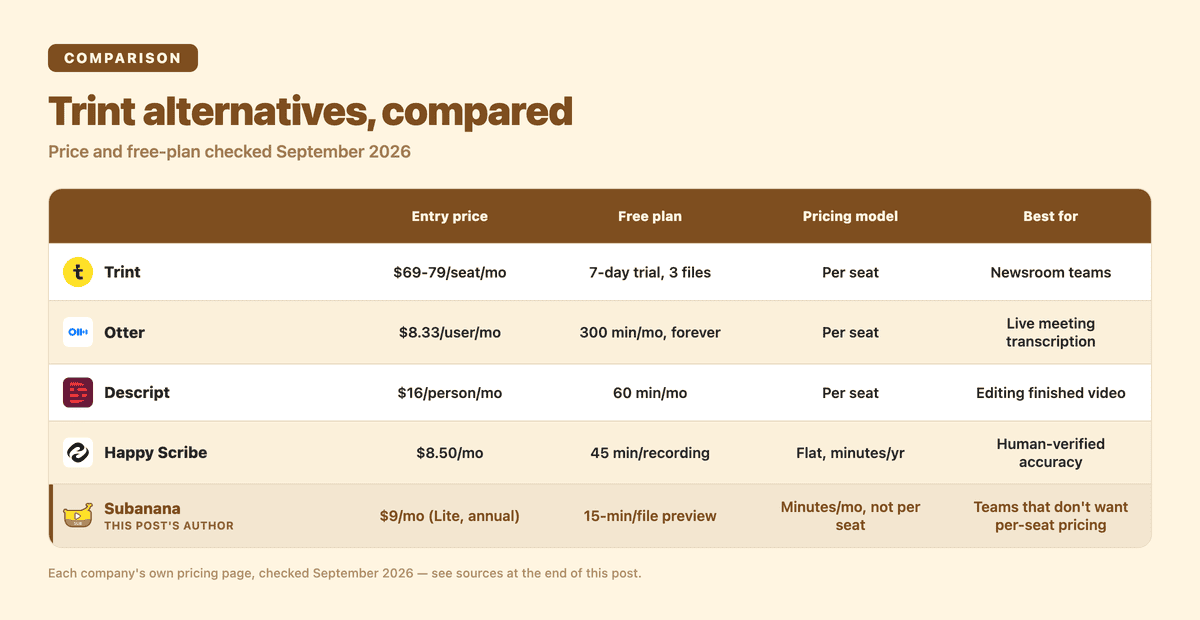
| Tool | Entry price | Free plan | Pricing model | Best for |
|---|---|---|---|---|
| Trint | $69–79/seat/month | 7-day trial only, 3 files | Per seat | Newsrooms, broadcast, teams already on their integrations |
| Otter | $8.33/user/month (annual) | Yes — 300 min/month, forever | Per seat | Live in-meeting transcription |
| Descript | $16/person/month (annual) | Yes — 60 min/month | Per seat | Producing finished video/audio, not just a transcript |
| Happy Scribe | $8.50/month | Yes — 45 min/recording, 10 min AI trial | Flat, minutes/year | On-demand human-verified accuracy |
| Subanana | $9/month (Lite, annual) | Yes — 15 min/file preview | Minutes/month, not per seat | Small teams who don't want per-seat pricing |
So which should you pick?
A team already running newsroom software (ENPS, Octopus, Sony camera ingestion) with the per-seat cost absorbed into an existing budget has a real, specific reason to stay on Trint, not a generic loyalty argument. Anyone who needs to read a transcript live while a meeting is still happening should look at Otter; none of the file-upload tools here do that. If the deliverable is a finished video or podcast episode rather than a text file, Descript's edit-by-text model will likely be faster than transcribing and editing separately. A project that needs a guaranteed human accuracy check should use Happy Scribe's on-demand proofreading. And a solo user or small team whose main objection to Trint is the per-seat math gets the most direct fix from Subanana's minute-based pricing, since adding people to a workspace doesn't multiply the bill.
FAQ
How much does Trint cost?
Trint has no free plan, only a 7-day trial limited to 3 files. Paid pricing is per seat: Pro is $79/seat/month ($948/seat/year annually) for individuals, Team is $69/seat/month ($828/seat/year annually) for 2–5 people, and Business pricing is custom for larger teams.
What is the best free transcribing app?
Among the tools compared here, Otter has the most generous permanent free plan: 300 transcription minutes every month with no trial deadline. Happy Scribe and Descript also offer real free tiers (45-minute recordings and 60 minutes/month respectively). Subanana's free tier is a 15-minute-per-file preview rather than a usable export, so anyone prioritizing a free, exportable transcript should start with Otter or Happy Scribe's free tier instead.
Will transcriptionists be replaced by AI?
AI transcription has already taken over most of the routine work: straightforward audio with clear speech and one or two speakers. What hasn't gone away is demand for human review on the cases AI still gets wrong, like heavy accents, overlapping speakers, poor audio, or contexts such as legal, medical, or broadcast work where an error has real consequences. That's why a tool like Happy Scribe sells human proofreading as an add-on instead of assuming AI output alone is always good enough. The job shifted from full manual transcription toward reviewing and correcting AI output; it didn't disappear.
Every plan and pricing figure above was checked directly on each company's own site in September 2026. Check their pricing page before buying, since these numbers change. To see how Subanana's minute-based pricing works in practice, the AI transcription tool page has the current plan breakdown, or go straight to AI meeting transcription if meetings are the main use case.