
Best Transcription Software for Mac in 2026
The best transcription software for Mac depends on what you mean by "best." Some Mac users want audio to stay entirely on the computer. Others want a browser-based tool that handles multiple languages, subtitles, translations, and meeting workflows without another desktop app.
The shortlist splits cleanly into two categories in 2026. Native Mac apps offer privacy and offline processing. Cloud tools offer broader collaboration, translation, exports, and language support.
I went through each tool's own pricing and feature pages this week. I run Subanana, so take that into account when you get to its section, though the facts there are checked against the same public pages as everyone else's. Here's what each option is actually good for, and where it falls short.
How these Mac transcription tools are grouped
I've grouped the list into native Mac apps and web-based cloud tools. The first category includes MacWhisper and Aiko, which process audio locally. The second includes Otter.ai, Descript, Happy Scribe, and Subanana. I checked each product's current pricing and feature pages directly, including MacWhisper's product page, Aiko's Mac App Store listing, Otter's pricing page, Descript's pricing page, and Happy Scribe's pricing page. If you want a broader look at transcription software beyond the Mac-specific angle, see our wider transcription software comparison.
MacWhisper
MacWhisper is a native Mac transcription app built for people who want audio processed locally. It runs on Apple Silicon Macs and uses the machine's hardware acceleration to speed up transcription.
Its strongest advantage is privacy. You can transcribe audio without uploading it to a cloud service at all. That makes MacWhisper a natural choice for sensitive interviews, confidential recordings, legal material, or anyone who doesn't want their audio leaving the Mac.
MacWhisper isn't a stripped-down utility either. Useful features include:
- Batch transcription for processing multiple files at once
- Automatic speaker recognition
- Audio and video imports across common formats (MP3, WAV, M4A, MOV, MP4)
- Subtitle exports, including SRT and VTT
- Meeting recording support for apps such as Zoom, Teams, and Discord
- Translation and cleanup tools
MacWhisper Pro is a one-time purchase of €64, with lifetime updates included. That's confirmed on the product's current pricing page, and there's no recurring subscription for it.
MacWhisper is the strongest pick when local processing is the deciding factor. It also does real-time dictation and can capture audio live from other apps running on the same Mac, though that's system-wide dictation rather than an audience-facing live-caption feed. Setting up a browser workflow, shared team workspaces, or automatic quality fallback across multiple models means looking elsewhere.
Aiko
Aiko is a smaller, simpler native Mac app for fully offline transcription. It turns recordings into text on the device, with no cloud upload required.
The app is deliberately minimal. You import recordings, transcribe them locally, apply word replacements, and export the result. It also supports subtitle exports and a wide range of spoken languages. Aiko's own App Store description is direct about its limits: it doesn't currently have speaker detection, and it doesn't do live transcription while recording. That makes it a weaker fit for multi-person meetings where knowing who said what matters.
Aiko is a good fit for:
- Private recordings that must stay on your Mac
- Lectures, interviews, voice memos, and training sessions
- Users who want a minimal interface
- People who prefer a one-time purchase over a subscription
The Mac App Store currently lists Aiko at $24, with a trial available before you buy. Its App Store listing describes transcription only; translation isn't mentioned anywhere in it.
Choose Aiko when you want the simplest possible offline workflow. Choose MacWhisper when you need batch processing, speaker recognition, meeting capture, or more extensive exports.
Otter.ai
Otter.ai is a cloud meeting transcription service, best known for live captions, lecture capture, meeting notes, and searchable conversations.
You can use Otter through its web app, desktop app, and mobile apps. It connects to meeting platforms such as Zoom, Microsoft Teams, and Google Meet, and it offers live transcription, speaker identification, playback, and an AI assistant you can ask questions about your meetings.
Otter is particularly useful when the transcript is part of an ongoing meeting workflow: a student capturing a lecture, a sales team recording customer calls, a manager checking what was decided several meetings ago.
The free plan currently includes 300 transcription minutes per month, capped at 30 minutes per conversation and three lifetime file imports, plus live transcription, speaker identification, and support for Zoom, Microsoft Teams, and Google Meet. The paid Pro plan is $8.33 per user per month on annual billing (higher on monthly billing), confirmed on Otter's current pricing page.
Otter wins when live captioning and meeting capture are the main job. It's less compelling for subtitle production, multilingual translation workflows, or anyone who needs local-only processing.
Descript
Descript combines transcription with a full audio and video editor. Its central idea: edit the recording by editing the transcript.
That makes it a strong choice for podcasters, YouTubers, marketers, and other creators. Once your recording is transcribed, you can delete words from the transcript and the corresponding audio or video edit happens automatically.
Useful features include:
- Text-based audio and video editing
- Speaker detection
- Dynamic captions and subtitle tools
- Filler-word and repeated-word removal
- Video export and audio enhancement
Descript's Creator plan is $12 per editor per month on annual billing ($15/month on monthly billing), and its Pro plan is $24 per editor per month annually ($30/month monthly). Both figures are confirmed on Descript's current pricing page. A free plan exists with limited transcription hours.
Descript's real job is editing; transcription is just how you get into that editing environment. The workflow assumes you already have a recording sitting there, with no live captioning as you speak. Pick it if your goal is a finished podcast, video, or clip. If you only need clean text, subtitles, or translated files, its wider editing feature set is more than you need.
Happy Scribe
Happy Scribe is a cloud platform for transcription, subtitling, translation, and meeting notes, supporting a broad range of languages with both automated and human transcription options.
The automated workflow is built for speed: upload a file, choose the language, edit the transcript or subtitles, export. If you need a reviewed transcript, human proofreading is available as a separate add-on.
Happy Scribe supports:
- AI transcription and subtitles across a broad language range
- Automatic speaker detection
- Translation workflows
- Meeting recordings from Google Meet, Zoom, and Microsoft Teams
- Collaborative editing
- Exports including DOCX, TXT, SRT, VTT, and other subtitle formats
The Basic plan starts at $8.50 per month on annual billing, with a short free trial to test transcription, subtitling, and translation. That's confirmed on Happy Scribe's current pricing page. Human proofreading is priced separately.
Happy Scribe is one of the better choices for multilingual subtitle work, and it makes sense if you want the option to move from automatic transcription to human review without switching platforms. The workflow is upload-then-process; there's no live event captioning here. Your effective cost depends on a credit system: minutes used and which services you select.
Subanana
Subanana is a cloud-based web app. It works in any modern Mac browser: Safari, Chrome, whatever you already have open. There's no Mac app to install and no menu-bar utility; you sign in and upload or paste a link.
That's a real trade-off. If your audio must never leave your Mac at all, MacWhisper or Aiko are the honest picks here. Where Subanana earns its place on this list is what happens once the audio does get uploaded.
Subanana's transcription system benchmarks multiple speech-to-text models and routes each transcription to whichever one performs best for the source language and the use case, with automatic fallback to another model if the first one shows quality issues. That matters because transcription quality isn't one fixed number. A model that handles a clear English interview well isn't necessarily the best choice for an accented speaker, a noisy recording, or a less common language, and locking to a single engine means every one of those cases gets the same model whether or not it's the right one.
On top of that routing layer, Subanana runs a quality-assurance stack: hallucination detection with automatic model substitution, an LLM-assisted proofreading pass that surfaces a 0–100 quality score alongside misheard-word and punctuation fixes, and deterministic characters-per-second flagging that catches subtitle cues too dense or too sparse to read comfortably.
Glossary control is also workspace- and project-level. Pin recurring names, product terms, or client-specific vocabulary once at the workspace level, or attach a narrower list to a single project, with bulk XLSX/CSV import for lists longer than a few terms. A separate Background Pack lets you upload reference material (a style guide, a past transcript, a glossary doc) so the system has context before it processes the audio.
Translation is available in every mode, though the target count differs: subtitle mode can output multiple translation languages from a single job, while transcript and meeting-summary mode each support one translation target per job. Exports cover seven formats: SRT, VTT, TXT, DOCX, XLSX, Markdown, and FCPXML, plus a bilingual dual-language SRT (source and translation in one file) and one-click video export with subtitles burned in, either single-language or bilingual.
For meetings specifically, Subanana's Google Meet and Microsoft Teams bots join scheduled calls automatically. The bot records the meeting and transcribes it after the meeting ends, so it is not for live captioning during the call itself. If live captions on the call are the actual job, Otter covers that; the meeting bot here doesn't.
For people who need zero installation, multi-language translation, recurring-terminology control, and flexible export formats, Subanana's transcription tool is the more complete browser workflow of the group.
Comparison table
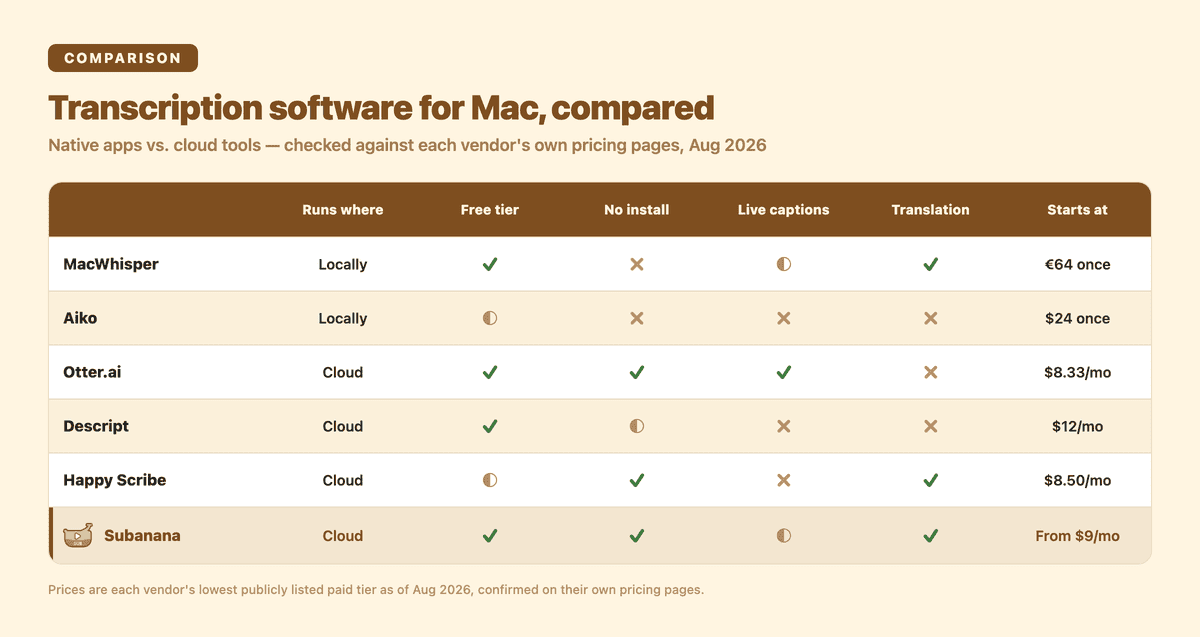
| Tool | Local or cloud? | Free plan? | Works without installing anything? | Meeting / live-caption support | Language and translation breadth | Transcription engine | Starting paid price |
|---|---|---|---|---|---|---|---|
| MacWhisper | Local Mac app | Free version available | No, requires installing a Mac app | Meeting recording + transcription | Broad language support with translation features | Local, on-device processing | €64 one-time (Pro) |
| Aiko | Local Mac app | Trial available | No, requires installing a Mac app | No live transcription; no speaker detection | Wide range of spoken languages | Local, on-device processing | $24 one-time |
| Otter.ai | Cloud service | Yes, 300 min/month (30 min/conversation cap) | Yes, through the web app | Strong live transcription + meeting capture | Multi-language, narrower than subtitle-focused tools | Cloud; doesn't disclose its STT engine | $8.33/user/mo (annual) |
| Descript | Cloud editor | Yes, limited hours | Mostly; desktop app also offered | Recording, captions, speaker detection | Creator-focused, not translation-first | Cloud transcription inside an editor | $12/editor/mo (annual) |
| Happy Scribe | Cloud service | 10-min trial | Yes, through the web app | Meeting recorder + integrations | Broad multilingual transcription, subtitles, translation | Automated + optional human review | $8.50/mo (annual) |
| Subanana | Cloud web app | Free tier available | Yes; any modern browser, no install | Meet/Teams bot (post-meeting, not live) | Translation in every mode; multiple targets for subtitles | Multi-model routing with automatic fallback | From US$9/mo (annual) |
So which should you pick?
If privacy is your top priority, MacWhisper is the strongest local option here: batch transcription, speaker recognition, and meeting recording, all without a cloud upload.
Want something even simpler and fully offline? Aiko handles private recordings and straightforward speech-to-text jobs well. Skip it for meetings, since there's no speaker detection or live transcription.
Otter.ai is the pick for lectures, calls, and meetings where you need real-time text and speaker labels as they happen.
Descript earns its spot when transcription is one step in a bigger content-production process; podcasters and video creators get more out of its editing tools than a standalone transcript app gives them.
Go with Happy Scribe if multilingual subtitles or the option of human proofreading matter more than anything else on this list.
Subanana is built for a zero-install browser workflow: translation across many languages, glossary control for recurring terminology, and a quality-assurance layer on top of the raw transcript.
One line covers the two native apps together: pick MacWhisper or Aiko whenever the audio must never leave your Mac, full stop. Everything else on this list asks you to trust a cloud upload; those two don't.
Frequently asked questions
Does Apple have a built-in transcription app?
Yes. macOS includes Dictation, and the Voice Memos app can transcribe recordings on-device on supported Macs (Apple silicon, running a recent macOS version). It's basic: no speaker labeling, no translation workflow, and no export formats beyond copying the text out. (Apple Voice Memos support)
Does Mac have a transcribe feature?
Yes. Beyond Voice Memos, macOS also has Live Captions, which transcribes audio from apps or the microphone in real time, processed on-device. These built-in features are English-first and don't provide reliable multi-speaker labeling, which is why anyone recording meetings or interviews with more than one speaker usually reaches for a dedicated tool. (Apple Live Captions support)
What is the most accurate transcription software?
There's no single winner across every language, accent, microphone, and recording environment. Accuracy shifts with background noise, overlapping speakers, audio quality, and which language is being spoken. Tools that evaluate and route across multiple speech-to-text models for different languages and use cases, rather than shipping one fixed engine, tend to handle those edge cases more flexibly. Review anything important yourself, especially names, numbers, or technical terms.
What is the best medical dictation software for Mac?
Dedicated medical dictation tools, like Dragon Medical, are purpose-built for clinical documentation with specialized medical vocabularies. General transcription software, including every tool on this list, Subanana included, isn't built for that workflow. If clinical dictation is the job, a dedicated medical product is the right tool, not a general transcription app.
The best transcription software for Mac is the one that matches your actual constraint: local privacy, live meeting capture, creator-style editing, or a flexible browser workflow with translation built in. If the last one fits, try Subanana's transcription tool, or compare plans on Subanana's pricing page.