
The same 30-second answer in an interview can turn into three different documents, depending on what you're asking a transcript to do. A researcher coding qualitative data wants every "um" and false start. A journalist quoting a source wants clean, readable prose. A video editor burning captions onto a clip wants short, timed lines with no punctuation at all. Same recording, three deliverables.
Below are illustrative examples of each, not real interviews and not attributed to any real person or company, built from the same short exchange so you can see exactly what changes between formats. Then I'll walk through which one fits your situation, and how Subanana produces the cleaned, speaker-labelled version most people actually ask for.
The three format examples are independent of any tool. They describe what a transcript looks like, not what a specific product does.
The 3 formats an interview transcript can take
1. Verbatim (research-grade)
Verbatim transcription keeps everything: filler words, restarts, overlapping speech, non-verbal sounds. It's the standard for qualitative research and legal/compliance use, where the exact words matter more than readability, because you're coding the transcript for analysis, not quoting it in a finished piece.
[00:04:12]
INTERVIEWER: So, um, how did you — how did you first start using the app
day-to-day, like was it, was it immediate or did it take a while?

SUBJECT: Uh, it was — honestly it took like a — a couple weeks? Because
at first I was, I was just using it for, you know, [cough] just the
basic stuff, and then, and then a coworker showed me the — the search
thing, and that's when it, that's when it kind of clicked.
This is close to what a first-pass AI transcription looks like before any cleanup: every disfluency preserved, no paragraph breaks, timestamps at intervals rather than per sentence. Manual verbatim transcription and specialist research-transcription services are the usual route here, since the point is completeness, not polish. It's genuinely the right choice for the research use case, and it's not what most AI transcription tools, Subanana included, are built to hand you by default, because most people asking for an interview transcript want format 2.
2. Cleaned and speaker-labelled (what most people actually want)
This is the format behind the phrase "can I get a clean transcript of this interview": filler words gone, sentences punctuated, paragraphs broken where a new thought starts, and each speaker clearly tagged. It reads like something you could paste into a document or a story, not a recording played back in text.
Interviewer: How did you first start using the app day-to-day? Was it
immediate, or did it take a while?

Subject: Honestly, it took a couple of weeks. At first I was just using
it for the basic stuff, and then a coworker showed me the search
feature — that's when it clicked.
Same exchange, same information, but you can actually quote the second sentence in an article without editing it first. This is the format Subanana's transcript mode is built to produce directly from an audio or video file: automatic punctuation and paragraph breaks are on by default (there's no toggle to turn them off), and speaker diarization splits the text into turns and tags each one. If you want the mechanics of how the speaker-tagging itself works, I wrote that up separately in how AI adds speaker labels to a transcript. This post is about the finished formats, not the diarization engine underneath.
3. SRT / caption-style (timed cues for video)
If the interview is going out as a video (a YouTube upload, a course clip, a social cutdown), you don't want prose at all. You want short, timed lines synced to the audio, formatted as an SRT or VTT subtitle file. Subtitle convention deliberately skips punctuation and capitalization rules that a reading transcript would use, because captions are meant to be read quickly, line by line, not as a document.
14
00:04:12,100 --> 00:04:15,400
how did you first start using

15
00:04:15,400 --> 00:04:18,900
the app day to day was it immediate

16
00:04:18,900 --> 00:04:21,600
or did it take a while
This is the output of Subanana's subtitle mode, not transcript mode: same source audio, different pipeline, because a caption's job (short cues, timed to the second) is different from a transcript's job (readable prose). SRT and VTT are two of the seven export formats Subanana supports for a project, alongside TXT, DOCX, XLSX, Markdown, and FCPXML.
Which format should you use?
| Format | Keeps fillers/restarts? | Punctuation | Speaker labels | Timestamps | Best for |
|---|---|---|---|---|---|
| Verbatim | Yes, all of them | Minimal | Often initials only | Interval-based | Qualitative research, legal/compliance record |
| Cleaned & speaker-labelled | No, removed | Full sentences, paragraphs | Named/tagged per turn | Optional | Journalism, blog quotes, meeting minutes, reports |
| SRT / caption-style | No | None (by convention) | Rarely (burned into cue if needed) | Short and frequent, precise | Video captions, accessibility, social clips |
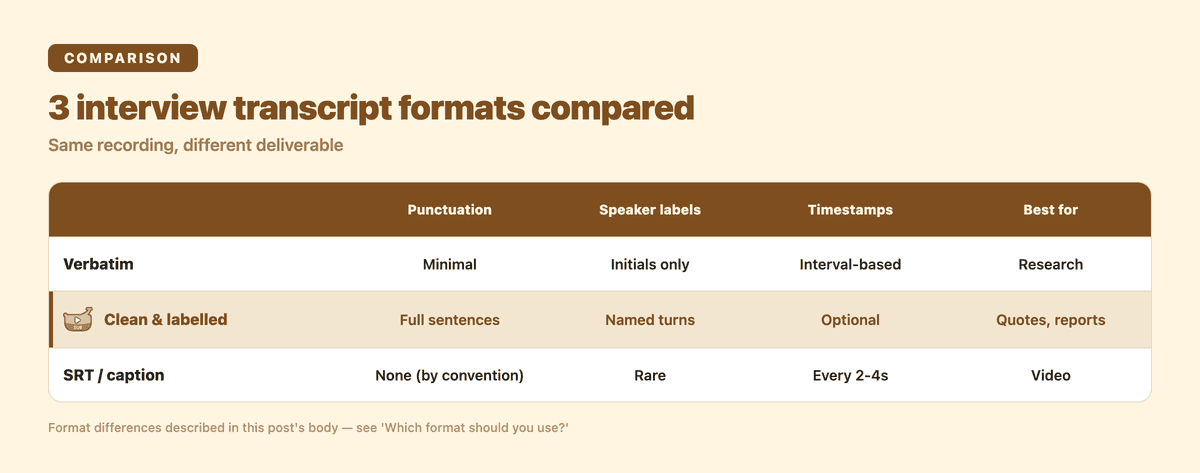
If you're not sure which one you need: ask what happens to the text next. Going into a codebook or a legal file → verbatim. Going into an article, a report, or a set of interview notes → cleaned and speaker-labelled. Going onto a video → SRT/VTT.
Two sites that cover this well from a research and general-purpose angle, if you want more detail: TranscriptionWing's side-by-side pure-verbatim vs smart-verbatim example shows the same interview treated both ways with timestamps and speaker initials. Krisp's guide has a good checklist of what to put in the header of a professional transcript: date, location or platform, participant names, the interview's topic, and a consent note if the conversation was recorded with permission on record. Worth doing regardless of which tool produces the body text.
How Subanana produces the clean, speaker-labelled version
If you're recording an interview (over Zoom, in person with a phone, or as a straight audio file), here's the path from raw audio to the format 2 transcript above:
- Upload the file. Audio or video, up to 30 GB / 8 hours on every plan including Free. Subanana also pulls straight from a public YouTube or Instagram URL if the interview is already posted somewhere.
- Set the number of speakers, manually if you know it (interviewer + subject = 2) or leave it on auto-detect. This drives the diarization pass that splits the transcript into tagged turns.
- Auto-punctuation and paragraphing run automatically. This is forced on for transcript-mode output, not an option you toggle.
- An LLM proofreading pass scores the output 0-100 and proposes fixes for misheard words, punctuation, and grammar. You review and accept or reject each one.
- Add names and jargon to a glossary before the project so a guest's name or a company term gets spelled consistently rather than however the model happened to hear it that one time.
- Ask the transcript itself questions once it's done, like "what did she say about pricing" or "summarize the second half," through the in-editor AI chat, instead of re-reading the whole thing to find one quote.
- Export as DOCX or TXT for the readable version, SRT/VTT if you also need the caption-style cut for a video version of the same interview, or a bilingual SRT if you need the interview in a second language and want source + translation in one file.
The free plan lets you generate and preview the first 15 minutes of a file; getting the actual SRT/DOCX/TXT export requires a paid plan, starting at $18/month (or $9/month billed annually) on Lite. Check Subanana's pricing for the full breakdown across Lite, Pro, and Max.
Try the AI transcription tool on your own recording if you want to see where your interview lands before you decide.
Frequently asked questions
How do I write a transcript of an interview? Record the conversation, then either type it out by hand, run it through an AI transcription tool, or send it to a transcription service. Manual typing gives you full control over verbatim detail but is slow: a 1-hour interview can take most of a workday to type by hand. AI transcription tools produce a first draft in minutes, which you then review for accuracy. See the full walkthrough in how to transcribe an interview.
What is the transcript of the interview? It's the written record of everything said during the interview, usually split by speaker (who said what) and formatted for either reading (punctuated prose) or video captioning (timed, unpunctuated cues), depending on what it's for.
What are examples of transcripts? The three formats above are the main ones you'll run into: verbatim (every filler word and restart kept, used for research), cleaned and speaker-labelled (readable prose split by speaker, used for quotes and reports), and SRT/caption-style (short timed lines, used for video).
What is the format for a transcript? There's no single standard format. It depends on the destination. A research transcript usually opens with a header (date, participants, topic, consent note) followed by verbatim text tagged by speaker. A quote-ready transcript is paragraphed prose with speaker names. A video transcript is an SRT or VTT file with numbered, timed cues.