
AI transcription pricing runs roughly $0.08 to $0.30 per minute of audio — about $4.50 to $18 an hour — once you divide a subscription by the hours it actually covers. Pay-as-you-go, where you buy hours instead of a plan, sits around $10 an hour.
That range is wide for a reason, and it is not because some tools are four times better than others. It is because the four common pricing models meter completely different things. Two tools can both charge $25 a month and cost you wildly different amounts for the same 10 hours of audio.
A disclosure before the numbers: I run Subanana, one of the tools priced below. So I have put our own math in the same table as everyone else's, including the parts that look worse. Every competitor figure here comes from that company's own live pricing page, checked live in August-September 2026, not from a press release, and not from another blog post. Prices change; check the link before you buy.
The short answer, in the unit that actually matters
Nobody buys "a plan." You buy the ability to turn N hours of recording into text. So convert everything to cost per hour of audio before you compare anything.
| Pricing model | What you are charged for | Published rate you will see | Suits |
|---|---|---|---|
| Pay-as-you-go | Hours of audio, bought up front | ~$10 per hour | One-off projects, irregular volume |
| Subscription with included hours | A monthly or yearly fee that covers N hours | $25/mo covering 5 hrs (~$5/hr) | Steady, predictable volume |
| Subscription with included minutes | A fee that covers N minutes per cycle | $9-$50/mo covering 60-600 min | Steady volume, finer granularity |
| Per seat | Each person on the account, monthly | $25-$60 per seat per month | Teams where several people need access |
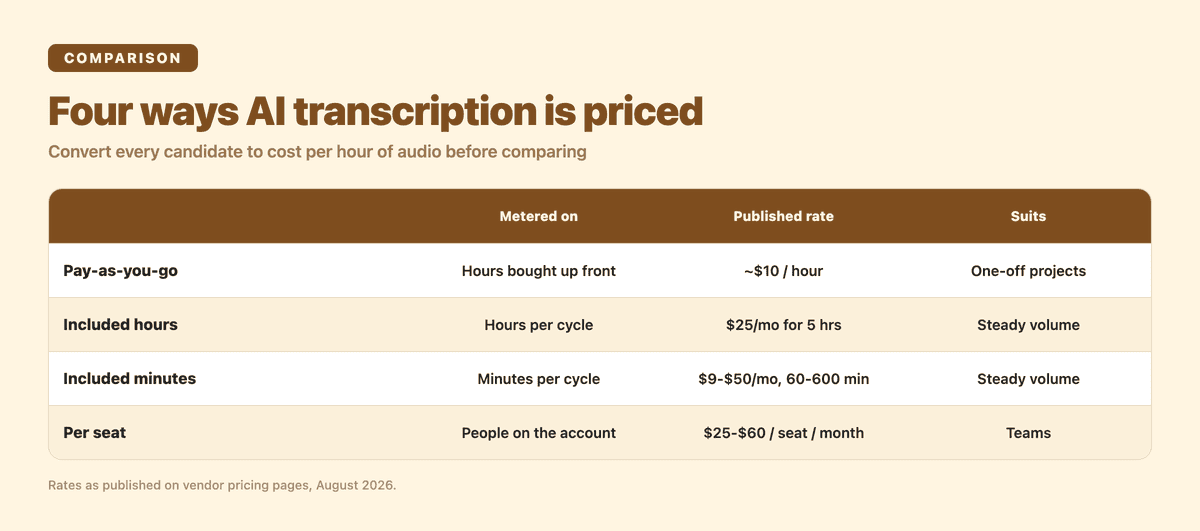
The two subscription rows look similar and behave very differently at the edges, which is the whole point of this article.
Why two tools at the same monthly price can cost you very different amounts
Here is what each of four tools publishes on its own pricing page today.
Sonix sells both models side by side, which makes it a useful reference point. Its pricing page lists a Pay As You Go plan at $10/hr, and a Core subscription at $25/mo or $275/yr that includes 5 hrs/mo (60 hrs/yr) of transcription and translation, with one user included and extra seats at $25/mo each. Additional hours on any subscription plan are billed at $10/hr. Do the division: Core works out at $5.00 an hour monthly, or $4.58 an hour if you pay annually and use the full 60 hours.
Otter meters something different, and this is the trap. Its pricing page lists a free Basic plan with 300 monthly transcription minutes and 3 lifetime audio/video file imports, and a Pro plan that includes 1200 in-app recording minutes and a separate 10 monthly audio/video file imports, metered on Pro at up to 1,200 imported minutes per user — the same size as the recording-minutes allowance, not a smaller one. Read that twice. The number that actually governs an uploader is not a smaller minutes pool, it's the file count. On the free plan, 3 lifetime imports is a harsher limit than the 300-minute allowance suggests. On Pro, 10 files a month is the practical ceiling long before 1,200 minutes is. If your work is uploading recordings you already have rather than recording live in the app, count files, not minutes. This is not a criticism; capturing live meetings is what Otter is built around, and it is genuinely strong at it. It just means you cannot put its headline recording-minute figure in the same column as a file-upload tool's and call it a comparison.
Rev prices per seat. Its pricing page lists Essentials at $29.99 per seat/month, or $25.49 per seat/month billed yearly, and Pro at $59.99 per seat/month, or $47.99 billed yearly. Its FAQ notes that entitlements within seat subscriptions are pooled at the account level, so a team draws from one shared allowance rather than a strict per-person one. Rev also runs a human transcription service alongside the AI one, and paid subscribers get a discount on it — which matters if some of your audio is court-grade or broadcast-grade and genuinely needs a person.
Subanana uses included minutes. Our pricing page lists Lite at $18/mo (or $9/mo billed annually, $108/yr) with 60 min/mo, Pro at $30/mo (or $18/mo annually, $216/yr) with 180 min/mo, and Max at $75/mo (or $50/mo annually, $600/yr) with 600 min/mo. Divide those out and you get:
| Plan | Monthly billing | Annual billing |
|---|---|---|
| Lite | $0.30/min ($18.00/hr) | $0.15/min ($9.00/hr) |
| Pro | $0.167/min ($10.00/hr) | $0.10/min ($6.00/hr) |
| Max | $0.125/min ($7.50/hr) | $0.083/min ($5.00/hr) |
Those per-minute figures are arithmetic on the list prices above, not a separate published rate. That is the exercise you should run on every tool on your shortlist, and it is why the honest answer to "how much does AI transcription cost" is a range rather than a number.
Two things fall out of that table immediately. Annual billing roughly halves the effective rate on the entry plan, and the cheapest plan is the most expensive per minute. Both are true of most tools in this category, ours included.
Work out your own number: three worked examples
Pick the row that looks like your month.
Occasional — 2 hours a month. 120 minutes. On a pay-as-you-go model at $10/hr that is $20. On a small included-minutes plan you will overshoot a 60-minute allowance and need the next tier up. On a per-seat plan you are paying a full seat for two hours of use. Pay-as-you-go usually wins here, and a free tier may cover you outright if you only need to read the text rather than export it.
Steady — 10 hours a month. 600 minutes. This is where subscriptions win decisively: $10/hr pay-as-you-go costs $100, while a plan sized to 600 minutes costs $50-$75. If your volume is genuinely steady, this is the band where annual billing pays for itself.
One-off project — 20 hours, once. 1200 minutes. Do not buy an annual plan for this. Either buy hours outright at around $10/hr, or take a single month of a large plan and cancel. The mistake I see most often is someone committing to a year for a project that ends in three weeks.
Four costs that are not on the pricing page
Export is often the paywall, not the transcription. Many tools, ours included, will let you transcribe on a free tier and then not let you take the file away. On Subanana's free tier you preview the first 15 minutes of each file and get 3 uploads a month, and the only thing you can export is a watermarked 15-second clip (from the first subtitle, up to 720p). Paid plans remove the watermark and unlock the seven standalone export formats — SRT, VTT, TXT, DOCX, XLSX, Markdown and FCPXML. I would rather you know that before you upload two hours of interviews than after. When you evaluate any tool, run a real file through it and then try to get the file out; that is the step that reveals the true price.
Per-seat pricing multiplies. A $30 seat is $30. Five people who each need to open a transcript occasionally is $150 a month, for the same volume of audio. If your team is a few people who need read access rather than production access, check whether sharing a project covers you before you buy seats.
Unused minutes usually expire. On our monthly plans, the allocation is granted per billing cycle and resets at the start of the next one — unused minutes do not roll over. Annual plans work differently: the whole year's pool is granted at once and you can spend it whenever you like across the term. If your workload is lumpy — nothing for two months, then thirty hours in one week — an annual pool fits that shape far better than twelve separate monthly buckets.
Redoing a job you paid for. The cheapest per-minute rate is worthless if the output needs an hour of manual repair. This is mostly a language-coverage question. Test your actual source language and your actual audio conditions — background noise, several speakers talking over each other, accented speech — before you commit to a year. We publish how we actually test transcription accuracy if you want a method to copy.
How to price your own workload in ten minutes
- Measure your real monthly volume in minutes. Not your best guess — add up last month's recordings. Most people overestimate by two to three times.
- Count who genuinely needs an account, as opposed to who needs to read a finished transcript.
- Convert every candidate to cost per hour of audio, using the division above. Ignore the headline price entirely.
- Run one real file through each free tier, then try to export it in the format your workflow needs.
- Only then choose monthly or annual. Check the size of the annual discount rather than assuming it — across the pages I fetched for this article it ranged from about 8% to about 50%, and even a 50% discount is not a bargain if you cancel in month three.
If you want to run step 4 on our side, the AI transcription tool takes an audio or video file — or a public link — in the browser, and the free tier lets you see what the output looks like on your own audio before any of this pricing math matters. For a broader look at what each tool is good at rather than what it charges, I keep a separate comparison of transcription software up to date.
Frequently asked questions
How much does AI transcription cost per minute? Across the pricing pages checked for this article, per-minute cost runs about $0.08 to $0.30, or roughly $4.50 to $18 an hour, depending on the pricing model and how much of your allocation you actually use. Pay-as-you-go options cluster around $10 an hour. On a subscription, the entry-level plan is almost always the most expensive per minute; the real discount sits in the larger tiers and in annual billing, not the cheapest plan.
Is there a free AI transcription plan? Yes, on nearly every tool in this category, including ours. Treat it as a preview tier, not a finished-file tier: see "What is the best free AI transcriber?" below for what each free plan actually lets you keep.
Pay-as-you-go vs. monthly subscription: which is cheaper? It depends on your volume. Occasional use, a couple of hours a month, usually favors pay-as-you-go. Steady use, around 10 hours a month or more, usually favors a subscription sized to that volume. See "Work out your own number" above for the break-even math.
What is the best free AI transcriber? The useful question is not which free tier is best but what each free tier lets you keep. Free plans in this category generally give you a monthly allowance and a preview of the result; the exports, the longer files and the higher-quality renders sit behind payment. Otter's Basic plan publishes 300 monthly transcription minutes. Subanana's free tier previews the first 15 minutes of each file across 3 uploads a month, with a watermarked video as the only export. So compare free tiers on the thing you need to walk away with — a readable transcript on screen is a different product from a subtitle file you can drop into an editor.
Can ChatGPT do transcription? It is very good at working on text you already have — paste a transcript in and it will clean it up, reformat it, or summarise it. Its audio-handling capabilities have been expanding, and they change often enough that the only reliable source is OpenAI's own help centre rather than any article, including this one. What a dedicated transcription tool adds on top is the machinery around the words: speaker labels held consistently across a long multi-speaker recording, timed subtitle files you can drop into an editor, and batch handling when you have thirty files rather than one. I walk through that workflow comparison in can ChatGPT create meeting minutes.
How long does it take to transcribe 2 hours of audio? Minutes, not hours. Our median processing times in July 2026 were 7.5 minutes for a 2-hour meeting recording and 11.4 minutes for a 2-hour video. A human transcriptionist working from the same audio typically needs several hours, which is the real reason the price gap between AI and human transcription is so large.
Is transcribing worth it as a side hustle? The economics have moved. When AI transcription of an hour of audio costs somewhere between $4.50 and $18, purely mechanical typing work is hard to price against that. What has held its value is the judgement layer: verifying names and technical terms, certified or legal-grade accuracy, difficult audio, and languages where automatic models are still weak. Transcriptionists who use AI for the first pass and sell the review pass are pricing the part that has not been commoditised.
In short
Convert everything to cost per hour of audio, then check what you are actually metered on — hours, minutes, recording time, file count, or seats. On a subscription sized to your volume, expect somewhere between $4.50 and $18 an hour; pay-as-you-go clusters around $10. And before the price matters at all, run one real file through and try to export it, because on most tools in this category the export is where the free tier ends and the product begins.