
I run a transcription tool, so I get asked some version of this a lot. "I already pay for Descript, can't it just do my transcripts?" The honest answer is yes, with real caveats that Descript's own marketing pages don't make easy to piece together. I checked all of them for this post, in September 2026.
What Descript's speech-to-text actually does
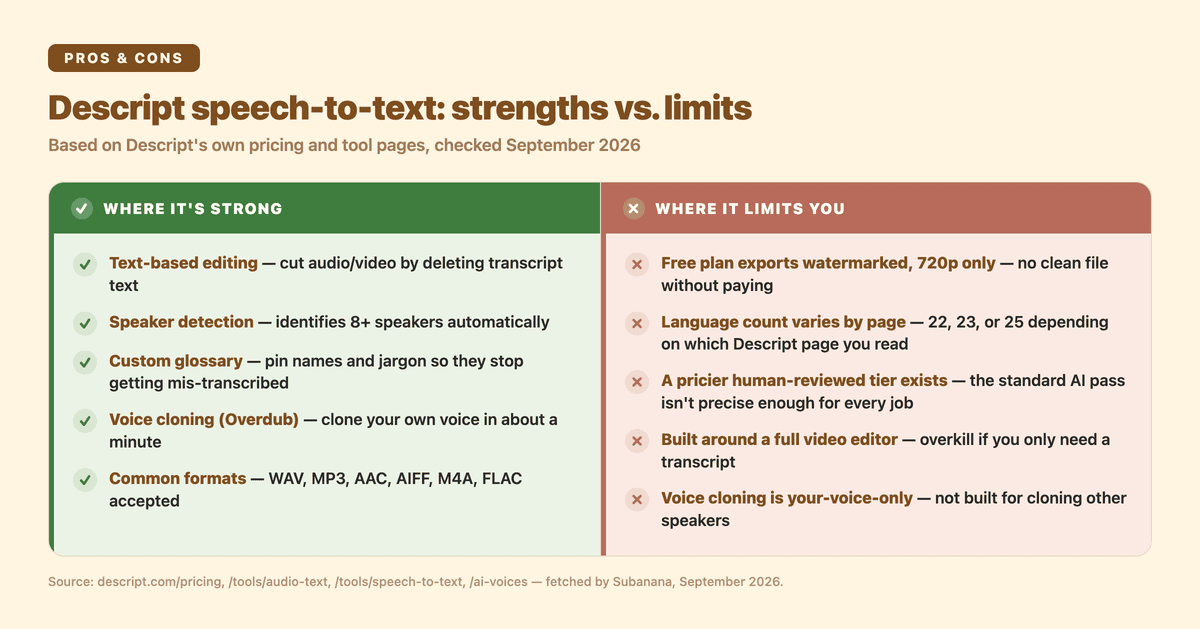
Descript's core workflow is text-based video and audio editing. You upload a file, it transcribes it, and you edit the transcript to edit the recording: delete a paragraph of text and the matching audio or video gets cut. Transcription is the on-ramp to that editor, not a standalone output.
For the transcription itself, Descript advertises high out-of-the-box accuracy on clear audio, per its own marketing, not an independent benchmark. It supports common audio formats: WAV, MP3, AAC, AIFF, M4A, and FLAC. Speaker detection is built in and, per Descript's pricing page, distinguishes at least 8 speakers automatically. There's also a "Transcription glossary" for pinning names, brands, or jargon so the model stops guessing at them, plus a filler-word removal pass and a "Regenerate" tool for fixing garbled words after the fact.
One thing worth flagging: Descript's own pages don't agree with each other on language coverage. Its audio-to-text tool page says "23+ languages." Its speech-to-text tool page says "22+ languages." Its pricing page lists exactly 25 languages by name, and that list applies across every tier, including Free, not just the paid ones. These probably aren't contradictions so much as different snapshots of a growing list, but if you're picking a tool because it "supports 25 languages," check which page you're quoting.
Treat Descript's AI transcript as a strong first draft, not a final one, for anything that needs to be airtight — legal, medical, or an accessibility-mandated caption file, and plan on a manual review pass.
What Descript's free plan actually gives you
This is the part that's easy to miss. Per Descript's pricing page, the free tier is $0/month with 1 hour of media per month and 100 AI credits as a one-time allowance, not a monthly refill. Video exports on Free carry a watermark and are capped at 720p. The first paid tier, Hobbyist, runs $24/month billed monthly or $16/month billed annually, removes the watermark, and raises the cap to 1080p export with 10 media hours and 400 AI credits per month. Creator, Descript's most-popular tier, runs $35/month monthly or $24/month annually with 4K export, also watermark-free.
If your actual job is "get a clean transcript file out," Descript's free tier lets you export it: its audio-to-text tool page lists plain text, rich text, Markdown, HTML, Word, SRT, and VTT export with no plan gate on that export itself. The real free-tier wall is volume, not export: 1 hour of media a month and a one-time batch of AI credits, both used up fast, plus a watermark on any video export. What the paid tiers add is more media hours, more AI credits every month, a watermark-free video export, and a higher resolution.
Our own free tier at Subanana is gated the other way around. You can generate and preview a file for its first 15 minutes for free, up to 3 uploads per month, but subtitle, transcript, and text export require a paid plan. Descript's free wall is volume; Subanana's is extraction. Which one costs you less depends on whether you need a little export done right now or a lot of preview room before you commit.
Can Descript clone my voice?
Yes. This is Descript's AI Voices / Overdub feature, and it's a real, shipped capability. Descript's own page states you can "clone your voice in a minute" and then generate new speech in that voice from typed text. The one hard boundary they state outright: "you can only clone your voice, not Morgan Freeman's." It's built for fixing your own flubbed line or generating narration in your own voice, not for cloning other people.
That's a genuinely different feature from transcription, and part of why Descript is priced and positioned as a creator studio rather than a transcription utility. You're paying for an editor, a voice-cloning engine, and a transcription pipeline together, whether or not you need all three.
When a dedicated transcription tool is the better fit
Descript makes sense when the transcript is a means to an edit: you're cutting a podcast or video and want to do it by deleting text. If that's not your workflow, and you just need accurate, exportable transcripts, subtitles, or a meeting summary without learning a video editor, a tool built around that single job usually gets you to a finished file faster and for less.
That's the case we make in more depth in our head-to-head comparison of Subanana and Descript, which walks through pricing, language support, and the AI-editing features side by side if you're deciding between the two. This post isn't trying to repeat that table. It's here to answer the narrower question of what Descript's transcription actually does on its own terms.
If you're weighing a different everyday tool instead of a dedicated editor, we've also checked whether Copilot can transcribe audio to text.
If transcription and captions are the actual job, our AI transcription tool is built around that single workflow: upload audio or video, get a transcript with automatic punctuation, and export straight to SRT, VTT, TXT, DOCX, XLSX, or Markdown. There's no editor to learn first.
FAQ
Can Descript convert audio to text? Yes. Upload an audio or video file and Descript transcribes it automatically as part of its editor, with speaker detection and support for common formats (WAV, MP3, AAC, AIFF, M4A, FLAC). Descript advertises high accuracy on clear audio out of the box, per its own marketing rather than an independent benchmark.
Is Descript transcription free? There's a free tier per Descript's pricing page: $0/month, 1 hour of media and a one-time 100 AI credits, with video export capped at 720p and watermarked. Paid plans start at $16/month billed annually ($24/month billed monthly), remove the watermark, and raise the export resolution along with the monthly media and credit allowances.
How do I turn speech into text? Upload or record the audio in a transcription tool, whether that's Descript or a dedicated tool like Subanana, and let the AI model transcribe it. Then review and correct any misheard names or terms. Most tools let you pin those in a custom glossary so they stop getting mistranscribed. From there you can export as a transcript, subtitle file, or summary depending on what you need.
Can Descript clone my voice? Yes, via its AI Voices / Overdub feature. Descript says you can clone your own voice "in a minute" and then generate new speech from text in that voice. It's explicitly limited to your own voice, not anyone else's.