
Human transcription is still the right choice for some high-stakes records. AI transcription is usually the better choice for everyday audio when you need speed, scale, editing tools, subtitles, or summaries.
The honest answer is more useful than pretending AI is right for every transcription job.
Human transcription vs AI transcription at a glance
| Dimension | Human transcription | AI transcription (Subanana) |
|---|---|---|
| Turnaround | A person listens, types, reviews, and delivers the transcript. The turnaround can range from hours to several days. | The transcript is generated in minutes, then reviewed and edited in the app. |
| Cost model | You usually pay for each audio or video minute, with the price depending on the service and level of review. | A subscription gives you a pool of transcription minutes. Subanana also has a free plan with limited monthly uploads. |
| Everyday content | Useful when the buyer specifically wants a person to review the whole file. | Well suited to meetings, podcasts, interviews, internal notes, lectures, and creator content. |
| Quality control | A human can resolve genuinely ambiguous wording by considering context and intent. | Multiple quality layers detect likely problems, substitute a model when needed, proofread the text, and flag dense speech. |
| Legal and certified records | The right option when a court, legal workflow, or organization requires human sign-off or an accountable reviewer. | Not a substitute for a certified, notarized, or legally signed transcript. Subanana is AI-only. |
| Subtitles and exports | A transcriptionist may provide requested formats, depending on the service. | Export SRT, VTT, TXT, DOCX, XLSX, and Markdown. Create bilingual SRT files and burn subtitles into video. |
| Context and terminology | A human can interpret unfamiliar terms during review. | A glossary, background documents, and project context help the system handle recurring terminology. |
| Meetings | A person can transcribe a recording after the meeting. | Meeting bots can automatically join Google Meet or Microsoft Teams, record, transcribe, and summarize after the meeting. |
| Live use | A human transcriptionist is not usually a live captioning or translation product. | Live Caption and Live Translation support direct audio input (microphone or system audio), with up to five translation targets and a shareable audience link. |
In short:
- Choose human transcription when the record needs human accountability.
- Choose AI transcription when the goal is to understand, search, edit, summarize, caption, or reuse audio quickly.
- Choose a hybrid workflow when AI can create the first draft and a qualified person must approve the final record.
What human transcription is actually good at
Human transcription means that a person listens to the recording and produces or reviews the written record. The person may type the transcript from scratch, correct an automated draft, identify speakers, format the document, or certify the result.
Buyers pay for human transcription to get judgment and accountability.
A human reviewer can stop when the audio is unclear. They can compare the surrounding conversation, recognize an unusual name, ask whether a phrase makes sense, and make a deliberate decision about an ambiguous passage. In some workflows, a named person is also responsible for the final record.
That matters most when a transcription is part of a legal or regulated process. A misheard phrase in a casual podcast may create an annoying correction. A misheard phrase in a legal transcript could change the meaning of a statement. One transcription vendor uses the illustrative example of “I wasn’t there” versus “I was there” to show how a small wording difference could affect a case.
This is why human transcription remains a market category. Rev, for example, sells legal-grade human transcription products specifically because some buyers need a human involved. Its product range includes Human Transcription, Legal Rough Draft, Legal Premium Transcript, Court Reporting Self-Service, and SmartDepo for legal deposition summaries.
None of this makes human transcription automatically better. When buyers choose it anyway, they are usually paying for someone to take responsibility for the record.
Common types of transcription
People often ask about the four types of transcription. The terminology varies between vendors, but the industry generally distinguishes several common approaches:
- Verbatim transcription: Captures the spoken words closely, including repetitions, false starts, filler words, and sometimes non-speech sounds.
- Clean or edited transcription: Removes distracting repetitions and filler words while preserving the speaker’s meaning.
- Intelligent verbatim transcription: Keeps the substance of the speech but edits wording and structure to make the result easier to read.
- Specialized transcription: Uses conventions for a particular field, such as legal, medical, court-reporting, or research work.
The right style depends on the purpose. A legal record may require a strict format and careful treatment of every utterance. A marketing team may want a clean transcript that can become an article. A researcher may need the original wording and pauses preserved.
Before paying for human transcription, define the output you need. “A transcript” can mean several different things.
What AI transcription is actually good at
AI transcription uses speech recognition to convert audio into text. Modern tools can do more than produce a rough block of words. The useful products combine speech recognition with speaker handling, punctuation, editing, formatting, summaries, translation, and quality checks.
The practical gap has closed for much everyday content. Meetings, podcasts, interviews, lectures, internal notes, and creator videos often do not require a certified human record. They require a usable draft quickly.
Subanana runs multiple quality layers on every transcription, routing to the best-benched speech-to-text model per language, detecting hallucinations with automatic model substitution, running an AI-assisted proofreading pass, and flagging dense speech in the editor. The proofreading pass proposes fixes for misheard words and homophones. You review and confirm each change rather than having text silently rewritten.
We continuously benchmark speech-to-text models and pick the best performer per source language for every transcription. You are not locked into one vendor.
That process does not make every audio file perfect. Audio quality, overlapping speakers, accents, background noise, specialist terminology, and unclear speech can still affect the result. A quality workflow should make problems visible and give you a fast way to correct them.
You can read more about this process in how we test AI transcription models. For conversations with multiple speakers, our guide to speaker labels and diarization explains the related workflow.
Where AI transcription wins
1. Turnaround
Minutes versus hours-to-days is the single biggest gap between the two approaches: a transcript ready right after a meeting ends, a podcast transcript published while the episode is still current, a long interview reviewed without sitting in someone's queue. Waiting days for a human first draft only makes sense when a formal review was the actual point of ordering one.
2. Cost at scale
Human transcription is commonly priced per audio minute. That can be sensible for a single important file, but the cost grows with every recording.
AI transcription can be cheaper for people who process audio regularly. Subanana's plans:
- Free: 15 minutes per project and 3 uploads per month. No card required.
- Lite: $9 per month when billed annually, or $18 per month when billed monthly. Includes 720 minutes per year.
- Pro: $18 per month when billed annually, or $30 per month when billed monthly. Includes 2,160 minutes per year.
- Max: $50 per month when billed annually, or $75 per month when billed monthly. Includes 7,200 minutes per year.
Minutes do not roll over month to month on monthly billing. Annual plans provide one annual pool of minutes.
For a deeper comparison of pricing models, see how AI transcription cost works. You can also view the current Subanana plans before deciding whether a subscription fits your workflow.
3. A quality workflow is built into the product
A skilled transcriptionist hands you good judgment. What they don't hand you, as part of the same job, is a model comparison across the whole file, an automatic hallucination check, a homophone review pass, a density flag on the sentences that will be hard to read, a generated summary, and six ready export formats. Subanana's quality stack runs all of that on every job:
- Routes each source language to the best-performing speech-to-text model from our benchmarks.
- Detects likely hallucinations and substitutes another model automatically.
- Runs an AI-assisted proofreading pass, proposing fixes for likely misheard words and homophones for you to review and confirm.
- Flags high characters-per-second density in the editor, so you can inspect sections that may be difficult to follow or subtitle.
None of this claims automation beats human judgment for every recording. What it changes is simpler: a separate human first-pass transcription stops being necessary for most everyday recordings.
4. AI tools can do work a transcriptionist does not
A transcriptionist can create a transcript. An AI transcription platform can connect the transcript to the rest of your content workflow.
Subanana supports:
- Glossaries at the workspace and project level.
- Bulk glossary import through XLSX or CSV.
- Background Pack documents that provide reference context.
- A Template Library with 14 summary templates.
- SRT, VTT, TXT, DOCX, XLSX, and Markdown exports.
- Bilingual or dual-track SRT with the source language and translation in one file.
- Burned-in video export with single-language or bilingual subtitles.
- File uploads for video and audio up to 30GB or 8 hours on every plan, including Free.
- Public YouTube and Instagram links as input sources.
- Automatic post-production meeting capture for Google Meet and Microsoft Teams.
The AI meeting transcription workflow can auto-join through the calendar, record, transcribe, and summarize meetings after they finish. It is post-production, not live transcription.
Subanana also offers Live Caption and Live Translation, fed by direct audio input (microphone or system audio). It runs on the Max plan, or on any plan with top-up credits. A host can configure up to five translation targets, and the audience joins through a shareable link or QR code on their own device.
There is an important limitation: live transcripts cannot be exported in any format. That means no SRT export and no downloadable transcript from the live workflow. If you need a reusable file, upload the recording as a project instead.
You can start with Subanana’s AI transcription tool and see whether its workflow matches the type of content you process.
Where human transcription still wins
Certified and legal-grade records
If a court, legal workflow, or organization requires a certified, notarized, or human-verified transcript, go to a qualified human transcription provider. Subanana is AI-only and has no human-reviewed tier. A signature, an affidavit, a certification — those come from a person, not a pipeline.
Human judgment in ambiguous audio
Genuinely ambiguous audio is where AI still falls short. The system can flag likely errors and lean on context, but it can't always tell you which of two plausible readings is the right one. A person listening can weigh intent, tone, and what was said five minutes earlier, then make a call and explain it. For internal meeting notes, that level of judgment rarely matters. When the wording itself might become evidence, it matters a lot.
Liability and accountability
Logs and quality checks document a process. A named person or organization stands behind the words and gives some buyers someone to call when something's wrong. If your compliance requirement is specifically about who is answerable for the transcript, only a human transcription service closes that gap.
How to choose the right workflow
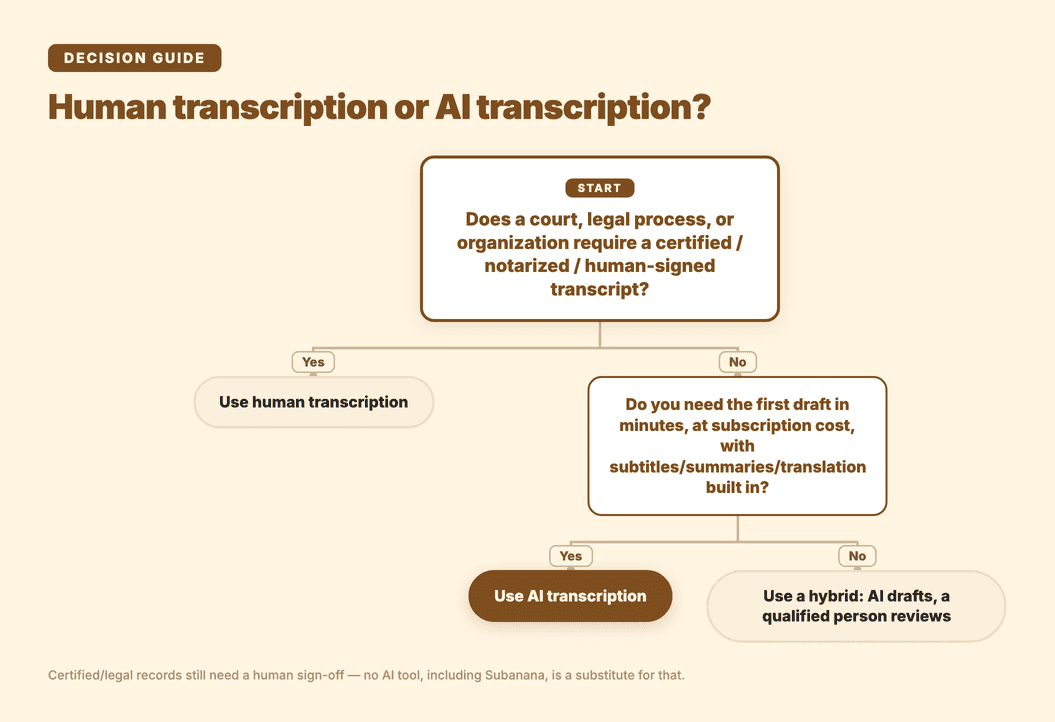
Use human transcription when:
- The transcript will be submitted to a court.
- A legal or regulated process requires human sign-off.
- You need a certified, notarized, or human-verified record.
- A named reviewer must accept responsibility for the final wording.
- The audio contains ambiguity that could materially affect the outcome.
Use AI transcription when:
- You need meeting notes quickly.
- You are turning interviews or podcasts into written content.
- You need subtitles or translations.
- You process many recordings.
- You want summaries, searchable text, or structured exports.
- The transcript is an internal working document rather than a formal legal record.
Use a hybrid workflow when:
- AI can save time on the first draft.
- A qualified person must review the final version.
- You need both automation and formal accountability.
- The record is important, but only certain sections require close human review.
For most everyday audio, AI is now the practical default. For certified and legal records, human transcription remains the correct choice.
Frequently asked questions
Are transcriptionists being replaced by AI?
For routine volume, largely yes. Meetings, podcasts, interviews, and creator content mostly go straight from recording to an editable AI transcript now, no person required for the first draft. Certified legal transcripts, court reporting, and anything needing a human signature are the exception, and that exception isn't shrinking.
What are the four types of transcription?
Verbatim, clean/edited, intelligent verbatim, and specialized (legal, medical, court-reporting conventions). Verbatim keeps every repetition and filler word; clean/edited strips those out while keeping the meaning; intelligent verbatim sits between the two, tightening wording without losing substance. Terminology drifts by vendor, so confirm what you're actually getting before you order.
How accurate are AI transcribers?
It depends heavily on the audio — noise, overlapping speakers, accents, and specialist terms all move the needle more than the tool itself does. What matters more than the raw first pass is what happens after it. Subanana routes each language to the best-performing model it has benchmarked, checks for hallucinations, can swap in another model, runs a proofreading pass, and flags dense sections for review — all of which catches a lot, none of which is a substitute for reviewing anything that actually matters legally.
Can ChatGPT do transcription?
Sometimes, informally. But a general chat assistant isn't built as a transcription pipeline — no file-limit handling, speaker labels, language routing, subtitle formats, or hallucination checks by design. Fine for asking a quick question about a short recording. Not what you want for repeatable production work, where a dedicated tool like Subanana carries the glossary support, model routing, and density flagging that a chat product doesn't.
Final verdict
Human transcription still wins when a person must stand behind the record. That includes certified legal transcripts, court reporting, notarized documents, and other workflows where formal accountability matters.
AI transcription wins for most everyday audio because it is faster, easier to scale, and connected to editing, summaries, subtitles, translation, and export tools.
Subanana is built for that everyday category. It is not a human transcription service, and it should not be used as one. If you need fast, reusable transcripts for meetings, interviews, podcasts, videos, or internal work, create a Subanana account.