
A good sermon notes template is short. You want a few prompts that catch the passage, the main idea and one thing to act on, without turning the service into a dictation exercise.
This page has a plain-text template you can copy into your phone, a journal or a shared doc, a version for kids, and practical tips for taking notes while you listen. The second half is for church media and communications teams who write up sermon notes, small-group questions and a recap every week.
Jump to: The template · How to fill it in · Kids' version · Note-taking tips · For church media teams
The sermon notes template
Copy the block below and paste it wherever you keep notes. Delete any line you don't use; the only ones that matter every week are the passage, the big idea and the application.
SERMON NOTES

Date:
Speaker:
Series / title:

SCRIPTURE
Main passage:
Other verses mentioned:

BIG IDEA (one sentence)


MAIN POINTS
1.
   Supporting verse:
2.
   Supporting verse:
3.
   Supporting verse:

QUOTES AND ILLUSTRATIONS
-

QUESTIONS I STILL HAVE
-

APPLICATION
One thing I will do this week:
Someone I could share this with:

PRAYER
If you prefer paper, print it on one page and leave the most space under "Main points" and "Application". Those are the two sections people run out of room in.
How to fill in each block
| Block | What to write | A prompt that helps |
|---|---|---|
| Scripture | The main passage, plus any cross-references the speaker reads aloud | "Which verse did they keep coming back to?" |
| Big idea | One sentence in your own words | "If a friend asked what the sermon was about, what would I say?" |
| Main points | Headings, not full sentences; add the verse that supports each one | "What changed when the speaker moved on?" |
| Quotes and illustrations | A phrase or a story you want to remember | "What would I retell at lunch?" |
| Questions | Anything that confused or challenged you | "What would I ask the speaker afterwards?" |
| Application | One specific action, with a day attached | "What will I do differently by Friday?" |
| Prayer | A line or two in response to what you heard | "What do I want to ask for, or give thanks for?" |
The big idea is the hardest block and the most useful. Many speakers say it outright near the start or the end, often more than once. If you can't find it during the service, leave the line blank and fill it in that afternoon when you reread your points.
A sermon notes template for kids
Younger listeners do better with fewer lines and room to draw. This version works for roughly ages 6 to 10. For younger children, a grown-up writes the words and the child does the drawing. Older kids can use the main template.
MY SERMON NOTES

Today's date:
The Bible story or verse:

Draw a picture of what you heard:
+------------------------+
|                        |
|                        |
|                        |
+------------------------+

Words I heard (tick them when you hear them):
[ ] God   [ ] love   [ ] ________   [ ] ________

One thing I learned:

My prayer:
Two tips for parents and kids' ministry leaders. Fill in the two blank "words" boxes before the service with words you expect the speaker to use, so there is something to listen for. And talk through the drawing on the way home; the conversation matters more than the page.
Tips for taking sermon notes
Write headings, not transcripts. You'll miss the next point if you try to capture every sentence. A few words per point is enough to jog your memory later.
Look up the passage before Sunday. If your church posts the reading or series in advance, read it once. You'll recognise the structure as it unfolds, and your notes will be about what's new to you.
Use a symbol for "come back to this". A star or a question mark next to a line takes a second and saves you hunting for the part that stuck with you.
Keep the application small and dated. "Pray more" is hard to act on. "Call my sister on Wednesday" is easy to check.
Reread within a day. A quick reread the same afternoon is when you fill gaps, write the big idea in your own words and move one thing into your calendar.
Bring your notes to small group. Your questions block is a ready-made starting point for discussion.
If you'd rather listen without writing at all, many churches post the recording online. You can go back to it later and take notes at your own pace.
For church media teams: the weekly write-up
If you're on the media or communications team, sermon notes are only one part of your week. You may also publish discussion questions for small groups, a short recap for the newsletter or website, and sometimes a blog post. It all starts from the same recording, and it is usually due Monday morning.
This part of the page shows one way to get a first draft of all three from the recording, so your time goes into checking and polishing. The pastor still reviews everything before it goes out.
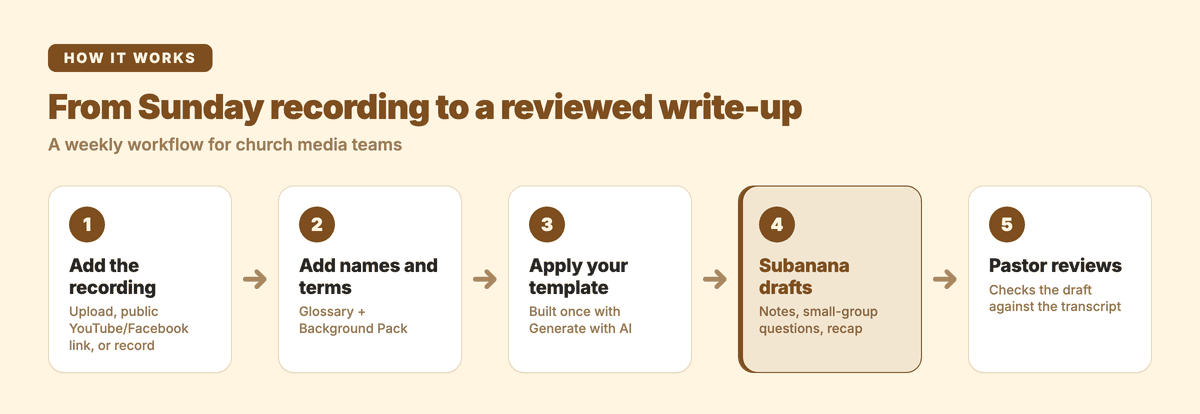
1. Get the sermon into Subanana
You have three ways in:
- Upload the file your sound desk or livestream software saves. Subanana takes video and audio files up to 8 hours and 30 GB each, and up to 20 files in one batch, so a full service recording fits. One thing to set up before your first real Sunday: the free plan transcribes the first 15 minutes of each file as a preview, so transcribing a full sermon end to end needs a paid plan.
- Paste a public YouTube or Instagram link if you stream the service. Subanana fetches it and transcribes it without you downloading anything. If your stream is members-only or otherwise restricted, download the file from your streaming platform and upload it instead. Live streams can be imported once they've ended.
- Record in the browser with the Record option ("Record your screen, camera or voice") if you want a quick audio capture.
The sermon transcription page covers the transcript side in more detail.
One housekeeping note before you upload. A service recording often carries more than the sermon — prayer requests, testimonies, names, children's voices. Decide with your pastor which recording goes in (many teams upload only the sermon segment, not the whole service), and keep project sharing to the people who need it.
2. Teach it your names and terms
Sermons are full of words a general transcription model may not expect: your pastor's name, the book you're preaching through, place names like Capernaum or Philippi, and the names of ministries and events.
Add them to a Glossary, which pins terms you don't want misspelled. A Workspace glossary applies to every project, so you set it up once. If you already keep a list, you can bulk-import it from XLSX or CSV.
If the pastor shares an outline or manuscript, attach it as a Background Pack. You can upload PDF, DOCX, PPTX, XLSX, TXT or MD files, paste text, or drop a URL, and Subanana reads it as context for that project.
3. Build your own sermon template once
Subanana's Template Library has 14 built-in summary templates, and you can build your own with "Generate with AI". Describe the sections your church publishes and reuse that template every week. Here's a starting description you can paste in and adjust:
Sermon write-up for our church website and small groups.

1. Sermon notes: title, speaker, main passage, the big idea in one
   sentence, 3 to 5 main points with the verse the speaker used for each,
   one key quote.
2. Small-group discussion questions: 1 icebreaker, 3 questions about the
   passage, 2 application questions. Plain, warm language.
3. Recap: a 120-word summary for the newsletter, written in the third
   person ("Pastor ___ taught from ...").

Only use what was said in the sermon. Quote scripture references exactly
as the speaker gave them.
Keep your church's voice in the description. If your small groups use a fixed question format, paste that format in too.
4. Let Subanana draft, then ask for more
Pick your Glossary, Background Pack and sermon template in the project's supporting materials, and Subanana drafts the notes, questions and recap from the transcript.
If you need something extra, ask the AI anything about the transcript in the project chat. For example: "Write two more discussion questions for a youth group," or "Which verses did the pastor quote in the second half?"
5. Send it to the pastor for review
Share the project with your pastor — view access is enough — so they can check the draft against the transcript and send corrections back however your team already talks. Your media team, as the project owner, makes the final edits to the summary before it goes out.
When it's approved, the notes are ready for your website, bulletin or small-group leaders. If you also publish a full transcript, paid plans export it as DOCX, TXT or Markdown.
If you want to turn the sermon into a longer blog post or a set of social clips, the guide on repurposing a video or podcast into blog posts walks through that next step, and how to transcribe a video covers the basics of getting clean text from any recording.
Running a church council, elders' or board meeting as well? Those need minutes rather than sermon notes; the minutes and notes templates are a better fit.
A small-group discussion question template
Whether you write them by hand or edit a draft, this structure keeps discussion guides consistent from week to week:
SMALL GROUP: [Series name], week [#]
Passage:

Open (5 min)
- An easy question anyone can answer.

Read the passage aloud.

Discuss (25 min)
1. What stands out to you in this passage?
2. What did the sermon say this passage means?
3. Where does this passage challenge you?

Apply (10 min)
4. What is one thing you could do this week because of this?
5. How can the group support you?

Pray (10 min)
FAQ
What should sermon notes include? At minimum: the main passage, the big idea in one sentence, the main points and one specific application. Quotes, questions and a prayer are useful extras.
How do I take notes without missing the sermon? Write short headings for each point and fill in details afterwards. A same-day reread does more for your memory than writing more during the service.
Can we make sermon notes from our livestream? Yes. Once the stream has ended, paste the public YouTube link into Subanana, and apply your sermon template to draft notes, questions and a recap.
Is there a built-in sermon template? Not a sermon-specific one. The 14 built-in templates are general-purpose — Speech and Education are the closest fits. For a weekly write-up, build your own with "Generate with AI" using the description above, then reuse it every week.
Upload this week's recording and let Subanana draft your notes, small-group questions and recap for the pastor to review.