
Good meeting minutes aren't a transcript. Nobody re-reads a wall of "and then Sarah said…". The job of minutes is to answer three questions a week later: what did we decide, who's doing what, and by when. Everything else is optional.
This post gives you a clean template you can copy right now, shows you the format that actually gets used, and — the part most template posts skip — how to fill it in a couple of minutes from a recording instead of typing it up after every call.
Subanana, a browser tool for transcription and meeting summaries, is used to show where a tool fits. The template works with pen, Word, or Google Docs just as well.
The meeting minutes template (copy this)
MEETING MINUTES

Meeting:        [name / purpose]
Date & time:    [date, start–end]
Location:       [room / call link]
Attendees:      [names]
Apologies:      [who couldn't make it]
Note-taker:     [name]

AGENDA
1. [item]
2. [item]
3. [item]

DISCUSSION & DECISIONS
- [Topic] — [one-line summary of what was discussed]
  DECISION: [what was decided]
- [Topic] — [summary]
  DECISION: [what was decided]

ACTION ITEMS
| # | Action | Owner | Due |
|---|--------|-------|-----|
| 1 | [task] | [name] | [date] |
| 2 | [task] | [name] | [date] |

NEXT MEETING
Date & time:    [date]
Carried over:   [any unfinished items]
That's the whole thing. Keep it boring — minutes are a record, not a document to impress anyone.
The format that actually gets used
Three parts do the real work; the rest is context.
- Decisions. Write the decision as a decision, not as a discussion. "The team talked about the launch date" is a note. "Decided: launch on Friday, revisit scope in Q4" is a minute. If a topic ended without a decision, say so — "no decision, parked to next meeting" is useful information.
- Action items with an owner and a due date. An action without a name is a wish. Every row in the action table needs a single owner (not "the team") and a date. This is the one section people actually come back to.
- Carry-over. Unfinished action items roll to the top of the next meeting. This single habit is what stops the same tasks from quietly disappearing.
Two more rules that keep minutes honest: write them the same day, while the context is fresh, and keep them short enough that someone will actually read them. A page is plenty for most meetings.
How to fill the template without typing it up
Here's the shift. Instead of scribbling notes during the call and typing them up after, you record the meeting once and let the transcript-and-summary do the first draft. You review and correct — you don't transcribe.
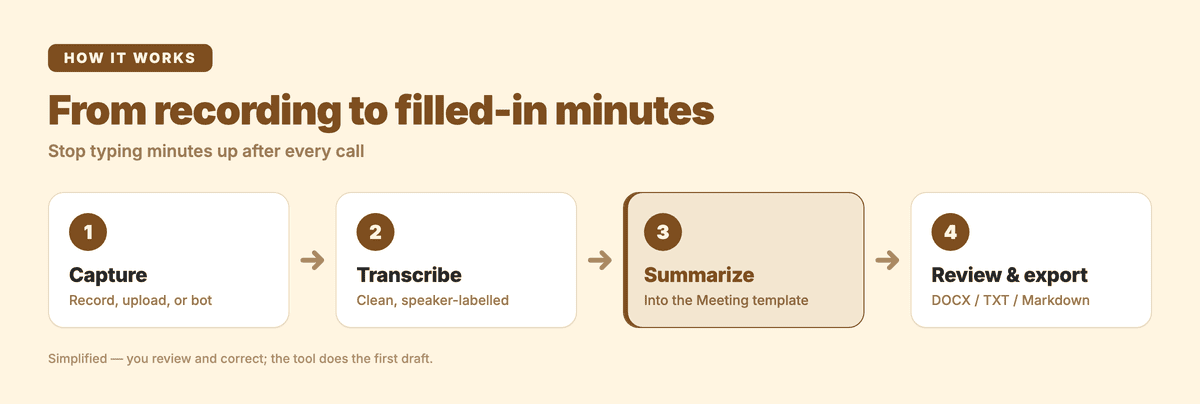
1. Capture the meeting
Upload a recording (MP3, M4A, MP4 — most audio and video formats work), or connect your calendar so the Google Meet or Microsoft Teams bot joins, records, and hands the recording back after the meeting ends. Either way you end up with one recording to work from.
2. Transcribe it
The recording becomes a clean, readable transcript — punctuation and paragraphs restored, filler words tidied up, and each speaker labelled so the back-and-forth reads like a conversation. Set the spoken language first; that's the setting that most affects accuracy.
3. Summarize into the minutes shape
This is where the template gets filled. Pick a Meeting summary template and the AI pulls out the key discussion points, decisions, and action items — the exact three sections that matter above. Subanana ships a library of built-in summary templates you apply in one click, or you can build your own to match the template above. Because the summary is grounded in the actual transcript, the action items come with who said they'd do what.
4. Review, then export
Read it against the recording, fix anything the summary missed, add owners and due dates where the call was vague, and export to DOCX, TXT or Markdown to drop into your notes, or copy it straight into your doc. If you're unsure whether a decision was final, you can ask the transcript directly — "what did we decide about the budget?" — and get an answer grounded in the meeting.
The point isn't to skip the thinking. It's to skip the typing, so the ten minutes you'd spend transcribing goes into sharpening the decisions and chasing the owners instead.
FAQ
Does Microsoft Word have a minutes template?
Yes — Word ships several built-in meeting minutes templates in its template gallery when you create a new document, and Google Docs has them too. They're fine as a starting layout. The template above is deliberately simpler, built around decisions and action items rather than formal boardroom structure. Use whichever gets read.
What is the best template for meeting minutes?
The best one is the shortest one your team will actually fill in. If a template has fields nobody uses, they get skipped and the minutes rot. Start with attendees, decisions, and an action table with owners and due dates. Add formality (agenda numbering, formal motions) only if your meetings genuinely need it — board and committee meetings do; a weekly standup doesn't.
Can ChatGPT create meeting minutes?
It can format notes you paste in, but it can't attend or hear the meeting — so you still need the source material. The reliable pattern is: get a transcript of the meeting first, then have an AI summarise that transcript into your minutes format. A dedicated transcription tool does both steps in one place and grounds the summary in what was actually said, rather than in whatever notes you happened to paste. For a full walkthrough of both methods — including ChatGPT's Record mode — see can ChatGPT create meeting minutes?.
What is the correct format for meeting minutes?
There's no single legal format for most meetings, but a usable one always covers: meeting name and date, attendees, agenda, discussion with the decisions made, action items (owner + due date), and the next meeting. Formal governance meetings (boards, non-profits, committees) may need to follow their bylaws — motions, seconds, and votes recorded verbatim — so check your organisation's rules there.
In short
Minutes are a record of decisions and commitments, not a transcript. Keep the template short, write decisions as decisions, give every action an owner and a date, and carry unfinished items forward. Then let a recording plus a summary do the first draft, so your time goes into the meeting's outcomes instead of retyping them.
Try Subanana free (preview the first 15 minutes of each file); plans are on the pricing page.