
Plaud sells a pocket recorder with a software subscription behind it. Subanana is a speech-to-text platform that runs entirely in a browser tab. They now overlap on one job: turning a recorded conversation or video into something usable. This page compares them using Plaud's own pricing page and Note Pro product page, re-read on 2026-10-06.
TL;DR
- Pick Plaud if you want a dedicated recording device in your pocket, want unlimited per-seat transcription for a team, or want access to 10,000+ pre-built summary templates.
- Pick Subanana if you don't want to buy hardware, need a bilingual subtitle file or burned-in video captions out of your recordings, or need to run a live, real-time captioned event for an audience.
Pricing Snapshot (checked 2026-10-06)
On Plaud's Note Pro page, fetched 2026-10-06, the Plaud Note is $159 and the Plaud Note Pro is $189 regular price. Plaud's pricing FAQ says every device includes the free Starter software plan. The software subscription is where Plaud actually competes with Subanana:
| Plaud Plan | Monthly | Annual | Transcription Minutes |
|---|---|---|---|
| Starter | Free (included with every device) | — | 300 min/month |
| Pro | $17.99/mo | $8.33/mo ($99.99/yr) | 1,200 min/month |
| Unlimited | $29.99/mo | $19.99/mo ($239.99/yr) | Unlimited, up to 24 hrs/day |
| Team | $28/user/mo (launch offer until November 30, 2026, then $35) | $20/user/mo (launch offer for the first year, then $25; offer ends November 30, 2026) | Unlimited per seat, up to 24 hrs/day |
Minutes don't roll over on any Plaud plan, per their pricing FAQ. You can still record with an empty balance; transcription just pauses until the next reset or a one-time top-up (600 / 3,000 / 6,000-minute packs).
Subanana has no hardware at all. Every tier below is a browser subscription, viewable in full at subanana.com/en/pricing:
| Subanana Plan | Monthly | Annual | Minutes |
|---|---|---|---|
| Free | $0 | — | 15-min preview per file, 3 uploads/month, no transcript export |
| Lite | $18/mo | $9/mo ($108/yr) | 60 min/month (720/yr pool) |
| Pro | $30/mo | $18/mo ($216/yr) | 180 min/month (2,160/yr pool) |
| Max | $75/mo | $50/mo ($600/yr) | 600 min/month (7,200/yr pool) |
Do the per-minute math and Plaud wins outright on volume (per the vendor pricing above): its annual Pro plan works out to roughly $0.007 per minute against Subanana Lite's roughly $0.15 per minute. If your only need is cheap bulk transcription, choose Plaud.
On teams: Plaud's pricing page says its Team plan bundles centralized billing, seat and device management, and secure offboarding with unlimited per-seat transcription, with a launch offer on annual billing for the first year (offer ends November 30, 2026).
Where Plaud Wins
1. Up to 50 hours of continuous hardware recording
Plaud's product page lists the Note Pro at up to 50 hours of continuous recording, up to 60 days of standby and 64 GB of internal storage, in a phone-attached or standalone dual-mode design. Subanana has no standalone recorder: capturing audio means an uploaded or imported file, a mic-fed live session, in-browser recording, a Meet/Teams bot joining a scheduled call, or the Chrome extension, all of which need a phone, laptop, or browser tab running. If your job is walking into rooms with nothing but the recorder in your pocket, that's what Plaud's hardware is built for.
2. Ask Plaud and a very large template library
Plaud's pricing page lists Ask Plaud (Beta) among the features included on all plans, plus Plaud's "10,000+ Professional Summary Templates" and Beta custom templates. Subanana's Template Library ships 14 built-in summary templates (Meeting, Speech, Business, Consulting, Education, Medical, Legal, Creator, and others) plus a "Generate with AI" custom builder. If you want the biggest possible menu of pre-built summary formats, Plaud's library is far larger.
3. Published compliance claims
Plaud's pricing page states that it is ISO 27001, ISO 27701, GDPR, SOC 2 Type II, HIPAA and EN 18031 compliant. If your procurement checklist needs named standards, that is a concrete advantage, though the page states compliance and I did not see audit reports.
Where Subanana Fits Better
1. Bilingual subtitles and burned-in video
Subanana exports a bilingual SRT with the source and translated text on paired lines in one file, and renders a one-click video export with burned-in subtitles (single-language or bilingual). Plaud's pricing page advertises "27+" export formats without breaking them down, so I can't tell you which subtitle options sit inside that figure; if subtitle files or captioned video are your destination, check Plaud's export list for your exact format before you buy. On paid plans, Subanana's subtitle and transcript export set is SRT, VTT, TXT, DOCX, XLSX, Markdown and FCPXML (for Final Cut Pro). The free tier does not export transcripts or subtitle files: it gives you a 15-minute preview, a watermarked 15-second video clip, and a downloadable AI summary. If your transcript's destination is a published video rather than a filed-away meeting note, Subanana's subtitle generator is built for that path specifically.
2. Live, real-time captioning for an actual audience
Subanana's Live Transcription & Translation captions a live event in real time: the host sets one source language plus up to five translation targets, and attendees join from a web link or QR code with no app install, each choosing their own display language. The captions stay in the app and cannot be exported. The only route to a file is re-processing the event's recorded audio as a normal upload, which re-transcribes from scratch and charges minutes again. Live runs on the Max plan.
Side-by-Side
The table sticks to the shared transcript job and what each vendor publishes. Subtitle files, live captions and meeting bots are covered in the sections above and are not scored here.
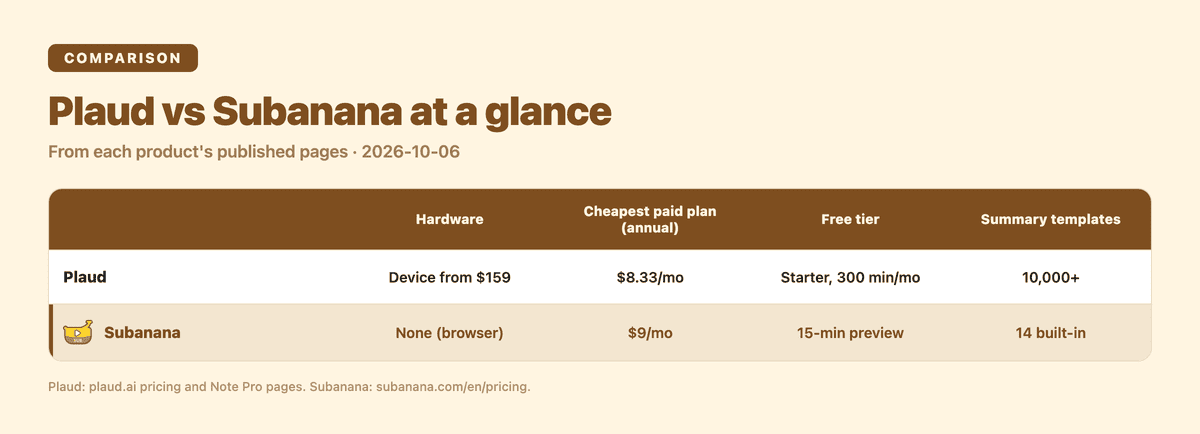
| Dimension | Plaud | Subanana |
|---|---|---|
| Hardware required | Device-based (Note $159, Note Pro $189 regular) | ❌ browser-only |
| Free tier | Starter included with every device | ✅ no purchase (15-min preview) |
| Cheapest paid entry (annual) | $8.33/mo (1,200 min/mo) | $9/mo (60 min/mo) |
| Export formats | "27+" (not itemized on the pricing page) | SRT, VTT, TXT, DOCX, XLSX, Markdown, FCPXML |
| Ask-style AI Q&A | ✅ Ask Plaud (Beta) | ✅ AI chat, per project |
| Summary templates | ✅ 10,000+ | 14 built-in + AI-generated custom |
| Business offering | ✅ Plaud's "Team" tier with launch offer (see pricing above) | No self-serve business tier |
So Which Should You Pick?
Buy Plaud if the recorder is the point: you capture in-person meetings, you want a very large template library, or your team needs unlimited per-seat transcription and named compliance standards. Use Subanana if you start from files or links you already have, and the deliverable is a subtitle file, a captioned video or live captions an audience can join without installing anything.
FAQ
Can I test both for free? Subanana's free tier needs no purchase: sign up and upload. Plaud's pricing FAQ says every Plaud device includes the Starter plan.
Does Subanana handle multilingual meetings? For a live event, yes: each attendee picks their own display language. For uploaded recordings, a single-language mode transcribes one source language for the whole file, and paid Enhanced transcription adds a multiple-languages mode (up to 10 languages per file). Plaud's pricing page lists 112 transcription languages with auto speaker labeling on every plan.
What happens to your recordings if you stop paying? Plaud's cancellation FAQ states that on paid individual plans, recordings and transcriptions are not deleted when you cancel: your account reverts to the free Starter plan and you keep access to what you already recorded and transcribed. Subanana keeps paid content for as long as the plan is active. On Free, accounts with no sign-in for 90 days get a deletion notice, a 14-day grace period and a 14-day quarantine before project data is purged, and uploads that were never added to a project auto-expire after 24 hours.
Try Both on Your Own Recording
Run one real recording through Plaud's software (or a device demo, if you can get one) and through Subanana's free tier, then compare the output against your next step: a filed note, a published clip or a live stream. Start free at subanana.com, with no device to buy.
Related reading: