
TL;DR
TurboScribe is difficult to beat for heavy solo users who want unlimited transcription at a low monthly price. Its annual plan is $120 per year, or $10 per month effective, and includes unlimited transcriptions, translation to 134+ languages, bulk uploads, and broad file-format support.
Subanana is built for a wider workflow. It captures Google Meet and Microsoft Teams meetings, supports live captions and live translation for events, creates AI meeting summaries, produces bilingual dual-track SRT files, and charges per workspace rather than per seat.
The short version:
- Pick TurboScribe for high-volume batch transcription of recorded files.
- Pick Subanana when meetings, live events, shared team access, or subtitle production are part of the job.
- Test both on your own audio. This is a documentation-based comparison, not a claim that one service produces better transcripts for every recording.
The comparison concedes TurboScribe’s real advantages where it has them.
Why look for a TurboScribe alternative?
TurboScribe has a clear product shape: upload or paste a link, wait for the transcript, then export or translate it. That simplicity is useful. You do not need specialized hardware, and the service supports a very broad list of audio and video formats.
That same focus becomes a limitation when your workflow starts before or after transcription.
You may be looking for a TurboScribe alternative if you need to:
- Capture a Google Meet or Microsoft Teams call without separately recording and uploading it.
- Provide captions to an audience during a live event.
- Create a meeting summary after a call.
- Give several people access through one shared workspace.
- Export a single subtitle file containing both the source and translated text.
- Burn subtitles directly into a video.
If you only need transcripts from existing recordings, those needs may not matter. In that case, TurboScribe’s unlimited pricing can be the more practical answer.
For a broader look at meeting-focused tools, see our guide to the best AI meeting transcription tools in 2026.
Pricing snapshot
TurboScribe pricing
TurboScribe offers a free plan with:
- Three transcripts per day.
- A maximum file length of 30 minutes.
- One file processed at a time.
- Lower priority in the transcription queue.
Its paid Unlimited plan costs:
- $20 per month when billed monthly.
- $120 per year, which works out to $10 per month when billed annually.
The plan is explicitly for one person. It includes unlimited transcriptions, uploads up to 10 hours and 5GB per file, up to 50 files at once, unlimited storage, bulk exports, all transcription modes, translation to 134+ languages, and highest queue priority.
For an individual who transcribes several hours of recorded audio every week, that is a strong offer. There is no metered-minute calculation to manage.
Subanana pricing
Subanana’s plans are metered by transcription minutes:
- Free: $0, with three uploads per month. The first 15 minutes of each file are previewed. Video exports are watermarked, and SRT, TXT, and DOCX exports are not available on the free plan.
- Lite: $18 per month monthly, or $9 per month billed annually. Includes 60 minutes per month, or a 720-minute annual pool.
- Pro: $30 per month monthly, or $18 per month billed annually. Includes 180 minutes per month, or 2,160 minutes annually.
- Max: $75 per month monthly, or $50 per month billed annually. Includes 600 minutes per month, or 7,200 minutes annually.
Paid Subanana plans remove the watermark, unlock all supported export formats, and support video export up to 4K. The 30GB / eight-hour per-file limit applies to every plan, free included, so file size is not a reason to upgrade between plans.
Subanana minutes do not roll over month to month. Annual plans provide one annual pool that can be used at any point during the year.
See the current Subanana pricing before choosing a plan.
The important pricing difference: workspace versus person
Subanana pricing is per workspace, not per seat: everyone already in a workspace draws from one minute allowance instead of paying separately. There is no self-serve invite-by-email flow yet; new workspace members are added by Subanana’s team. This differs from TurboScribe’s instant per-person signup.
TurboScribe’s Unlimited plan is explicitly for one person. There is no team plan visible on its pricing page. A team would need to account for separate individual access rather than one workspace price.
This does not make Subanana cheaper for everyone. A solo user who transcribes ten or more hours of files each month gets much more volume from TurboScribe. A workspace that already has several members sharing access gets more value from Subanana’s workspace-minute model, once that workspace exists.
Where TurboScribe wins
A fair TurboScribe alternatives comparison needs to start with its strengths.
1. Unlimited transcription is excellent for heavy solo use
Start with the workload: researchers processing archives, journalists working through interviews, students transcribing lectures, and creators converting a large back catalog all benefit from TurboScribe’s flat unlimited plan.
A person transcribing 10 or more hours of recorded files each month spends less with TurboScribe than with a metered-minutes service. Uploading recordings also requires no monthly allowance check.
Subanana’s minute limits suit users who value the surrounding workflow, or whose monthly volume is moderate and predictable.
2. Translation coverage is broad
Subanana translates uploaded files too, but TurboScribe includes translation to 134+ languages in one flat menu. Subtitle projects in Subanana support multiple translation targets per file, while transcript and meeting projects support one translation target per file.
TurboScribe’s real advantage here is menu breadth: 134+ languages to choose from versus Subanana’s more moderate range depending on mode. If you need a single file translated into one target language at a time, but want the widest possible choice of that target language, TurboScribe’s menu is the stronger fit.
3. Large uploads and bulk processing fit archival work
TurboScribe supports files up to 10 hours and 5GB, with up to 50 files uploaded at once. Its supported input list includes MP3, MP4, M4A, MOV, AAC, WAV, OGG, OPUS, MPEG, WMA, and more.
That combination suits a folder of recordings that needs batch processing.
4. It has useful conventional exports
TurboScribe exports PDF, DOCX, TXT, SRT, and VTT. It also supports speaker recognition and markets the product for meetings, interviews, and podcasts.
Subanana supports DOCX, TXT, SRT, VTT, XLSX, and Markdown, but not PDF. The better choice here depends on the formats your workflow requires.
Where Subanana wins
Unlimited transcription is not a contest Subanana is built to win. Subanana’s transcription sits inside a broader capture, meeting, live-caption, and publishing workflow instead.
1. Meeting capture without a separate recording
Subanana’s bot captures Google Meet and Microsoft Teams meetings. It records both in-room and remote audio through the meeting platform.
TurboScribe has no meeting bot or calendar capture feature listed on its site. It requires an existing recording or link, so nothing joins the call for you.
Subanana’s AI transcription tool also supports plain file upload and public link paste when a meeting bot is not the right fit.
2. AI meeting summaries
Subanana includes AI Meeting Summary.
TurboScribe does not list an AI meeting-summary feature. Its documented product focuses on transcription, translation, and exports.
The distinction is straightforward:
- Subanana produces a summary inside the meeting workflow.
- TurboScribe produces the transcript for use in another summary tool.
3. Live captioning and live translation
When an audience needs captions during an event, Subanana provides Live Caption and Live Translation through a shareable link or QR code. The feature is gated to the Max plan.
The host configures up to 5 live translation languages in advance. Each attendee opens the link on their own phone and picks the one language they want to read. A side-by-side view exists too, but only as a venue-screen projection the host sets up, not as an option on an individual attendee’s phone.
The live mode takes direct audio input from a microphone or system audio routed into the browser running the session. It is not a meeting-bot mode. A live session’s transcript cannot be exported; what you keep afterwards is the event recording, which the host can turn into a normal project. That project is transcribed from scratch, uses minutes like any upload, and does not reproduce the live transcript.
TurboScribe’s workflow centers on transcribing existing files. For a post-event file, TurboScribe is the better fit. For audience-facing captions during the event, Subanana is designed for that use case.
4. Bilingual dual-track SRT
Subanana can create a single bilingual SRT file with the source text and translated text together, one above the other in each cue. TurboScribe has SRT and translation support, but its documented output does not include this dual-track format.
That is useful for:
- Language-learning videos.
- Bilingual social clips.
- International training content.
- Videos where viewers need to compare the original and translated speech.
5. Burned-in subtitle video
TurboScribe documents subtitle and caption exports. Subanana goes further by rendering subtitles directly into the video file.
Paid Subanana plans support single-language or bilingual burned-in subtitles, up to 4K. This creates a finished captioned video for a social platform, presentation, or review link without requiring a separate video-editor step.
Burned-in bilingual video export is not listed on TurboScribe’s site.
6. Workspace minutes are pooled, not per-seat priced
Subanana bills the workspace, not the number of people using it. Everyone already inside a workspace draws from the same minute allowance.
There is no self-serve invite-by-email flow yet; new workspace members are added by Subanana’s team.
TurboScribe’s paid plan is explicitly for one person, with instant self-serve signup and no workspace concept.
Neither is a clean win: TurboScribe onboards a new user faster; a Subanana workspace that already has several people sharing it gets more value from one pooled minute allowance.
TurboScribe vs Subanana: feature comparison
| Feature | TurboScribe | Subanana |
|---|---|---|
| Free plan | Three transcripts per day, files up to 30 minutes | Three uploads per month, first 15 minutes previewed |
| Paid pricing model | Unlimited for one person | Metered minutes per workspace |
| Lowest annual paid price | $120 per year | $108 per year for Lite |
| Heavy solo transcription | Strong fit because of unlimited usage | Can become expensive or restrictive at high volume |
| Meeting bot | Not listed; no meeting capture found | Google Meet and Microsoft Teams bot capture |
| Live captions | Outside its file-based workflow | Available through a shareable audience link (Max plan) |
| Live translation | Outside its file-based workflow | Available with host-configured languages (Max plan) |
| AI meeting summary | Not listed | Available |
| Transcription languages | 98+ | 95+ |
| Translation | 134+ languages included, one flat menu | Multiple targets per file in subtitle mode, one target in transcript/meeting mode, up to 5 in live mode |
| Maximum file size | 5GB and 10 hours per file | 30GB and 8 hours per file, every plan |
| Bulk upload | Up to 50 files at once | Not positioned around 50-file batch upload |
| Common exports | PDF, DOCX, TXT, SRT, VTT | SRT, VTT, TXT, DOCX, XLSX, Markdown |
| Dual-track bilingual SRT | Not documented | Available |
| Burned-in video subtitles | Not documented | Available, including bilingual video |
| Speaker identification (diarization) | Available | Available |
| Multi-person access | Paid plan explicitly for one person | One workspace-wide minute pool; no self-serve invite-by-email flow yet; new members are added by Subanana’s team |
| Hardware required | No | No |
The table shows why there is no universal winner. TurboScribe is stronger on unlimited batch transcription and broad translation. Subanana is stronger when the workflow includes meetings, live audiences, summaries, team access, or finished subtitle video.
Who should choose TurboScribe?
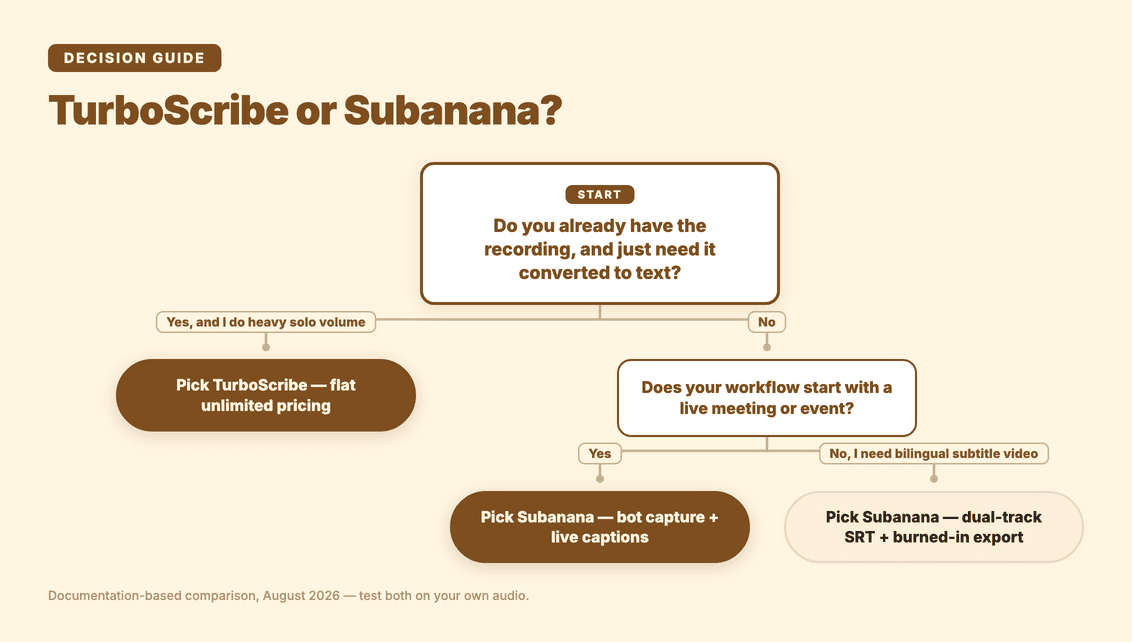
TurboScribe is the better choice if most of these statements describe you:
- You work alone.
- You already have the audio or video files.
- You transcribe many hours each month.
- You want unlimited usage at a flat price.
- You need translation to a wide range of languages.
- You process long files or many files in batches.
- You need PDF export.
- You are comfortable using another tool for meeting summaries or live captions.
For this user, TurboScribe’s focused product is a strength. There is no need to pay for meeting features you will not use.
Who should choose Subanana?
Subanana is the better choice if your workflow includes any of these:
- Capturing Google Meet or Microsoft Teams meetings.
- Creating AI summaries after meetings.
- Captioning a live event for an audience.
- Offering live translation through a QR code or shareable link.
- Already having a shared Subanana workspace with teammates.
- Producing bilingual dual-track SRT files.
- Exporting videos with burned-in subtitles.
- Using a transcription workflow that includes quality checks and proofreading.
Subanana uses multiple layers for quality: the best-benched speech-to-text model per language, hallucination detection with automatic model substitution, LLM-assisted proofreading, and characters-per-second flagging. We continuously benchmark speech-to-text models and pick the best performer per source language for every transcription, so you are not locked into one vendor.
That approach is valuable when the transcript is going directly into a meeting workflow or published video. It does not change the pricing reality for a heavy solo transcriber. If unlimited volume is the main requirement, TurboScribe is still the right answer.
You can start with Subanana and test it with your own recordings.
Is TurboScribe the best alternative to Subanana?
For some users, yes. TurboScribe is an excellent alternative to Subanana when the job is simply converting a large number of existing recordings into text at a predictable flat price.
For other users, Subanana is the more complete alternative to TurboScribe because it covers capture, live captioning, meeting summaries, and subtitle production.
The two tools diverge most in what happens before and after the transcript, so the deciding question is the shape of your workflow, not the raw transcript.
If your workflow begins with a recording and ends with a text export, TurboScribe’s economics and batch tools are compelling.
If your workflow begins in a meeting, continues through a summary, or ends with a live or bilingual video experience, Subanana covers more of the process.
For another focused comparison, read Subanana vs Happy Scribe.
FAQ
Is there a free TurboScribe alternative?
Yes. Both TurboScribe and Subanana have free tiers.
TurboScribe’s free plan allows three transcripts per day, with files up to 30 minutes and one file processed at a time. Subanana’s free plan allows three uploads per month, previews the first 15 minutes of each file, and limits some exports. The limits are structured differently, so the better free option depends on how often you use the tool.
Does TurboScribe have a team or multi-user plan?
TurboScribe’s Unlimited plan is explicitly for one person. No team plan is visible on its pricing page.
Subanana charges per workspace rather than per seat, so everyone already in a workspace draws from one minute allowance. There is no self-serve invite-by-email flow yet; new workspace members are added by Subanana’s team. Instant team onboarding therefore works differently from TurboScribe’s individual signup.
Does Subanana join and capture meetings automatically?
Yes. Subanana offers bot-based capture for Google Meet and Microsoft Teams. The bot joins the meeting and captures the meeting audio through the platform.
TurboScribe does not list meeting-bot or calendar capture. It processes recordings or links that you provide after the fact.
Subanana also offers live captions and live translation for events, but that is a separate direct-audio-input mode using a microphone or system audio routed into the browser. It is not the same as meeting-bot capture.
Which is cheaper for heavy solo use?
TurboScribe is cheaper for heavy solo use because its paid plan includes unlimited transcription.
The monthly price is $20, or $120 per year when billed annually. A person transcribing more than 10 hours of recordings each month gets more value from that flat price than from Subanana’s metered-minute plans.
Subanana is more economical once several people already share one workspace, or for users who need its meeting and live-event features.
Does Subanana translate transcripts like TurboScribe?
Yes, but the shape is different. TurboScribe presents one flat menu of 134+ target languages for any uploaded file. Subanana’s translation depends on the mode: a subtitle project can add multiple translation target languages to one file, a transcript or meeting project supports one translation target, and a live event supports up to 5.
Subanana’s advantage is the surrounding workflow once translation happens: bilingual dual-track SRT in a single file, and burned-in bilingual video export.
Which tool is better for long recordings and bulk uploads?
TurboScribe has the stronger documented batch workflow. It supports files up to 10 hours and 5GB, and allows up to 50 files to be uploaded at once.
Subanana supports files up to 30GB and eight hours on every plan, free included, but its plans are based on minutes rather than unlimited usage. Choose TurboScribe if bulk archival transcription is the central job. Choose Subanana if the recording is part of a broader meeting or publishing workflow.
Final verdict
TurboScribe is one of the strongest low-cost choices for a solo user who wants unlimited transcription of recorded files. Its translation coverage, long file limit, bulk uploads, and broad input support are real advantages.
Subanana is the better TurboScribe alternative when transcription is only one part of the work. It adds Google Meet and Microsoft Teams capture, AI meeting summaries, live audience captions, live translation, workspace-based pricing, bilingual SRT, and burned-in subtitle video.
Start with the workflow you actually have. If you need a transcript factory, try TurboScribe. If you need a meeting and captioning workspace, try Subanana.