
A "voice recorder and transcriber" is actually two purchases pretending to be one. Something has to capture the audio, and something has to turn it into text. Buy the wrong combination — a $159 recorder with a thin transcription plan, or a transcription app with no recording feature at all — and you end up stitching two tools together anyway. Here's how the pieces actually split, what each option costs, and where each one falls down.
Subanana, a transcription and subtitling tool, doesn't make a recorder. It's the software half of this decision, the part that takes audio you've already captured (on your phone, a laptop, or a dedicated recorder) and turns it into a transcript. If you're shopping for a standalone recording device, that's a different purchase. This post covers both halves so you can see where they meet.
The two decisions, separated
Recording method is what actually captures the sound:
- Your phone's voice memo app (free, always in your pocket, but no built-in transcription)
- A laptop or webcam mic during a call or a Zoom/Meet/Teams meeting
- A dedicated hardware recorder (Plaud, Sony, Olympus, and similar), with a better mic, longer battery life, and no dependence on a phone being nearby
- A wearable or pin recorder for hands-free, all-day capture
Transcription tool is what turns the audio file into text:
- Built into the recorder's companion app (Plaud, some Sony and Olympus models)
- A separate transcription service you upload the file to afterward (Subanana, Otter, Descript, Rev)
- A general-purpose office tool with a transcribe feature bolted on (Microsoft Word's "Transcribe" panel)
Most buying guides for "voice recorder and transcriber" only cover the first list: a rundown of hardware with "AI transcription" tucked in as a single bullet point, glossing over how good that transcription actually is, what languages it handles, or what happens to a 90-minute lecture recording once it's off the device. The transcription half is where most of the actual work, and most of the actual limits on language support, file length, and export format, actually live.
Use the tree below to skip straight to the option that matches your situation, then read the section for the specifics.
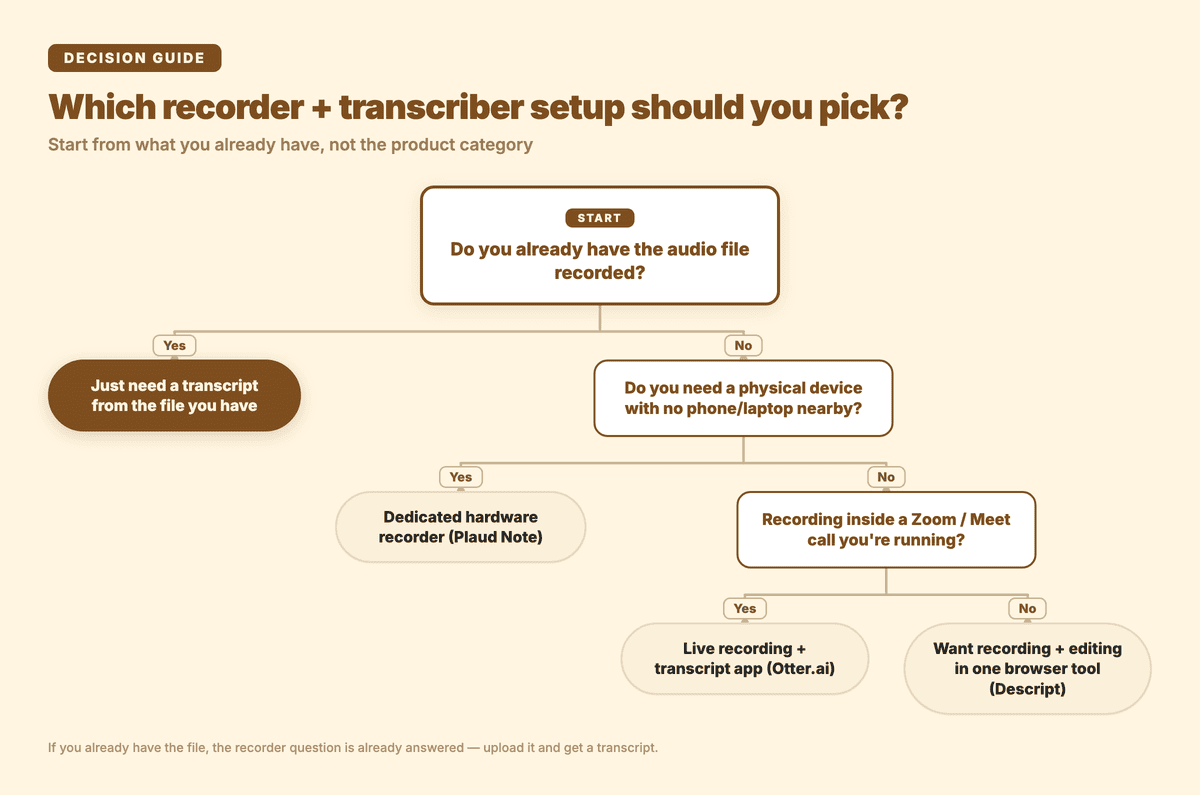
If you don't have a recording yet: Plaud Note
Plaud's Note is the recorder most people mean now when they say "AI voice recorder," a credit-card-sized device that clips to your phone case or sits on a table. As of this writing (plaud.ai, checked 2026-09-12), it costs $159, records up to 30 hours continuously on a charge with 60-day standby, holds 64GB of local storage, and transcribes in 112 languages through the companion Plaud app. The free plan built into the device covers 300 minutes of transcription a month.
This is the pick for people who want recording to be a single physical action: clip it on, press one button, forget about phone battery or app permissions. Journalists doing field interviews, researchers running participant sessions away from a laptop, or anyone who's had a phone die mid-interview once and never wants to repeat it will get the most out of it.
The catch is that transcription runs entirely through Plaud's own app, so you're locked into their pipeline once the audio is captured, and 300 free minutes a month runs out fast if you're recording lectures or long meetings regularly. It's also $159 up front before you've transcribed a single word, a real barrier if you're not sure yet whether you need dedicated hardware.
If you're recording inside a call you're already running: Otter.ai
Otter turns a phone or laptop you already have into a recorder, with a transcript appearing as you talk. Checked live at otter.ai/pricing (2026-09-12), the free plan gives 300 transcription minutes a month plus 3 lifetime file imports, and Pro ($8.33/user/month billed annually) raises that to 10 file imports a month while adding automatic sync from Zoom cloud recordings and Dropbox.
Otter suits people whose recordings mostly happen inside meetings they're already running on Zoom, Google Meet, or a laptop mic. Its strength is capturing while you talk, not processing a backlog of files recorded somewhere else.
That 3-lifetime-import cap on the free plan gets hit fast if your actual problem is "I have a folder of old interview recordings to get through" rather than "I want to record my next meeting." Otter's transcription is also tuned around English meeting speech, so it isn't the strongest fit for switching languages mid-recording or for the kind of formal, non-English source material this search often involves: lectures in a second language, multilingual interviews.
If you want recording and light editing in one place: Descript
Descript blurs recorder and transcriber into a single browser tool, transcribing in real time as you record. Checked live at descript.com/tools/voice-recorder (2026-09-12), the free tier includes 1 hour of transcription a month, and Hobbyist ($24/month, or $16/month billed annually) raises that to 10 hours. Descript advertises a high accuracy figure on that page for its own transcription; that's their marketing claim, not something I've independently measured, so I won't repeat the specific number here.
The thing to know before buying is that Descript's core product is a video and audio editor with transcription as an entry point, not a lightweight transcription tool on its own. You're paying for editing features (Studio Sound cleanup, filler-word removal) whether you need them or not. If all you want is audio in, transcript out, it's more tool than the job requires.
If you already have the file: Subanana
If you're past the recording question and just have the file, whether it's a voice memo, a Zoom recording, a lecture capture, or an interview pulled off a dedicated recorder, this is the half Subanana actually does. Upload the file (video or audio, up to 30GB / 8 hours per file, on every plan including free) and it comes back as a transcript with speaker separation, punctuation, and paragraphing applied automatically.
The part that matters most for multilingual audio: Subanana continuously benchmarks speech-to-text models and routes each transcription to whichever one performs best for that source language, instead of running everything through a single model tuned mostly for English. That's a routing decision, not an accuracy number, but it's the honest reason this matters when your source audio is a mixed-language interview or a lecture in a language most transcription tools treat as an afterthought. The same language list applies whether you're transcribing, translating, or both, across 95+ supported languages.
Two things are worth knowing if you're coming from a recorder or a lecture-capture app. If the recording is already posted somewhere public, a lecture uploaded to YouTube, an interview clip on Instagram, you can paste the link directly instead of downloading and re-uploading the file. And export isn't limited to plain text: SRT, VTT, TXT, DOCX, XLSX, or Markdown once you're on a paid plan (the free tier previews the first 15 minutes of a file's transcript but doesn't export, which is enough to check quality before committing to anything).
To state the limit plainly: Subanana does not sell a recorder. If your bottleneck is capturing the audio in the first place, no phone or laptop available, need 30 hours of battery, want a physical device, that's Plaud's category, not this one. What this tool solves is the second half of the job, getting from a finished audio file to a usable, exportable transcript.
Comparison table
| Plaud Note | Otter.ai | Descript | Subanana | |
|---|---|---|---|---|
| What it is | Hardware recorder + app | Recording + live-transcript app | Recording + editing + transcript | Upload-and-transcribe (no hardware) |
| Upfront cost | $159 device | Free / $8.33 mo (Pro, annual) | Free / $24 mo (Hobbyist) | Free / $18–$75 mo |
| Included transcription | 300 min/mo with device | 300 min/mo free, 10 file imports/mo Pro | 1 hr/mo free, 10 hr/mo Hobbyist | 60–600 min/mo by plan, 30GB/8hr per file all plans |
| Language handling | 112 languages (their figure) | Tuned for English meeting speech | Not specified on their site | 95+ languages, per-language model routing |
| Best for | Field interviews with no phone nearby | Recording inside Zoom/Meet calls | Recording + video/audio editing together | Transcribing files you already have, multilingual |
| Real limit | Locked to Plaud's app; 300 min/mo caps fast | 3 lifetime file imports on free tier | Editor-first, transcription is secondary | No recording hardware, software only |
Pricing and limits confirmed live from each vendor's site on 2026-09-12. Check current pricing before buying, since plans change.
So which should you pick?
If you don't have a recording yet and need hardware you can trust away from your phone, Plaud is the honest answer. You're paying for the device, and its transcription limits become a secondary concern once you're using it regularly. If you're recording inside Zoom or Meet calls you're already running, Otter's live-transcript-while-you-talk is genuinely useful and the free tier covers casual use. If you want one browser tool for both recording and light editing, Descript does that, with editing as the bigger part of what you're paying for.
If you're past all of that, you have the audio file, in whatever language, and just need it as an accurate, exportable transcript, that's the AI transcription tool built for this exact hand-off, whether the file came from a phone, a laptop, or one of the recorders above. For team interviews and research sessions specifically, the meeting transcription workflow adds speaker labels and a summary on top of the raw transcript.
For a closer look at the workflow of taking a voice memo specifically, not a dedicated recorder file, through to a usable transcript, see how to turn a voice recording into a usable transcript. And if your source audio is coming off WhatsApp voice notes rather than a recorder, transcribing WhatsApp voice messages covers that specific file-export step.
FAQ
Is there an audio recorder that transcribes to text? Yes. Hardware options like Plaud Note record and route the audio through a companion app for transcription. The trade-off is that transcription happens inside that app's own pipeline, and included minutes are limited (300 a month with Plaud, for example), so heavy users often end up exporting the raw audio to a separate transcription tool anyway once they exceed the device's included allowance.
Can you transcribe from a voice recording you already made? Yes, and this is the more common situation once you're past the "what device should I buy" question. Any recorded audio file, a phone voice memo, a call recording, a file pulled off a dedicated recorder, can be uploaded to a transcription tool directly. You don't need the same brand's app; a Plaud recording, a phone voice memo, and a Zoom recording can all go through the same transcription tool as long as it accepts standard audio and video formats.
What's the best device to record and transcribe? It depends which part of the job is actually your bottleneck. If you don't reliably have a phone or laptop free to record with, a dedicated device like Plaud solves that. If capturing audio was never the problem, you're recording fine, you just want a better transcript, especially in a language other than English, or need particular export formats like SRT, DOCX, or XLSX, the device matters less than the transcription tool you route the file through afterward.
Ready to see it on your own audio? Try Subanana's transcription tool. The free plan previews the first 15 minutes of any file, no card required.