
A podcast transcript almost never looks the way people expect. The raw output from a speech-to-text engine is a wall of run-on, unpunctuated text with filler words left in. What actually gets published, whether in show notes, as captions, or inside a podcast app, is a cleaned, labeled, format-specific version of that same audio. Below is a worked example of both, plus the conventions that change depending on where the transcript ends up.
The example below is an invented, illustrative excerpt: a generic two-person interview podcast, not a real show or a real person's words.
What does a raw podcast transcript look like?
This is what comes straight out of automatic speech recognition, before anyone touches it: no punctuation, no capitalization, no speaker separation, filler words intact.
so i think the biggest mistake people make when they're starting out is they
try to do everything themselves right they think i can handle the ordering
and the shipping and the customer service and then six months in they're
just completely burned out um and the business hasn't actually grown because
they spent all their time on stuff that didn't need to be them yeah that
tracks i see that constantly with the founders i talk to and it's it's not
even a money problem early on right like you could afford to hand some of
this off
That block is technically accurate (every word was said), but nobody would publish it as-is. It doesn't distinguish who's speaking, it has no sentence boundaries, and the filler words that are natural in speech ("um", "right", "i think") read as noise on the page. This is what the industry calls a raw or verbatim pass: faithful to the audio, not yet formatted for a reader.
What does a cleaned podcast transcript look like?
The same audio, cleaned and labeled for publishing:
Host: I think the biggest mistake people make when they're starting out is trying to do everything themselves. They think, "I can handle the ordering, the shipping, the customer service," and then six months in, they're completely burned out. The business hasn't actually grown, because they spent all their time on stuff that didn't need to be them.
Guest: That tracks. I see that constantly with the founders I talk to, and it's not even a money problem early on. You could afford to hand some of this off.
What changed: sentence boundaries and punctuation, capitalization, paragraph breaks per speaker turn, and speaker labels. Most of the filler is gone, but nothing was invented or rephrased: this is "clean" or "intelligent" verbatim, not a summary. That distinction matters for accuracy: a cleaned transcript should still be checkable against the audio, word for word, minus the "um"s.
Speaker labels: roles or real names?
Two conventions, and the right one depends on the show:
- Role labels ("Host:", "Guest:"): the safer default. They don't require the reader to remember who's who, and they hold up even if a guest's name is misspelled or mispronounced in the source audio.
- Named labels ("Priya:", "Tom:"): better for shows with a recurring cast or when guest names carry SEO value (someone searching for a specific guest's name should be able to find the episode transcript).
Whichever you pick, stay consistent for the whole episode. Switching from "Host:" to the host's first name partway through a transcript is the kind of inconsistency that makes a transcript look unedited even when the words are accurate.
When do timestamps belong in a podcast transcript?
Three different timestamp conventions, and the choice depends entirely on where the transcript is going:
- No timestamps at all: for a full transcript published as a blog post or show-notes page, timestamps mostly get in the way of reading. Readers skim prose, not time codes.
- Sparse timestamps as chapter anchors: a timestamp every few minutes, at topic changes, formatted
MM:SS(orHH:MM:SSpast the one-hour mark) and often turned into a clickable jump-link to that point in the audio player. This is the show-notes convention for a long episode. - Per-line timestamps in a caption format: every cue gets a precise start/end timestamp, formatted
HH:MM:SS,mmmfor SRT orHH:MM:SS.mmmfor WebVTT. A caption cue from the excerpt above looks like this:
1
00:03:12,400 --> 00:03:16,900
The biggest mistake people make starting out
is trying to do everything themselves.
Caption cues are also shorter and more lightly punctuated than a published transcript. Subtitle and caption conventions favor short, fast-to-read lines over full grammatical sentences, which is a different job than a transcript meant to be read start to end.
How the format changes depending on where you publish it
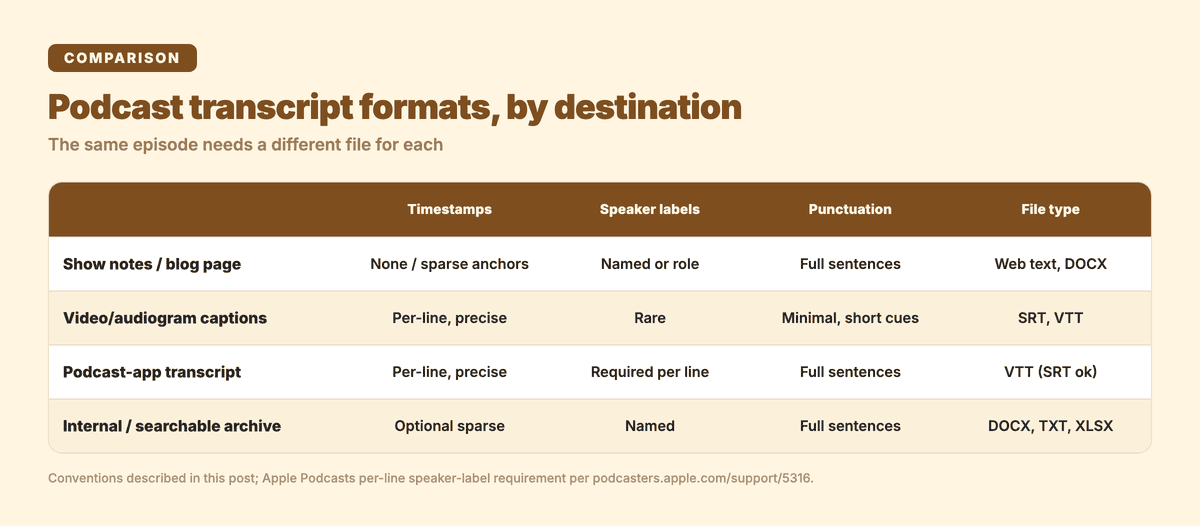
The same episode needs a different file, and different conventions, for each destination:
| Destination | Timestamps | Speaker labels | Punctuation | Typical file type |
|---|---|---|---|---|
| Show notes / blog page | None, or sparse chapter anchors | Named or role labels, prose paragraphs | Full sentences | Web page text, DOCX |
| Video/audiogram captions | Per-line, precise | Rare (usually omitted or abbreviated) | Minimal, short cues | SRT, VTT |
| Podcast-app native transcript (e.g. Apple Podcasts) | Per-line, precise | Required per line for names to display | Full sentences | VTT (SRT also accepted) |
| Internal archive / searchable reference | Optional sparse anchors | Named labels | Full sentences | DOCX, TXT, XLSX |
Apple Podcasts is a useful real-world anchor for the caption-format row: its transcripts feature accepts VTT or SRT files, and its own guidance recommends a VTT file that identifies "every speaker with each line" so speaker names display in the transcript view. That's a stricter per-line labeling requirement than a show-notes page needs. Files that don't meet Apple's quality standards simply don't display, which is a good argument for treating the podcast-app transcript as its own deliverable rather than repurposing whatever file you already have. (Apple Podcasts, transcript requirements.)
Producing this from your own recording
Getting from a raw recording to all of the above starts with one transcription pass, not four separate ones. Upload the episode audio or video file directly, or, if the episode also lives as a video on YouTube, paste the public URL instead of downloading it first, and set the number of speakers (or leave it on auto-detect) so the output comes back with speaker turns already separated.
From there, punctuation and paragraph restoration are applied automatically. That step isn't optional or a toggle: it runs on every transcript, so you're not starting from the raw block above. Subanana's AI transcription tool also runs a proofreading pass over the text that flags misheard words and homophones and assigns the transcript a 0–100 quality score in the editor, with each suggested fix shown for you to approve or reject rather than silently rewritten.
Export depends on which row of the table above you're filling: SRT or VTT for captions and the podcast-app transcript, DOCX or plain text for a show-notes page, XLSX if you want a structured, searchable archive copy. All of those come out of the same transcript: you're picking the export format, not re-transcribing per destination. For interview and meeting recordings specifically,
apply the same diarization and cleanup pass.FAQ
What is the format of a podcast transcript? There isn't one fixed format: it depends on the destination. A published transcript is prose with speaker labels and few or no timestamps. A caption file (SRT/VTT) is short, precisely timestamped cues with minimal punctuation. A podcast-app native transcript (like Apple Podcasts') is a VTT file with a speaker label on every line.
How do I make a transcript from a podcast? Run the episode audio (or a public YouTube link, if it's also posted as video) through a transcription tool with speaker diarization turned on, let the automatic punctuation and cleanup pass run, then export the format your destination needs: DOCX or plain text for show notes, SRT/VTT for captions or a podcast app.
What is an example of a podcast script? A script and a transcript are opposite directions: a script is written before recording, to guide what gets said. A transcript is produced after recording, from what was actually said. That's why a real transcript, like the raw example above, includes filler words, false starts, and cross-talk that a script never would.
How do I read a transcript of a podcast?
Speaker labels tell you who's talking each turn. Timestamps, where present, are anchors back to that point in the audio, not a running clock to follow. Bracketed notes like [crosstalk] or [inaudible] mark places the transcriber couldn't render cleanly. They're a flag to check the audio directly, not an error in the transcript.
Further reading: for a comparison of transcript tools rather than an example of the output, see Best Podcast Transcript Generator: 6 Tools Compared. For the actual workflow of turning a recording into an accurate transcript, see Transcribe Podcasts and Interviews Accurately. For a non-podcast raw-vs-cleaned example (meeting speech and a diarization sample), see Audio to Text Transcription Example: Before and After.
Try it on one of your own episodes: Subanana's transcription tool previews the first 15 minutes of any file free. The export formats described above (SRT, VTT, DOCX, XLSX) unlock on a paid
.