
Open the pricing page of any AI meeting-notes tool and you'll find a language count. Otter lists six. Fireflies says 100+. Subanana says 95+. Those numbers can't all be measuring the same thing, and they aren't: each is self-reported, unaudited, and picked by a marketing team. A tool claiming 100 languages tells you nothing about whether it handles your meeting — the one with two accents, a bit of cross-talk, and a product name nobody's model has seen before.
The language number on Subanana's own pricing page is just as unreliable as everyone else's. The rest of this post shows what actually predicts good multilingual transcription, and a test that takes about 20 minutes and costs nothing — so you don't have to take anyone's number on faith.
Why the language count is the wrong thing to compare
Here's the spread, pulled from each tool's live pricing or product page on 18 July 2026:
- Otter — "AI transcription in English, Spanish, French, German, Japanese, and Chinese." Six languages, named explicitly. (otter.ai/pricing)
- Fireflies — "Transcription in 100+ languages," listed on every plan. (fireflies.ai/pricing)
- Subanana — 95+ languages. (Subanana's own product data.)
A 17× gap between the top and bottom of that list, for tools that do broadly the same job. The gap isn't real capability — it's counting method. Does a "language" mean production-grade accuracy, or that the underlying model returns something when you feed it that language? Does it count regional variants separately or together? Nobody audits these claims, and no vendor is incentivised to count conservatively. Otter's honest, narrow six is arguably more useful information than a padded "100+", because at least you know exactly what they stand behind.
So the language count is a floor, not a measure. What you actually care about is narrower and more personal: does this tool transcribe the specific languages, accents, and vocabulary in your meetings well enough that editing the transcript is faster than typing it from scratch? That question has nothing to do with the headline number.
What actually determines multilingual accuracy
Three things move the needle far more than the language count:
1. Which speech-to-text model runs on your language. No single STT model is best at everything. A model that tops the charts on English can be mediocre on Cantonese; one that's strong on Japanese may stumble on European languages. Tools that lock to one provider inherit that provider's weak spots. Subanana's approach here is one mechanism worth checking for yourself: it continuously benchmarks STT models and picks the best performer per source language for every transcription — you're not locked into one vendor. That's a routing decision made per language, not a single global model. It's also the kind of mechanism no rival documents on its pricing page — which is exactly why you should verify it by testing, not by reading (including Subanana's).
2. What happens when the model fails. Every STT model occasionally hallucinates — invents words that were never spoken, usually on noise, silence, or an unfamiliar accent. The question is whether the tool catches it. Subanana runs hallucination detection and, when it flags a bad segment, automatically re-runs that segment on a different evaluated model — and those fallback re-runs aren't charged to you. You pay for the file once, however many internal retries it took. That's a real differentiator, but again: it's invisible until you feed the system a hard file and see whether the messy passages come back clean.
3. Names and jargon. The words most likely to be wrong are the ones that matter most in minutes — people's names, product names, acronyms, decisions. Every serious tool ships a glossary now (Otter, Fireflies, Descript and Rev all have one), so a glossary isn't a differentiator on its own. What differs is granularity: Subanana's glossary works at both workspace and per-project level, with per-language tagging and bulk XLSX/CSV import, rather than one account-wide list. If you run meetings for several clients with different vocabularies, that granularity is the part worth checking.
Notice what's not on this list: the raw language count. And if your meetings mix two languages, don't assume any file-based meeting tool sorts that out on its own — pick your source language deliberately and test that exact scenario, because mixed-language audio is the case most likely to break.
The 20-minute test that beats any spec sheet
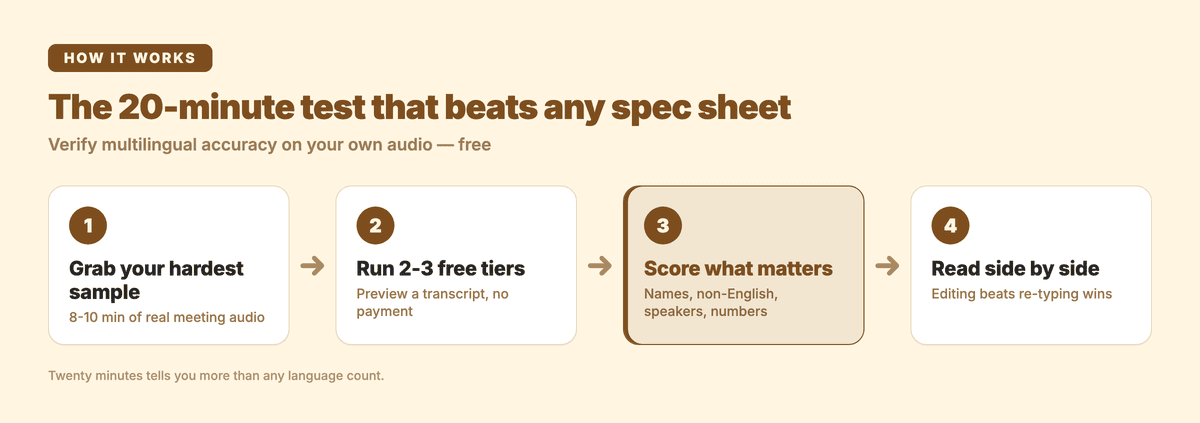
You don't need to trust anyone's language count — including Subanana's. Run this instead:
- Grab your hardest real sample. Not a clean solo voice memo — a genuine 8–10 minute clip of an actual meeting, with the accents, cross-talk and mixed languages you deal with every week. The messy file is the one that separates the tools.
- Run it through two or three free tiers. Most tools, Subanana included, let you preview a transcript without paying. (Subanana previews the first 15 minutes of each file free; some rivals offer a longer free tier — that generosity is a genuine point in their favour if you want to test a full meeting in one go.)
- Score only the passages that matter. Ignore the easy stretches. Check the four things minutes live or die on: proper nouns and names, the non-English passages, speaker attribution, and whether numbers, dates and action items survived intact.
- Read the transcripts side by side. The tool that gets your hard passages closest to right — so you're editing, not re-typing — wins, regardless of what its pricing page claims about languages.
Twenty minutes of this tells you more than any comparison table, this one included.
How the tools line up (documented, 18 July 2026)
| Tool | Self-reported languages | Zoom bot | Free tier | Meeting summary |
|---|---|---|---|---|
| Otter | 6 (EN/ES/FR/DE/JA/ZH) | ✓ (native) | ✓ Basic | ✓ |
| Fireflies | 100+ | ✓ | ✓ free forever | ✓ |
| Subanana | 95+ | ✗ bot (bot covers Meet + Teams; Zoom via Chrome extension) | preview 15 min/file | ✓ |
Two things in that table go against Subanana. Subanana has no Zoom bot — its meeting bot covers Google Meet and Microsoft Teams, and Zoom is captured by Subanana's Chrome extension instead, so if your team wants a bot inside the Zoom call, Otter and Fireflies (and Notta) have native Zoom bot capture that Subanana doesn't. And their free tiers are more generous for testing a whole meeting than Subanana's 15-minute preview. Where Subanana pulls ahead is the mechanism above (per-language routing + free fallback re-runs) and an in-app AI chat that answers questions grounded in the transcript ("what did we decide about the budget?").
Notta and Read.ai are worth a look too if Zoom capture and CRM push-out are priorities — Notta covers Zoom, Teams, Meet and Webex and integrates with CRMs. For a full buyer-profile breakdown of the big meeting assistants, I've written detailed roundups of the best Otter.ai alternatives, best Fireflies.ai alternatives, and ClovaNote alternatives; if you just need the output format, here are free meeting-minutes templates.
Frequently asked questions
Which AI meeting tool is best for non-English or multilingual meetings? There's no single answer, and be wary of anyone who gives you one — it depends on the exact languages and accents in your meetings. Run the 20-minute test above on two or three tools with your own audio. Language count won't decide it; how each tool handles your specific hard passages will.
Do meeting-transcription tools handle mixed-language meetings well? Don't assume they do it automatically. For file- and bot-based meeting transcription, choose your source language deliberately and test that exact scenario before you commit — mixed-language audio is one of the most common failure modes, whichever tool you pick.
Does supporting more languages mean better accuracy? No. The count is self-reported and unaudited, so a bigger number doesn't imply better transcription of any specific language. A tool that lists six well-supported languages may beat one claiming 100+ on the language you actually use.
How do I test transcription accuracy without published benchmark numbers? You test it yourself. Reputable tools avoid publishing single accuracy percentages precisely because accuracy varies so much by language, accent and audio quality that one number would mislead. The reliable signal is your own hard sample run through the free tiers.
The bottom line
The language count on a meeting tool's pricing page — Subanana's included — is marketing, not measurement. What determines whether a multilingual meeting transcribes well is which model runs on your language, what happens when it fails, and how well the tool learns your names and jargon. None of that shows up in a headline number, and all of it shows up in a 20-minute test on your own audio.
Run the test. If you want Subanana in the mix, you can try it free (preview the first 15 minutes of each file), or see plans on the pricing page.