
Open the notes from your last three staff meetings. If they're a list of who showed up and a paragraph summarizing "what we discussed," you have a record that nobody will read again, and definitely not the one you'll search when someone asks "didn't we already decide this in August?"
A staff meeting is a recurring meeting, and recurring meetings have a different documentation problem than a one-off. Attendance and a summary work fine for a single meeting. They fall apart across a series, because nothing in them tells you what's a standing item, what got decided, who owns what, or what's still open from last time. This guide covers what to capture instead, and how to do it without spending your Friday afternoon typing it up.
What attendance-and-a-summary notes miss
Management guidance on running staff meetings converges on the same structural fix: keep a standing agenda, the items you cover every time, in the same order, rather than starting from a blank page each week. A standing agenda is what makes a series of meetings comparable to each other instead of eight unrelated events.
On top of the standing structure, four things need to be captured explicitly. A generic summary paragraph usually loses all four:
- Decisions, separated from discussion. A meeting can spend twenty minutes debating an option and never actually decide anything, or decide something in one sentence buried inside a longer discussion. If your notes don't mark "decided: X" distinctly from "discussed: X," a reader six weeks later can't tell which parts are settled.
- Action items with an owner and a due date. "We'll look into the vendor contract" names no one responsible for doing it. The fix is mechanical: every action gets a name and a date attached, not just a task description.
- What carries over to next time. Staff meetings are a series, so most weeks end with a few items still open: waiting on someone, waiting on data, or deliberately deferred. If nothing tracks that list, it either gets re-raised from scratch or quietly drops.
- A way to find it again. Six months of "attendance + summary" documents adds up to a pile, not a record. The question that actually gets asked, "what did we decide about the renewal, and when," needs to be searchable across the whole series, not just readable inside one week's file.
Why a single template isn't the fix for a recurring meeting
A meeting-minutes template, a blank form with sections for attendees, agenda, and notes, solves the one-off case: you fill it in once, send it, done. If that's what you need, our meeting minutes template is built to be copied directly.
A staff meeting series needs something a single template can't give you on its own: continuity between instances. Standing items need to read the same way every week so they're comparable. Carryover items need to connect this week's notes to last week's. The archive across a series needs to be searchable as a whole, not as N separate documents that happen to share a naming convention. Solving that is mostly a capture-and-retrieval job, which is where recording the meeting and letting software handle the repetitive part starts to matter more than which template you picked. If you're still deciding between note-taking tools rather than templates, our guide to how AI meeting notes actually work covers that comparison.
How to capture it without typing it up
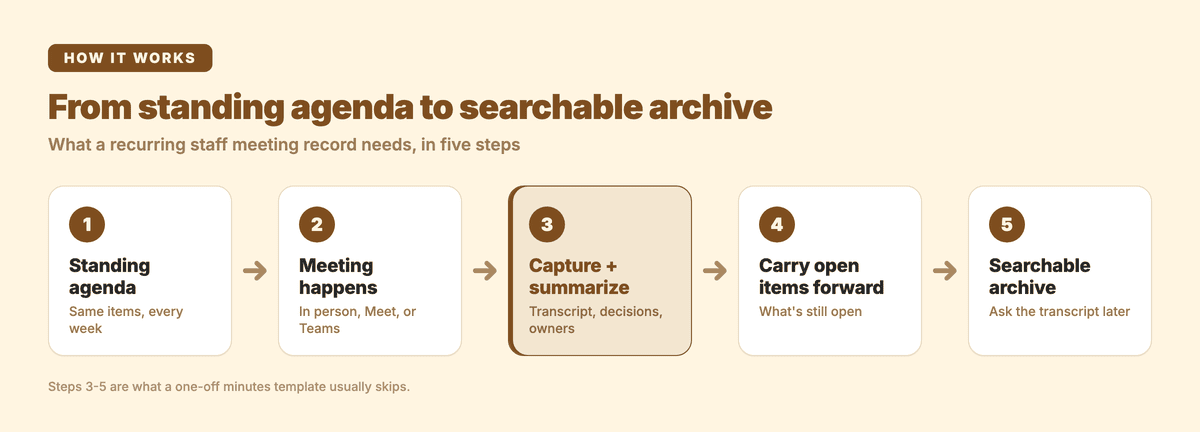
This is the workflow I use for Subanana's own recurring team meetings, with Subanana's AI meeting transcription doing the parts that don't need a human:
- Capture the meeting automatically. If the staff meeting runs on Google Meet or Microsoft Teams, connect your calendar and the meeting bot joins on schedule, records, and creates the project once the meeting ends; there's no on-screen transcript or live caption display during the call itself, since it's a recording feature. Zoom capture works differently: a separate Chrome extension handles it (see our Zoom meeting transcription guide for the platform-specific steps), since there's no calendar-triggered bot for Zoom. For an in-person meeting, upload the recording afterward.
- Get a transcript with decisions and action items pulled out, not just a summary paragraph. In Meeting mode, Subanana produces a punctuated, speaker-identified transcript plus a summary that separates key discussion points, decisions, and action items: the distinction a generic paragraph erases.
- Keep the vocabulary consistent across the series. A workspace-level glossary pins the project names, client names, and internal terms you use every week so they come out spelled the same way meeting after meeting. That compounds over dozens of instances in a way it can't for a one-off meeting.
- Ask one meeting's transcript instead of re-reading it. Inside the transcript editor you can ask the AI directly, "what did we decide about the renewal" or "who owns the vendor follow-up," and get an answer grounded in that meeting's transcript instead of scrolling back through your notes folder.
- Share the finished record, then move to next week's standing items. A project can be shared with the rest of the team so anyone can go back and check what was decided, and the standing-agenda structure carries straight into next week's meeting.
One limit worth naming: sharing gives teammates read access to review the record. It doesn't turn the notes into a document everyone edits together live during the meeting; that's a different workflow than recording and summarizing after the fact.
FAQ
What is a staff meeting?
A staff meeting is a recurring meeting between a manager (or leadership) and their team, used to share updates, review progress against standing items, and make decisions that affect the group. What separates it from a one-off meeting is the recurrence: the same group covering related ground week after week, which is exactly why the documentation needs continuity across instances, not just one good write-up.
What is discussed in a staff meeting?
Typical content is company or team announcements, progress updates on ongoing projects, problems that need a decision, and assignment of next steps. The standing-agenda approach, the same categories in the same order every time, is what keeps this comparable meeting to meeting instead of drifting into whatever's top of mind that week.
What is the purpose of a staff meeting?
To keep a team aligned on priorities, surface and resolve blockers, and make decisions that would otherwise happen in scattered one-on-ones or side threads. The notes exist to make that alignment durable, so a decision made in the room is still findable and actionable weeks later instead of resting on whoever happened to remember it.
What is another word for staff meeting?
Depending on the organization, the same recurring format gets called a team meeting, department meeting, standup (for a shorter daily version), or check-in. The documentation need is the same regardless of the label: standing items, clear decisions, owned action items, and a record you can search later.
Start with next week's meeting
You don't need to fix six months of past notes to get this right going forward. Set up the standing agenda, record next week's meeting, and let the transcript and summary handle the parts that used to eat your Friday afternoon.